
1. Taw qhia
This manual provides essential instructions for the safe and efficient operation, setup, and maintenance of your Ohaus ES50R ES Industrial Bench Scale. The Ohaus ES50R is designed for industrial weighing applications, offering a capacity of 50 kg (110 lb) with a readability of 20 g (0.05 lb). Please read this manual thoroughly before using the scale to ensure proper functionality and to prevent damage.
2. Cov ntaub ntawv kev nyab xeeb
Yuav tsum ua raws li cov kev ceev faj txog kev nyab xeeb hauv qab no:
- Do not overload the scale beyond its maximum capacity of 50 kg (110 lb).
- Ensure the scale is placed on a stable, level surface to achieve accurate readings.
- Operate the scale only with the specified 120 V power supply.
- Tsis txhob muab qhov ntsuas qhov kub thiab txias, av noo, lossis tshav ntuj ncaj qha.
- Tsis txhob muab cov nplais tso rau hauv dej lossis lwm yam kua dej.
- Keep the scale clean and free from dust and debris.
- Only qualified personnel should perform repairs or maintenance beyond routine cleaning.
3. Cov ntsiab lus ntawm pob
Xyuas kom tseeb tias tag nrho cov khoom muaj nyob rau thaum unpacking:
- Ohaus ES50R ES Industrial Bench Scale unit
- Power Adapter (for 120 V operation)
- Tus Neeg Siv Los Siv (cov ntawv no)
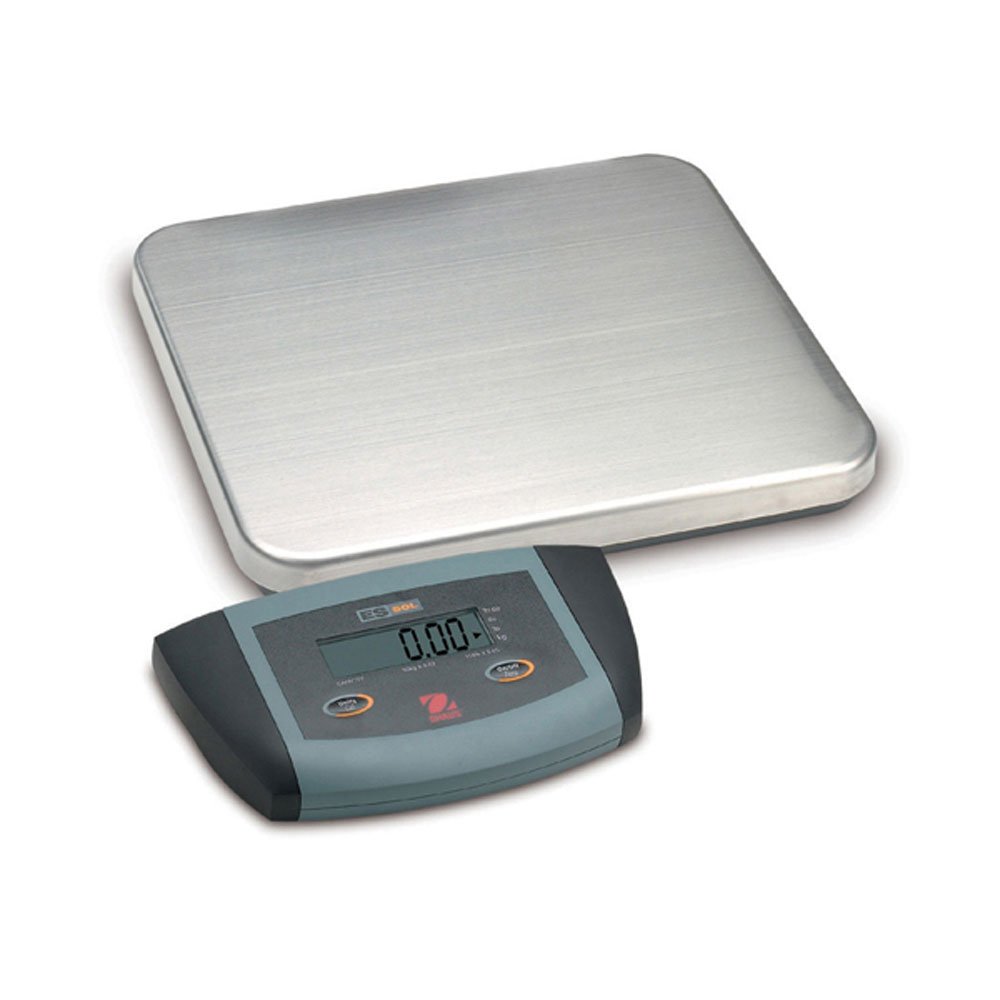
Daim duab 1: Ohaus ES50R ES Industrial Bench Scale. This image shows the complete bench scale unit, including the weighing platform and the display unit.
4. Teeb tsa
- Unpacking: Ua tib zoo tshem tag nrho cov khoom ntawm lub ntim. Khaws lub ntim rau yav tom ntej thauj lossis khaws cia.
- Qhov chaw: Place the scale on a firm, level, and stable surface, free from vibrations, drafts, and rapid temperature changes. Ensure adequate space around the scale for safe operation.
- Kev sib txuas fais fab: Connect the power adapter to the scale's power input port. Plug the adapter into a standard 120 V AC power outlet.
- Pib Pib Pib: Nias lub ON/OFF button to power on the scale. The display will perform a self-test and then show "0.00" or "0.0".
- Leveling: If your scale includes adjustable feet, rotate them until the bubble in the spirit level (if present) is centered.
5. Cov lus qhia ua haujlwm
5.1 Basic Weighing
- Ensure the scale is powered on and the display shows "0.00" or "0.0".
- Place the item to be weighed gently in the center of the weighing platform.
- Wait for the display to stabilize. The stable weight reading will be shown on the large LCD display.
- Remove the item from the platform. The display should return to zero.
5.2 Tare Function
The tare function allows you to subtract the weight of a container, so only the net weight of the contents is displayed.
- Place an empty container on the weighing platform.
- Nias lub SAIB button. The display will reset to "0.00" or "0.0", indicating the container's weight has been tared.
- Muab cov khoom uas yuav tsum tau ntsuas rau hauv lub thawv. Lub vijtsam yuav qhia qhov hnyav ntawm cov khoom.
- To clear the tare, remove the container from the platform and press the SAIB khawm dua.
5.3 Cov yam ntxwv tshwj xeeb
- Auto Shut Off: The scale is equipped with an auto shut-off feature to conserve power. If no activity is detected for a set period, the scale will automatically turn off.
- Loj Zaub: The LCD display provides clear and easy-to-read weight indications.
- Phau ntawv shutdown: To manually turn off the scale, press and hold the ON/OFF khawm kom txog rau thaum lub vijtsam kaw.
6. Kev tu
6.1 Kev ntxuav
To maintain accuracy and prolong the life of your scale:
- Disconnect the scale from the power supply before cleaning.
- Wipe the scale surfaces with a damp ntaub thiab ib tug me me detergent.
- Tsis txhob siv cov tshuaj abrasive, cov kuab tshuaj, lossis cov tshuaj hnyav.
- Ensure no liquid enters the scale's internal components.
- Ziab cov nplai kom huv si tom qab ntxuav.
6.2 Calibration
Regular calibration ensures the accuracy of your scale. Refer to the full technical manual or contact Ohaus customer support for detailed calibration procedures. Calibration typically requires certified weights.
7. Kev daws teeb meem
| Teeb meem | Ua Tau | Kev daws |
|---|---|---|
| Scale tsis tig rau. | No power supply; faulty power adapter. | Check power connection and outlet. Ensure power adapter is functioning correctly. |
| Kev nyeem tsis raug. | Scale not level; unstable surface; overload; calibration required. | Ensure scale is level and on a stable surface. Do not exceed capacity. Perform calibration if necessary. |
| Display shows "Err" or error code. | Overload; internal malfunction. | Remove weight from platform. If error persists, power cycle the scale. If still present, contact customer support. |
| Auto shut-off too soon/not at all. | Auto shut-off settings. | Refer to the full technical manual for adjusting auto shut-off settings, if available. |
8. Cov lus qhia tshwj xeeb
| Feature | Paub meej |
|---|---|
| Qauv | ES 50 R |
| Hom | Ohaus |
| Muaj peev xwm | 50 kg / 110 lb |
| Nyeem tau | 20 g / 0.05 lb |
| Hom zaub | LCD (Large Display) |
| Tshwj xeeb nta | Auto Shut Off, Manual Shutdown |
| Form Factor | Lub rooj zaum Scale |
| Fais fab mov | 120 V AC (via adapter) |
| Khoom Dimensions | 15 x 13 x 5.5 po |
| Yam Nyhav | 9.64 puj |
| Chaw tsim tshuaj paus | COLE-PARMER |
9. Warranty
The Ohaus ES50R ES Industrial Bench Scale comes with a 1 xyoo warranty from the date of purchase. This warranty covers defects in materials and workmanship under normal use. It does not cover damage resulting from misuse, accident, unauthorized modification, or operation outside the specified environmental and electrical limits. For warranty claims, please retain your proof of purchase and contact Ohaus customer support.
10. Cov neeg siv khoom txhawb nqa
For technical assistance, service, or to inquire about replacement parts, please contact Ohaus customer support. Visit the official Ohaus website for the most up-to-date contact information and additional resources.
Nco tseg: Always provide your product model number (ES50R) and serial number (if applicable) when contacting support.