
1. Taw qhia
The BUFFALO Giga Switching Hub LSW3-GT-24NSR is a 24-port Gigabit Ethernet switch designed for high-speed network environments. It is ideal for small to medium-sized offices and workplaces requiring robust and reliable network connectivity. This device supports full Gigabit speeds across all ports, ensuring efficient data transfer.
Key features include a fanless design for silent operation and enhanced reliability, as well as a loop detection function to prevent network disruptions caused by accidental network loops.
2. Cov ntaub ntawv kev nyab xeeb
Please read and understand the following safety precautions before using the device to prevent injury or damage.
- Fais fab mov: Use only the provided power adapter. Ensure the power outlet meets the specified voltage kev cai.
- Qhov cua: Tsis txhob thaiv qhov cua nkag. Xyuas kom muaj cua nkag txaus nyob ib puag ncig lub cuab yeej kom tiv thaiv kom tsis txhob kub dhau.
- Ib puag ncig: Avoid exposing the device to water, high humidity, extreme temperatures, or direct sunlight.
- Kev tuav: Do not drop or subject the device to strong impacts. Do not attempt to open or repair the device yourself. Refer all servicing to qualified personnel.
- Cov kab: Ensure all network cables are properly connected and secured.
3. Cov ntsiab lus ntawm pob
Xyuas kom tseeb tias txhua yam khoom muaj nyob hauv pob:
- BUFFALO Giga Switching Hub LSW3-GT-24NSR Unit
- Fais fab Cable
- Rack Mount Brackets (if included with your model)
- Rubber Feet (rau kev tso kawm desktop)
4. Teeb tsa
4.1 Kev teeb tsa lub cev
The LSW3-GT-24NSR can be installed on a desktop or mounted in a 19-inch equipment rack.
Kev tso chaw Desktop:
- Attach the included rubber feet to the bottom of the unit to prevent slipping and provide stability.
- Muab lub tshuab tso rau ntawm ib qho chaw tiaj tus, ruaj khov thiab muaj cua nkag tau zoo.
Rack Mounting:
- Attach the rack mount brackets to the sides of the unit using the provided screws.
- Secure the unit into a standard 19-inch equipment rack using appropriate rack screws (not included).
4.2 Txuas Network Cables
Connect your network devices (computers, servers, other switches) to any of the 24 RJ-45 ports on the front panel using standard Ethernet cables (Category 5e or higher recommended for Gigabit speeds).

Daim duab 1: Pem hauv ntej Vaj Huam Sib Luagview with 24 Ethernet Ports and Status LEDs.
4.3 Txuas fais fab
- Connect the power cable to the AC IN port on the rear of the device.
- Txuas qhov kawg ntawm lub hwj chim cable rau hauv lub qhov hluav taws xob tsim nyog.
- The device will power on automatically. The POWER LED on the front panel should illuminate.

Daim duab 2: Rov qab vaj huam sib luagview with AC IN Power Port.
5. Cov lus qhia ua haujlwm
5.1 LED Qhov taw qhia
The front panel features several LED indicators to monitor the status of the switch and its ports.
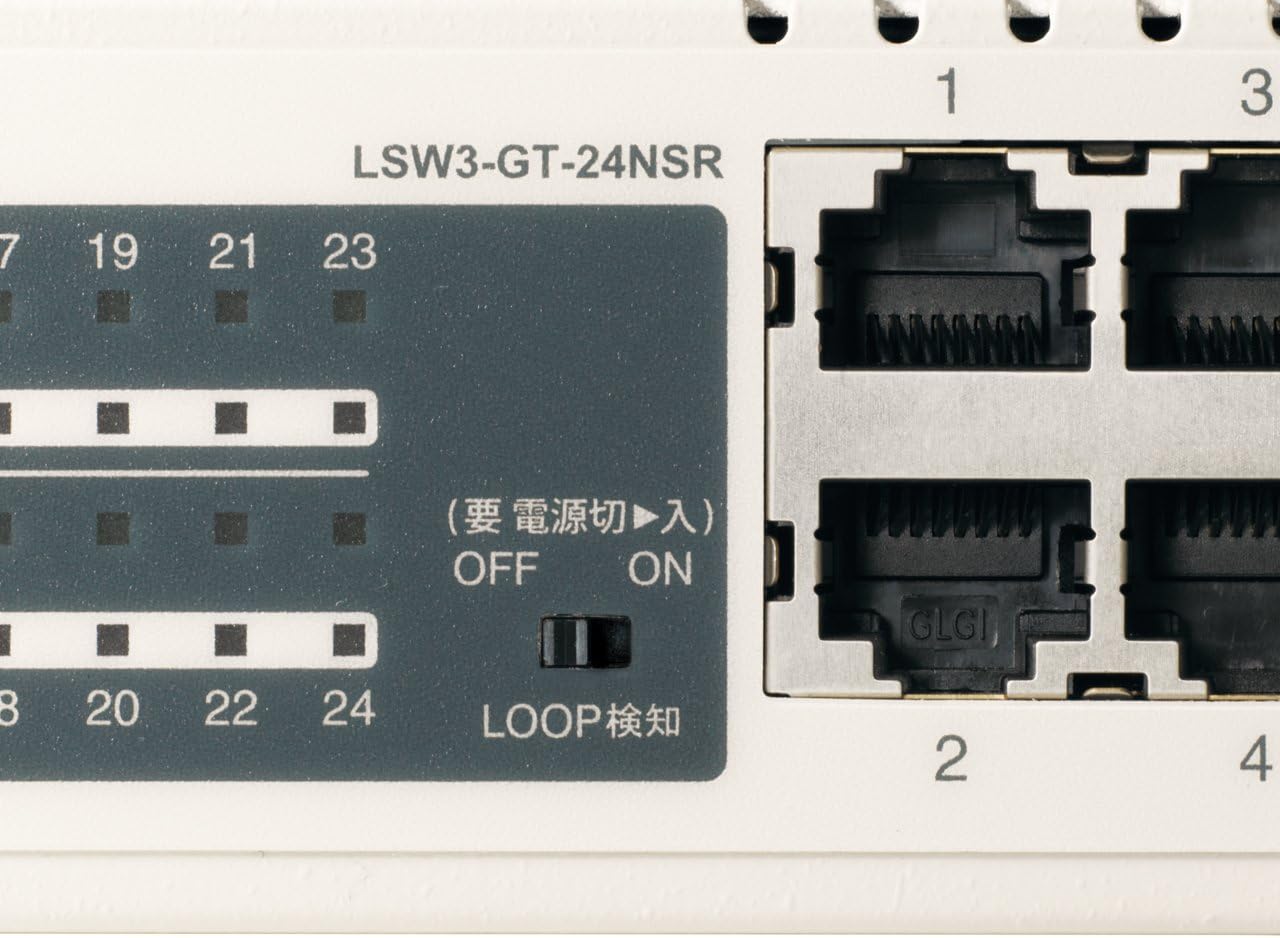
Daim duab 3: Paub meej view of LED Indicators and Loop Detection Switch.
| LED npe | xwm txheej | Kev piav qhia |
|---|---|---|
| Hwj chim | On | Tus ntaus ntawv yog powered on. |
| LINK / ACT (rau qhov chaw nres nkoj) | On | A network device is connected and a link is established. |
| Flashing | Cov ntaub ntawv raug xa los yog tau txais los ntawm qhov chaw nres nkoj. | |
| 1000/100/10M (rau qhov chaw nres nkoj) | Ntsuab | Port is operating at 1000 Mbps (Gigabit Ethernet). |
| Txiv kab ntxwv | Port is operating at 100 Mbps (Fast Ethernet). | |
| Tawm | Port is operating at 10 Mbps (Ethernet). | |
| LOOP DETECT | On | A network loop has been detected. |
5.2 Loop Detection Function
The LSW3-GT-24NSR features a hardware switch for enabling or disabling the loop detection function. This function helps prevent network instability caused by accidental network loops.
Figure 4: Loop Detection Switch (ON/OFF).
- ON: Loop detection is active. If a loop is detected, the corresponding port will be automatically shut down to prevent network broadcast storms, and the LOOP DETECT LED will illuminate.
- Tawm: Loop detection is disabled.
It is recommended to keep the loop detection function ON for network stability.
6. Kev tu
6.1 Ntxuav lub cuab yeej
To maintain optimal performance, periodically clean the exterior of the switch.
- Disconnect the power cable before cleaning.
- Siv ib daim ntaub mos, qhuav los so qhov chaw.
- Do not use liquid cleaners, aerosols, or solvents, as these may damage the casing los yog cov khoom siv sab hauv.
6.2 Kev txiav txim siab ib puag ncig
Ensure the device is operated within its specified environmental conditions:
- Kub: 0 ° C txog 40 ° C (32 ° F txog 104 ° F)
- Humidity: 10% mus rau 85% (tsis-condensing)
7. Kev daws teeb meem
If you encounter issues with your BUFFALO Giga Switching Hub, refer to the following common problems and solutions.
7.1 Tsis muaj zog
- Cov tsos mob: POWER LED yog tawm.
- Kev daws: Check if the power cable is securely connected to both the device and the power outlet. Ensure the power outlet is functional.
7.2 No Link or Slow Speed on a Port
- Cov tsos mob: The LINK/ACT LED for a connected port is off, or the 1000/100/10M LED indicates a lower speed than expected (e.g., 100M instead of 1000M).
- Kev daws:
- Verify the Ethernet cable is securely connected at both ends.
- Try a different Ethernet cable. Ensure it is a Category 5e or higher cable for Gigabit speeds.
- Txuas lub cuab yeej rau lwm qhov chaw nres nkoj ntawm qhov hloov.
- Check the network adapter settings on the connected device (computer, server) to ensure it is configured for auto-negotiation or the correct speed.
7.3 Network Instability / LOOP DETECT LED is On
- Cov tsos mob: The LOOP DETECT LED is illuminated, and network performance is degraded or unstable.
- Kev daws:
- A network loop has been detected. This typically occurs when two ports on the same switch (or different switches) are connected to each other, creating an infinite data path.
- Carefully inspect your network cabling to identify and remove any redundant connections that form a loop.
- If the loop detection switch is ON, the affected port will be automatically shut down. Once the loop is resolved, the port should resume normal operation.
8. Cov lus qhia tshwj xeeb
| Feature | Kev piav qhia |
|---|---|
| Hom | BUFFALO |
| Qauv nab npawb | LSW3-GT-24NSR |
| Chaw nres nkoj suav | 24 x 10/100/1000BASE-T RJ-45 chaw nres nkoj |
| Hloov Peev Xwm | 48 Gbps (Non-blocking) |
| Xa Tus Nqi Mus | 35.7mps ua |
| MAC Chaw Nyob Lub Rooj Loj | 8K nkag |
| Txhawb Jumbo Ncej | Mus txog 9KB |
| Nta | Auto-MDI/MDIX, Auto-Negotiation, Loop Detection Function, Fanless Design |
| Fais fab mov | Internal AC fais fab mov |
| Qhov Loj (W x D x H) | (Specific dimensions not provided in source, typical for 1U rackmount) |
| Qhov hnyav | (Specific weight not provided in source) |
| Ua haujlwm kub | 0 ° C txog 40 ° C |
| Kev khiav dej num | 10% mus rau 85% (tsis-condensing) |
9. Warranty thiab Support
This BUFFALO product is covered by a manufacturer's warranty. Please refer to the warranty card included with your product or visit the official BUFFALO website rau cov ncauj lus kom ntxaws warranty cov nqe lus thiab tej yam kev mob.
For technical support, product registration, or further assistance, please visit the official BUFFALO support website lossis hu rau lawv lub chaw pabcuam neeg siv khoom. Cov ntaub ntawv tiv tauj feem ntau tuaj yeem pom ntawm cov chaw tsim khoom website los yog nyob rau hauv cov khoom ntim.