
1. Taw qhia
This manual provides essential instructions for the safe and efficient operation of your Sharp CD-DH950P 240W Mini-Component System. This system features a 5-disc CD changer, a cassette deck, an iPod/iPhone docking station, a USB host for digital audio playback, and an AM/FM tuner. Please read this manual thoroughly before using the system and retain it for future reference.
2. Cov ntaub ntawv kev nyab xeeb
- Lub zog Source: Connect the unit only to an AC outlet of the specified voltage.
- Qhov cua: Xyuas kom muaj qhov cua txaus. Tsis txhob thaiv qhov qhib qhov cua.
- Dej thiab noo noo: Do not expose the unit to rain, moisture, or dripping/splashing liquids.
- Thaum tshav kub kub: Khaws lub tsev kom deb ntawm qhov chaw cua sov xws li radiators, cov ntawv sau cua sov, qhov cub, lossis lwm yam khoom siv uas ua kom sov.
- Ntxuav: Ua ntej koj ntxuav, rho lub tshuab tawm ntawm lub qhov hluav taws xob ntawm phab ntsa. Siv daim ntaub mos mos thiab qhuav.
- Kev pab: Tsis txhob sim muab cov khoom no rau koj tus kheej. Xa mus rau txhua qhov kev pabcuam rau cov neeg ua haujlwm pabcuam uas tsim nyog.
3. Cov ntsiab lus ntawm pob
Xyuas kom tseeb tias koj lub pob muaj cov khoom hauv qab no:
- Main Unit (CD-DH950P)
- Sab laug hais lus
- Tus Hais Lus Zoo
- Chaw taws teeb tswj nrog roj teeb
- AM Loop Antenna
- Kav hlau txais xov xov tooj cua FM
- Hwj chim Cord
4. Teeb tsa
4.1 Txuas Cov Neeg Hais Lus
Connect the speaker wires from the main unit to the corresponding terminals on the back of each speaker. Ensure correct polarity (red to red, black to black) for optimal sound quality. The left speaker connects to the left speaker output, and the right speaker to the right speaker output.
4.2 Connecting the Antennas
- Kav hlau txais xov FM: Connect the supplied FM wire antenna to the FM antenna terminal on the rear of the main unit. Extend the wire for better reception.
- AM Kav hlau txais xov: Connect the supplied AM loop antenna to the AM antenna terminals on the rear of the main unit. Position the antenna for best reception.
4.3 Kev sib txuas fais fab
Plug the power cord into the AC IN jack on the rear of the main unit, then plug the other end into a standard AC wall outlet.
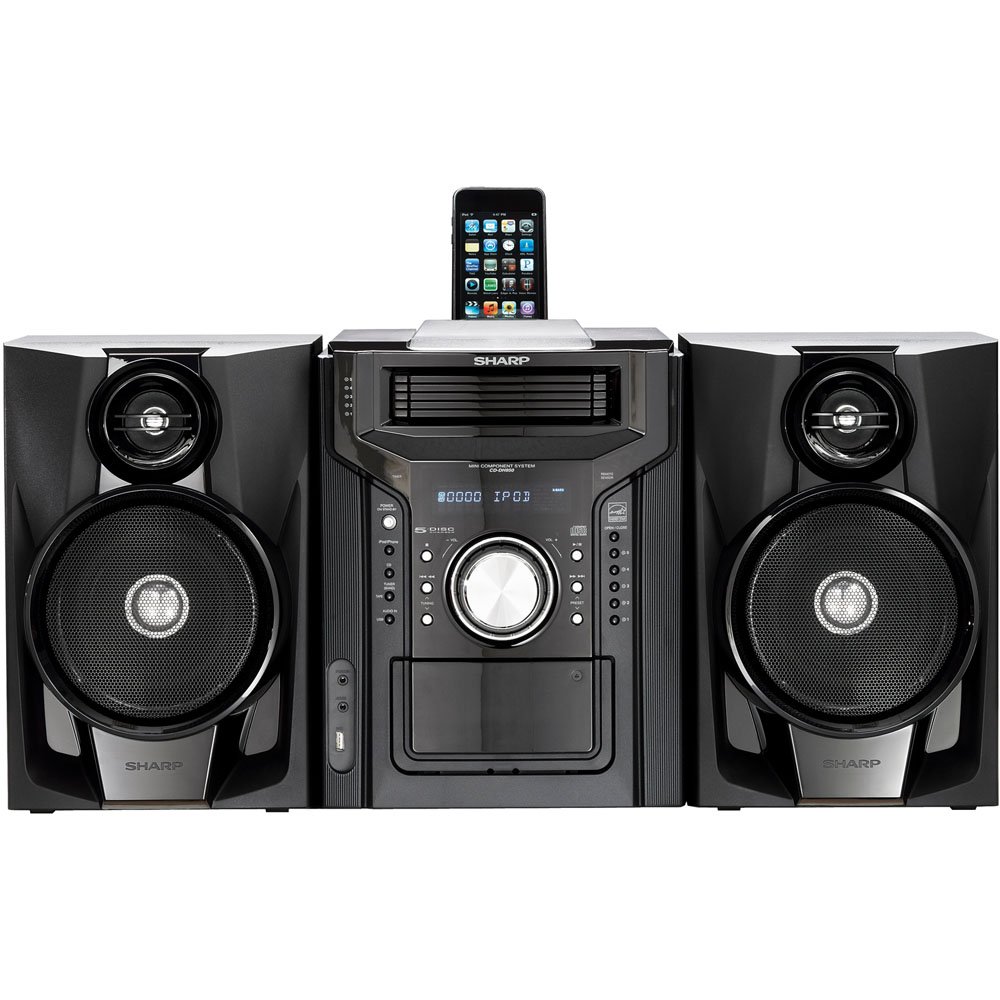
Daim duab 4.3.1: Zuag qhia tag nrho view of the Sharp CD-DH950P Mini-Component System, showing the main unit flanked by two speakers, with an iPhone docked on top of the main unit.
5. Cov lus qhia ua haujlwm
5.1 Lub hwj chim Qhib/Tawm thiab Kev Tswj Suab
- Nias lub Hwj chim nias lub khawm ntawm lub vaj huam sib luag pem hauv ntej lossis lub chaw taws teeb tswj kom qhib lossis kaw lub tshuab.
- Tig lub VOLUME pob qhov rooj rau pem hauv ntej vaj huam sib luag los yog siv lub VOL +/- cov nyees khawm ntawm cov chaw taws teeb tswj kom kho cov suab qib.
5.2 CD Playback
This system features a 5-disc CD changer.
- Nias lub QHOV / QHIA khawm qhib lub tais CD.
- Place up to five CDs on the disc trays, label side up.
- Xovxwm QHOV / QHIA rov kaw lub tais.
- Nias lub CD khawm xaiv CD muaj nuj nqi.
- Nias lub PLAY/PAUSE khawm kom pib ua si.
- Siv cov SKIP buttons to navigate between tracks or discs.
5.3 Kev Ua Haujlwm ntawm Cassette Deck
- Nias lub TAPE OPEN/CLOSE button to open the cassette deck.
- Ntxig ib daim kab xev.
- Nias lub daim kab xev button to select the cassette function.
- Xovxwm Ua si los pib ua si.
- To record, ensure the source is selected (e.g., CD, Tuner) and press the QHIA button on the cassette deck.
5.4 iPod/iPhone Docking
The system includes a top-mounted docking slot for compatible iPod and iPhone devices (30-pin connector).
- Carefully place your iPod or iPhone into the docking slot.
- The system will automatically switch to iPod/iPhone mode or you may need to press the iPod/iPhone khawm.
- Use the system's controls or your device's controls to play music. The device will also charge while docked.
5.5 USB Host Playback
Connect a USB storage device containing MP3 or WMA audio files to the USB port on the front panel.
- Ntxig lub USB ntaus ntawv rau hauv qhov chaw nres nkoj USB.
- Nias lub USB khawm xaiv USB muaj nuj nqi.
- Use the playback controls to navigate and play files.
5.6 AM/FM Tuner
- Nias lub HLOOV button to select AM or FM radio.
- Siv cov TUNING +/- cov nyees khawm kom manually qhib rau qhov chaw nres tsheb.
- To auto-scan, press and hold the TUNING +/- khawm.
- To store a preset, tune to the desired station, then press MEMORY followed by a preset number.
5.7 Suab Input
Connect an external audio device (e.g., MP3 player, smartphone) to the AUDIO IN jack on the front panel using a 3.5mm stereo cable.
- Connect your device to the AUDIO IN jack.
- Nias lub AUDIO IN button to select this source.
- Tswj kev ua si rov qab los ntawm koj lub cuab yeej txuas nrog.
6. Kev tu
6.1 Ntxuav Lub Tsev
Wipe the exterior of the unit with a soft, dry cloth. Do not use abrasive cleaners, waxes, or solvents. Ensure the unit is unplugged before cleaning.
6.2 Kev Saib Xyuas CD thiab Cassette
- Handle CDs by their edges to avoid fingerprints and scratches. Clean discs with a soft, lint-free cloth from the center outwards.
- Store cassette tapes away from strong magnetic fields and direct sunlight.
7. Kev daws teeb meem
| Teeb meem | Ua Tau | Kev daws |
|---|---|---|
| Tsis muaj zog | Txoj hlua fais fab tsis txuas; qhov hluav taws xob tsis zoo | Ensure power cord is securely plugged in; Try a different outlet |
| Tsis muaj suab | Volume too low; Speakers not connected; Incorrect source selected | Increase volume; Check speaker connections; Select correct input source |
| CD tsis ua si | Disc inserted incorrectly; Disc is dirty or scratched | Insert disc correctly (label side up); Clean or replace disc |
| Kev txais xov tooj cua tsis zoo | Antenna not positioned correctly; Weak signal | Adjust position of AM/FM antennas; Try auto-tuning or manual fine-tuning |
| iPod/iPhone not charging/playing | Device not properly docked; Device not compatible (e.g., newer connector) | Re-dock the device; Note that this system uses a 30-pin connector, newer devices may require an adapter (not included) |
8. Cov lus qhia tshwj xeeb
- Hom Tshuaj: Ntsej muag
- Qauv: CD-DH950P
- Total Output Power: 240 Watts RMS (85W/ch FTC)
- Hais Configuration: 2.1 Channel
- Txhawb suab tawm tswv yim: CD, MP3, WMA
- Teeb liab-rau-suab nrov: 100dB ua
- Compatible Devices: MP3 Player, Smartphone (via 30-pin dock or USB/Audio In)
- Qhov Loj (L x W x H): 27.6 x 13.6 x 13.5 po
- Yam khoom hnyav: 24.4 Ib
- UPC: 074000369863, 074000369290
9. Warranty Information
This product is covered by a 1-year limited warranty from the date of purchase. Please refer to the warranty card included with your product for full terms and conditions, or contact Sharp customer service for details.
10. Txhawb nqa
For further assistance, technical support, or service inquiries, please contact Sharp customer service. Contact information can typically be found on the Sharp official website lossis hauv cov ntaub ntawv muab nrog koj cov khoom.