
1. Taw qhia
Ua tsaug rau kev yuav khoomasing the Caliber RMD 068-2 Car Radio USB/SD Player. This manual provides detailed instructions for the installation, operation, and maintenance of your new car radio. Please read this manual thoroughly before using the product to ensure proper functionality and safety. Keep this manual for future reference.
2. Cov ntaub ntawv kev nyab xeeb
- Kev teeb tsa: Ensure the unit is installed by a qualified technician to prevent damage to the vehicle's electrical system. Incorrect wiring can cause fire or electrical shock.
- Fais fab mov: Connect the unit only to a 12V DC car battery with a negative ground.
- Fuses: Always replace fuses with new ones of the specified rating. Using an incorrect fuse can cause damage to the unit or vehicle.
- Qib Qib: Do not operate the unit at excessively high volume levels, as this may impair your ability to hear external traffic sounds and could be dangerous.
- Ntxuav: Siv ib daim ntaub mos, qhuav los ntxuav. Tsis txhob siv cov tshuaj abrasive los yog cov kuab tshuaj.
- Moisture: Tsis txhob tso lub tsev rau cov dej los yog dej.
3. Cov ntsiab lus ntawm pob
Thov xyuas kom meej tias txhua yam khoom muaj nyob:
- Caliber RMD 068-2 Car Radio Unit
- Detachable Pem Hauv Ntej Vaj Huam Sib Luag
- ISO Txuas Hluav Taws Xob
- Mounting Ncej
- Disassembly Keys (2 pcs)
- Tus Neeg Siv Los Siv (cov ntawv no)
4. Khoom Tshajview
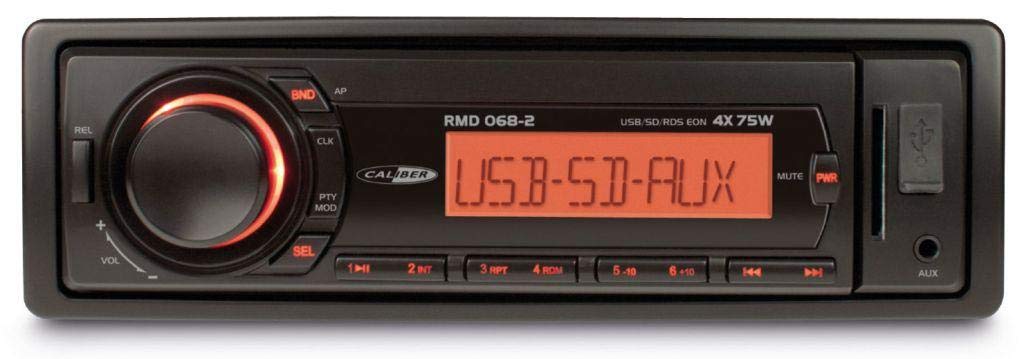
Daim duab 1: Pem hauv ntej view of the Caliber RMD 068-2 Car Radio. This image shows the main unit with its detachable front panel, including the display, control buttons, USB port, and SD card slot.
4.1 Pem hauv ntej vaj huam sib luag tswj
- POWER/MODE Button: Press to turn on/off. Short press to switch between Radio, USB, SD, AUX modes.
- VOLUME pob qhov rooj: Rotate to adjust volume. Press to access audio settings (Bass, Treble, Balance, Fader).
- QHIA: Shows current time, radio frequency, track information, etc.
- USB Chaw nres nkoj: Txuas USB flash drives rau kev ua si media.
- SD daim npav qhov: Insert SD cards for media playback.
- AUX Input (3.5mm Jack): Txuas cov khoom siv suab sab nraud.
- BAND/AMS Button: In radio mode, press to select radio band (FM1, FM2, FM3). Long press for Automatic Memory Store.
- PRESET khawm (1-6): Store and recall radio stations. In USB/SD mode, use for direct track selection.
- PLAY/PAUSE Button: Ua si lossis ncua qhov kev ua si xov xwm.
- FORWARD/BACKWARD Buttons: Skip tracks or tune radio frequency.
- EJECT Button: Release the detachable front panel.
4.2 Kev Sib Txuas Tom Qab
The rear of the unit features standard ISO connectors for power and speakers, along with an antenna input.
- ISO Power Connector: For connecting to the vehicle's power supply (constant 12V, ignition 12V, ground).
- ISO Speaker Connector: For connecting to the vehicle's speakers (Front Left, Front Right, Rear Left, Rear Right).
- Antenna Input: For connecting the car's radio antenna.
5. Teeb tsa
5.1 Kev teeb tsa
- Disconnect roj teeb: Before starting, disconnect the negative terminal of your car battery to prevent short circuits.
- Tshem Tawm Qhov qub: Carefully remove your existing car radio from the dashboard.
- Install Mounting Frame: Insert the supplied mounting frame into the dashboard opening and bend the tabs to secure it.
- Txuas Txuas Txuas: Refer to the wiring diagram in section 5.2. Connect the ISO wiring harness to the car's wiring and then to the Caliber RMD 068-2 unit. Connect the antenna cable.
- Slide Unit In: Carefully slide the Caliber RMD 068-2 unit into the mounting frame until it clicks into place.
- Reconnect roj teeb: Reconnect the negative terminal of your car battery.
- Txuas Pem Hauv Ntej Vaj Huam Sib Luag: Attach the detachable front panel to the main unit.
5.2 Wiring Diagram
The Caliber RMD 068-2 uses standard ISO connectors. Ensure correct connections as shown below. If your vehicle does not have ISO connectors, an adapter may be required.
| Tus Pin No. | Wire Color (Typical) | Muaj nuj nqi |
|---|---|---|
| 4 | Daj | Tsis tu ncua 12V (Battery) |
| 7 | Liab | Hloov 12V (Ignition) |
| 8 | Dub | Hauv av |
| 5 | Xiav | Antenna Remote Out |
| Tus Pin No. | Wire Color (Typical) | Muaj nuj nqi |
|---|---|---|
| 1 | Ntshav | Rov qab sab xis (+) |
| 2 | Ntshav / Dub | Sab xis (-) |
| 3 | Ntsuab | Sab laug (+) |
| 4 | Ntsuab / Dub | Sab laug (-) |
| 5 | Grey | Pem hauv ntej sab xis (+) |
| 6 | Grey/Dub | Pem hauv ntej sab xis (-) |
| 7 | Dawb | Pem hauv ntej sab laug (+) |
| 8 | Dawb / Dub | Pem hauv ntej sab laug (-) |
Note: Wire colors may vary depending on vehicle manufacturer. Always consult your vehicle's wiring diagram.
6. Cov lus qhia ua haujlwm
6.1 Basic Functions
- Fais fab / Off: Nias lub HWJ HUAM / HOM khawm kom tig lub tsev rau lossis tawm.
- Volume Control: Tig lub VOLUME knob clockwise to increase volume, counter-clockwise to decrease.
- Hom Kev Xaiv: Luv nias lub HWJ HUAM / HOM button to cycle through available modes: Radio (FM), USB, SD, AUX.
- Suab Settings: Nias lub VOLUME knob to enter audio settings. Rotate the knob to select settings like BASS, TREBLE, BALANCE, FADER. Press the knob again to confirm or move to the next setting.
6.2 Xov tooj cua ua haujlwm
- Kev xaiv Band: Hauv xov tooj cua hom, nias lub BAND/AMS khawm kom hloov ntawm FM1, FM2, thiab FM3 bands.
- Kev Ceev Nyob: Luv nias lub FORWARD/BACKWARD buttons to fine-tune the frequency.
- Tsis siv neeg nrhiav: Ntev nias lub FORWARD/BACKWARD buttons to automatically search for the next strong station.
- Khw muag khoom Presets: Tune to your desired station. Long press one of the PRESET (1-6) buttons until you hear a beep. The station is now stored.
- Recall Presets: Short press one of the PRESET (1-6) buttons to recall a stored station.
- Automatic Memory Store (AMS): Ntev nias lub BAND/AMS button to automatically scan and store the strongest stations into the current band's presets.
6.3 USB/SD Ua Si
- Ntxig Xov Xwm: Insert a USB flash drive into the USB port or an SD card into the SD card slot. The unit will automatically switch to USB/SD mode and begin playback.
- Ua si / Pause: Nias lub PLAY/PAUSE khawm kom ncua lossis rov pib playback.
- Hla kev: Luv nias lub FORWARD/BACKWARD cov nyees khawm hla mus rau qhov txuas ntxiv lossis yav dhau los.
- Fast Forward/Rewind: Ntev nias lub FORWARD/BACKWARD cov nyees khawm kom nrawm rau pem hauv ntej lossis rov qab nyob rau hauv ib qho kev khiav.
- Folder Navigation: Siv cov PRESET 5 thiab PRESET 6 buttons to navigate between folders on your USB/SD media.
6.4 AUX Input
- Txuas Ntaus: Connect your external audio device (e.g., smartphone, MP3 player) to the 3.5mm AUX input jack on the front panel using an audio cable.
- Xaiv Hom AUX: Nias lub HWJ HUAM / HOM button repeatedly until "AUX" is displayed.
- Tswj Playback: Control playback (play, pause, skip) directly from your connected external device. The car radio will control the volume.
7. Kev tu
- Ntxuav Chav Tsev: Use a soft, dry cloth to wipe the front panel and display. Do not use harsh chemicals, cleaning sprays, or abrasive cloths, as these can damage the surface.
- Vaj Huam Sib Luag Pem Hauv Ntej Uas Tshem Tau: When detaching the front panel, handle it carefully. Store it in a protective case (if supplied) to prevent scratches or damage.
- Chaw nres nkoj USB/SD: Keep the USB port and SD card slot free from dust and debris.
8. Kev daws teeb meem
| Teeb meem | Ua Tau | Kev daws |
|---|---|---|
| Tsis muaj zog | Blown fuse; Incorrect wiring; Loose connection | Check and replace fuse; Verify wiring connections (Yellow to constant 12V, Red to ignition 12V, Black to ground); Ensure front panel is securely attached. |
| Tsis muaj suab | Volume too low; Mute activated; Incorrect speaker wiring; Damaged speakers | Increase volume; Check if mute is active; Verify speaker connections; Test with known good speakers. |
| Radio reception poor | Lub kav hlau txais xov tsis txuas; Lub kav hlau txais xov puas lawm; Thaj chaw teeb liab tsis muaj zog | Ensure antenna is securely connected; Check antenna for damage; Try tuning to a stronger station or move to a different location. |
| USB/SD tsis ua si | Tsis muaj kev txhawb nqa file format; Corrupted media; Incorrectly inserted media; Max capacity exceeded | Xyuas kom meej files are MP3/WMA format; Try a different USB/SD card; Reinsert media correctly; Check media capacity (max 32GB recommended). |
| Front panel cannot be detached | Eject button not fully pressed; Mechanism jammed | Press the EJECT button firmly; Do not force the panel. |
If the problem persists after trying these solutions, please contact your dealer or a qualified service center.
9. Cov lus qhia tshwj xeeb
- Qauv: Caliber RMD 068-2
- Fais fab tso zis: 4 x 75 Watts Max
- Fais fab mov: 12V DC (10.8V-15.6V), Negative Ground
- fuse: 10 A
- Txhawb suab tawm tswv yim: MP3, WMA (via USB/SD)
- USB/SD Compatibility: Mus txog 32GB (FAT32 hom)
- FM xov tooj cua: RDS, 18 Presets
- AUX Input: 3.5mm Stereo Jack
- Vaj Huam Sib Luag Pem Hauv Ntej Uas Tshem Tau: Yog lawm
- Qhov hnyav: Kwv yees li 0.95 kg (2.09 lbs)
10. Warranty thiab Support
This Caliber product is covered by a warranty in accordance with applicable European laws. For detailed warranty terms and conditions, please refer to the warranty card included with your product or visit the official Caliber website. For technical support, troubleshooting assistance, or service inquiries, please contact your authorized Caliber dealer or the customer service department in your region. Please have your product model number (RMD 068-2) and proof of purchase ready when contacting support.
Note: Specifications and design are subject to change without notice for improvement.