
PeakTech P 3131
PeakTech Muaj Tseeb RMS P 3131 Clamp 'Meter' nrog Multimeter's Manual
Model: P 3131 | Brand: PeakTech
1. Taw qhia
This manual provides comprehensive instructions for the safe and effective use of the PeakTech True RMS P 3131 Clamp Meter with Multimeter. This device is designed for measuring AC/DC currents without circuit interruption, as well as AC/DC voltage and resistance, with continuity testing capabilities. It features a 3 3/4 digit LCD display with True RMS measurement for accurate readings.
Thov nyeem phau ntawv qhia no kom zoo ua ntej siv lub cuab yeej thiab khaws cia rau yav tom ntej.
2. Cov ntaub ntawv kev nyab xeeb
WARNING: Improper use of this meter can cause damage, shock, injury, or death. Always follow all safety precautions.
- Ib txwm ua raws li cov cai hauv zos thiab hauv tebchaws.
- Do not use the meter if it appears damaged or if the insulation on test leads is compromised.
- Ensure the meter is set to the correct function and range before making measurements.
- Avoid contact with live circuits. Use appropriate personal protective equipment (PPE).
- The device is rated for CAT II 600V. Do not exceed these limits.
- Hloov cov roj teeb tam sim ntawd thaum lub ntsuas roj teeb qis tshwm.
- Do not operate the meter in explosive atmospheres.
3. Khoom Tshajview thiab Cheebtsam
The PeakTech P 3131 is a robust and reliable clamp meter. Familiarize yourself with its main components:

Daim duab 1: Pem hauv ntej view of the PeakTech P 3131 Clamp Meter, qhia qhov clamp jaw, function selector, LCD display, and input terminals.
- Clamp Lub puab tsaig: Rau kev ntsuas tsis sib cuag AC / DC tam sim no.
- Function Selector Dial: To select measurement modes (A~, A=, V~, V=, Ω/Continuity, OFF).
- LCD zaub: Qhia ntsuas ntsuas, ntsuas ntsuas, thiab ntsuas.
- Khawm: AC/DC, ZERO, H/MAX (Data Hold/Max Hold).
- Cov tswv yim Terminals: COM (common) and VΩ (voltage/resistance) for test leads.
- Tes Guard: Provides protection against accidental contact.
4. Teeb tsa
4.1 Kev teeb tsa roj teeb
The PeakTech P 3131 requires two 1.5V AAA batteries (included). To install or replace batteries:
- Xyuas kom lub cuab yeej raug kaw.
- Nrhiav lub hau ntawm lub roj teeb rau sab nraum qab ntawm lub 'meter'.
- Siv lub hau ntswj los qhib lub thawv.
- Insert the two AAA batteries, observing correct polarity (+ and -).
- Hloov lub roj teeb lub hau npog thiab tuav nws nrog cov ntsia hlau.
When the low battery indicator appears on the display, replace the batteries immediately to ensure accurate measurements.
4.2 Kev Sib Txuas Cov Thawj Coj
Rau voltage, resistance, and continuity measurements, connect the supplied test leads:
- Ntxig qhov kev xeem dub coj mus rau hauv lub COM (common) input terminal.
- Ntxig lub liab xeem lead rau hauv lub VΩ input lub davhlau ya nyob twg.

Figure 2: PeakTech P 3131 Clamp Meter shown with its carrying case, test leads, batteries, and user manual.
5. Cov lus qhia ua haujlwm
5.1 Fais fab / Off
Rotate the function selector dial from the "OFF" position to any desired measurement function to power on the meter. To power off, rotate the dial back to "OFF". The meter features an automatic power-off function (can be deactivated) to conserve battery life.
5.2 Kev Ntsuas Tam Sim No AC/DC (Cl)amp)
To measure current without breaking the circuit:
- Tig lub function selector dial rau lub A~ (AC Current) or A= (DC Current) position.
- Nias lub AC / DC button if you need to switch between AC and DC current modes (if the dial position combines them).
- Nias lub ZERO button to zero the display before measuring DC current, especially for small currents, to compensate for residual magnetism.
- Qhib clamp puab tsaig los ntawm nias lub khawm.
- Enclose only ib conductor with the clamp puab tsaig. Xyuas kom lub puab tsaig kaw tag nrho.
- Nyeem tus nqi tam sim no ntawm LCD zaub.
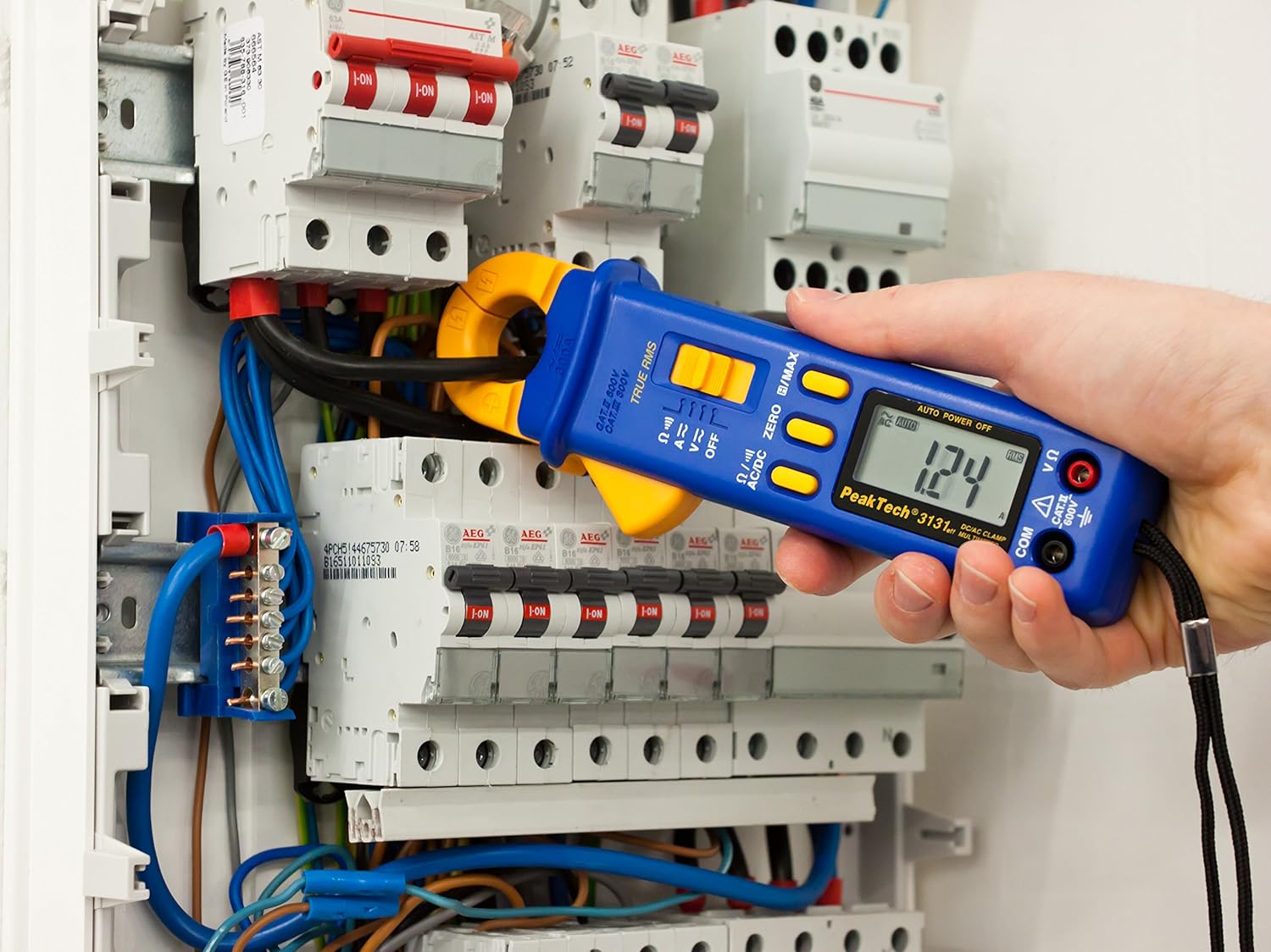
Figure 3: The PeakTech P 3131 Clamp Meter in use, measuring current on a single conductor within an electrical panel.
5.3 AC / DC Voltage Kev ntsuas
Kev ntsuas voltage:
- Txuas cov kev xeem coj raws li tau piav qhia hauv Tshooj 4.2.
- Tig lub function selector dial rau lub V~ (AC Voltage) lub V= (DC Voltage) txoj haujlwm.
- Connect the test probes in parallel to the circuit or component you wish to measure.
- Nyeem voltage tus nqi ntawm LCD zaub.
5.4 Kev Ntsuas Kev Tiv Thaiv thiab Kev Txuas Ntxiv Mus
To measure resistance or check for continuity:
- Txuas cov kev xeem coj raws li tau piav qhia hauv Tshooj 4.2.
- Tig lub function selector dial rau lub Ω/))) (Resistance/Continuity) position.
- For resistance: Connect the test probes across the component. Ensure the circuit is de-energized.
- For continuity: Touch the test probes to the two points you want to check. A continuous beep indicates a low-resistance path (continuity).
- Nyeem cov nqi tiv thaiv ntawm LCD zaub.
5.5 Kev Ua Haujlwm Tshwj Xeeb
- True RMS: The meter measures True Root Mean Square values for AC voltage and current, providing accurate readings for non-sinusoidal waveforms.
- Kev Tuav Ntaub Ntawv (H): Nias lub H/MAX nias lub pob ib pliag kom khov qhov nyeem tam sim no ntawm qhov screen. Nias dua kom tso.
- Maximum Value Hold (MAX): Nias thiab tuav lub H/MAX button to capture and display the maximum measured value. Press again to exit.
- ZERO Function: Used to zero the display for DC current measurements to eliminate offset errors.
- Auto Raning: The meter automatically selects the appropriate measurement range.
- Auto Fais Fab: The meter automatically turns off after a period of inactivity to save battery. This feature can typically be disabled by holding a specific button during power-on (refer to the device's on-screen indicators or a more detailed manual if available).
6. Kev tu
6.1 Kev ntxuav
So lub 'meter' lub thawv nrog kev tshaj tawmamp ntaub thiab ib tug me me detergent. Tsis txhob siv cov tshuaj abrasives lossis cov kuab tshuaj. Xyuas kom lub meter qhuav tag ua ntej siv.
6.2 Hloov roj teeb
Refer to Section 4.1 for instructions on battery replacement. Always use two fresh 1.5V AAA batteries. Remove batteries if the meter is not used for an extended period to prevent leakage.
6.3 Cia khoom
Store the meter in a cool, dry place, away from direct sunlight and extreme temperatures. Use the provided carrying case for protection.
7. Kev daws teeb meem
| Teeb meem | Ua Tau | Kev daws |
|---|---|---|
| Meter tsis muaj zog. | Cov roj teeb tuag lossis tsis raug teeb tsa. | Xyuas cov roj teeb polarity; hloov roj teeb. |
| "OL" lossis "OVER" tso tawm. | Measurement exceeds selected range or meter's maximum capacity. | Select a higher range (if manual ranging) or ensure measurement is within meter's limits. |
| Inaccurate DC current reading. | Residual magnetism in clamp puab tsaig. | Nias lub ZERO button before measurement. |
| Tsis muaj continuity beep. | Open circuit or high resistance. | Check connections; ensure circuit is complete. |
If problems persist, contact PeakTech customer support or a qualified service technician.
8. Kev qhia tshwj xeeb
| Parameter | Specification |
|---|---|
| Zaub | 3 3/4 digit LCD, max. 3999 counts |
| DC Voltage (DCV) | 0.1 mV to 600 V (Accuracy: 0.5% + 2 digits) |
| AC Voltage (ACV) | 1 mV to 600 V (Accuracy: 1.5% + 5 digits) |
| DC tam sim no (DCA) | 10 mA to 300 A (Accuracy: 1% + 2 digits) |
| AC tam sim no (ACA) | 10 mA to 300 A (Accuracy: 1% + 3 digits) |
| Kuj (Ω) | 0.1 Ω to 40 MΩ (Accuracy: 0.9% + 2 digits) |
| Kev xeem txuas ntxiv | Buzzer muaj nuj nqi |
| RMS tiag | Yes, for AC measurements |
| Lub puab tsaig qhib | 22 mm max. conductor diameter |
| Kev ntsuas kev nyab xeeb | EN 61010-1, CAT II 600 V |
| Fais fab mov | 2 x 1.5V AAA roj teeb |
| Qhov Loj (L x W x H) | 192 x 66 x 27 mm (kwv yees 7.56 x 2.6 x 1.06 nti) |
| Qhov hnyav | 205g (kwv yees 0.45 lbs) |
9. Warranty thiab Support
PeakTech products are manufactured under strict quality control. This product is covered by a standard manufacturer's warranty against defects in materials and workmanship. Please refer to the warranty card included with your product or visit the official PeakTech website rau cov ncauj lus kom ntxaws warranty cov nqe lus thiab tej yam kev mob.
For technical support, service, or calibration inquiries, please contact your local PeakTech distributor or the PeakTech customer service department. Contact information can typically be found on the PeakTech website los yog nyob rau hauv cov khoom ntim.
Ask a question about this manual
Ask about setup, troubleshooting, compatibility, parts, safety, or missing instructions. Manuals+ will review the question and use this page’s manual context to help answer it.