
Taw qhia
This manual provides detailed instructions for the Inateck Bluetooth 4.1 Sport Headset, Model P20 (BH1001). Please read this guide thoroughly before using the product to ensure proper operation and to maximize your listening experience. This headset is designed for active lifestyles, offering wireless audio with a secure fit and integrated microphone.
1. Teeb tsa
1.1 Ntim Cov Ntsiab Lus
Xyuas kom tseeb tias txhua yam khoom muaj nyob hauv pob:
- Inateck Bluetooth Sport Headset (P20 / BH1001)
- USB Charging Cable
- Multiple pairs of silicone ear tips (various sizes)
- Nqa Hnab
- Tus Neeg Siv Los Siv (cov ntawv no)
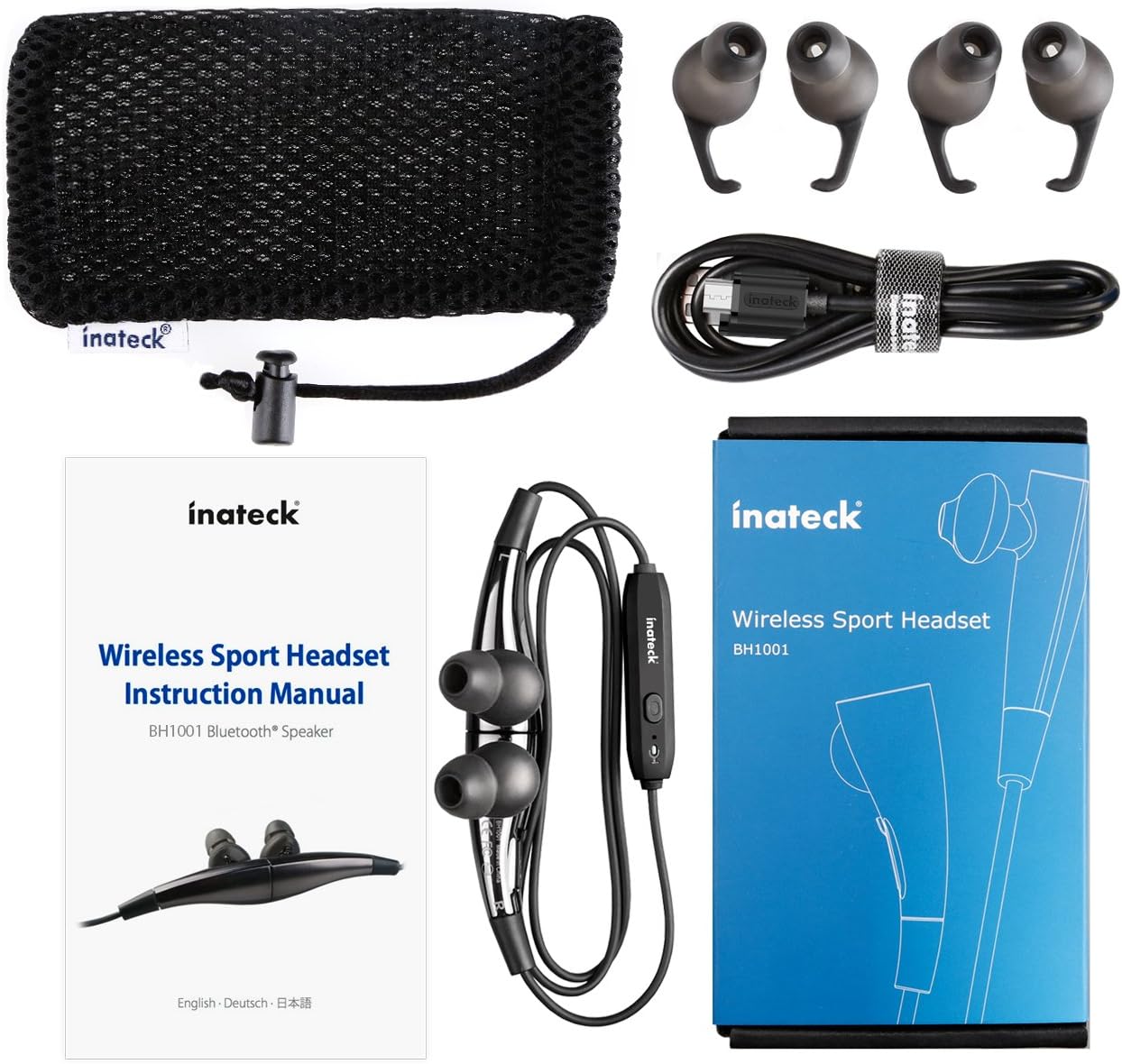
Daim duab 1.1: Contents of the Inateck Bluetooth Sport Headset package.
1.2 Them lub mloog pob ntseg
Before first use, fully charge the headset. A full charge takes approximately 3 hours and provides at least 8 hours of music playback.
- Locate the Micro USB charging port on the headset.
- Connect the small end of the provided USB charging cable to the headset's Micro USB port.
- Txuas qhov kawg loj dua ntawm USB cable rau lub qhov fais fab USB (piv txwv li, lub qhov USB hauv computer, USB adapter phab ntsa).
- The status indicator light will illuminate during charging. It will change color or turn off once charging is complete.

Daim duab 1.2: Charging the Inateck Bluetooth Sport Headset via Micro USB.
1.3 Pairing nrog ib lub cuab yeej Bluetooth
To connect your headset to a smartphone or other Bluetooth-enabled device:
- Nco ntsoov tias lub pob ntseg kaw.
- Press and hold the Multifunction Key (MFB) on the inline control unit for approximately 5-7 seconds until the status indicator light flashes red and blue alternately. This indicates pairing mode.
- Ntawm koj lub cuab yeej Bluetooth, qhib Bluetooth thiab tshawb nrhiav cov khoom siv tshiab.
- Select "Inateck BH1001" or "Inateck P20" from the list of available devices.
- Once paired, the status indicator light on the headset will flash blue slowly, and you may hear an audible confirmation.
- The headset will automatically attempt to reconnect to the last paired device when turned on.

Daim duab 1.3: Inateck Headset paired with a mobile device for music playback.
2. Cov lus qhia ua haujlwm
2.1 Headset Controls
The inline control unit provides easy access to various functions:

Daim duab 2.1: Tshajview of the Inateck Headset control unit.
- Multifunction Key (MFB):
- Press and hold (5-7s): Power On/Off, Enter Pairing Mode
- Short press: Play/Pause music, Answer/End call
- Long press (during incoming call): Reject call
- Volume Up (+) / Next Track:
- Xovxwm luv: nce ntim
- Ntev nias: Hla mus rau kab tom ntej
- Volume Down (-) / Previous Track:
- Xovxwm luv: Txo ntim
- Long press: Go to previous track
- Chaw nres nkoj Micro USB: Rau them lub mloog pob ntseg.
- Qhov taw qhia qhov xwm txheej: Qhia txog lub zog, kev sib txuas, thiab kev them nyiaj.
- Microphone: Hu rau tes dawb.
2.2 Hnav Lub Taub Hau
Select the ear tips that provide the most comfortable and secure fit for your ears. The headset is designed to be worn with the cable behind your neck, ensuring stability during physical activity.

Daim duab 2.2: Proper wearing of the Inateck Sport Headset for active use.
2.3 Magnetic Earbuds Feature
The earbuds feature integrated magnets. When not in use, you can connect the two earbuds together, forming a necklace around your neck. This action automatically pauses music playback and prevents the headset from falling off.

Daim duab 2.3: Magnetic earbuds feature for secure wearing around the neck.

Daim duab 2.4: Headset worn as a necklace using the magnetic feature.
3. Kev tu
- Ntxuav: Siv daim ntaub mos mos thiab qhuav los so lub mloog pob ntseg. Tsis txhob siv cov tshuaj ntxuav uas ua rau tawv los yog cov tshuaj yaj.
- Cov lus qhia pob ntseg: Regularly remove and clean the silicone ear tips with mild soap and water. Ensure they are completely dry before reattaching.
- Cia: When not in use, store the headset in the provided carrying pouch to protect it from dust and damage. Avoid extreme temperatures.
- Dej tsis kam: The headset is designed to be water-resistant for sports and exercise (e.g., sweat, light rain). Do not submerge it in water or expose it to heavy rain.
4. Kev daws teeb meem
4.1 Tsis Muaj Peev Xwm Ua Haujlwm
Ensure the headset is fully charged. Connect it to a power source using the USB cable and allow it to charge for at least 30 minutes before attempting to power on again.
4.2 Tsis tuaj yeem koom tes nrog lub cuab yeej
- Ensure the headset is in pairing mode (status indicator flashing red and blue alternately).
- Make sure Bluetooth is enabled on your device and it is within range (typically 10 meters or 33 feet).
- Tua thiab qhib Bluetooth function ntawm koj lub cuab yeej.
- If previously paired, try "forgetting" or "unpairing" the headset from your device's Bluetooth settings and then re-pair.
- Xyuas kom tsis muaj lwm yam khoom siv Bluetooth cuam tshuam nrog kev sib txuas.
4.3 Tsis muaj suab lossis suab tsis zoo
- Txheeb xyuas qib ntim ntawm ob lub mloog pob ntseg thiab koj lub cuab yeej txuas nrog.
- Ensure the headset is properly paired and connected to your device.
- Move closer to your device to reduce potential interference or range issues.
- Ensure the ear tips are correctly seated in your ears for optimal sound delivery.
- Reboot both the headset and your connected device.
4.4 Kev sib txuas sib txuas
- Ensure there are no physical obstructions between the headset and your device.
- Avoid placing your device in areas where the signal might be blocked (e.g., deep pockets, behind thick walls).
- Txo kev cuam tshuam los ntawm lwm cov khoom siv wireless (Wi-Fi routers, lwm yam khoom siv Bluetooth).
- Keep the headset and your device within the recommended Bluetooth range.
5. Cov lus qhia tshwj xeeb
| Hom | Inateck |
| Qauv Lub Npe | P20 |
| Qauv nab npawb | BH1001 |
| Connectivity Technology | Bluetooth 4.1 |
| Form Factor | Hauv pob ntseg |
| Pob ntseg tso | Intra-aural |
| Lub mloog pob ntseg Jack | USB (rau them) |
| Dej Resistance Level | Waterproof (suitable for sweat/light rain) |
| Tshwj xeeb nta | Sports and exercise, integrated microphone, magnetic earbuds |
| Yam Nyhav | 78 Nws |
| Tswj hom | Volume Control, Multifunction Button |
| Khoom siv | Yas |
6. Warranty Information
Inateck products typically come with a limited warranty. For specific warranty terms and conditions applicable to your Inateck Bluetooth Sport Headset, please refer to the warranty card included in your product packaging or visit the official Inateck webqhov chaw. Khaws koj cov ntaub ntawv pov thawj ntawm kev yuav khoom rau kev lees paub.
7. Cov neeg siv khoom txhawb nqa
If you encounter any issues not covered in this manual or require further assistance, please contact Inateck customer support. You can usually find contact information, FAQs, and additional resources on the official Inateck webqhov chaw:
Webqhov chaw: www.inateck.com
Please have your product model (P20 / BH1001) and purchase details ready when contacting support.