
1. Taw qhia
This manual provides essential instructions for the installation, operation, maintenance, and troubleshooting of the APC Smart-UPS SRT3000RMXLT 3kVA 208V Rackmount Uninterruptible Power Supply (UPS). Please read this manual thoroughly before installing or operating the equipment to ensure proper usage and safety.
2. Cov ntaub ntawv kev nyab xeeb
Observe all warnings and operating instructions in this manual. Failure to do so may result in injury or equipment damage.
- Kev Nyab Xeeb Hluav Taws Xob: Chav tsev no muaj phom sij voltages. Do not attempt to disassemble the UPS. Servicing should only be performed by qualified personnel.
- Roj teeb kev nyab xeeb: Batteries can present a risk of electrical shock and high short-circuit current. Remove watches, rings, or other metal objects before handling batteries. Use tools with insulated handles.
- Qhov hnyav: The UPS is heavy. Use proper lifting techniques and ensure adequate support during installation.
- Ib puag ncig: Install the UPS indoors in a controlled environment, free from excessive dust, moisture, and extreme temperatures.
3. Cov ntsiab lus ntawm pob
Carefully unpack the UPS and inspect for shipping damage. The package should contain the following items:
- APC Smart-UPS SRT3000RMXLT Unit
- Power Supply (Built-In)
- Rack-mounting kho vajtse
- Cov ntaub ntawv CD
- USB cable
- Serial kab
4. Teeb tsa
4.1 Kev teeb tsa lub cev
The SRT3000RMXLT is designed for rack installation. Ensure the rack is stable and capable of supporting the UPS weight (approximately 69 pounds).
- Mount the UPS into a standard 19-inch rack using the provided rack-mounting hardware.
- Ensure adequate airflow around the unit. Do not block ventilation openings.

Daim duab 4.1: Pem hauv ntej view of the APC Smart-UPS SRT3000RMXLT. This image shows the front panel with the display and ventilation grille.
4.2 Txuas UPS
Connect the UPS to the utility power and your equipment.
- Connect the UPS input power cord to a dedicated 208V AC outlet. The UPS uses a Type B - 3 pin (North American) power plug.
- Connect your equipment to the output receptacles on the rear of the UPS. The unit provides 12 IEC 320 C13/C14 outlets.
- For communication, connect the USB cable or serial cable from the UPS to your computer or network management card.
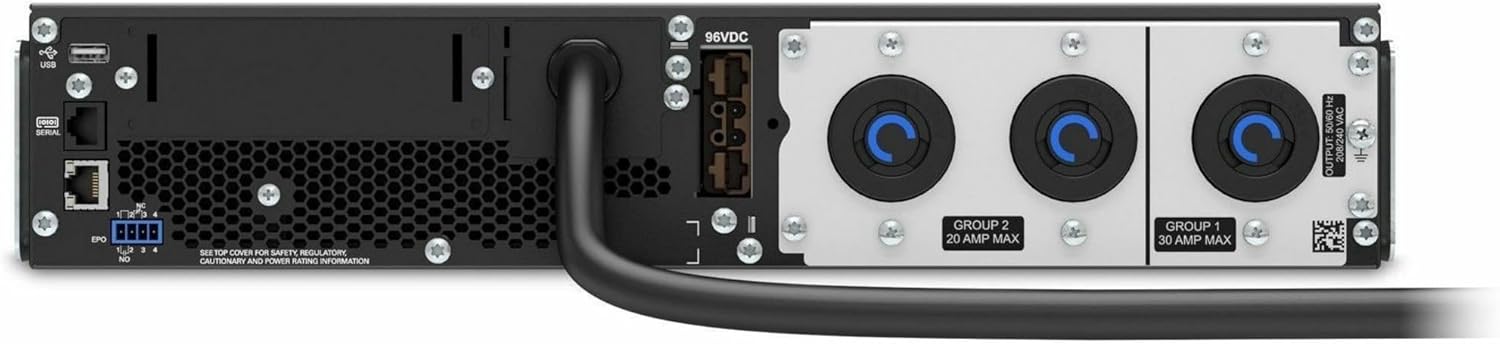
Daim duab 4.2: Hauv qab view of the APC Smart-UPS SRT3000RMXLT. This image displays the various input and output ports, including USB, serial, EPO, and the 12 output receptacles, along with the main power input.
4.3 Pib Power-Up
After all connections are secure:
- Press the power button on the front panel to turn on the UPS.
- The UPS will perform a self-test and the display will show the current status.
- Allow the batteries to charge for at least 6 hours before relying on them for extended backup time.
5. Operating the UPS
5.1 Front Panel Display and Controls
The front panel features an LCD display and control buttons for monitoring and configuring the UPS.
- LCD zaub: Shows real-time status, load, battery charge, input/output voltage, and event logs.
- ESC khawm: Exits the current menu or cancels an operation.
- OK khawm: Txheeb xyuas qhov kev xaiv lossis nkag mus rau hauv cov ntawv qhia zaub mov.
- Up/down Arrows: Navigate through menu options or adjust settings.
5.2 Kev ua haujlwm yooj yim
- Qhib: Nias thiab tuav lub hwj huam khawm kom txog thaum lub teeb pom kev.
- Tig tawm: Press and hold the power button until the UPS powers down. Ensure all connected equipment is safely shut down first.
- Roj teeb hom: Thaum muaj hwj chim outage, the UPS will automatically switch to battery power. The display will indicate 'On Battery'.
- Kev Ntsuas Tus Kheej: Initiate a manual self-test through the front panel menu to verify battery and UPS functionality.
6. Kev tu
6.1 Hloov roj teeb
The UPS uses sealed lead-acid batteries. Battery life is typically 3-5 years, depending on environmental conditions and usage. Replace batteries when the UPS indicates a 'Battery Fault' or 'Replace Battery' warning.
- Contact APC support or a certified service technician for battery replacement.
- Always use genuine APC replacement battery cartridges (RBCs) to ensure compatibility and optimal performance.
- Recycle old batteries responsibly.
6.2 Kev ntxuav
Keep the UPS free from dust and debris to ensure proper ventilation.
- Use a soft, dry cloth to clean the exterior of the UPS.
- Do not use liquid cleaners or solvents.
- Xyuas kom lub qhov cua qhov qhib kom tsis txhob muaj kev cuam tshuam.
7. Kev daws teeb meem
Tshooj no muab cov kev daws teeb meem rau cov teeb meem uas feem ntau tshwm sim. Yog xav tau cov teeb meem nyuaj dua, hu rau kev pab txhawb nqa.
| Teeb meem | Ua Tau | Kev daws |
|---|---|---|
| UPS does not turn on | No input power; Battery disconnected or discharged | Check power cord connection; Ensure utility power is present; Allow batteries to charge. |
| UPS beeps continuously | On battery power; Overload condition | Check utility power; Reduce connected load. |
| 'Replace Battery' indicator | Roj teeb ze rau qhov kawg ntawm lub neej | Order and replace the battery cartridge. |
| UPS not providing power to outlets | Output circuit breaker tripped; UPS in fault mode | Reset circuit breaker; Check display for fault codes and consult manual. |
8. Cov lus qhia tshwj xeeb
Key technical specifications for the APC Smart-UPS SRT3000RMXLT.
| Feature | Specification |
|---|---|
| Qauv nab npawb | SRT3000RMXLT |
| Hom | APC |
| Output Power Capacity | 3000 VA / 2700 W |
| Nominal Tso Tawm Voltage | 208V AC ua |
| Nominal Tswv Yim Voltage | 208V AC / 230V AC |
| Input zaus | 60 Hz |
| Tso zis txuas | 12 x IEC 320 C13/C14 |
| Hom roj teeb | Lead Acid |
| Hom Lub Sijhawm Recharge | 6 teev |
| Typical Backup Time (Full Load) | 4 feeb |
| Form Factor | Khib |
| Dimensions (H x W x D) | 9 x 23 x 34 po |
| Qhov hnyav | 69 Ib |
| Ua haujlwm kub | 0 - 40 ° C (32 - 104 ° F) |
9. Warranty thiab Support
9.1 Warranty Information
APC provides a standard warranty for this product. Please refer to the warranty card included with your product or visit the official APC website rau cov ncauj lus kom ntxaws warranty thiab tej yam kev mob tshwj xeeb rau koj cheeb tsam.
9.2 Technical Support
For technical assistance, product information, or troubleshooting beyond the scope of this manual, please contact APC customer support. Have your model number (SRT3000RMXLT) and serial number ready when contacting support.
- Visit the official APC website rau kev pab txhawb nqa, FAQs, thiab cov ntaub ntawv tiv tauj.
- Online resources often include updated manuals, firmware, and diagnostic tools.