
1. Taw qhia
This manual provides essential instructions for the safe and efficient installation, operation, and maintenance of your COTEK SP-3000-148 High Frequency Pure Sine Wave Inverter. Please read this manual thoroughly before attempting any installation or operation to ensure proper use and to prevent potential hazards. Keep this manual for future reference.
2. Cov lus qhia kev nyab xeeb
Ib txwm ua raws li cov kev ceev faj kev nyab xeeb hauv qab no kom txo tau qhov kev pheej hmoo ntawm kev raug hluav taws xob, hluav taws kub, lossis kev raug mob:
- Nyeem tag nrho cov lus qhia: Before operating the inverter, read all instructions and cautionary markings on the inverter, the batteries, and all appropriate sections of this manual.
- Cov neeg ua haujlwm tsim nyog: All electrical work should be performed by qualified personnel familiar with battery and inverter systems and their installation.
- Qhov cua: Ensure adequate ventilation around the inverter. Do not install in a zero-clearance compartment.
- Tsis txhob ya raws: Do not expose the inverter to rain, snow, spray, or bilge water.
- Proper grounding: The inverter must be properly grounded.
- Roj teeb kev nyab xeeb: Work in a well-ventilated area when working with batteries. Wear eye protection and protective clothing. Avoid touching eyes while working near batteries.
- Disconnect hwj chim: Before performing any maintenance or cleaning, disconnect all power to the inverter.

Image: Always use appropriate safety equipment when working with electrical systems.
3. Khoom Nta
The COTEK SP-3000-148 inverter offers the following key features:
- Cov zis sine nthwv dej ntshiab rau cov khoom siv hluav taws xob rhiab heev.
- Power ON / OFF remote control capability via green terminal.
- Input & output fully isolation for enhanced safety.
- Temperature & load controlled cooling fan for optimal performance and longevity.
- User-friendly interface for ease of operation.
- Type 1 Indoor Aluminum Enclosure for durability and protection.
4. Khoom Tshajview
The COTEK SP-3000-148 is a high-frequency pure sine wave inverter designed to convert 48VDC battery power into stable 120VAC electricity, suitable for a wide range of applications.

Duab: Zuag qhia tag nrho view of the COTEK SP-3000-148 Pure Sine Wave Inverter.
4.1 Lub Vaj Huam Sib Luag
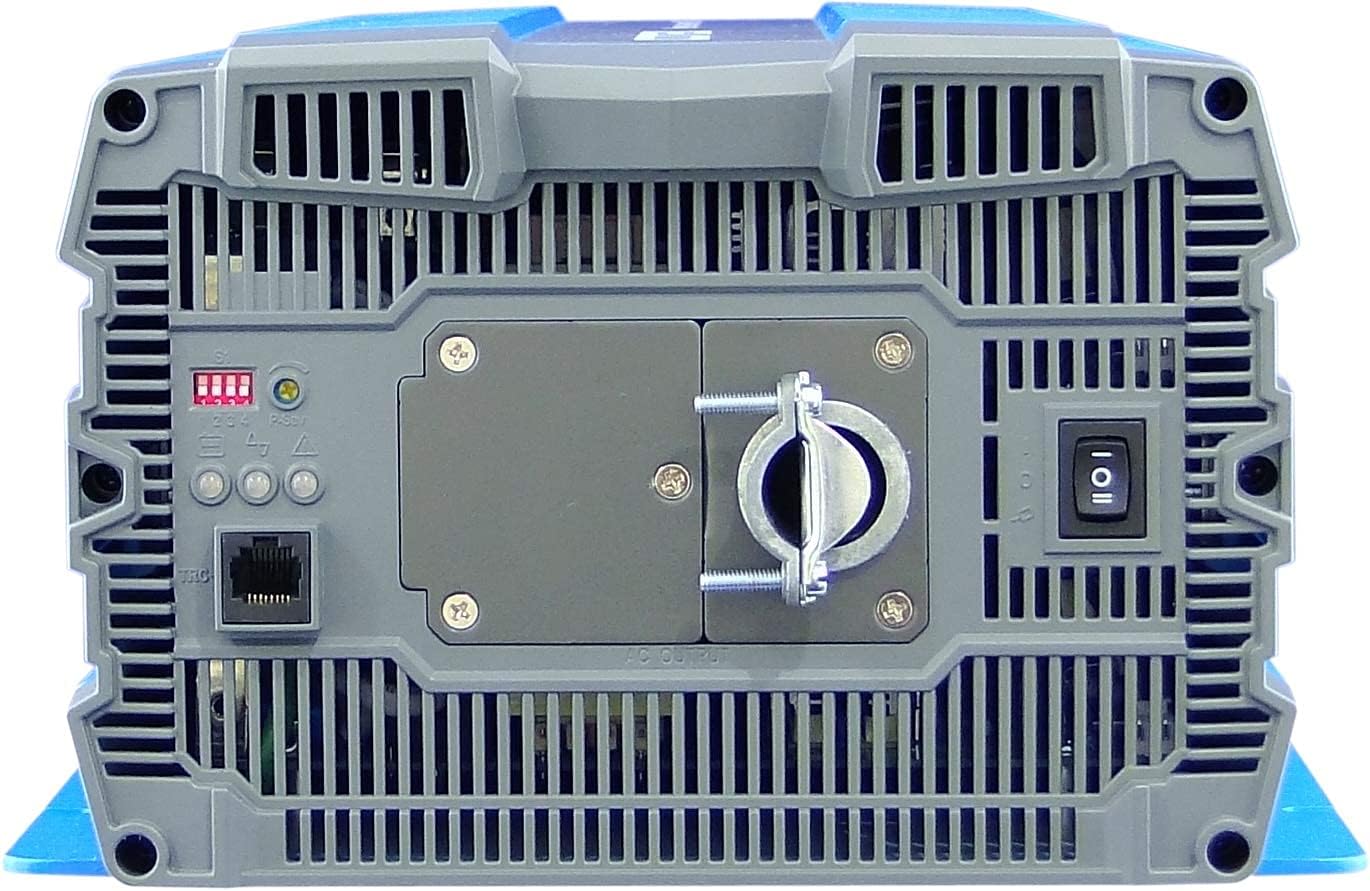
Image: Rear panel of the COTEK SP-3000-148 inverter.
- AC tso zis Terminal: Hardwire connection for 120VAC output.
- DIP Hloov: Used for configuring output voltage thiab zaus.
- Remote Control Port (Green Terminal): For connecting an optional remote ON/OFF switch.
- Lub hwj chim hloov: Main ON/OFF switch for the inverter.
- LED Qhov taw qhia: Display operational status and fault conditions.
4.2 Pem Hauv Ntej Vaj Huam Sib Luag
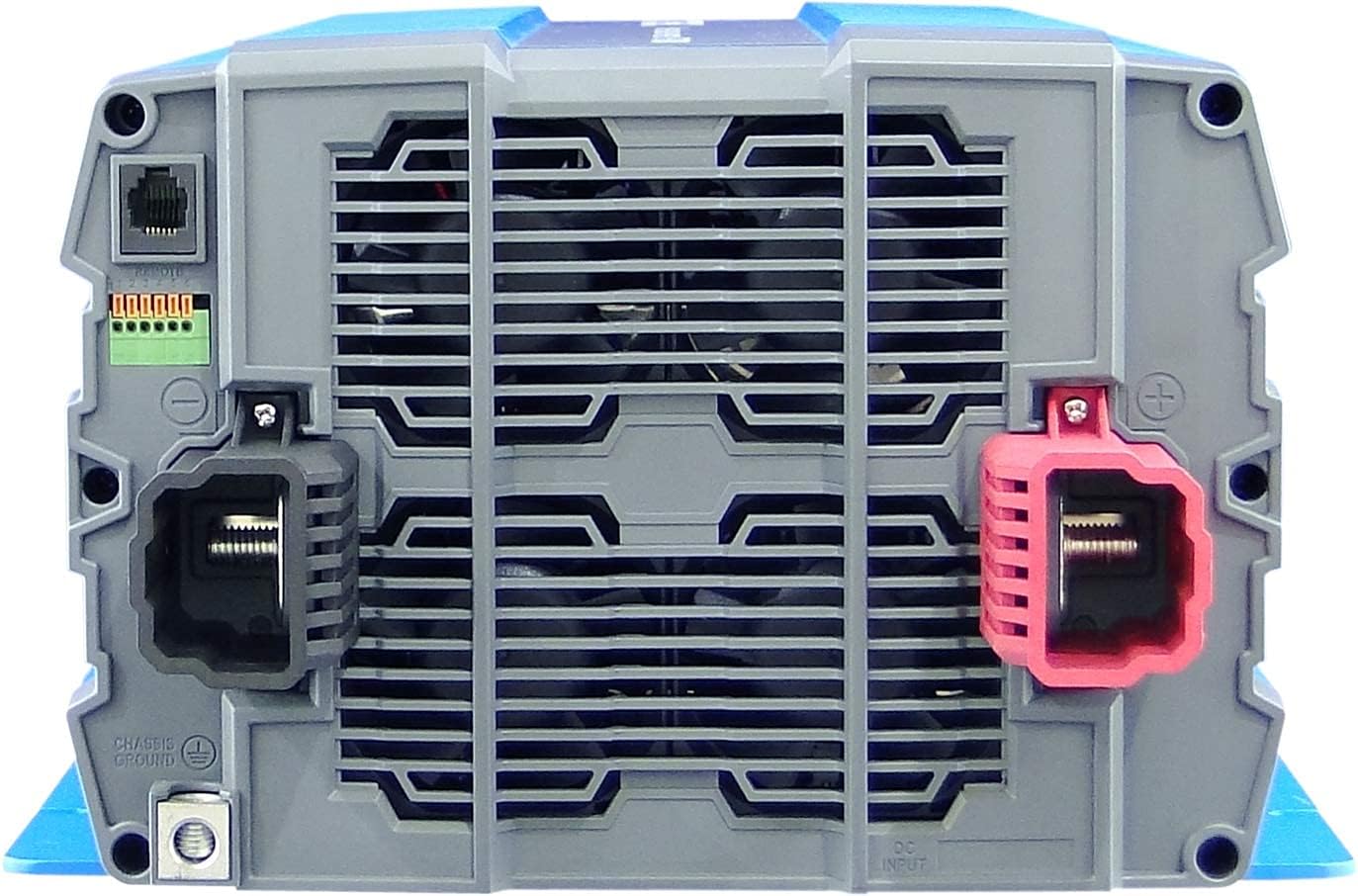
Image: Front panel of the COTEK SP-3000-148 inverter.
- Cov Chaw Nkag DC: Positive (+) and Negative (-) terminals for 48VDC battery connection.
- Chassis Ground Terminal: For connecting the inverter to earth ground.
5. Kev teeb tsa
Proper installation is crucial for the safe and efficient operation of your inverter.
5.1 Mounting
- Qhov chaw: Choose a dry, well-ventilated area, away from direct sunlight, heat sources, and flammable materials.
- Kev taw qhia: Mount the inverter horizontally on a flat, stable surface. Ensure adequate clearance around the unit for proper airflow.
- Kev ruaj ntseg Mounting: Use appropriate fasteners to securely mount the inverter to prevent movement or vibration.

Image: Mechanical drawings with dimensions for mounting the SP-3000 series inverter.
5.2 Thaiv
All wiring must comply with local and national electrical codes.
5.2.1 DC Input Connection (48VDC)
- Connect the positive (+) terminal of the inverter to the positive terminal of your 48VDC battery bank.
- Connect the negative (-) terminal of the inverter to the negative terminal of your 48VDC battery bank.
- Use appropriately sized cables and fuses/breakers for the DC input circuit to prevent overcurrent.
5.2.2 AC Output Connection (120VAC Hardwire)
- Connect your AC loads to the hardwire AC output terminal block on the rear panel.
- Ensure proper polarity (Line, Neutral, Ground) for all AC connections.
- Consult a qualified electrician for hardwiring AC circuits.
5.2.3 Kev tsim kho av
- Connect the chassis ground terminal on the inverter's front panel to a reliable earth ground.
- This connection is essential for safety and to minimize electrical noise.
5.2.4 Remote Control Connection
- Connect an optional remote ON/OFF switch to the green terminal block on the rear panel.
- Refer to the remote control's specific instructions for wiring details.
6. Kev ua haujlwm
6.1 Hwj chim Rau/Tawm
- Txhawm rau Fais Fab: Ensure all connections are secure. Flip the main power switch on the rear panel to the 'ON' position. The LED indicators will illuminate to show operational status.
- Mus Faib Tawm: Flip the main power switch to the 'OFF' position. If using a remote switch, ensure it is also in the 'OFF' position.
6.2 DIP Hloov Chaw
The DIP switches on the rear panel allow configuration of the inverter's output voltage and frequency. Refer to the diagram below for specific settings. Always power off the inverter before changing DIP switch settings.

Image: COTEK SP-3000 series specifications and DIP switch settings.
6.2.1 Tso zis Voltage Xaiv
The inverter supports various output voltages (100V, 110V, 115V, 120V AC). Adjust DIP switches according to the desired output voltage as indicated in the specifications diagram.
6.2.2 Output Frequency Selection
The inverter can operate at 50Hz or 60Hz. Set the DIP switches to match the required frequency for your region or application.
6.2.3 Hom Txuag Lub Zog
The inverter features a power saving mode (High Efficiency). Refer to the diagram for enabling or disabling this feature via DIP switches.
6.3 LED Qhov taw qhia
The inverter is equipped with LED indicators to display its operational status and alert you to potential issues. Consult the specifications diagram for a detailed explanation of each LED's meaning.
7. Kev tu
Regular maintenance ensures the longevity and reliable operation of your inverter.
- Ntxuav: Periodically clean the exterior of the inverter with a dry cloth. Ensure ventilation openings are free from dust and debris. Do not use liquid cleaners.
- Kev sib txuas: Regularly check all DC and AC connections for tightness. Loose connections can cause overheating and poor performance.
- Kev tshuaj xyuas roj teeb: Inspect your battery bank regularly for corrosion, damage, or signs of leakage.
8. Kev daws teeb meem
The SP-3000-148 inverter includes several protection features. If the inverter stops operating or indicates a fault, refer to the table below for common issues and solutions.
| Teeb meem | Ua Tau | Kev daws |
|---|---|---|
| No AC Output / Inverter Off | Main switch off, low battery voltage, overload, internal fuse. | Check power switch, charge batteries, reduce load, check DC input fuse. |
| Input Under-Voltage Tswb | Roj teeb voltage qis. | Them los yog hloov cov roj teeb. |
| Tawm tswv yim dhau-Voltage Tswb | Roj teeb voltage heev. | Check charging system, ensure correct battery voltage. |
| Tso zis ntau dhau | Connected load exceeds inverter's capacity. | Txo tag nrho cov load txuas nrog lub inverter. |
| Tshaj kub | Inverter overheating due to poor ventilation or excessive load. | Ensure adequate ventilation, reduce load, allow inverter to cool. |
| Luv Circuit Court | Short circuit detected on AC output. | Identify and clear the short circuit on the AC output wiring or load. |
9. Cov lus qhia tshwj xeeb
The following table details the technical specifications for the COTEK SP-3000-148 Pure Sine Wave Inverter:
| Feature | Specification |
|---|---|
| Qauv | Qauv: SP-3000-148 |
| AC Voltage | 120VAC (Selectable via DIP switch) |
| AC Kev Cai | ± 5% |
| Rated zog | 3000 W |
| Surge Power (1 Sec) | 6000 W |
| Lub zog tso zis ntau tshaj (1 min) | 3450 W |
| Tso zis Waveform | Pure Sine Wave (THD<3% at nominal load) |
| Ntau zaus | 60Hz (Selectable via DIP switch) |
| DC Voltage | 48 VDC ua |
| Voltage Ntau yam | 42.0 ~ 66.0VDC |
| Tsis Muaj Load Tam Sim No | <1.0A @48VDC |
| Kev txuag hluav taws xob | <0.4A @48VDC |
| Efficiency (Max.) | 92% |
| Input Under-Voltage Kev Tiv Thaiv | 42.0 ± 0.5VDC |
| Input Under-Voltage Tswb | 44.0 ± 0.5VDC |
| Input Under-Voltage Rov qab | 50.0 ± 0.5VDC |
| Tawm tswv yim dhau-Voltage Kev Tiv Thaiv | 66.0 ± 1.0VDC |
| Tawm tswv yim dhau-Voltage Rov qab | 64.0 ± 1.0VDC |
| Tso zis ntau dhau | Shutdown output, restart to recover. |
| Tso zis luv | Shutdown output, restart to recover. |
| Tshaj kub | Shutdown output, auto-recovery after cooling. |
| DC input rov qab polarity | Los ntawm fuse |
| Kev khiav hauj lwm Temp. | -20 ° C ~ + 40 ° C |
| Cia Temp. & Cov av noo | -30°C ~ +70°C, 10 ~ 95% RH |
| Dimensions (W x H x D) | 442 x 239 x 102.5 hli (17.4 x 9.4 x 4.0 nti) |
| Qhov hnyav | 8.2kg (18.08 lbs) |
| Warranty | 2 Xyoo Chaw Tsim Tshuaj |
10. Warranty Information
The COTEK SP-3000-148 Pure Sine Wave Inverter comes with a 2-Xyoo Chaw Tsim Tshuaj Warranty. This warranty covers defects in materials and workmanship under normal use. Please retain your proof of purchase for warranty claims. For detailed warranty terms and conditions, refer to the official COTEK warranty statement or contact customer support.
11. Cov neeg siv khoom txhawb nqa
If you encounter any issues not covered in this manual or require technical assistance, please contact COTEK customer support. Have your product model number (SP-3000-148) and purchase information ready when contacting support.