
1. Taw qhia
Thank you for choosing the OSD Audio PRE-1 High Definition Preamplifier. This unit is designed to enhance your audio experience by providing versatile source selection and precise audio control. The PRE-1 acts as a central hub for various audio components, including turntables, CD/DVD players, and tape decks, delivering a clean and powerful signal to your main ampua neej nyob.
This manual provides detailed instructions for the proper setup, operation, and maintenance of your PRE-1 preamplifier. Please read this manual thoroughly before operating the unit to ensure optimal performance and longevity.
2. Cov ntaub ntawv tseem ceeb ntawm kev nyab xeeb
- Lub zog Source: Connect the unit only to the type of power source indicated on the marking label.
- Qhov cua: Ensure adequate ventilation. Do not block any ventilation openings. Install in accordance with the manufacturer’s instructions.
- Dej thiab noo noo: Tsis txhob siv cov cuab yeej no nyob ze dej los yog ua rau nws poob los yog txaws.
- Thaum tshav kub kub: Tsis txhob nruab ze ntawm tej qhov chaw kub xws li radiators, lub tshav kub registers, qhov cub, los yog lwm yam apparatus (xws li amplifiers) uas ua kom sov.
- Ntxuav: Ntxuav tsuas yog nrog daim ntaub qhuav.
- Kev pab: Tsis txhob sim muab cov khoom no rau koj tus kheej. Xa mus rau txhua qhov kev pabcuam rau cov neeg ua haujlwm pabcuam uas tsim nyog.
- Grounding: Qhov no unit yuav tsum tau grounded kom zoo.
3. Cov ntsiab lus ntawm pob
Thov xyuas kom meej tias cov khoom hauv qab no suav nrog hauv koj lub pob khoom:
- OSD Audio PRE-1 High Definition Preampua neej nyob
- Fais fab Cable
- Tus Neeg Siv Los Siv (cov ntawv no)
4. Khoom Tshajview
4.1. Pem Hauv Ntej Vaj Huam Sib Luag
The front panel provides access to all primary controls and a microphone input for convenient use.

This image displays the front panel of the OSD Audio PRE-1 Preamplifier, including its physical dimensions for installation planning.

Cov ncauj lus kom ntxaws view of the left side of the PRE-1's front panel, highlighting the Microphone Level, Bass, Midrange, and Treble adjustment knobs.

Cov ncauj lus kom ntxaws view of the right side of the PRE-1's front panel, showing the Loudness, Balance, and Volume controls, along with input selection and function buttons.
- Lub zog khawm: Tig lub unit rau lossis tawm.
- Mic tswv yim: 1/4-inch jack for connecting a microphone.
- Qib Mic: Adjusts the volume of the microphone input.
- Bass Control: Kho qhov tso zis zaus qis.
- Mid Control: Adjusts the mid-range frequency output.
- Treble Control: Kho qhov tso zis ntau zaus.
- Suab nrov: Engages or disengages a loudness contour for enhanced bass and treble at low volumes.
- Qhov nyiaj tshuav: Adjusts the left/right channel balance.
- Ntim: Master volume control for all outputs.
- Input Xaiv: Rotary knob to choose between Phono, AUX1, AUX2, and CD/DVD inputs.
- Tape Button: Activates the Tape Monitor loop.
- Mono khawm: Combines stereo signals into a monaural output.
- Tsawg Lim: Engages a low-frequency cut-off filter.
- Suab nrov: Silences all audio output.
4.2. Pem hauv ntej vaj huam sib luag
The rear panel houses all the necessary input and output connections for your audio system.
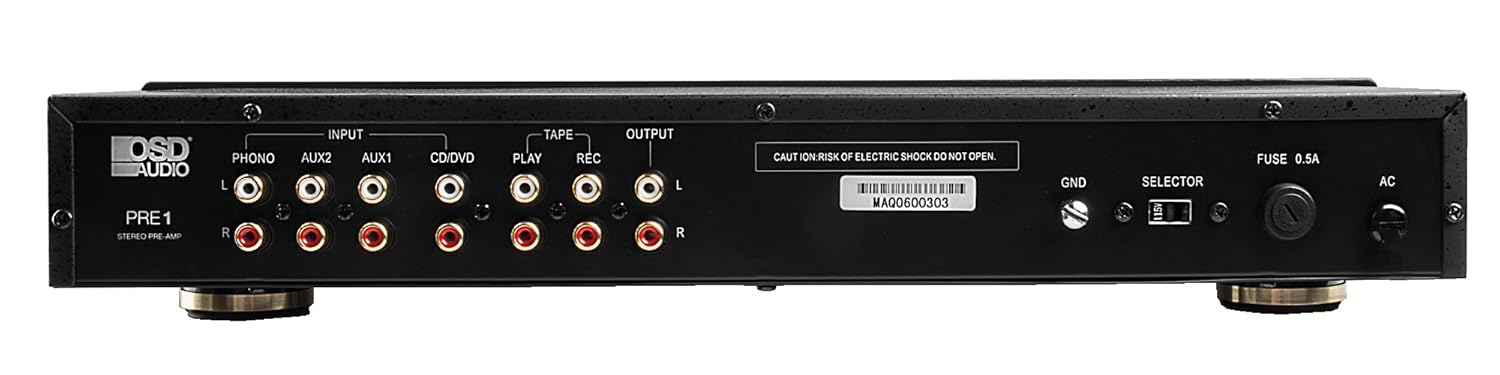
The rear panel of the PRE-1 Preamplifier, showing all input and output connections for various audio devices.
- Phono Input (L/R): RCA inputs for connecting a turntable. Includes a ground terminal.
- AUX1 Input (L/R): RCA inputs for general auxiliary devices.
- AUX2 Input (L/R): RCA inputs for a second auxiliary device.
- CD/DVD Input (L/R): RCA inputs for CD or DVD players.
- Tape Play (L/R): RCA inputs for the playback output of a tape deck or other recording device.
- Tape Rec (L/R): RCA outputs for connecting to the recording input of a tape deck or other recording device.
- Output (L/R): RCA outputs to connect to your main power ampua neej nyob.
- Ground Terminal (GND): Connects to the ground wire of your turntable to reduce hum.
- Selector Hloov: For internal configuration (typically left in default position unless specified).
- fuse: Replace only with the specified fuse type and rating.
- AC hwj chim tswv yim: Connects to the supplied power cable.
5. Kev teeb tsa thiab kev sib txuas
Follow these steps to properly set up your OSD Audio PRE-1 Preampua neej nyob:
- Qhov chaw: Place the PRE-1 on a stable, flat surface, ensuring adequate ventilation around the unit. Avoid placing it near heat sources or in direct sunlight.
- Fais fab tawm: Ensure all audio components, including the PRE-1 and your main amplifier, are turned off before making any connections.
- Txuas qhov chaw:
- Turntable: Connect the RCA cables from your turntable to the Phono Input (L/R) on the PRE-1. Connect the turntable's ground wire to the GND terminal on the PRE-1.
- CD/DVD Player: Connect the RCA cables from your CD/DVD player to the CD/DVD Input (L/R).
- Other Devices (e.g., Streamer, Tuner): Connect RCA cables from these devices to the AUX1 Input (L/R) or AUX2 Input (L/R).
- Tape Deck: Connect the playback outputs of your tape deck to the Tape Play (L/R) inputs. Connect the recording inputs of your tape deck to the Tape Rec (L/R) tso zis.
- Txuas rau Ampua neej nyob: Txuas lub Output (L/R) RCA jacks on the PRE-1 to the input jacks of your main power ampua neej nyob.
- Kev sib txuas fais fab: Txuas cov khoom siv fais fab cable rau lub Cov fais fab AC Lub Tswv Yim on the rear panel of the PRE-1, then plug it into a suitable wall outlet.
- Pib Pib Pib: Turn on your main power amplifier first, then turn on the PRE-1. When powering off, turn off the PRE-1 first, then your main ampua neej nyob.
6. Cov lus qhia ua haujlwm
Once your PRE-1 is connected, follow these steps for basic operation:
- Xaiv cov tswv yim: Siv cov Cov lus xaiv xaiv rotary knob on the front panel to choose the desired audio source (Phono, AUX1, AUX2, CD/DVD).
- Kho qhov ntim: Pib nrog cov Ntim knob at its minimum setting. Begin playing your selected audio source and slowly increase the volume to a comfortable listening level.
- Tone Controls: Siv cov Bass, Nruab nrab, thiab Treble knobs to adjust the tonal characteristics of your audio. Turn clockwise to increase, counter-clockwise to decrease.
- Sib npaug tswj: Kho cov Tshuav knob to fine-tune the left and right channel output for optimal stereo imaging.
- Suab nrov: Nias lub Suab nrov button to activate a contour that boosts bass and treble frequencies, which can be beneficial at lower listening volumes. Press again to deactivate.
- Tsawg Lim: Nias lub Tsawg Lim button to engage a filter that reduces very low frequencies. This can help eliminate rumble from turntables or other unwanted low-frequency noise. Press again to deactivate.
- Mono: Nias lub Mono button to combine the left and right stereo channels into a single monaural signal. This is useful for playing mono recordings. Press again for stereo.
- Suab nrov: Nias lub Ntshai button to instantly silence the audio output. Press again to restore sound.
- Kev siv lub microphone: Plug a microphone into the Mic Input. Adjust the microphone's volume using the Theem Qeb pob qhov rooj.
- Tape Monitoring/Recording: If you have a tape deck connected, select the appropriate input for playback. To record, ensure your tape deck is set to record and the PRE-1 is passing the desired source through the Tape Rec outputs.
7. Kev tu
Proper care and maintenance will ensure the longevity and optimal performance of your PRE-1 Preampua neej nyob.
- Ntxuav: Use a soft, dry cloth to clean the exterior of the unit. Do not use liquid cleaners, aerosols, or harsh chemicals, as they may damage the finish or internal components.
- Qhov cua: Saib xyuas ib ntus kom paub tseeb tias qhov qhib qhov cua tsis pub muaj plua plav thiab thaiv.
- Kev sib txuas: Occasionally check all cable connections to ensure they are secure. Loose connections can lead to signal loss or interference.
- Cia: If storing the unit for an extended period, disconnect it from the power outlet and store it in a cool, dry place, away from direct sunlight and extreme temperatures.
8. Kev daws teeb meem
If you experience issues with your OSD Audio PRE-1, refer to the following common problems and solutions:
| Teeb meem | Ua Tau | Kev daws |
|---|---|---|
| Tsis muaj zog | Power cable not connected; Power outlet not active; Blown fuse | Ensure power cable is securely connected. Test the outlet with another device. Check and replace the fuse if necessary (refer to specifications for fuse type). |
| Tsis muaj suab nrov | Incorrect input selected; Volume too low; Mute engaged; Loose audio cables; Main amplifier off or incorrect input selected | Select the correct input source. Increase the volume. Disengage Mute. Check all RCA cable connections. Ensure your main amplifier is on and set to the correct input. |
| Distorted suab | Volume too high (clipping); Incorrect tone control settings; Faulty cables | Reduce the volume. Adjust Bass, Mid, and Treble controls to neutral or desired settings. Try replacing audio cables. |
| Humming los yog buzzing suab nrov | Ground loop; Loose ground wire (Phono); Interference from other electronics | Ensure turntable ground wire is connected to the PRE-1's GND terminal. Try moving the PRE-1 or other audio components away from power cables or other electronic devices. Use a ground loop isolator if necessary. |
| Microphone tsis ua haujlwm | Mic not connected; Mic Level too low; Faulty microphone | Ensure microphone is securely plugged into the Mic Input. Increase the Mic Level. Test with another microphone if available. |
9. Cov lus qhia tshwj xeeb
Below are the technical specifications for the OSD Audio PRE-1 Preampua neej nyob:
| Feature | Specification |
|---|---|
| Qauv | PIB-1 |
| Hom | OSD Audio |
| Tus naj npawb ntawm Channel | 2 |
| Mounting Hom | Nto Mount |
| UPC | 819603012446 |
| ASIN | B01MPYJLPX |
| Chaw tsim tshuaj paus | OSD Audio |
10. Warranty thiab Support
OSD Audio products are designed for reliability and performance. For specific warranty details and terms, please refer to the warranty card included with your product or visit the official OSD Audio website. If you require technical assistance or have questions not covered in this manual, please contact OSD Audio customer support.
OSD Audio Customer Support: Please visit the OSD Audio website rau cov ntaub ntawv tiv tauj thiab kev txhawb nqa.