
1. Taw qhia
This manual provides detailed instructions for the installation, operation, and maintenance of your THINKWARE F100 Dash Cam. The F100 is designed to record high-quality video footage of your journeys, offering features such as Full HD 1080p recording, night vision, and a secure parking mode to enhance your driving safety and provide evidence in case of incidents.
Thov nyeem phau ntawv qhia no kom zoo ua ntej siv cov khoom kom paub tseeb tias ua haujlwm tau zoo thiab tiv thaiv kev puas tsuaj.
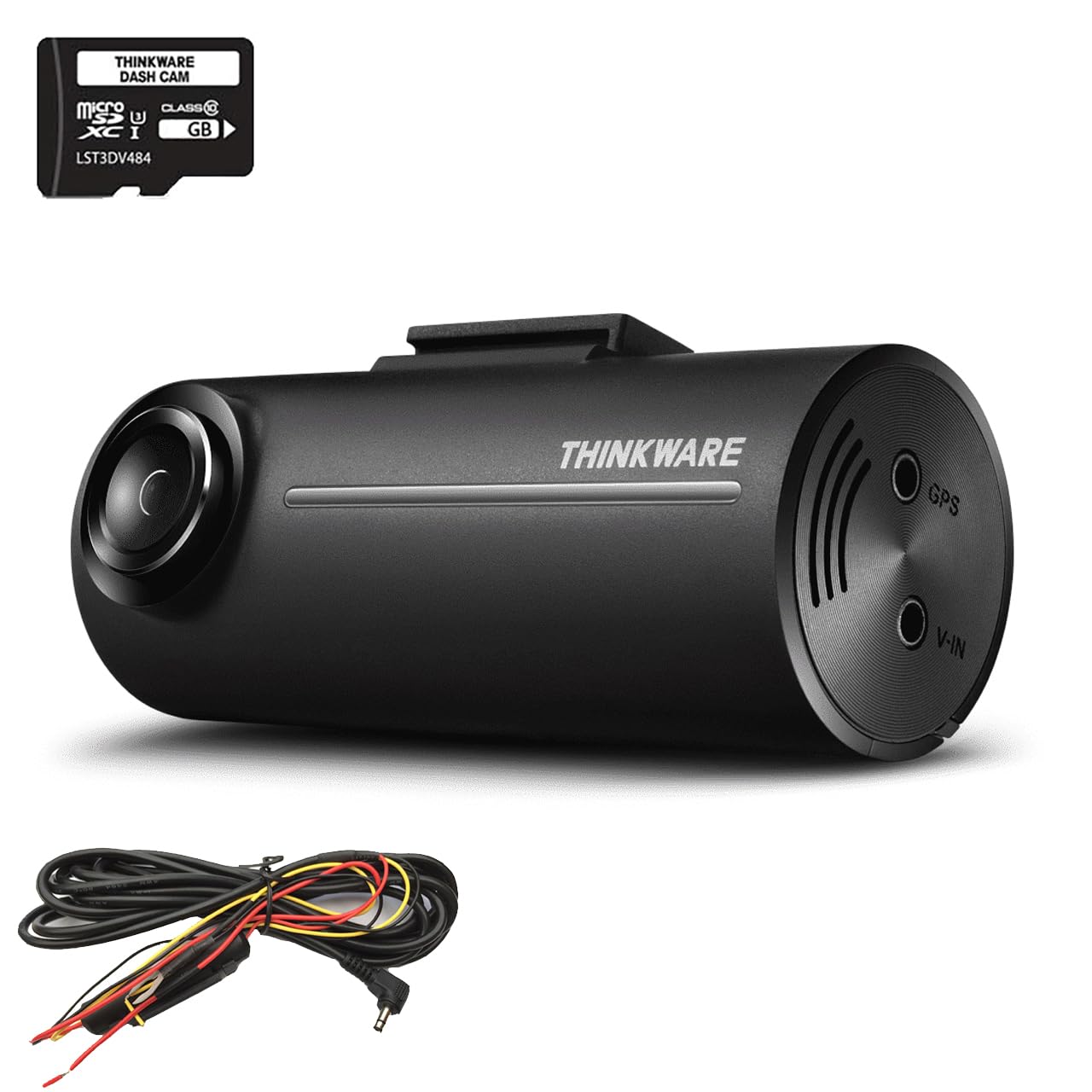
Image 1.1: The THINKWARE F100 Dash Cam recording in Full HD 1080p.
2. Cov ntsiab lus ntawm pob
Verify that all components are present in the box before proceeding with installation.
- THINKWARE F100 Dash Cam Unit
- Cov kab hluav taws xob
- 16GB Micro SD Card
- Phau Ntawv Qhia Pib Ceev & Cov Lus Qhia Warranty
- 3M Sticky Mounting Pad (2 included)

Image 2.1: All items included in the THINKWARE F100 Dash Cam package.
3. Khoom Tshajview
The THINKWARE F100 Dash Cam features a compact design for discreet installation and a wide-angle lens to capture a broad view ntawm txoj kev.

Image 3.1: The F100 Dash Cam mounted on a windshield.
Cov yam ntxwv tseem ceeb:
- Full HD 1080p Recording: Captures clear video at 30 frames per second with a 135-degree wide-angle view.
- Night Enhancement Technology: Sony CMOS image sensors provide clearer images in low-light conditions.
- Hom Kev Saib Xyuas Chaw Nres Tsheb: Monitors your vehicle when parked, preventing battery drain with its G-sensor system.
- Format Free Technology: Extends the life of your Micro SD card by eliminating the need for manual formatting.
- Driver Safety Features: Includes emergency recording via G-sensor accident detection and optional speed camera alerts (requires optional GPS antenna).

Image 3.2: Visual representation of F100 key features.
4. Kev teeb tsa
Proper installation is crucial for optimal performance. It is recommended to have the dash cam professionally installed, especially for hardwiring.
4.1 Kev Teeb Lub Koob Yees Duab Dash
- Clean the area on your windshield where you intend to mount the dash cam. Ensure it does not obstruct your view.
- Attach one of the 3M sticky mounting pads to the dash cam mount.
- Firmly press the mount onto the cleaned windshield area. Hold for at least 30 seconds to ensure a secure bond.
- Adjust the camera angle to ensure it captures the road ahead clearly, with the horizon in the middle of the frame.
4.2 Power Connection (Hardwire)
The F100 includes a hardwire cable for secure parking mode installation, which connects directly to your vehicle's fuse box. This connection prevents battery drain while providing continuous power for parking surveillance.
- Connect the hardwire cable to the power input port on the dash cam.
- Route the cable along the windshield trim and down to your vehicle's fuse box. Use cable clips to secure the cable and keep it tidy.
- Connect the hardwire cable's ACC (Accessory) and BATT (Battery) wires to appropriate fuse slots in your vehicle's fuse box. Consult your vehicle's manual or a professional installer for correct fuse selection.
- Connect the GND (Ground) wire to a metal bolt or chassis point in your vehicle.
- Once connected, start your vehicle to ensure the dash cam powers on correctly.
5. Kev ua haujlwm yooj yim
5.1 Hwj chim Rau/Tawm
- When connected to your vehicle's power supply (either via cigarette lighter adapter or hardwire kit), the F100 will automatically power on and begin continuous recording when the vehicle starts.
- The dash cam will automatically power off when the vehicle's ignition is turned off, unless parking mode is enabled via hardwire installation.
5.2 Hom Kev Kaw Suab
- Cov Ntaubntawv Nruam Nruam: The dash cam records continuously in 1-minute segments while driving. Older files are overwritten automatically when the SD card is full.
- Txheej xwm Recording: In the event of an impact or sudden braking detected by the G-sensor, the dash cam will automatically save a 20-second video clip (10 seconds before and 10 seconds after the event) to a protected folder, preventing it from being overwritten.
- Phau Ntawv Teev Tseg: Press the emergency recording button on the dash cam to manually save a 20-second video clip to the protected folder.
6. Advanced Features
6.1 Parking Surveillance Mode
With the hardwire installation, the F100 can monitor your vehicle even when parked. This mode uses the G-sensor to detect impacts and motion, recording events to provide security when you are away from your vehicle.
- The F100's parking mode system continuously monitors your car battery's health. If the battery voltage drops below a safe level, the dash cam will automatically shut down to prevent complete battery drain.
- Motion detection and impact detection are active in parking mode.

Image 6.1: Battery Saving Parking Mode functionality.
6.2 Driver Safety Features
- G-Sensor Accident Detection: Automatically detects impacts and saves footage to a protected folder.
- Speed Camera Alerts: The F100 supports a UK speed camera database (Cyclops) with free updates. This feature requires an optional GPS antenna to function.
6.3 Format Free Technology
The F100 utilizes an advanced file allocation table system that manages the Micro SD card efficiently, reducing the need for manual formatting and extending the lifespan of the memory card.
7. PC/Mac Viewyog Software
The THINKWARE PC/Mac Viewer software allows you to manage your dash cam settings, view sau foostage, and download or delete files los ntawm koj lub computer.
7.1 Downloading and Installing the Viewer
Cov viewer software can be downloaded for free from the official THINKWARE website. Follow the on-screen instructions to install it on your computer.
7.2 siv lub Viewer
- Remove the Micro SD card from the dash cam.
- Insert the Micro SD card into your computer's card reader.
- Launch the THINKWARE PC/Mac Viewyog software.
- You can now browse recorded videos, adjust dash cam settings, and update firmware if available.

Image 7.1: The THINKWARE PC/Mac Viewer software in use.
8. Kev tu
8.1 Micro SD Card Management
- Tsis tu ncua khaws cov khoom noj tseem ceebtage from your Micro SD card to a computer or external storage.
- Although the F100 features Format Free technology, it is still recommended to manually format the SD card every few months using the PC/Mac Viewer software to maintain optimal performance and prevent data corruption.
- Use only high-quality, genuine Micro SD cards from reputable brands.
8.2 Kev Ntxuav Lub Koob Yees Duab Dash
- Wipe the camera lens gently with a soft, lint-free cloth to ensure clear recordings.
- Clean the exterior of the dash cam with a dry or slightly damp daim ntaub. Tsis txhob siv cov tshuaj hnyav los yog cov tshuaj abrasive.
9. Kev daws teeb meem
If you encounter issues with your F100 Dash Cam, refer to the following common problems and solutions:
| Teeb meem | Ua Tau | Kev daws |
|---|---|---|
| Dash cam tsis muaj hwj chim rau. | No power supply; faulty cable; incorrect hardwire connection. | Check power cable connection. Ensure vehicle ignition is on (if not hardwired). Verify hardwire connections to fuse box. |
| Cov ntaub ntawv nres lossis khov. | SD card error; full SD card; incompatible SD card. | Format the SD card using the PC/Mac Viewer. Replace with a new, high-quality SD card if issues persist. |
| Tsis zoo video. | Dirty lens; incorrect camera angle; low-light conditions. | Clean the camera lens. Adjust camera angle. Ensure sufficient lighting for optimal recording. |
| Chaw nres tsheb hom tsis ua haujlwm. | Not hardwired; incorrect hardwire connection; battery voltage qis. | Ensure the dash cam is hardwired correctly. Check vehicle battery health. |
If the problem persists after trying these solutions, please contact THINKWARE customer support.
10. Cov lus qhia tshwj xeeb
Technical specifications for the THINKWARE F100 Dash Cam:
| Feature | Paub meej |
|---|---|
| Chaw tsim tshuaj paus | Kev xav |
| Qauv nab npawb | F100 |
| Khoom Dimensions | 7.8 x 3.4 x 3.15 cm |
| Qhov hnyav | 421.84g ua |
| Video Capture daws teeb meem | Tiam Ntawv Tsis Tau HD 1080p |
| Optical Sensor Technology | CMOS (Sony) |
| Tshwj xeeb nta | Night Vision, G-Sensor, Parking Mode, Format Free Technology |
| Mounting Hom | Tus Cua Ntsia Cua Mount |
| Cov Cheebtsam suav nrog | Dash Camera, Hardwire Cable, 16GB SD Card |
| Xim | Dub |
11. Warranty thiab Support
THINKWARE provides comprehensive support for its products. As a global dash cam brand, we offer a free technical helpline and professional national installation services.
For warranty information, please refer to the 'Quick Start Guide & Warranty Information' included in your product package. For technical assistance or further inquiries, please visit the official THINKWARE website lossis tiv tauj lawv cov neeg siv khoom ncaj qha.