
1. Taw qhia
This manual provides essential information for the proper installation, operation, and maintenance of the Unknown Brand Ink Pump, Model PRO-031. This component is designed for use with specific Roland SP and SJ series printers to ensure efficient ink delivery. Adherence to these instructions will help maintain optimal performance and longevity of the ink pump.
2. Khoom Tshajview
The Ink Pump (Model PRO-031) is a critical component in the ink delivery system of compatible Roland printers. It is engineered to be solvent-resistant, making it suitable for use with various eco-solvent or water-based inks. Its construction emphasizes durability and anti-corrosion properties to ensure reliable performance over time.

Figure 2.1: Close-up of the Ink Pump, showing the main body and connected tubes.

Figure 2.2: The Ink Pump with its integrated tubing, ready for installation.
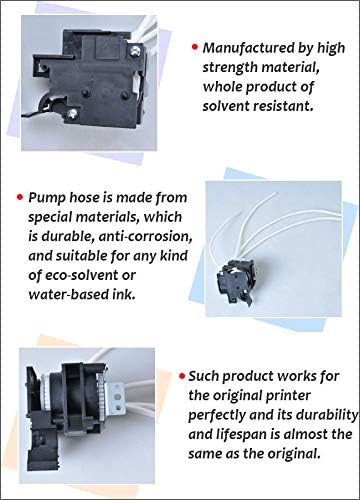
Figure 2.3: Key features of the Ink Pump, highlighting its material strength, solvent resistance, and durable hose.
3. Kev sib haum xeeb
This ink pump is compatible with the following Roland printer models:
- Roland SJ-740
- Roland SJ-540
- Roland SJ-645 EX
- Roland SJ-745 EX
- Roland SJ-1000
- Roland SJ-1045 EX
- Roland SJ-545 EX
- Roland SP-300
- Roland SP-300V
- Roland SP-540
- Roland SP-540V
Ensure your printer model is listed above before proceeding with installation.
4. Kev teeb tsa thiab kev teeb tsa
Installation of printer components should ideally be performed by a qualified technician. Incorrect installation can lead to damage to the printer or the component.
- Fais fab tawm: Before beginning any installation, ensure the printer is completely powered off and disconnected from the main power supply.
- Nkag mus: Carefully open the printer's access panels to locate the existing ink pump. Refer to your printer's service manual for specific access instructions.
- Kev tshem tawm: Disconnect all ink tubes and electrical connectors from the old ink pump. Note the orientation and connection points for reassembly. Remove any mounting screws or clips securing the old pump.
- Kev teeb tsa: Position the new Ink Pump (Model PRO-031) in the designated location. Secure it using the appropriate mounting hardware.
- Kev sib txuas: Reconnect the ink tubes to the new pump, ensuring a secure and leak-free fit. Verify that each tube is connected to its correct port. Reconnect any electrical connectors.
- Kev tshuaj xyuas: Visually inspect all connections and mounting points to ensure everything is correctly installed and secured.
- Hwj chim On: Close all printer access panels. Reconnect the printer to the power supply and power it on.
- Kuaj: Perform a test print or initiate a cleaning cycle to verify proper ink flow and pump function.
5. Cov Cai Ua Haujlwm
The ink pump facilitates the movement of ink from the cartridges or bulk ink system to the print heads. It operates in conjunction with the printer's control system to maintain consistent ink pressure and flow, which is essential for high-quality printing. During cleaning cycles, the pump also assists in drawing waste ink through the capping station to prevent clogs and maintain print head health.
6. Kev tu
Regular maintenance helps extend the lifespan of the ink pump and ensures consistent printer performance.
- Kev tshuaj xyuas tsis tu ncua: Periodically inspect the ink pump and its tubing for any signs of wear, cracks, or leaks. Address any issues promptly.
- Kev huv huv: Keep the area around the ink pump clean and free from ink spills or dust accumulation.
- Ink Compatibility: Always use inks that are compatible with your printer and the solvent-resistant properties of this pump. Using incompatible inks can lead to premature wear or failure.
- Kev Pabcuam Kev Ua Haujlwm: For any complex maintenance or repair, consult a qualified printer technician.
7. Kev daws teeb meem
If you experience issues related to ink delivery, consider the following basic troubleshooting steps:
- No Ink Flow: Check all ink tube connections to ensure they are secure and not kinked or blocked. Verify that ink cartridges or bulk ink systems have sufficient ink.
- Weak Ink Flow: This could indicate a partial blockage or a pump that is not operating at full efficiency. Check for air bubbles in the ink lines.
- Suab nrov txawv txawv: If the pump makes unusual noises, it may indicate a mechanical issue. Power off the printer and inspect the pump for any visible obstructions or damage.
- Cov lus yuam kev: Refer to your printer's user manual for specific error codes related to the ink system.
For persistent problems, professional diagnosis and repair are recommended.
8. Cov lus qhia tshwj xeeb
| Specification | Paub meej |
|---|---|
| Khoom npe | Ink Pump |
| Qauv nab npawb | NPE-031 |
| Hom | Tsis paub |
| Chaw tsim tshuaj paus | KD-Tec |
| Applicable Printer Models | Roland SJ-740 / SJ-540 / SJ-645 EX / SJ-745 EX / SJ-1000 / SJ-1045 EX / SJ-545 EX, Roland SP-300 / SP-300V / SP-540 / SP-540V |
| Product Size (Approx.) | 60mm x 60mm x 50mm |
| Lub cev hnyav (Kwv yees.) | 75g (2.65 ooj) |
| Packing Size (Approx.) | 90mm x 80mm x 70mm |
| Packing Weight (Approx.) | 80g (2.82 ooj) |
| UPC | 756155144709 |
| Khoom Khoom | Solvent Resistant, Anti-corrosion |
9. Warranty Information
Specific warranty terms for this product are typically provided by the seller at the time of purchase. Please retain your proof of purchase and contact the seller directly for any warranty-related inquiries.
10. Txhawb nqa
For technical assistance or further questions regarding the installation or operation of this ink pump, please contact the vendor or a qualified printer service technician. Always refer to your printer's official documentation for comprehensive service and support information.