
1. Taw qhia
This manual provides detailed instructions for the safe and efficient operation of your KNACRO IMAX B6AC 80W Balance Battery Charger/Discharger. This device is designed to charge and discharge various battery types, including LiIon, LiPo, LiFe, NiCd, NiMh, and Pb batteries. It features advanced functions such as balance charging to prevent overcharging and ensure battery longevity.
2. Cov lus qhia kev nyab xeeb
Please read and understand all safety warnings and instructions before using the charger. Failure to do so may result in property damage, injury, or fire.
- Always supervise the charging process, especially when charging lithium batteries, to prevent overcharging which can lead to explosion.
- Ensure proper ventilation around the charger during operation to prevent overheating.
- Do not attempt to charge damaged or swollen batteries.
- Verify battery type, cell count, and charging current settings match your battery specifications before starting any process.
- Keep the charger away from moisture, heat sources, and flammable materials.
- Disconnect power immediately if any malfunction or unusual behavior is observed.
3. Cov ntsiab lus ntawm pob
Carefully unpack the box and ensure all items listed below are present and in good condition.
- 1 x iMAX B6AC Battery Balance Charger
- 1 x Alligator Clip DC Input Cable
- 1 x XT60 Plug Output Cable
- 1 x Glow Charging Cable
- 1 x XT60 to JST Plug Charging Cable
- 1 x XT60 to JR Plug Charging Cable
- 1 x XT60 to Alligator Clip Charging Cable
- 1 x AC Input Cable
- 1 x English Manual
Duab 3.1: The IMAX B6AC charger shown with its complete set of included cables and accessories, including the AC power cord, various charging cables with different connectors (XT60, JST, JR, Alligator Clip), and the DC input cable.

Duab 3.2: Cov ncauj lus kom ntxaws view of the assortment of charging cables provided with the charger, featuring different connectors such as XT60, JST, JR, and alligator clips, designed for compatibility with various battery types.
4. Khoom Tshajview thiab nta
The KNACRO IMAX B6AC is a versatile professional balance charger/discharger with an integrated AC adapter, offering comprehensive battery management for hobbyists and professionals.

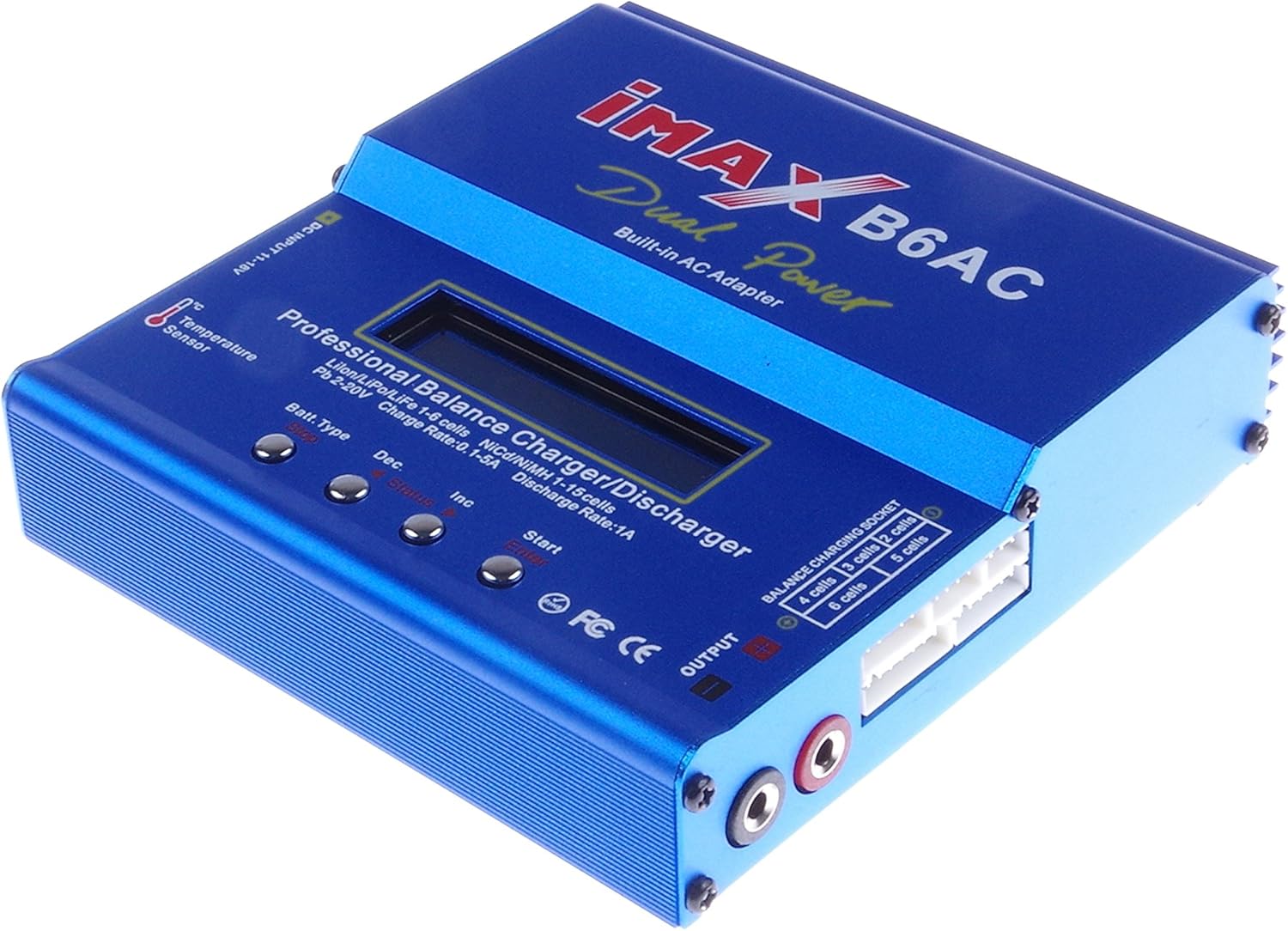
Duab 4.1: Ib lub hauv ntej meej view of the blue IMAX B6AC balance charger, highlighting its central LCD screen, control buttons, and various input/output ports. The 'Dual Power Built-in AC Adapter' text is visible.
Cov yam ntxwv tseem ceeb:
- Tsis siv neeg ua haujlwm: Features an 'AUTO' function that sets feeding current during charging or discharging, preventing overcharging, especially for lithium batteries.
- Kev Nyab Xeeb Mechanisms: Automatically disconnects circuits and alarms upon detecting malfunctions, ensuring maximum safety. All settings are user-configurable.
- Integrated Balance Charger: Employs an individual-cell-voltage balancer, eliminating the need for an external balancer for balance charging. Monitors and balances each cell during discharge, terminating the process if any cell voltage yog txawv txav.
- Versatile Lithium Battery Support: Adaptable to various lithium battery types including Li-ion, LiPo, and LiFe. Offers 'fast' charge for reduced duration and 'store' mode to optimize final voltage for long-term storage, protecting battery lifespan.
- Delta-Peak Sensitivity: Utilizes an automatic charge termination program based on Delta-peak voltage detection, ensuring charging stops when the battery's voltage exceeds a safe threshold.

Duab 4.2: This image displays both the front panel and the bottom of the IMAX B6AC charger, revealing the ventilation grilles on the bottom for heat dissipation and important warning labels regarding operation and safety.
5. Teeb tsa
5.1 Txuas fais fab
The IMAX B6AC charger can be powered by either AC (100-240V) or DC (11-18V) input.
- AC zog: Connect the provided AC input cable to the charger's AC input port (located on the side) and then plug it into a wall outlet.
- DC fais fab: Connect the Alligator Clip DC Input Cable to a 11-18V DC power source (e.g., a car battery or a regulated DC power supply). Ensure correct polarity.

Duab 5.1: Ib sab view of the IMAX B6AC charger, clearly showing the AC input port for wall power and the DC input port for external 11-18V power sources. Ventilation grilles are also visible.
5.2 Connecting Batteries
Connect your battery to the charger's output ports. For lithium batteries, always use the balance port in conjunction with the main charging port for safety and optimal performance.
- Lub ntsiab tseem ceeb: Use the appropriate charging cable (e.g., XT60, JST, JR, Alligator Clip) to connect your battery's main power lead to the charger's output banana sockets.
- Balance Port (for Lithium Batteries): For LiPo, LiFe, and LiIon batteries, connect the battery's balance lead to the corresponding balance port on the charger (2S-6S).

Duab 5.2: This image provides a close-up of the charger's output section, detailing the banana sockets for power output and the multi-pin balance charging socket, labeled for 2S to 6S battery configurations.
6. Cov lus qhia ua haujlwm
6.1 Navigating Menu
The charger features an LCD screen and four control buttons for navigation and setting adjustments.

Duab 6.1: An annotated image of the IMAX B6AC charger's control panel, clearly labeling the functions of each button: 'Batt. Type/Stop' for selecting battery type and stopping programs, 'Dec' for decreasing values, 'Inc' for increasing values, and 'Start/Enter' for initiating processes and confirming selections.
- Batt. Type / Stop: Press to cycle through main menu options or to stop a running program.
- Dec (-): Decreases selected values or moves backward in menus.
- Inc (+): Increases selected values or moves forward in menus.
- Start / Enter: Initiates a program or confirms a selection. Press and hold to start a program.
6.2 Charging Lithium Batteries (LiPo/LiFe/LiIon)
Always connect both the main power lead and the balance lead for lithium batteries.
- From the main menu, use the Batt. Hom button to select the appropriate lithium battery type (e.g., LiPo BATTERY).
- Xovxwm Pib / Nkag mus to enter the program menu.
- Siv Inc/Dec to select the desired charging mode (e.g., BALANCE, FAST CHG, STORAGE, DISCHARGE).
- Xovxwm Pib / Nkag mus kom paub meej tias hom.
- Adjust the charging current and cell count using Inc/Dec. For balance charging, the charger will automatically detect the cell count.
- Nias thiab tuav Pib / Nkag mus for 3 seconds to begin the process. The charger will perform a battery check. Confirm by pressing Pib / Nkag mus dua.
Tus Nqi Them Nqi:
Recommended for regular charging to ensure all cells are equally charged, maximizing battery life and safety.
Fast Charge:
Charges the battery quickly to approximately 90% capacity without balancing, suitable when time is limited.
Kev Them Nyiaj Cia:
Charges or discharges the battery to a specific voltage level ideal for long-term storage, preserving battery health.
Tso tawm:
Discharges the battery to a user-defined voltage. Useful for preparing batteries for storage or cycling.
6.3 Charging NiMH/NiCD Batteries
- Los ntawm cov ntawv qhia zaub mov tseem ceeb, xaiv NiMH BATTERY or NiCD BATTERY siv cov Batt. Hom khawm.
- Xovxwm Pib / Nkag mus to enter the program menu.
- Xaiv CHAW or TSHUAJ hom.
- Adjust the charging/discharging current and the Delta-Peak sensitivity (if applicable) using Inc/Dec.
- Nias thiab tuav Pib / Nkag mus for 3 seconds to begin.
6.4 Charging Pb Batteries
- Los ntawm cov ntawv qhia zaub mov tseem ceeb, xaiv PB BATTERY siv cov Batt. Hom khawm.
- Xovxwm Pib / Nkag mus to enter the program menu.
- Xaiv CHAW or TSHUAJ hom.
- Adjust the charging/discharging current and voltage siv Inc/Dec.
- Nias thiab tuav Pib / Nkag mus for 3 seconds to begin.
6.5 Tus neeg siv chaw
The charger allows customization of various parameters such as safety timer, capacity limit, temperature cut-off, and buzzer settings. Access these settings from the main menu by cycling through options with the Batt. Hom button until 'USER SET PROGRAM' appears.
7. Kev tu
Proper maintenance ensures the longevity and reliable operation of your charger.
- Ntxuav: Regularly wipe the charger with a soft, dry cloth. Do not use solvents or abrasive cleaners.
- Cia: Khaws lub charger rau hauv qhov chaw txias, qhuav kom deb ntawm tshav ntuj ncaj qha thiab qhov kub thiab txias.
- Kev tshuaj xyuas: Periodically check cables and connectors for any signs of wear, damage, or corrosion. Replace damaged components immediately.
- Xyuas kom tseeb tias cov qhov cua tsis muaj hmoov av thiab cov khib nyiab.
8. Kev daws teeb meem
If you encounter issues with your charger, refer to the common problems and solutions below.
- 'CONNECTION BREAK' Error: This indicates a poor connection between the charger and the battery. Check all cables and connectors for secure attachment and damage.
- 'CELL ERROR' or 'VOLTAGE ERROR': This typically occurs with lithium batteries when the cell count detected by the charger does not match the setting, or if a cell voltage is critically low/high. Verify your battery settings and inspect the battery for damage.
- Lub Charger Tsis Muaj Hwj Chim: Ensure the AC or DC input cable is securely connected and the power source is active. Check for any blown fuses in the power supply or charger (if accessible).
- Overheating: If the charger becomes excessively hot, ensure it has adequate ventilation and is not covered. Reduce the charging current if possible.
- Charging Process Stops Prematurely: Check if safety timers, capacity limits, or temperature cut-offs are enabled in the user settings and adjust if necessary.
9. Cov lus qhia tshwj xeeb
| Specification | Tus nqi |
|---|---|
| Cov lus qhia Voltage Ntau yam | AC 100-240V 50/60 Hz / DC 11.0-18.0 Volt |
| Tso zis Voltage Ntau yam | DC 2 ~ 20V |
| Max. Them Nqi | 80 W |
| Max. Tshem tawm lub zog | 10 W |
| Charge Current Range | 0.1-6.0 A |
| Tshem tawm tam sim no ntau yam | 0.1-2.0 A |
| Current Drain for Balancing Li-Po | 300 mAh / cell |
| LiIon/LiPo/LiFe Cells | 1-6 hlwb |
| NiCd/NiMH Cells | 1-15 hlwb |
| Pb Battery Voltage | 2 ~ 20V |
| Yam khoom loj | 133 x 142 x 36 mm |
| Yam Nyhav | 800g (approx. 1.76 lbs) |
10. Kev them nyiaj yug thiab Warranty
Yog xav paub ntxiv txog kev pab txog kev siv tshuab lossis kev lav phib xaub, thov hu rau koj tus khw muag khoom lossis tus chaw tsim khoom ncaj qha. Khaws koj daim ntawv txais nyiaj yuav khoom ua pov thawj ntawm kev yuav khoom.
Manufacturer: KNACRO