
1. Taw qhia
This user manual provides comprehensive instructions for the installation, operation, and maintenance of the Secukey SK4-W Standalone Access Control System. Please read this manual carefully before installation and use to ensure proper functionality and safety.
The Secukey SK4-W is a robust, IP66-rated access control device designed for outdoor use, featuring RFID card and PIN code access. It is an ideal solution for securing doors, gates, and other entry points.
2. Khoom Tshajview
2.1 Cov yam ntxwv tseem ceeb
- IP66 Waterproof and Anti-Vandal Design: Suitable for harsh outdoor environments.
- Ntau hom kev nkag: Supports RFID card only, PIN code only, or Card + PIN for enhanced security.
- Muaj Peev Xwm Siv Tau Ntau: Manages up to 1000 users.
- Integrated Relay: Built-in NO, NC, Com relay for direct door lock control.
- Adjustable Output Times: Programmable lock output time (1-99 seconds) and alarm output time (1-3 minutes).
- Wiegand 26-bit Interface: Supports external Wiegand readers, exit buttons, and alarms.
- Latch Mode: Allows the door or gate to remain open.
- Dav Voltage Ntau Yam: Operates on 12~28V AC/DC.
- Backlit Keypad: Xyuas kom pom kev zoo hauv cov xwm txheej uas tsis muaj teeb.
- Kev tsim kho ruaj khov: Zinc alloy casing with powder coating.
2.2 Cheebtsam suav nrog
- 1 x Secukey SK4-W Standalone Access Control Device (RFID/PIN)
- 1 x Master Add Card
- 1 x Master Delete Card
- 1 x User Manual
2.3 Cov khoom Views

Daim duab 1: Pem hauv ntej view of the SK4-W unit, highlighting the keypad and Secukey branding.

Daim duab 2: Angled view of the SK4-W, providing a perspective of its slim profile.

Daim duab 3: Sab view of the SK4-W unit.
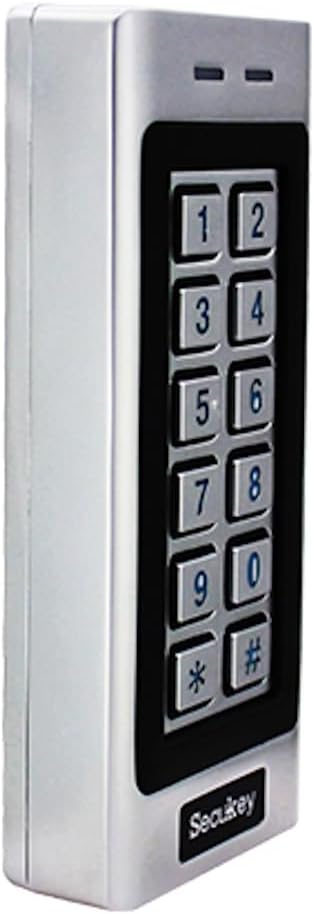
Daim duab 4: Lwm sab view of the SK4-W unit.

Daim duab 5: Rov qab view of the SK4-W unit, displaying the integrated wiring for installation.
3. Kev teeb tsa thiab kev teeb tsa
3.1 Mounting Tus Ntaus
The SK4-W is designed for surface mounting. Choose a secure location near the door or gate, ensuring it is within reach for users and protected from direct impact. Use appropriate screws and wall plugs for the mounting surface.
3.2 Wiring Diagram
The device requires a 12~28V AC/DC power supply (not included). Connect the wires according to the diagram provided in the full manual. Ensure all connections are secure and insulated to prevent short circuits.
- Lub zog nkag: Connect to 12~28V AC/DC power source.
- Lock Output (NO/NC/COM): Connect to your electric lock.
- Tswb Tsim Tawm: Connect to an external alarm system (if applicable).
- Wiegand In/Out: For connecting external Wiegand readers or other Wiegand devices.
- Tawm khawm: Connect a push-to-exit button for convenient egress.
For detailed wiring schematics, please refer to the comprehensive wiring diagram included in the product packaging.
4. Cov lus qhia ua haujlwm
4.1 Initial Setup and Master Cards
Upon first power-up, the device will be in factory default mode. Use the included Master Add Card and Master Delete Card to manage user access.
- Ntxiv cov neeg siv: Present the Master Add Card, then present the new user's RFID card or enter their PIN.
- Rho tawm cov neeg siv: Present the Master Delete Card, then present the user's RFID card or enter their PIN to be deleted.
4.2 Access Modes
The SK4-W supports three primary access modes:
- Card Only Mode: Users gain access by presenting a valid RFID card.
- PIN Only Mode: Users gain access by entering a valid 4-6 digit PIN code.
- Card + PIN Mode: Users must present a valid RFID card and then enter their corresponding PIN code for access. This mode offers the highest security.
Refer to the full programming guide for instructions on how to switch between access modes and manage user PINs.
4.3 Visitor PINs
The SK4-W supports up to 10 visitor PINs, which can be set to be valid for 1 to 10 uses. This feature is useful for temporary access for guests or service personnel.

Figure 6: The SK4-W supports visitor PINs and is IP66 waterproof, suitable for outdoor installation.
4.4 Latch Mode
The latch mode allows the door or gate to remain unlocked for an extended period, which can be useful during peak hours or for maintenance. Consult the programming manual for activation and deactivation procedures.
5. Kev tu
The Secukey SK4-W is designed for minimal maintenance due to its robust construction and IP66 rating. However, regular checks can prolong its lifespan and ensure optimal performance.
- Ntxuav: Wipe the keypad and casing zoo,damp ntaub. Tsis txhob siv cov tshuaj abrasive los yog cov kuab tshuaj.
- Kev txheeb xyuas: Periodically inspect wiring connections for any signs of wear, corrosion, or loosening.
- Hloov tshiab Firmware: Xyuas cov chaw tsim khoom website for any available firmware updates.

Figure 7: The SK4-W is designed to withstand extreme operating temperatures, from -40°C to 60°C.
6. Kev daws teeb meem
| Teeb meem | Ua Tau | Kev daws |
|---|---|---|
| Device tsis qhib. | Tsis muaj hluav taws xob; tsis raug voltage; loose wiring. | Check power connections and ensure correct 12~28V AC/DC supply. Verify wiring. |
| RFID card not recognized. | Card not enrolled; incorrect card type (not 125 KHz EM); damaged card. | Ensure the card is properly enrolled. Verify it is a 125 KHz EM card. Try another card. |
| PIN code tsis ua haujlwm. | Incorrect PIN; PIN not enrolled; device in card-only mode. | Double-check the PIN. Ensure the PIN is enrolled. Verify the access mode setting. |
| Door lock not activating. | Incorrect lock wiring (NO/NC); lock power issue; relay output time too short. | Check lock wiring and power. Adjust the lock output time in settings. |
| Wiegand output issues. | Incorrect Wiegand wiring; incompatible Wiegand device. | Verify Wiegand 26-bit wiring. Ensure external device compatibility. |
If the problem persists, please contact Secukey technical support for assistance.

Figure 8: Wiegand 26-bit input and output signal timing diagram.
7. Cov lus qhia tshwj xeeb
| Yam ntxwv | Tus nqi |
|---|---|
| Qauv nab npawb | SK4-W |
| Hom | Secukey |
| Qhov Loj (L x W x H) | 13.0 x 5.6 x 2.3 cm |
| Qhov hnyav | 500g ua |
| Xim | Nyiaj |
| Fais fab mov | 12 ~ 28V AC / DC |
| Kev Tiv Thaiv Ingress (IP) ntsuas | IP66 (Waterproof, Anti-Vandal) |
| Tus neeg siv peev xwm | Mus txog 1000 cov neeg siv |
| PIN Code Length | 4 rau 6 tus lej |
| Daim npav hom | 125 KHz EM Card |
| Wiegand Sib Tham | Wiegand 26-bit Input & Output |
| Xauv Tawm Tawm Load | 3A Max |
| Tswb Tawm Tawm Tsawg | 3A Max |
| Ua haujlwm kub | -40 ° C txog 60 ° C (-40 ° F txog 140 ° F) |
| Kev khiav dej num | 10% mus rau 90% (tsis-condensing) |
| Casing Khoom siv | Zinc Alloy with Powder Coating |
8. Warranty thiab Support
Secukey products are manufactured to high quality standards. For warranty information and technical support, please refer to the warranty card included with your product or visit the official Secukey webqhov chaw.
Tiv tauj xov tooj:
- Chaw tsim tshuaj paus: Secukey
- Webqhov chaw: www.secukey.com (Ex ibample link, qhov link tiag yuav txawv)
- Kev Pabcuam Cov Neeg Siv Khoom: Xa mus rau kev ntim khoom lossis weblub vev xaib rau cov neeg tiv tauj kev txhawb nqa hauv cheeb tsam.
Thov khaws koj cov ntaub ntawv pov thawj ntawm kev yuav khoom rau kev lees paub.