
1. Taw qhia
This manual provides essential instructions for the installation, operation, and maintenance of your Focal 300 ICW 8 in-wall/in-ceiling loudspeaker. Please read this manual thoroughly before proceeding with installation and retain it for future reference. The Focal 300 ICW 8 is a high-fidelity 8-inch loudspeaker designed for discreet integration into your living space, featuring patented Flax cone technology for superior audio performance.
2. Cov lus qhia kev nyab xeeb
- Kev Nyab Xeeb Hluav Taws Xob: Always disconnect power to the installation area before beginning any wiring. Improper wiring can cause electrical shock or damage to equipment.
- Structure Integrity: Ensure the mounting surface (wall or ceiling) can safely support the weight of the speaker. Consult a structural engineer if unsure.
- Kev xaim: Use appropriate gauge speaker wire for your installation length and amplifier power. Refer to your amplifier's manual for recommended wire specifications.
- Qhov cua: Ensure adequate air circulation around the speaker's enclosure, especially if installing in a confined space, to prevent overheating.
- Kev Tiv Thaiv Hnov: Tsis txhob mloog ntev ntawm qhov ntim siab kom tsis txhob hnov qab.
- Proposition 65 Ceeb toom: Cov khoom no yuav muaj cov tshuaj lom rau lub Xeev California ua rau muaj mob qog noj ntshav thiab yug menyuam lossis lwm yam kev ua mob rau menyuam.
3. Dab tsi hauv lub thawv
Carefully unpack your Focal 300 ICW 8 loudspeaker and verify that all components are present:
- Focal 300 ICW 8 Loudspeaker (1 unit)
- Circular Front Grille (1 unit)
- Square Front Grille (1 unit)
- Instruction Manual (cov ntaub ntawv no)
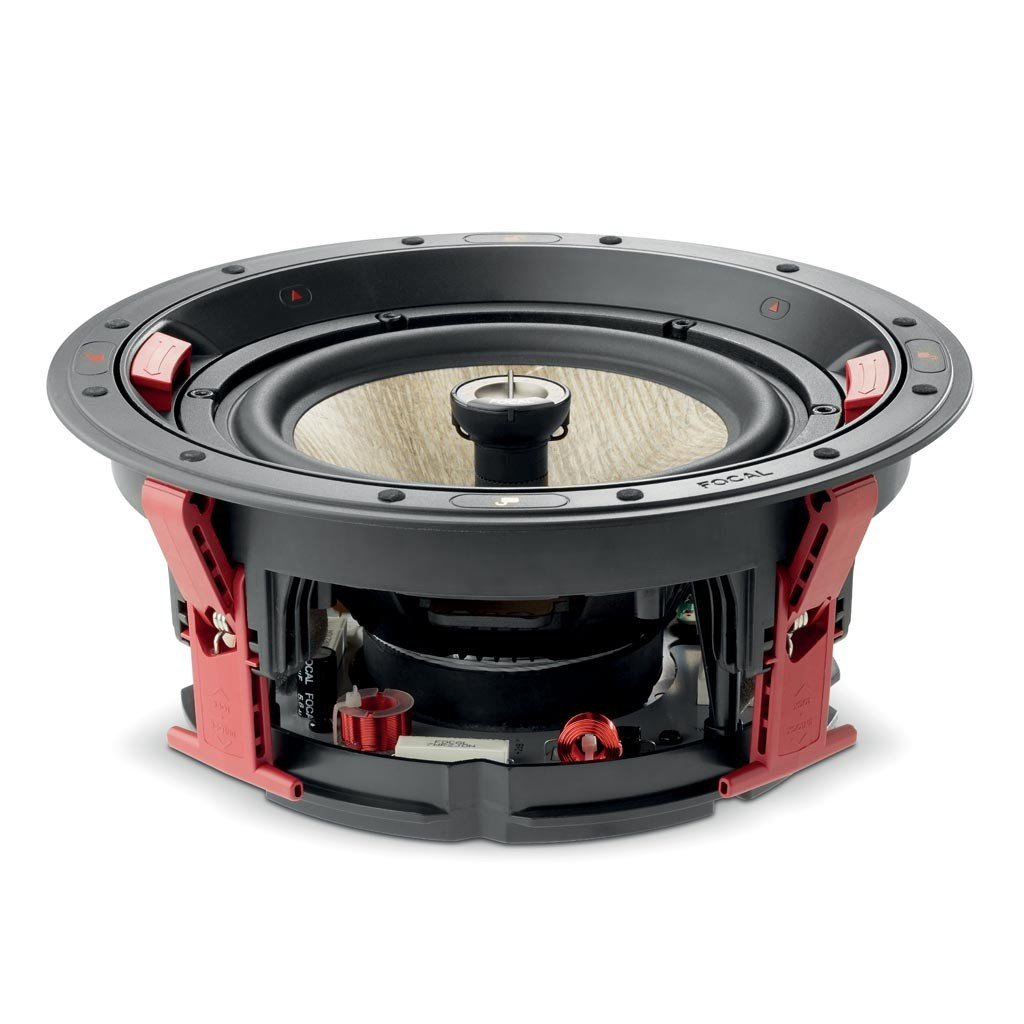
Daim duab 3.1: tawg view showing the speaker, mounting frame, and grille options.
4. Kev teeb tsa thiab kev teeb tsa
The Focal 300 ICW 8 loudspeaker is designed for easy installation in walls or ceilings. No specialized tools are required once the opening is prepared.
4.1. Kev npaj thiab kev npaj
- Qhov chaw: Choose a suitable location in your wall or ceiling, ensuring there are no obstructions (e.g., electrical wires, plumbing, studs/joists) behind the mounting surface. Use a stud finder to locate framing members.
- Kev xaim: Run appropriate speaker wire from your amplifier to the chosen speaker location. Leave sufficient slack for connection.
- Clearance: Ensure there is enough depth behind the wall/ceiling surface for the speaker's enclosure. Refer to the specifications section for dimensions.
4.2. Cutting the Mounting Hole
- Use the provided cutting template (if included, otherwise refer to the speaker's outer dimensions) to mark the exact opening size on the wall or ceiling.
- Carefully cut the hole using a drywall saw or rotary tool. Ensure clean edges for a flush fit.
4.3. Connecting Speaker Wires

Figure 4.1: Speaker terminals for wire connection.
- Strip approximately 1/2 inch (12mm) of insulation from the ends of your speaker wires.
- Connect the positive (+) wire (typically red or marked) from your amplifier to the red (+) terminal on the speaker.
- Connect the negative (-) wire (typically black or unmarked) from your amplifier to the black (-) terminal on the speaker.
- Ensure a secure connection and no stray wire strands that could cause a short circuit.
4.4. Mounting the Speaker

Figure 4.2: The speaker's mounting frame with integrated clamps.
- The Focal 300 ICW 8 features a tool-free, snap-in bracket system for easy installation.
- Carefully insert the speaker assembly into the prepared mounting hole.
- The integrated mounting clamps will automatically engage and secure the speaker to the wall or ceiling as you push it into place. Ensure the speaker is flush with the surface.
4.5. Attaching the Grille
The Focal 300 ICW 8 comes with both circular and square magnetic grilles. Choose the one that best suits your aesthetic preference.


Figure 4.3: Speaker with circular grille (left) and square grille (right).
- Align the chosen grille with the speaker frame.
- The grille will magnetically attach to the speaker, providing a clean and seamless finish.
5. Operating the Loudspeaker
Once installed and connected to an appropriate amplifier, your Focal 300 ICW 8 loudspeaker is ready for use. These are passive speakers, meaning they require an external amplifier los yog receiver los tsim suab.
- Xyuas kom koj amplifier is powered off before making any connections.
- Connect the speaker wires from the Focal 300 ICW 8 to the corresponding speaker output terminals on your amplifier. Maintain correct polarity (+ to + and - to -).
- Lub zog rau koj amplifier and select the appropriate audio source.
- Start with a low volume level and gradually increase it to your desired listening level.
6. Kev tu
The Focal 300 ICW 8 loudspeaker requires minimal maintenance to ensure long-lasting performance.
- Ntxuav: Use a soft, dry cloth to gently wipe the grilles and visible surfaces of the speaker. Do not use abrasive cleaners, solvents, or excessive moisture, as these can damage the finish or internal components.
- Grille Care: If the grilles become dusty, they can be carefully removed and gently vacuumed with a soft brush attachment.
- Kev tshuaj xyuas: Periodically check speaker wire connections to ensure they remain secure.
7. Kev daws teeb meem
If you encounter issues with your Focal 300 ICW 8 loudspeaker, refer to the following common problems and solutions:
| Teeb meem | Ua Tau | Kev daws |
|---|---|---|
| Tsis muaj suab los ntawm tus hais lus |
|
|
| Suab tsis meej los yog tsis meej |
|
|
| Speaker buzz or hum |
|
|
8. Cov lus qhia tshwj xeeb
Key technical specifications for the Focal 300 ICW 8 loudspeaker:
| Feature | Specification |
|---|---|
| Hom | Focal |
| Qauv nab npawb | F300ICW8 |
| Hom hais lus | In-Wall / In-Ceiling Loudspeaker |
| Woofer Diameter | 8 Nws |
| Tweeter Diameter | 100 Hundredths-Inches (1 inch) |
| Speaker Maximum Output Power | 150 Watts |
| Zaus teb | 28 KHz (Upper limit, typical for tweeters) |
| Impedance | 8 awm |
| Teeb liab-rau-suab tsis piv | 90dB ua |
| Mounting Hom | Ceiling Mount, Wall Mount (Magnetic Mount) |
| Cov ntaub ntawv enclosure | Aluminium |
| Yam khoom Dimensions (D x W x H) | 14.96" H x 12.6" W x 14.96" H |
| Yam Nyhav | 3 Ib |
| Xim | Dawb |
9. Warranty thiab Support
Warranty: The Focal 300 ICW 8 loudspeaker comes with a 2-Year Manufacturer Warranty. Please retain your proof of purchase for warranty claims. This warranty covers defects in materials and workmanship under normal use.
Kev them nyiaj yug: For technical assistance, troubleshooting beyond this manual, or warranty inquiries, please contact your authorized Focal dealer or visit the official Focal weblub xaib rau cov ntaub ntawv txhawb nqa cov neeg siv khoom.