
1. Taw qhia
The EBYTE E30-170T20D is a high-performance wireless module based on the SI4463 chip from Silicon Labs. It operates in the 148~173.5MHz frequency band and offers transparent data transmission with TTL level output. This module is designed for applications requiring long-distance communication, robust performance, and low power consumption, featuring an air wake-up function (WOR) and Forward Error Correction (FEC) algorithm.
Its 170MHz frequency provides excellent penetration and diffraction capabilities, making it suitable for industrial and indoor environments. The module supports both SMD and DIP interfaces for flexible integration.
Cov yam ntxwv tseem ceeb:
- IC: SI4463
- Zaus: 148 ~ 173.5MHz
- Power: 10~20dBm (100mW max)
- Distance: Up to 2.0 km (tested up to 2.5 km)
- Interface: UART (TTL level)
- Air Wake-up Function (WOR)
- Forward Error Correction (FEC) algorithm for improved reliability
- Half-duplex operation
- Supports 2.3V~5.2V power supply
- Industrial grade design (-40 ~ 85 °C)
- SMA interface for external antenna
Cov ntawv thov raug:
- Meter reading systems
- Cov khoom siv hauv tsev ntse
- Industrial wireless tswj
- Ntse xauv
- Kev daws teeb meem ua liaj ua teb ntse
- Temperature/humidity sensors
- Lub tswb ceeb toom kev ruaj ntseg hauv tsev thiab tej thaj chaw deb keyless nkag
- Wireless tswb kev ruaj ntseg systems
- Tsim cov kev daws teeb meem automation
- Cov khoom siv kho mob
- Advanced Meter Reading Architecture (AMI)
- Automotive kev lag luam kev siv
2. Teeb tsa
2.1 Module dhauview
The E30-170T20D module features a compact design with a metal shield covering the main IC. It includes a standard SMA connector for antenna attachment and a row of pins for power and data communication.
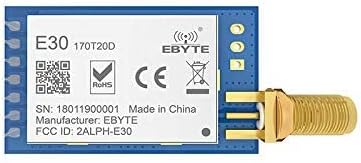
Daim duab 2.1: Sab saum toj view of the EBYTE E30-170T20D wireless module, showing the EBYTE logo, model number, RoHS and CE marks, and the SMA antenna connector.
2.2 Pinout and Connections
The module provides a set of pins for power supply and UART communication. Ensure correct voltage and data line connections to avoid damage.

Daim duab 2.2: Hauv qab view of the EBYTE E30-170T20D module, displaying the pin labels (M0, M1, RXD, TXD, AUX, VCC, GND) and an ESD sensitive device warning.
The pins typically include:
- VCC: Power supply input (2.3V to 5.2V)
- GND: Hauv av
- TXD: Transmit Data (UART output)
- RXD: Receive Data (UART input)
- M0, M1: Mode selection pins
- AUX: Auxiliary pin (e.g., for indicating data readiness)
2.3 Kav hlau txais xov txuas
The module features an SMA interface for connecting an external antenna. Ensure the antenna is securely attached to maximize transmission distance and signal integrity.
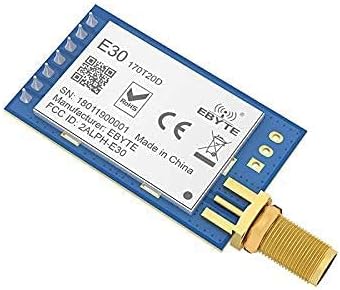
Figure 2.3: The EBYTE E30-170T20D module with an antenna connected to its SMA port, illustrating the compact form factor.
2.4 Kev xav txog kev teeb tsa
For secure mounting, the module may include nuts and washers for the SMA connector. These components help in firmly attaching the module to an enclosure or panel.

Figure 2.4: Illustration of the nuts and washers provided for the EBYTE UART DIP module, designed for secure installation.
3. Cov lus qhia ua haujlwm
3.1 Transparent Transmission
The E30-170T20D module supports transparent transmission, meaning data sent to its UART input (RXD) will be wirelessly transmitted, and data received wirelessly will be output through its UART output (TXD). This simplifies integration as no complex protocol handling is required at the host microcontroller level for basic data transfer.
3.2 Air Wake-up Function (WOR)
The module features a WOR function, enabling ultra-low power consumption. In WOR mode, the module can periodically wake up to check for incoming data, and if no data is detected, it returns to a low-power sleep state. This is ideal for battery-powered applications where energy efficiency is critical.
3.3 Forward Error Correction (FEC)
The integrated FEC algorithm enhances the reliability and transmission range of the module. FEC proactively corrects interfered data packets, reducing data loss in environments with sudden interference. Without FEC, such packets would typically be dropped, leading to reduced data integrity and effective range.
3.4 Data Rate and Half-Duplex Operation
The module supports air data rates ranging from 1kbps to 25kbps. It operates in half-duplex mode, meaning it can either transmit or receive data at any given time, but not simultaneously. Proper communication protocols should account for this half-duplex nature to manage data flow effectively.
4. Kev tu
4.1 Kev Saib Xyuas Ib Leeg
- Khaws lub module kom huv si thiab tsis muaj hmoov av thiab cov khib nyiab.
- Avoid exposing the module to extreme temperatures or humidity outside its specified operating range.
- Ensure proper ventilation if the module is enclosed to prevent overheating.
4.2 Electrostatic Discharge (ESD) Kev ceev faj
The E30-170T20D is an ESD sensitive device. Always handle the module with appropriate ESD precautions, such as using an anti-static wrist strap and working on an ESD-safe mat, to prevent damage to internal components.
4.3 Kev ua haujlwm ib puag ncig
The module is designed for industrial-grade applications and can operate reliably in temperatures ranging from -40 °C to 85 °C. While robust, prolonged exposure to the extreme ends of this range or rapid temperature changes should be minimized to ensure longevity.
5. Kev daws teeb meem
5.1 No Communication
- Check Power Supply: Verify that the VCC pin receives a stable voltage within the 2.3V to 5.2V range.
- UART Connections: Ensure TXD and RXD pins are correctly connected to your host device (TX to RX, RX to TX).
- Tus nqi Baud: Confirm that the UART baud rate and other serial parameters (data bits, parity, stop bits) match between the module and your host device.
- Module Mode: Check the M0 and M1 pin states to ensure the module is in the correct operating mode for communication.
5.2 Poor Range or Signal Quality
- Kav hlau txais xov: Ensure the antenna is securely connected to the SMA port and is appropriate for the 170MHz frequency band.
- Obstructions: Minimize physical obstructions (walls, metal objects) between the transmitting and receiving modules.
- Kev cuam tshuam: Identify and mitigate potential sources of RF interference in the operating environment.
- Fais fab tso zis: Verify the module's power output settings. Higher power generally provides better range, but ensure compliance with local regulations.
5.3 Module Not Responding
- Rov Pib Dua: Try power cycling the module.
- Kev puas tsuaj: Inspect the module for any visible physical damage.
- ESD: Consider if the module might have been exposed to electrostatic discharge without proper precautions.
6. Cov lus qhia tshwj xeeb
| Parameter | Tus nqi |
|---|---|
| IC | SI 4463 |
| Ntau zaus | 148-173.5 MHz |
| Hloov Hwj chim | 10~20dBm (100mW max) |
| Kev sib txuas lus nrug | Txog li 2.0 km (kab pom) |
| Interface | UART (TTL level) |
| Fais fab mov | DC 2.3V ~ 5.2V |
| Ua haujlwm kub | -40 ° C txog 85 ° C |
| Cov ntaub ntawv tus nqi | 1kbps ~ 25kbps |
| Kav hlau txais xov Txuas | SMA |
| Qhov ntev | Refer to datasheet for exact dimensions (DIP/SMD) |
| Ua raws | FCC, CE, CCC |
7. Warranty thiab Support
7.1 Chaw tsim tshuaj paus ntaub ntawv
The E30-170T20D module is manufactured by EBYTE. For detailed technical support, datasheets, and further product information, please visit the official EBYTE webqhov chaw:
7.2 Kev ua raws cai
The E30-170T20D strictly adheres to design standards of FCC, CE, and CCC, meeting various RF certification requirements for export. Users are advised to ensure their application of the module complies with local regulations regarding radio frequency devices.