
Nestling HK-688
Nestling HK-688 Walkie Talkies User Manual
Model: HK-688
1. Taw qhia
This manual provides comprehensive instructions for the safe and effective operation of your Nestling HK-688 Walkie Talkies. These mini 2-way radios are designed for clear communication over long distances, making them ideal for children's outdoor adventures, camping, hiking, and general play.
The Nestling HK-688 Walkie Talkies feature 22 UHF channels, a generous range, and user-friendly controls. Please read this manual thoroughly before using the device to ensure proper functionality and to maximize your experience.

Image: Three Nestling HK-688 walkie talkies in camo blue, camo pink, and camo green, displayed with their product packaging.
2. Khoom Tshajview
2.1 Ntim Cov Ntsiab Lus
Lub pob khoom txheem muaj cov khoom hauv qab no:
- 3x Nestling HK-688 Camo Kids Walkie Talkies (Camo Blue, Camo Pink, Camo Green)
- 1x Tus neeg siv phau ntawv (cov ntaub ntawv no)
- Lus Cim: Cov roj teeb AAA tsis suav nrog thiab yuav tsum tau yuav cais.
2.2 Cov yam ntxwv tseem ceeb
- 22 FRS/GMRS Channels: Provides multiple communication options.
- Ntev Ntev: Up to 3km (1.9 miles) in typical conditions, and up to 5km (3.1 miles) in open fields.
- Clear Suab Zoo: Ensures effective communication.
- LCD Backlit Zaub: Rau qhov yooj yim viewing of channel, battery status, and other indicators.
- Built-in Mini LED Torch: Useful for low-light conditions.
- Automatic Channel Scan: Quickly finds active channels.
- Automatic Squelch: Reduces background noise for clearer reception.
- CTCSS 99 Sub-codes: Enhances privacy by filtering unwanted signals.
- Hu rau Ceeb Toom: Notifies you of incoming calls.
- Channel Xauv: Tiv thaiv kev hloov pauv channel tsis raug.
- PTT/VOX Function: Push-to-Talk for manual transmission or Voice Operated Exchange for hands-free communication.
- Battery Save Function: Ua kom lub roj teeb siv tau ntev dua.
- Tsawg zog ceeb toom: Indicates when batteries are running low.
- Adjustable Volume: Control the listening level.
- Lightweight thiab Portable: Designed for easy carrying with a built-in belt clip.
- Drop Resistant Design: Enhanced durability for active use.

Image: Visual representation of the walkie talkie's dimensions and key features like drop resistance, low battery alert, flashlight, and communication range.

Image: Features of the walkie talkie, including 22 channels with privacy codes, extended range, noise reduction, drop resistance, and a built-in flashlight.
2.3 Device Components

Image: Detailed diagram illustrating the various parts of the walkie talkie, including buttons, display, and audio components.
- Kav hlau txais xov: Rau kev xa tawm thiab txais cov teeb liab.
- Lamp (Flashlight): Built-in LED light.
- Microphone: For speaking into the device.
- PTT Button (Push-to-Talk): Nias thiab tuav kom xa koj lub suab.
- LCD zaub: Shows channel, battery level, and other indicators.
- Call Lock Button: Locks the current channel.
- Saib khawm: Allows listening to weak signals on the current channel.
- Lamp Scan khawm: Activates the flashlight and initiates channel scan.
- Down khawm: Navigates menus or decreases values.
- Power/Menu Button: Turns the device on/off and accesses the menu.
- Hais lus: For listening to incoming transmissions.
3. Teeb tsa
3.1 Kev teeb tsa roj teeb
Each Nestling HK-688 Walkie Talkie requires 4x AAA batteries (not included).
- Release the Belt Clip: Press the lock on the top of the belt clip and lift the clip up to detach it from the radio.
- Qhib lub roj teeb Compartment: Locate the battery cover on the back of the walkie talkie. Gently push down on the tab and slide the cover off.
- Ntxig roj teeb: Insert 4x AAA batteries into the compartment, ensuring correct polarity (+/-) as indicated inside the compartment.
- Kaw lub roj teeb Compartment: Replace the battery cover and slide it until it clicks securely into place. Reattach the belt clip if desired.
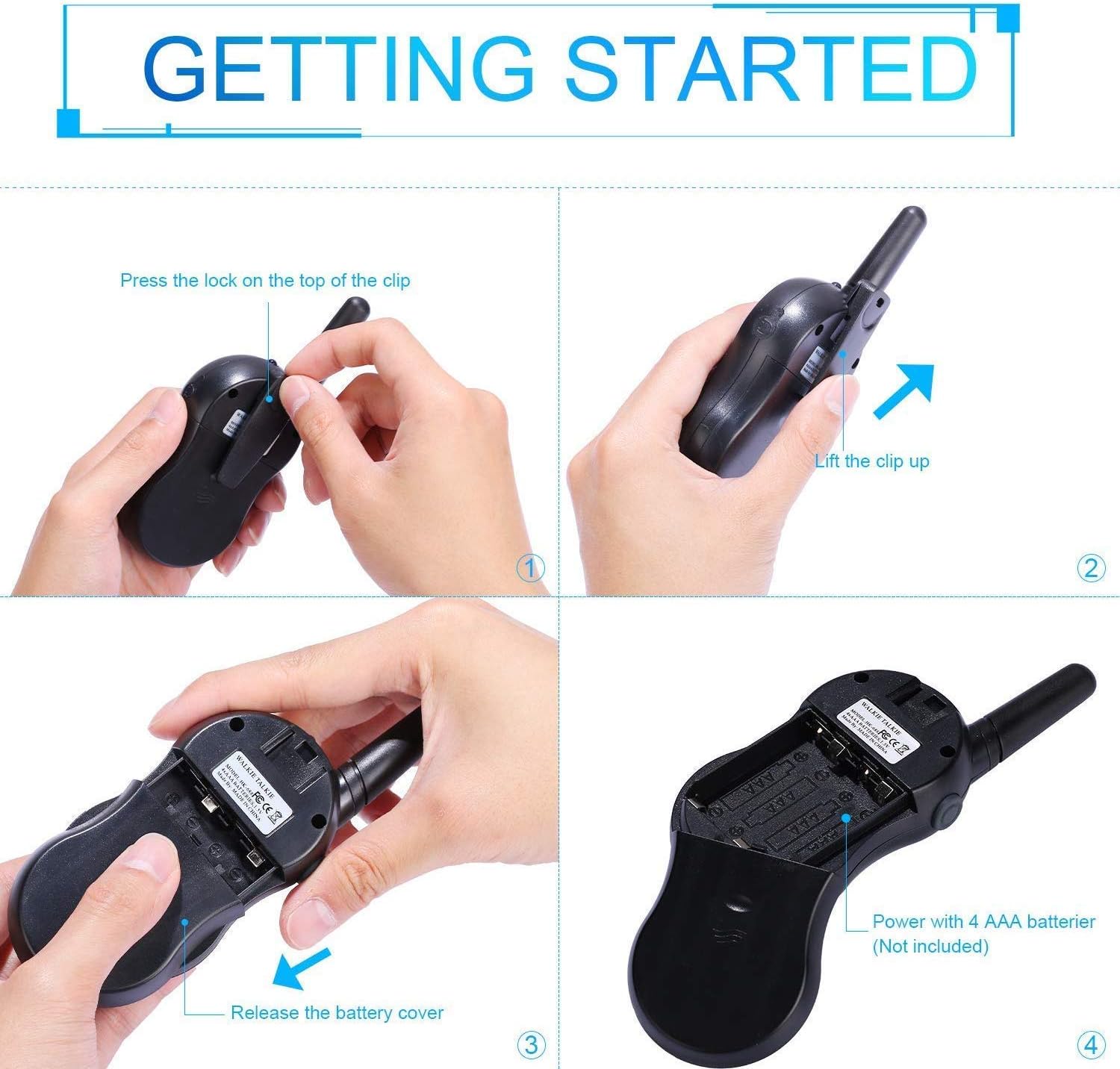
Image: Step-by-step instructions for opening the battery compartment and inserting AAA batteries into the walkie talkie.

Image: An open battery compartment of the walkie talkie, ready for battery insertion.
3.2 Hwj chim Rau/Tawm
To turn the walkie talkie on or off, press and hold the Hwj chim/Ntawv qhia zaub mov button until the LCD screen illuminates or turns off.
4. Cov lus qhia ua haujlwm
4.1 Basic Communication (Push-to-Talk)
- Xaiv ib Channel: Ensure all walkie talkies you wish to communicate with are set to the same channel and sub-code. Use the Up thiab nqes khawm hloov cov channel.
- Kev xa tawm: Nias thiab tuav lub PTT button (located on the side of the radio). Speak clearly into the microphone, holding the radio approximately 2-3 inches from your mouth.
- Txais: Tso lub PTT button to listen for incoming transmissions.
Tip: For optimal range and clarity, avoid obstructions like buildings, dense foliage, or large metal objects. Adverse weather conditions can also affect range.
4.2 Channel Selection and Sub-codes (CTCSS/DCS)
Your walkie talkie supports 22 FRS/GMRS channels and 99 CTCSS/DCS sub-codes. Sub-codes help filter out unwanted conversations on the same channel, enhancing privacy.
- Nias lub Ntawv qhia zaub mov button once to enter channel selection mode. The channel number will flash.
- Siv cov Up or nqes cov nyees khawm kom xaiv koj cov channel xav tau (1-22).
- Nias lub Ntawv qhia zaub mov button again to enter sub-code selection mode. The sub-code number will flash.
- Siv cov Up or nqes buttons to select your desired sub-code (0-99). Setting to 0 disables the sub-code.
- Nias lub PTT button or wait a few seconds for the setting to be saved and exit the menu.
4.3 VOX Function (Voice Operated Exchange)
The VOX function allows for hands-free communication. When activated, the radio will automatically transmit when it detects your voice.
- Nias lub Ntawv qhia zaub mov button multiple times until the VOX icon (VOX) appears on the LCD and flashes.
- Siv cov Up or nqes buttons to select the VOX sensitivity level (e.g., 1-3, with 1 being most sensitive). Select "OFF" to disable VOX.
- Nias lub PTT button or wait a few seconds to save the setting and exit.
4.4 Kev Ua Haujlwm ntawm Lub Teeb Ci
To turn the built-in LED flashlight on or off, briefly press the Lamp button (often combined with the Scan button).
4.5 Call Alert Tone
To send a call alert tone to other radios on the same channel, briefly press the Hu rau button (often represented by a musical note icon).
4.6 Channel Xauv
To prevent accidental channel changes, you can lock the current channel.
- Nias thiab tuav lub Call Lock button (often represented by a key icon) until a key icon appears on the LCD.
- Txhawm rau qhib, nias thiab tuav lub Call Lock button again until the key icon disappears.

Image: Examples of suitable scenarios for using the walkie talkies, such as outdoor play, family activities, and leisure.

Image: Illustrations of walkie talkies being used for communication in both play and household settings.
5. Kev tu
5.1 Roj Teeb Kho
- Always use fresh, high-quality AAA batteries.
- Remove batteries from the walkie talkie if it will not be used for an extended period to prevent leakage and damage.
- Pov tseg cov roj teeb uas siv los ua lub luag haujlwm raws li cov cai hauv zos.
5.2 Kev Tu thiab Cia Khoom
- Clean the walkie talkie with a soft, damp daim ntaub. Tsis txhob siv cov tshuaj hnyav los yog cov tshuaj abrasive.
- Do not immerse the walkie talkie in water, as it is not water-resistant.
- Store the walkie talkie in a cool, dry place away from direct sunlight and extreme temperatures.
6. Kev daws teeb meem
| Teeb meem | Ua Tau | Kev daws |
|---|---|---|
| Tsis muaj zog | Cov roj teeb tuag los yog teeb tsa tsis raug. | Hloov cov roj teeb nrog cov tshiab, kom ntseeg tau qhov tseeb polarity. |
| Kev xa lossis txais tsis tau | Not on the same channel/sub-code; out of range; PTT button not pressed/released. | Ensure all radios are on the same channel and sub-code. Move closer to the other radio. Press and hold PTT to transmit, release to receive. |
| Lub suab tsis zoo / Static | Out of range; obstructions; low battery; squelch setting. | Move closer. Avoid obstructions. Replace batteries. Check squelch settings. |
| Channel changes accidentally | Channel lock is not activated. | Activate the channel lock function. |
| VOX tsis ua haujlwm | VOX sensitivity too low or VOX is off. | Adjust VOX sensitivity to a higher level or ensure VOX is enabled. |
7. Cov lus qhia tshwj xeeb
| Feature | Paub meej |
|---|---|
| Hom | Nestling |
| Qauv | HK-688 Nws |
| Ntau zaus | 400-470 MHz |
| Cov channel | 22 FRS/GMRS Channels |
| Sub-codes | CTSC 99 |
| Fais fab kis | <= 0.5 W |
| Modulation Hom | FM-F3E |
| Ntau yam | Up to 3km (1.9 miles) typical, MAX 5km (3.1 miles) in open field |
| Caug | Auto squelch |
| Hom zaub | LCD Backlit |
| Lub mloog pob ntseg Jack | 2.5 hli / 0.1 nti |
| Fais fab mov | 4x AAA batteries per radio (Not Included) |
| Khoom Dimensions (H x L x D) | 14cm x 5.5cm x 3.5cm (5.5 x 2.2 x 1.4 nti) |
| Pob luj | 370 g |
| Xim | Camo Blue, Camo Pink, Camo Green |
| Dej Resistance Level | Tsis Water Resistant |
8. Warranty thiab Support
Nestling HK-688 Walkie Talkies come with a 12 Lub Hlis Warranty txij hnub ntawm kev yuav khoom.
For any support inquiries, troubleshooting assistance beyond this manual, or warranty claims, please refer to the contact information provided on the product packaging or the retailer's webqhov chaw uas cov khoom tau yuav.
Ask a question about this manual
Ask about setup, troubleshooting, compatibility, parts, safety, or missing instructions. Manuals+ will review the question and use this page’s manual context to help answer it.