
UEi Test Instruments IRT803
Phau Ntawv Qhia Siv UEi IRT803 Insulation Resistance Tester
Model: IRT803 | Brand: UEi Test Instruments
1. Taw qhia
This manual provides essential information for the safe and effective operation of the UEi IRT803 Digital Insulation Resistance Tester. The IRT803 is a versatile instrument designed for measuring insulation resistance, AC/DC voltage, and continuity. It features a 1000V AC/DC measurement capability, auto-ranging, a backlit display, and a DMM rotary style selector. Key functions include Lock, Compare, and Polarization Index (PI)/Dielectric Absorption Ratio (DAR) tests. Please read this manual thoroughly before use to ensure proper handling and to maximize the instrument's performance.
2. Cov ntaub ntawv kev nyab xeeb
Always adhere to safety precautions when using electrical testing equipment. The IRT803 is designed with safety in mind, featuring a CATIV rating up to 600V and CATII up to 1000V, ensuring protection in various jobsite environments. Failure to follow safety instructions can result in electric shock, fire, or damage to the instrument.
- Tsis txhob siv lub tester yog tias nws zoo li puas lawm lossis yog tias cov xov hlau kuaj puas lawm.
- Xyuas kom meej qhov tseeb muaj nuj nqi thiab ntau yam raug xaiv ua ntej ua ib qho kev ntsuas.
- Always disconnect power to the circuit under test before connecting or disconnecting test leads for resistance measurements.
- Hnav cov khoom siv tiv thaiv tus kheej (PPE) uas tsim nyog, xws li cov hnab looj tes rwb thaiv tsev thiab cov tsom iav kev nyab xeeb.
- Do not operate the tester in wet conditions or in the presence of explosive gases or dust.
- Hloov cov roj teeb sai sai thaum lub cim qhia tias roj teeb qis tshwm sim kom paub tseeb tias nyeem tau raug.
3. Dab tsi hauv lub thawv
Thaum unpacking, xyuas kom meej tias tag nrho cov khoom teev hauv qab no yog tam sim no thiab tsis puas:
- UEi IRT803 Insulation Resistance Tester
- Silicone test leads with alligator clips (red and black) (ATL57)
- Insulation test probe with alligator clips (red & black)
- 4 AA roj teeb
- Cov neeg siv phau ntawv
- Lub hnab nqa khoom

Image 3.1: All components included with the UEi IRT803 Insulation Resistance Tester, including the meter, test leads, probes, batteries, manual, and soft carrying case.
4. Khoom Tshajview
The IRT803 is designed for ease of use and durability. It features an easy-to-read LCD display with a backlight for visibility in various lighting conditions, and a work light to illuminate dark environments. The unit is protected by a rugged rubber boot, which also includes convenient test lead holders for compact storage. An auto power-off function helps conserve battery life.
4.1. Cov Nta Tseem Ceeb thiab Kev Ua Haujlwm
- 600V AC/DC Measurement: Capable of measuring both alternating and direct current voltagmus txog 600V.
- Rwb thaiv tsev Resistance: Measures resistance from 0.01MΩ up to 2GΩ with test voltages of 50V, 100V, 250V, 500V, and 1000V.
- Kev txuas ntxiv: Rau kev kuaj xyuas qhov sib txuas ntawm lub voj voog.
- Compare Reading Function: Allows for comparison against a set reference value.
- PI/DAR Test: Automatic calculation of Polarization Index and Dielectric Absorption Ratio for advanced insulation diagnostics.
- A-Hold/Hold: Khov qhov nyeem uas tau tso tawm kom yooj yim rau kev sau cia.
- Lock Reading: Locks the test voltage for continuous insulation testing.
- Rotary Dial Selector: Intuitive selection of measurement functions and test voltages.
- Khau looj roj hmab tiv thaiv: Enhances durability and provides lead storage.

Duab 4.1: Pem hauv ntej view of the IRT803 showing the LCD display, rotary selector, and function buttons.

Image 4.2: Visual representation highlighting the main functions and features of the IRT803.
5. Teeb tsa
5.1. Kev teeb tsa roj teeb
The IRT803 requires four (4) AA batteries for operation. To install or replace batteries:
- Xyuas kom tseeb tias lub tester raug tua.
- Nrhiav lub roj teeb rau sab nraum qab ntawm lub tshuab.
- Siv lub hau ntswj qhib lub roj teeb lub hau npog.
- Insert the four AA batteries, observing the correct polarity (+/-) as indicated inside the compartment.
- Muab cov roj teeb khwb sib khwb kom zoo.
5.2. Kev Sib Txuas Cov Thawj Coj
Connect the test leads to the appropriate input jacks on the tester. For most measurements, the red lead connects to the 'V Ω INSULATION' jack and the black lead connects to the 'COM' (common) jack. Ensure connections are firm and secure.

Image 5.1: The IRT803 with test leads properly connected to the input jacks.
6. Cov lus qhia ua haujlwm
6.1. Powering On/Off and Display Backlight
- To power on the unit, rotate the selector dial from 'OFF' to any desired measurement function.
- To power off, rotate the selector dial back to 'OFF'. The unit also features auto power-off to save battery life after a period of inactivity.
- Nias lub Xaiv button (often indicated by a light bulb icon) to toggle the display backlight on or off.
6.2 ib. Rwb thaiv tsev Resistance Test
The IRT803 can perform insulation resistance tests at various voltages.
- Xaiv Qhov Ntsuastage: Rotate the selector dial to the desired insulation test voltage (50V, 100V, 250V, 500V, lossis 1000V).
- Connect Test Leads: Connect the red test lead to the circuit under test and the black test lead to the ground or common point. Ensure the circuit is de-energized.
- Pib Kev Ntsuas: Press and hold the large red TEST button to begin the insulation test. The test voltage will be applied, and the resistance reading will be displayed.
- Xauv muaj nuj nqi: Rau kev sim tas mus li, nias lub LOCK button after initiating the test. This will maintain the test voltage without needing to hold the TEST khawm. Xovxwm TEST dua kom qhib.
- Compare Function: Siv cov PIV button to set a reference value and compare subsequent readings against it.
- PI/DAR Test: Select the PI/DAR function on the dial. The meter will automatically perform the Polarization Index and Dielectric Absorption Ratio tests, displaying the calculated values.
- Read and Record: Observe the reading on the LCD. Use the THOV button to freeze the display for easier recording.
- Tso tawm: After completing an insulation test, the circuit under test should be discharged. The IRT803 typically handles this automatically, but always exercise caution.

Image 6.1: The IRT803 being used to measure insulation resistance on electrical wiring.

Image 6.2: Ib qho kev kaw view of the test leads securely connected to the IRT803's input terminals.
6.3. Pov Lis Voltage Testing (AC/DC)
Kev ntsuas AC lossis DC voltage up to 600V:
- Rotate the selector dial to the 'V' position.
- Connect the red test lead to the positive or live point and the black test lead to the negative or neutral/ground point of the circuit.
- The display will show the measured voltage. The meter will automatically detect AC or DC voltage.
6.4. Kev ntsuas txuas ntxiv
To check for continuity in a circuit:
- Rotate the selector dial to the 'Ω' (Ohms) position, which typically includes continuity.
- Connect the test leads across the component or circuit path you wish to test.
- If there is continuity (low resistance), the meter will typically emit an audible beep and display a low resistance value.
7. Kev tu
7.1. Kev ntxuav
To maintain the accuracy and longevity of your IRT803:
- rub lub casing ua adamp ntaub thiab xab npum me me. Tsis txhob siv cov tshuaj abrasives lossis cov kuab tshuaj.
- Ensure the unit is completely dry before storage or next use.
7.2. Hloov roj teeb
Replace batteries as described in Section 5.1 when the low battery indicator appears on the display. Always use fresh AA alkaline batteries.
7.3. Cia
When not in use, store the IRT803 in its soft carrying case in a cool, dry environment, away from direct sunlight and extreme temperatures. If storing for extended periods, remove the batteries to prevent leakage.
8. Kev daws teeb meem
If you encounter issues with your IRT803, refer to the following common problems and solutions:
| Teeb meem | Ua Tau | Kev daws |
|---|---|---|
| Tester does not power on | Cov roj teeb tuag lossis tsis raug teeb tsa | Xyuas cov roj teeb polarity; hloov nrog AA roj teeb tshiab. |
| No reading on display | Incorrect function selected; open circuit; poor test lead connection | Verify selector dial position; ensure test leads are firmly connected to the circuit and the meter; check for breaks in the circuit. |
| Kev nyeem tsis raug | Low battery; environmental interference; incorrect range/function | Replace batteries; move away from strong electromagnetic fields; ensure correct function and test voltage raug xaiv. |
| Test leads not working | Damaged leads; poor connection | Inspect leads for damage; ensure they are fully inserted into the jacks. Replace if damaged. |
If the problem persists after attempting these solutions, please contact UEi Test Instruments customer support.
9. Cov lus qhia tshwj xeeb
| Parameter | Tus nqi |
|---|---|
| Qauv nab npawb | SIB 803 |
| Hom | UEi Test Instruments |
| Rwb thaiv tsev Test Voltages | 50V, 100V, 250V, 500V, 1000V |
| Rwb thaiv tsev Resistance Range | 0.01MΩ to 2GΩ |
| Insulation Resistance Accuracy | ±1.5-3% + 5 digits (0.01MΩ-500MΩ) |
| Voltage Kev ntsuas | Mus txog 600V AC / DC |
| Kev sib txuas ntxiv | 20.00 Ω to 20.0 kΩ (as per product description) |
| Kev ntsuas kev nyab xeeb | CATIV 600V, CATII 1000V |
| Hwj chim Source | 4 x AA roj teeb |
| Zaub | LCD nrog Backlight |
| Khoom Dimensions | 2.7 x 3.52 x 8.27 po |
| Yam Nyhav | 1.8 Ib |
| Xim | Daj |
10. Warranty Information
The UEi IRT803 Insulation Resistance Tester is backed by a 1-xyoo txwv warranty from the date of purchase. This warranty covers defects in materials and workmanship under normal use. It does not cover damage resulting from misuse, unauthorized modification, accident, or neglect. For specific terms and conditions, please refer to the warranty card included with your product or contact UEi Test Instruments customer support.
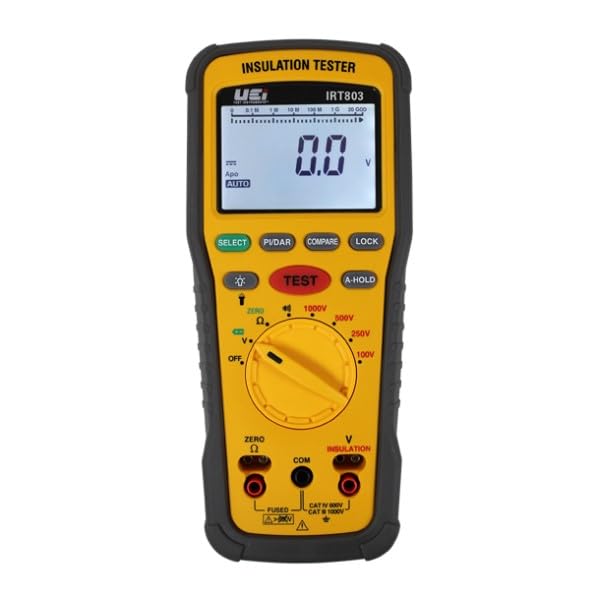
Image 10.1: Example of a Certificate of Conformity, indicating adherence to quality standards.
11. Txhawb nqa
For technical assistance, troubleshooting beyond this manual, or warranty claims, please contact UEi Test Instruments customer support. You can find more information and contact details by visiting the official UEi Test Instruments website or their Amazon store page.
UEi Test Instruments Store: Mus saib lub khw
Ask a question about this manual
Ask about setup, troubleshooting, compatibility, parts, safety, or missing instructions. Manuals+ will review the question and use this page’s manual context to help answer it.