
TRACEABLE Excursion-Trac
Traceable Excursion-Trac Data Logger Thermometer User Manual
Model: Excursion-Trac
Taw qhia
The Traceable Excursion-Trac Data Logger Thermometer is designed for precise temperature monitoring and data recording. This device simultaneously displays current, minimum, and maximum temperatures, and features a rolling memory for extensive data storage. It is equipped with a submersible probe and offers customizable alarm functions to ensure critical temperature conditions are maintained and recorded.
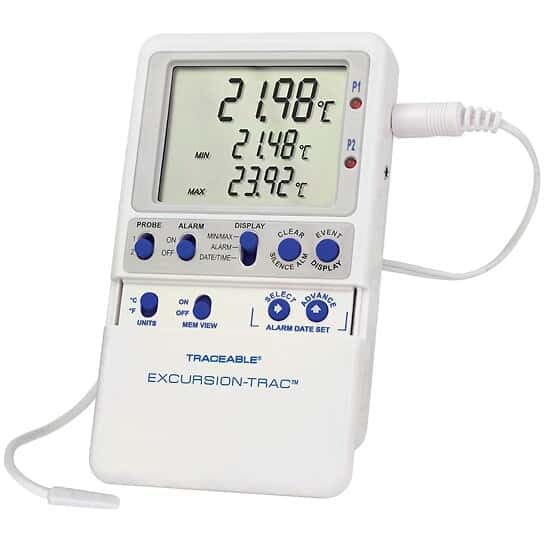
Image: The Traceable Excursion-Trac Data Logger Thermometer, showing its digital display and connected bullet probe.
Ntim Cov Ntsiab Lus
Xyuas kom tseeb tias tag nrho cov khoom muaj nyob rau hauv unpacking:
- Traceable Excursion-Trac Data Logger Thermometer Unit
- Bullet Probe with 10-ft (3-m) Cable
- USB Flash Drive
- Flip-Open Stand
- Hook-and-Loop Strips
- Magnetic Strips
- Wall-Mount Receptacle
- Cov roj teeb (teeb tsa ua ntej los yog sib cais)
- NIST-Traceable Calibration Certificate with Data
Teeb tsa
- Kev teeb tsa roj teeb: If batteries are not pre-installed, open the battery compartment on the back of the unit and insert the specified batteries, observing correct polarity.
- Kev sojntsuam txuas: Connect the bullet probe cable to the designated port on the thermometer unit. Ensure a secure connection.
- Qhov chaw pib: Position the thermometer unit using the flip-open stand for a benchtop, or utilize the hook-and-loop strips, magnetic strips, or wall-mount receptacle for secure placement. The 10-ft (3-m) submersible micro-cable allows the probe to be placed in the desired monitoring location, even permitting doors to close over the cable.
- Hwj chim On: Press the power button (if available) or ensure the unit is active. The display should illuminate, showing current temperature readings.
Cov lus qhia ua haujlwm
Kev ua haujlwm yooj yim
- Zaub: The LCD simultaneously shows the current temperature, minimum recorded temperature (MIN), and maximum recorded temperature (MAX).
- Chav nyob: Use the 'UNITS' button to toggle between Celsius (°C) and Fahrenheit (°F) temperature scales.
- Nco View: The 'MEM VIEW' function allows review ntawm cov ntaub ntawv khaws cia.
Cov ntaub ntawv kaw
- The device features rolling memory, capable of retaining the most recent 525,600 temperature observations.
- Hloov cov ntaub ntawv: To transfer recorded data, insert the provided USB flash drive into the unit's USB port. The data will be saved as a CSV file, accessible on any computer without special software.
- Clear Nco: After downloading data and alarm events, the memory can be cleared to continue recording new data. Refer to the device's specific buttons (e.g., 'CLEAR') for this function.
Tswb Functions
- The thermometer allows setting limits for and storing up to 10 unique alarm events.
- Teeb tsa lub tswb: Use the 'ALARM' and 'SELECT/ADVANCE' buttons to set desired high and low temperature alarm thresholds.
- Smart-Alarm Function: The Smart-Alarm provides both visual and audible alerts. It continues to alert even if conditions return to the normal temperature range, ensuring that any excursion is noted.
- Silence tswb: An 'ALARM SILENCE' button is available to temporarily mute audible alerts.
Kev tu
- Ntxuav: So lub tsev huv si nrog adamp cloth. Do not submerge the main unit in water. The bullet probe is submersible and can be cleaned as needed.
- Hloov roj teeb: When the battery indicator appears or the unit fails to power on, replace the batteries. Refer to the battery compartment for the correct battery type.
- Kev sojntsuam saib xyuas: Handle the probe and its cable with care to prevent damage. Avoid sharp bends or excessive pulling on the cable.
Kev daws teeb meem
| Qhov teeb meem | Ua Tau | Kev daws |
|---|---|---|
| Unit does not power on or display is blank. | Cov roj teeb tuag lossis tsis raug teeb tsa. | Hloov cov roj teeb, xyuas kom meej polarity. |
| Kev nyeem ntawv kub tsis raug. | Probe not properly connected or damaged. | Ensure probe is securely connected. Inspect probe and cable for visible damage. |
| Data not transferring to USB drive. | USB drive not properly inserted or full. | Re-insert USB drive. Ensure the drive has sufficient space. Try a different USB drive if available. |
| Alarm not sounding or not clearing. | Alarm settings incorrect or alarm silenced. | Verify alarm thresholds. Check if the alarm has been manually silenced. |
Specifications
| Feature | Paub meej |
|---|---|
| Qauv nab npawb | Excursion-Trac |
| Qhov kub thiab txias | –58 to 158 Degrees Fahrenheit (-50 to 70 Degrees Celsius) |
| Kev daws teeb meem | 0.01 Qib |
| Qhov tseeb | 0.25 degree Celsius |
| Data Logging Capacity | 525,600 temperature observations (rolling memory) |
| Kev sib txuas | USB (for CSV data transfer) |
| Hom zaub | LCD |
| Tshwj xeeb Feature | Alarm (Smart-Alarm function) |
| Kev sojntsuam hom | Bullet Probe, Submersible, 10-ft (3-m) cable |
| Khoom siv | Yas |
| Khoom Muag | So huv |
| Daim ntawv pov thawj | NIST-traceable calibration |
Kev them nyiaj yug thiab Warranty
For technical assistance, product inquiries, or warranty information, please contact the manufacturer, Cole-Parmer, or visit their official website. Specific warranty details were not provided in the product data.
Chaw tsim tshuaj paus: COLE-PARMER
Hom Tshuaj: LAWV
Kev them nyiaj yug hauv internet: www.coleparmer.com
Ask a question about this manual
Ask about setup, troubleshooting, compatibility, parts, safety, or missing instructions. Manuals+ will review the question and use this page’s manual context to help answer it.