

Taw qhia
Thank you for choosing the XO B24 Foldable Bluetooth Headphones. This manual provides essential information for the safe and efficient use of your device. Please read it carefully before use and retain it for future reference.
The XO B24 headphones are designed for comfort and portability, featuring high-quality materials and a secure fit for an optimal audio experience.
Khoom Tshajview
The XO B24 headphones offer both wired and wireless connectivity, a built-in microphone for calls, and a foldable design for easy storage and transport.
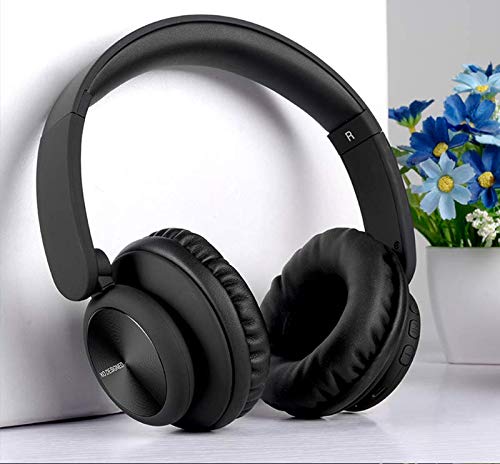
Image: XO B24 Foldable Bluetooth Headphones, showcasing their over-ear design and black color.
Specifications
| Feature | Kev piav qhia |
|---|---|
| Hom Lub Npe | XO |
| Qauv Lub Npe | B24 |
| Qauv nab npawb | XO-B24 |
| Xim | Dub |
| Headphone Form Factor | On-Ear |
| Connectivity Technology | Muaj xov hlau, Wireless (Bluetooth) |
| Lub mloog pob ntseg Jack | 3.5 mm Jack |
| Wireless Kev Sib Txuas Lus Technology | Bluetooth |
| Tshwj xeeb nta | Includes Microphone, Foldable Design |
| Microphone | Yog lawm |
| Kev tshem tawm suab nrov | Tsis muaj |
| Tswj hom | Volume Control, Touch Control |
| Compatible Devices | Ntau lub tshuab |
| Yuav tsum tau roj teeb | Yog lawm |
Teeb tsa
1. Them lub mloog pob ntseg
- Txuas lub USB charging cable uas muab rau lub qhov chaw them nyiaj ntawm lub mloog pob ntseg.
- Plug the other end of the USB cable into a compatible USB power source (e.g., computer, wall adapter).
- The LED indicator will illuminate during charging and turn off or change color once fully charged.
2. Bluetooth khub
- Xyuas kom lub mloog pob ntseg tau them tag nrho.
- Press and hold the Power button on the headphones until the LED indicator flashes rapidly, indicating pairing mode.
- Ntawm koj lub cuab yeej (smartphone, ntsiav tshuaj, computer), qhib Bluetooth thiab tshawb nrhiav cov khoom siv muaj.
- Select "XO B24" from the list of found devices.
- Once paired, the LED indicator will stop flashing and may show a solid light or flash slowly.
3. Kev Txuas Hluav Taws Xob (Xaiv Tau)
- Insert one end of the 3.5mm audio cable into the headphone jack on the XO B24.
- Plug the other end of the 3.5mm audio cable into the audio output jack of your device.
- The headphones will operate in wired mode, conserving battery life.
Cov lus qhia ua haujlwm
Hwj chim On/Off
- Hwj chim On: Nias thiab tuav lub hwj huam khawm li ntawm 3 vib nas this kom txog thaum lub teeb pom kev LED teeb.
- Fais fab tawm: Nias thiab tuav lub khawm Power li ntawm 3-5 vib nas this kom txog thaum lub teeb LED tua.
Ua Nkauj Rov Ua Si
- Ua si / Pause: Press the Multi-function button (often the Power button) once.
- Next Track: Press and hold the Volume Up button or a dedicated 'Next' button.
- Yav dhau los khiav: Press and hold the Volume Down button or a dedicated 'Previous' button.
Volume Control
- Ua Kom Ntim: Nias lub Volume Up khawm.
- Txo Ntim: Nias lub Volume Down khawm.
Hu Saib Xyuas
- Teb / Xaus Hu: Nias lub Multi-function khawm ib zaug.
- Tsis kam hu: Nias thiab tuav lub khawm Multi-function rau kwv yees li 2 vib nas this.
Folding Mechanism
- To fold the headphones for storage, gently rotate the earcups inwards towards the headband until they are compact.
- To unfold, reverse the process, ensuring the earcups click securely into place.
Kev tu
- Ntxuav: Siv ib daim ntaub mos, qhuav los ntxuav lub mloog pob ntseg. Tsis txhob siv cov tshuaj abrasive los yog cov kuab tshuaj.
- Cia: Thaum tsis siv, khaws cov mloog pob ntseg rau qhov chaw txias thiab qhuav, kom deb ntawm tshav ntuj ncaj qha thiab qhov kub thiab txias heev. Siv tus qauv tsim uas muab tais tau rau qhov chaw me me.
- Kev kho roj teeb: Txhawm rau kom lub roj teeb lub neej ntev, tsis txhob tso tawm lub mloog pob ntseg ntau zaus. Them lawv tsis tu ncua, txawm tias tsis siv tas li.
- Tsis txhob noo noo: Keep the headphones away from water and excessive humidity.
Kev daws teeb meem
| Teeb meem | Kev daws |
|---|---|
| Lub mloog pob ntseg tsis qhib. | Xyuas kom tseeb tias lub mloog pob ntseg tau them tag. Txuas rau lub zog fais fab thiab sim dua. |
| Tsis tuaj yeem ua khub ntawm Bluetooth. | Make sure the headphones are in pairing mode (LED flashing rapidly). Disable and re-enable Bluetooth on your device. Move closer to the headphones. |
| Tsis muaj suab nrov lossis tsis muaj suab nrov. | Check the volume levels on both the headphones and your connected device. Ensure the headphones are properly paired or the 3.5mm cable is securely connected. |
| Lub suab zoo tsis zoo. | Ensure there are no obstructions between the headphones and your device. Try moving closer to your device. Disconnect and reconnect the Bluetooth connection. |
| Microphone tsis ua haujlwm. | Ensure the headphones are properly connected and selected as the audio input device on your system. Check if the microphone is muted on your device. |
Warranty thiab Support
The XO B24 Foldable Bluetooth Headphones come with a standard manufacturer's warranty. Please refer to the warranty card included in your product packaging for specific terms and conditions.
For technical support, troubleshooting assistance, or warranty claims, please contact your retailer or the official XO customer service. Contact information can typically be found on the product packaging or the manufacturer's webqhov chaw.