
Taw qhia
Thank you for choosing the Waykar 296 Pints Commercial Dehumidifier. This manual provides essential information for the safe operation, installation, maintenance, and troubleshooting of your dehumidifier. Please read it thoroughly before use and retain it for future reference.
This commercial-grade dehumidifier is designed for large spaces up to 9,000 square feet, effectively removing up to 296 pints (37 gallons) of moisture per day. It is suitable for basements, industrial or commercial spaces, garages, cellars, workshops, libraries, laboratories, and flood restoration.
Cov ntaub ntawv tseem ceeb ntawm kev nyab xeeb
Txhawm rau txo qhov kev pheej hmoo ntawm hluav taws kub, hluav taws xob poob siab, lossis raug mob, nco ntsoov ua raws li cov kev ceev faj hauv qab no:
- Nyeem tag nrho cov lus qhia ua ntej siv lub cuab yeej.
- Xyuas kom meej tias lub hwj huam mov sib phim daim ntawv ntsuam xyuas ntawm lub tsev.
- Tsis txhob siv lub tshuab dehumidifier nrog lub cable puas lossis ntsaws.
- Nco ntsoov tshem lub tshuab ua ntej ntxuav lossis ua haujlwm.
- Tsis txhob thaiv cov cua nkag lossis qhov hluav taws xob.
- Keep the unit on a level surface to prevent water leakage.
- Cov cuab yeej no tsis yog tsim los siv los ntawm cov tib neeg (xws li cov menyuam yaus) uas muaj peev xwm txo qis lub cev, hnov lus lossis lub hlwb, lossis tsis muaj kev paub thiab kev paub, tshwj tsis yog lawv tau txais kev saib xyuas lossis kev qhia txog kev siv cov khoom siv los ntawm tus neeg saib xyuas kev nyab xeeb.
Khoom Tshajview
Cheebtsam thiab nta
The Waykar 296 Pints Commercial Dehumidifier features a robust design with intelligent controls for efficient moisture removal.
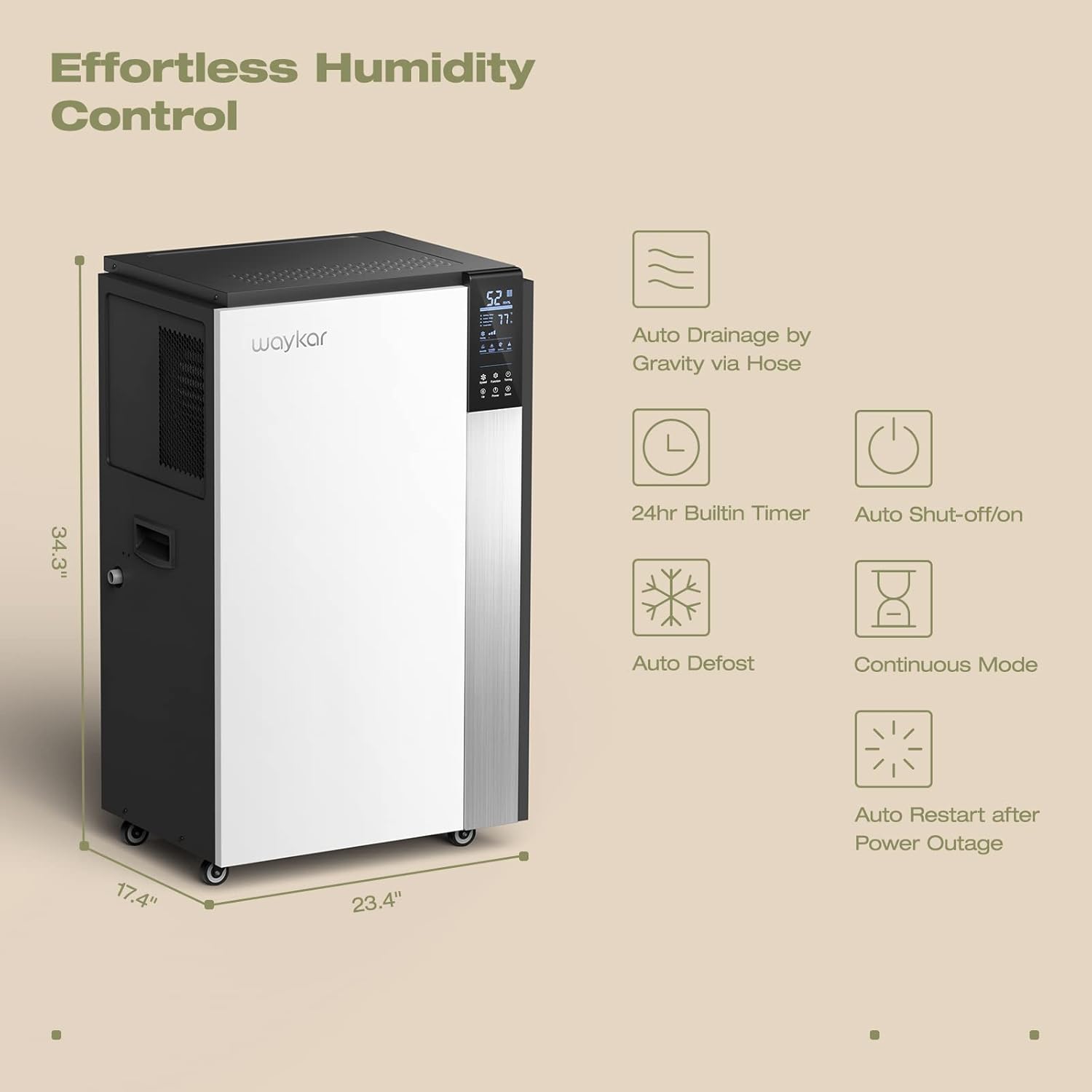
Figure 1: Intelligent Touch Control Panel
Displays humidity, temperature, and allows setting adjustments.

Figure 2: Dehumidifier Dimensions and Key Features
Illustrates the unit's dimensions (34.3" H x 23.4" W x 17.4" D) and highlights features like auto drainage, 24hr timer, auto shut-off/on, auto defrost, continuous mode, and auto restart after power outage.
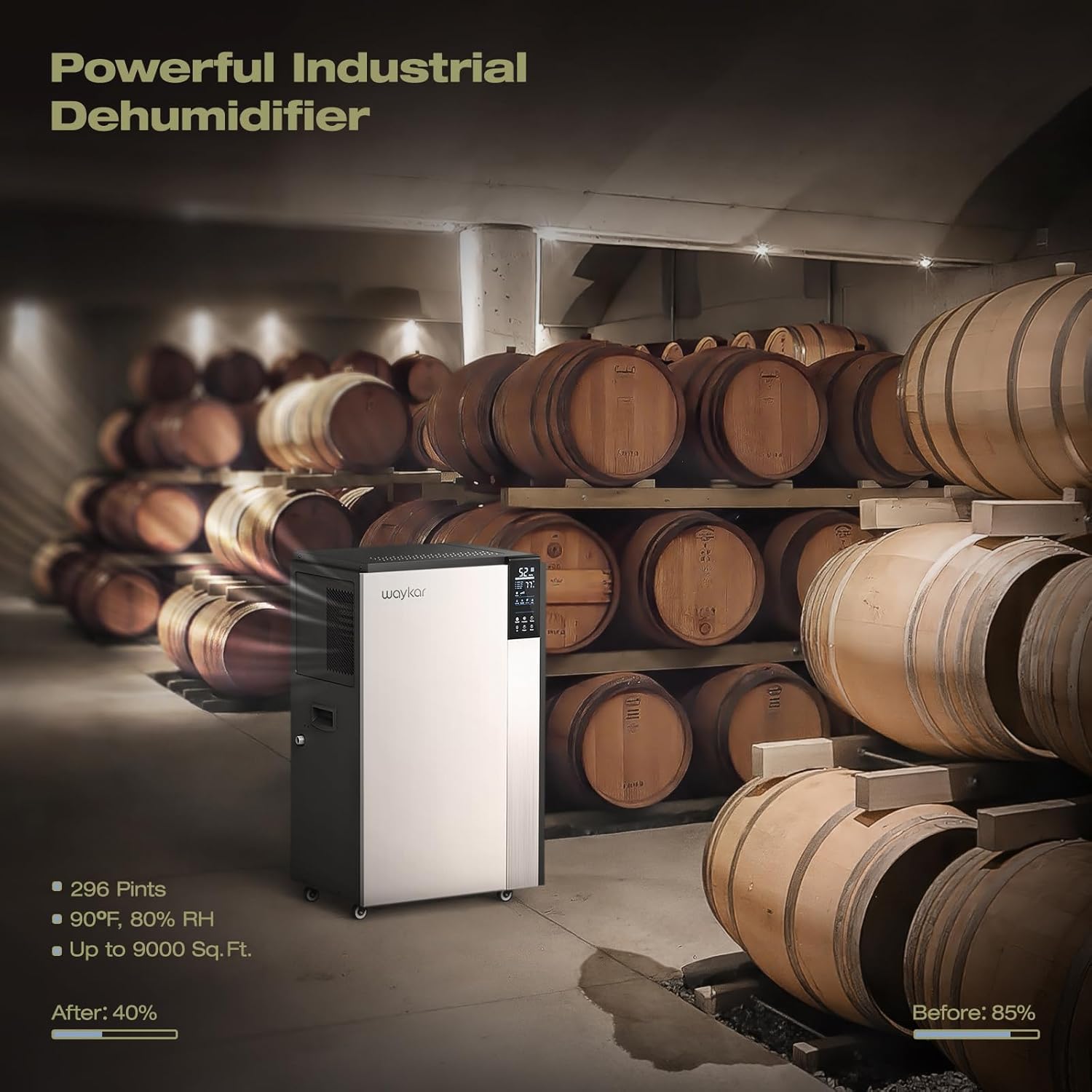
Figure 3: Continuous Drainage Setup and Detachable Filter
Shows the connection for the continuous drain hose and the location of the washable air filter.
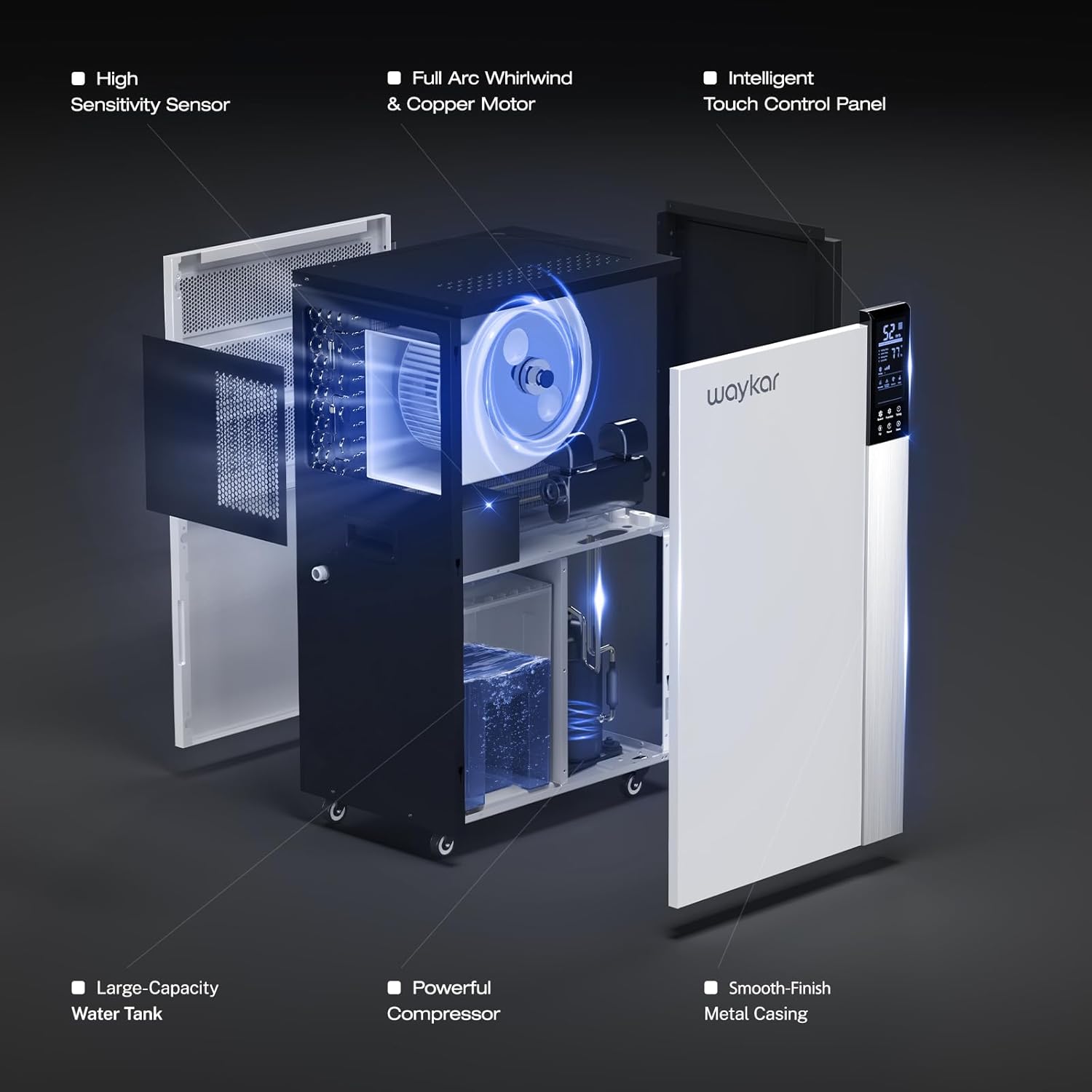
Figure 4: Internal Structure and Components
Ib qho tawg view showing the high sensitivity sensor, full arc whirlwind & copper motor, intelligent touch control panel, large-capacity water tank, powerful compressor, and smooth-finish metal casing.
Teeb cov lus qhia
- Unpacking: Carefully remove the dehumidifier from its packaging. Inspect for any shipping damage.
- Qhov chaw: Position the dehumidifier on a level, stable surface in the desired area. Ensure there is at least 8 inches (20 cm) of space around the unit for proper airflow. The unit is equipped with four universal wheels and two ergonomically placed handles for easy movement.
- Initial Standby: After transport, allow the unit to stand upright for at least 24 hours before plugging it in. This allows the refrigerant to settle.
- Kev sib txuas fais fab: Txuas cov hlua hluav taws xob rau hauv qhov hluav taws xob hauv av nrog qhov tseeb voltage (refer to the rating label).
- Kev teeb tsa dej ntws:
- Continuous Drainage (Recommended): For continuous operation without manual emptying, connect the included 40-inch (100 cm) drain hose to the drainage port on the unit. Ensure the hose is sloped downwards to allow gravity drainage to a suitable floor drain or container.
- Water Bucket (Internal): If continuous drainage is not used, the unit will collect water in its internal bucket. The unit will automatically shut off when the bucket is full.
Cov lus qhia ua haujlwm
Tswj vaj huam sib luag muaj nuj nqi
The intelligent touch control panel allows for easy operation and monitoring.
- Lub zog khawm: Nias kom tig lub ON los yog OFF.
- Humidity Setting (Up/Down Buttons): Adjust the desired humidity level between 10% and 90% Relative Humidity (RH). The unit will automatically operate to maintain this level.
- Ntxuam Ceev khawm: Select between High and Low fan speeds.
- Khawm Timer: Teem lub sijhawm 24-teev rau kev ua haujlwm tsis siv neeg ON / OFF.
- Zaub: Shows current room humidity, set humidity, and operating temperature.
Hom kev ua haujlwm
- Tsis Siv Neeg Humidity Control: Set your desired humidity level. The dehumidifier will sense the room's humidity and automatically turn on or off to maintain the pre-set level.
- Hom Nruam: For maximum dehumidification, select continuous mode. The unit will run continuously regardless of the humidity level. This mode is typically used with continuous drainage.
- Auto Defrost: The unit features an automatic defrost function that activates when frost builds up on the evaporator coils, ensuring efficient operation in low-temperature environments.
- Pib Pib Pib: Yog muaj zog otage, chav tsev yuav cia li rov pib dua nrog cov teeb tsa yav dhau los thaum lub zog rov qab los.
Kev tu
Kev saib xyuas tsis tu ncua ua kom pom kev ua haujlwm zoo thiab txuas ntxiv lub neej ntawm koj lub dehumidifier.
- Ntxuav Cov Cua Lim:
- The unit has a "Clean Reminder" feature for the filter.
- Tshem tawm thiab tshem tawm lub dehumidifier.
- Remove the detachable air filter (refer to Figure 3 for location).
- Wash the filter with warm, soapy water. Rinse thoroughly and allow it to air dry completely before reinstalling.
- Ntxuav lub lim dej txhua ob lub lis piam lossis ntau zaus dua nyob ntawm seb siv li cas thiab huab cua zoo li cas.
- Cleaning Unit Sab nrauv:
- So sab nrauv nrog mos, damp daim ntaub. Tsis txhob siv cov tshuaj hnyav los yog cov tshuaj abrasive.
- Kev Tshawb Xyuas Dej Dej:
- Periodically check the drain hose for kinks, blockages, or algae growth if using continuous drainage.
- If using the internal water bucket, empty and clean it regularly to prevent mold and mildew growth.
- Cia:
- Yog tias khaws cia rau lub sijhawm ntev, xyuas kom nws huv thiab qhuav.
- Drain any remaining water from the internal bucket and hose.
- Store the unit upright in a cool, dry place. The back housing can be opened to store the drain hose and other accessories inside.
Cov Lus Qhia Teeb Meem
Ua ntej hu rau cov neeg siv khoom txhawb nqa, thov saib cov teeb meem thiab cov kev daws teeb meem hauv qab no:
| Teeb meem | Ua Tau | Kev daws |
|---|---|---|
| Dehumidifier tsis qhib. | No power, power cord loose, full water bucket. | Check power connection, ensure outlet is functional. Empty water bucket if full. |
| Unit runs but does not remove moisture. | Air filter clogged, room temperature too low, humidity setting too high. | Clean air filter. Ensure room temperature is above 5°C (41°F). Lower the desired humidity setting. |
| Cov dej ntws los ntawm lub cev. | Unit not level, drain hose kinked or blocked, drain hose not properly connected. | Place unit on a level surface. Check and clear drain hose. Ensure hose connection is secure. |
| Unit tsis nrov. | Air filter clogged, unit not on a stable surface, internal component issue. | Clean air filter. Ensure unit is on a firm, level surface. If noise persists, contact customer support. |
| Error Code E6 (as mentioned in reviews). | Defrost sensor issue or other internal fault. | Refer to specific troubleshooting steps provided by Waykar customer service, potentially involving disconnecting a low voltage wire. Contact customer support for guidance. |
Specifications
| Feature | Paub meej |
|---|---|
| Qauv | Waykar 296 Pints Commercial Dehumidifier |
| Moisture tshem tawm muaj peev xwm | 296 Pints (37 Gallons) per day |
| Thaj Chaw | Mus txog 9,000 sq. Ft. |
| Yam Nyhav | 50.8, XNUMX kg |
| Xim | Dawb |
| Tshwj xeeb nta | Portable, Intelligent Touch Control, Auto Defrost, 24H Timer, Auto Shut-off/on, Auto Restart, Continuous Drainage |
| Cov Cheebtsam suav nrog | Waykar 296 Pints Dehumidifier x 1, Drain Hose |
| Ntws Hose Ntev | 40 nyob rau hauv (100 cm) |
Warranty thiab Customer Support
Waykar stands behind its products with comprehensive warranty and support services:
- Nyiaj rov qab Guarantee: 30-Days Money Back if you are not satisfied with the product.
- Warranty: 1-year warranty, with an option for a 2nd-year warranty extension.
- Kev pab txhawb nqa: Lifetime expert technical support is available.
- Hu rau: For any questions or issues, please contact Waykar customer support. They aim to reply within 12 hours to assist with problem resolution.