
1. Taw qhia
This manual provides essential instructions for the safe and efficient operation of your Multilaser MINI TORRE 900W SP380 audio system. Please read this manual thoroughly before using the product and retain it for future reference. Proper use will ensure optimal performance and extend the lifespan of your device.
2. Cov lus qhia kev nyab xeeb
- Lub zog Source: Xyuas kom meej tias lub hwj huam mov sib phim lub voltage yuav tsum tau teev nyob rau ntawm daim ntawv lo khoom.
- Qhov cua: Do not block ventilation openings. Maintain adequate space around the unit for proper airflow.
- Dej thiab noo noo: Keep the device away from water, rain, and excessive humidity. Do not operate with wet hands.
- Qhov Chaw Kub Kub: Avoid placing the unit near heat sources such as radiators, stoves, or other heat-producing appliances.
- Ntxuav: Disconnect the power before cleaning. Use a dry, soft cloth. Do not use liquid cleaners or aerosol sprays.
- Kev pab: Do not attempt to repair the unit yourself. Refer all servicing to qualified service personnel.
- Cov menyuam yaus: Khaws cov cuab yeej thiab nws cov khoom siv kom deb ntawm cov menyuam yaus.
- Qhov chaw: Muab lub tshuab tso rau ntawm ib qho chaw ruaj khov thiab tiaj tus kom tiv thaiv nws kom tsis txhob poob.
3. Khoom Tshajview
The Multilaser MINI TORRE 900W SP380 is a powerful audio system designed for versatile sound reproduction. It features dual speakers, LED lighting, and multiple connectivity options.
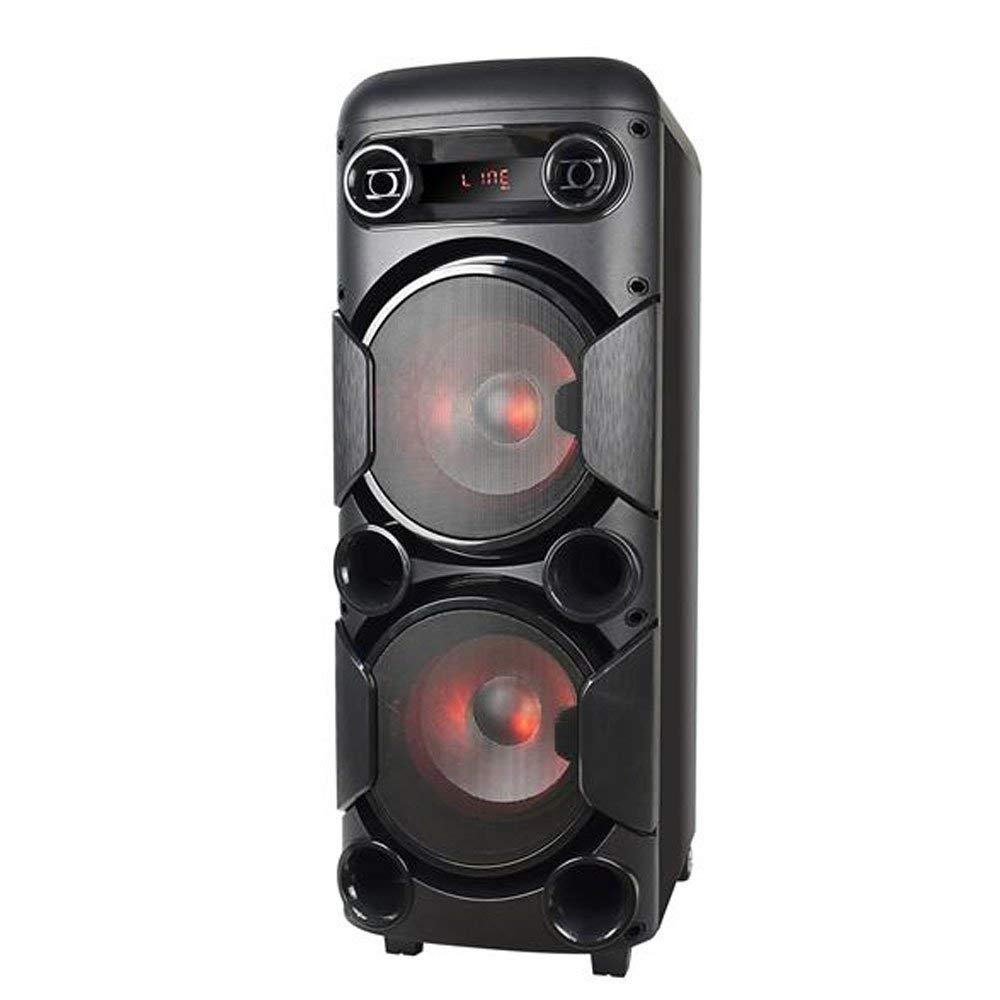
Daim duab 3.1: Pem hauv ntej view of the Multilaser MINI TORRE 900W SP380, showcasing its dual speaker design and illuminated LED woofers.
The control panel, located on the top of the unit, provides access to all functions and inputs.

Daim duab 3.2: Paub meej view of the control panel, including volume knob, equalizer sliders, input ports (USB, TF/Memory Card, Line, Mic 1, Mic 2), and control buttons for mode, light, and playback.
4. Teeb tsa
- Unpacking: Carefully remove the MINI TORRE from its packaging. Retain the packaging for future transport or storage.
- Qhov chaw: Position the speaker on a flat, stable surface. Ensure there is adequate space around the unit for ventilation. The integrated wheels facilitate easy transport.
- Kev sib txuas fais fab: Connect the power cable to the AC input on the unit and then to a suitable power outlet. The device supports bivolt automatic voltage.
- Pib Pib Pib: Flip the power switch (usually located on the control panel) to the "ON" position. The display will illuminate.
5. Cov lus qhia ua haujlwm
5.1. Fais fab / Off
To power on the device, locate the power switch on the control panel and set it to the "ON" position. To power off, set the switch to "OFF".
5.2. Volume Control
Adjust the main volume using the large central VOLUME knob on the control panel. Turn clockwise to increase volume and counter-clockwise to decrease.
5.3. Hom Xaiv
Nias lub MODE button repeatedly to cycle through available input modes: Bluetooth (BT), FM Radio, USB, Memory Card (TF), and Auxiliary (LINE).
5.4. LED teeb pom kev zoo
Nias lub Lub teeb button to toggle the LED lighting effects on the speakers. Multiple light modes may be available.
5.5. Microphone tswv yim
Connect a microphone to either the MIC 1 or MIC 2 input. Adjust the microphone volume using the MIC.VOL slider and add echo effect with the Echo tus swb.
5.6. Sound Equalization
Siv cov KHO thiab ntses bass thaj tsam sliders to adjust the high and low frequencies of the audio output, respectively, to suit your preference.
6. Kev sib txuas
6.1. Bluetooth khub
- Turn on the MINI TORRE and select Bluetooth (BT) siv hom kev siv MODE button. The display will show "BT" and a pairing indicator.
- Qhib Bluetooth ntawm koj lub smartphone, ntsiav tshuaj, lossis lwm yam khoom siv tau tshaj.
- Nrhiav rau available devices and select "MULTILASER SP380" (or similar name) from the list.
- Once paired, the device will confirm the connection, and you can begin playing audio wirelessly.
6.2. USB / Memory Card Playback
Ntxig ib USB flash drive rau hauv USB port or a TF (MicroSD) card into the TF/USB slot. The unit will automatically switch to USB or TF mode and begin playing compatible audio files. Use the playback control buttons (PLAY/PAUSE, Yav dhau los, Tom ntej no) to manage your music.
6.3. Auxiliary Input (LINE IN)
Connect an external audio device (e.g., MP3 player, laptop) to the LINE input using a 3.5mm audio cable. Select LINE mode nrog cov MODE button. Audio will play from the connected device.
6.4. Xov tooj cua FM
Hloov mus rau FM siv hom kev siv MODE khawm. Nias thiab tuav lub PLAY/PAUSE button to initiate an automatic scan for FM stations. The unit will save detected stations. Use the Yav dhau los thiab Tom ntej no cov nyees khawm kom mus txog hauv cov chaw nres.
7. Kev tu
- Ntxuav: Before cleaning, ensure the device is powered off and unplugged. Use a soft, dry, lint-free cloth to wipe the exterior surfaces. Do not use abrasive cleaners, waxes, or solvents.
- Cia: Yog tias khaws cia lub tshuab ntev, rho nws tawm ntawm lub qhov hluav taws xob thiab khaws cia rau qhov chaw txias, qhuav, deb ntawm tshav ntuj ncaj qha thiab qhov kub thiab txias heev.
- Tsis txhob Obstructions: Regularly check that the speaker grilles and ventilation openings are free from dust and debris.
8. Kev daws teeb meem
| Teeb meem | Ua Tau | Kev daws |
|---|---|---|
| Tsis muaj zog | Power cable not connected; Power outlet not working; Power switch off. | Ensure power cable is securely connected. Test the outlet with another device. Turn the power switch to "ON". |
| Tsis muaj suab | Volume too low; Incorrect input mode selected; External device not playing. | Increase volume. Press MODE to select the correct input. Ensure the external device is playing and its volume is up. |
| Bluetooth tsis sib xws | Device too far; Bluetooth not enabled on external device; Incorrect mode. | Move devices closer. Ensure Bluetooth is enabled on your external device. Select BT hom ntawm tus hais lus. |
| USB/TF daim npav tsis ua si | Card/drive not inserted correctly; Incompatible file format; Incorrect mode. | Reinsert the USB drive or TF card. Ensure audio files are in a compatible format (e.g., MP3). Select USB or TF hom. |
| FM xov tooj cua static | Weak signal; No antenna connected (if applicable). | Reposition the unit or extend the antenna (if present). Perform an auto-scan for stations again. |
9. Cov lus qhia tshwj xeeb
Below are the technical specifications for the Multilaser MINI TORRE 900W SP380:

Daim duab 9.1: Packaging of the Multilaser MINI TORRE 900W SP380, highlighting its main features and technical specifications.
| Feature | Paub meej |
|---|---|
| Hom | Multilaser |
| Qauv | SIB 380 |
| Lub zog tso zis siab tshaj plaws ntawm lub tso suab | 900 Vev RMS |
| Connectivity Technology | Kev pab txhawb nqa, Bluetooth 5.0 |
| Hom hais lus | Tower (2x 8" drivers) |
| Tshwj xeeb nta | USB Port, LED Lighting, Microphone Input, Memory Card Slot, FM Radio, Bass Boost, Transport Wheels |
| Yam khoom Dimensions (D x W x H) | 33 x 37 x 82 cm |
| Yam Nyhav | 11.95 kg ib |
| Compatible Devices | Notebook, Smartphone, Tablet |
| Hwj chim Source | Bivolt automatic (AC) |
| Zaus teb | 60Hz-20KHz |
| rhiab heev | 89dB ua |
| Impedance | 4 awm |
| Cov Cheebtsam suav nrog | 1x Mini Torre 900W SP380, 1x Cable Set, 1x User Manual |
10. Warranty thiab Support
The Multilaser MINI TORRE 900W SP380 comes with a 1 xyoo warranty txij hnub ntawm kev yuav khoom. Qhov kev lees paub no suav nrog kev tsim khoom tsis raug raws li kev siv ib txwm siv.
For warranty claims, technical support, or service inquiries, please contact Multilaser customer support through their official channels. Please have your proof of purchase and product model number (SP380) ready when contacting support.
Nco tseg: The warranty does not cover damage caused by misuse, accidents, unauthorized modifications, or failure to follow the instructions in this manual.