
1. Taw qhia
Thank you for choosing the Losei D65 Wireless Earbuds. These earbuds are designed to provide a high-quality audio experience with advanced features such as environmental noise canceling (ENC), individual power display, wireless charging, and IPX7 waterproofing. This manual will guide you through the setup, operation, and maintenance of your new earbuds.
2. Dab tsi hauv lub thawv
- Wireless Sport Earbuds (1 Pair)
- Charging Case (1 PC)
- Type-C Charging Cable (1 PC)
- Original Ear Caps (1 Pair)
- Spare Ear Caps (6 Pairs)
- Tus neeg siv phau ntawv (Cov ntaub ntawv no)
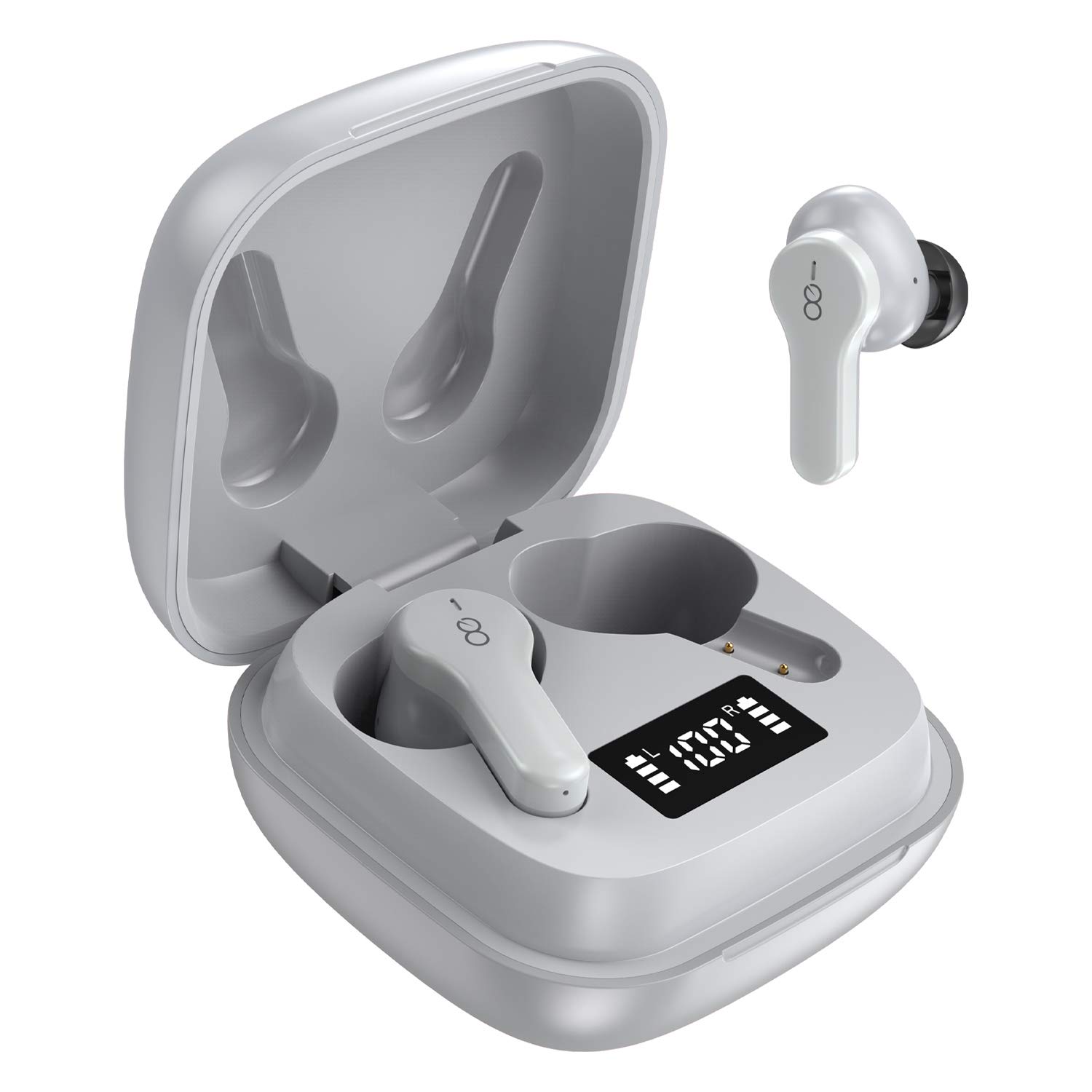
3. Khoom Tshajview
The Losei D65 earbuds feature a compact, in-ear design with touch controls. The accompanying charging case provides portable power and includes a digital display to show battery levels for both the case and individual earbuds.
Cov yam ntxwv tseem ceeb:
- Clear Call with 4-Mics Noise Reduction: Built-in 4 microphones with Environmental Noise Canceling (ENC) technology for clear calls.
- Individual Power Display: Digital display on the charging case shows battery percentage for the case and charging status for each earbud.
- Wireless Charging & Extended Playtime: Supports wireless charging and provides up to 30 hours of total playtime with the charging case.
- Comfortable Fit & IPX7 Waterproof: Ergonomic design with multiple ear tip sizes and IPX7 water resistance for sports and daily use.
- Auto Pairing & Smart Touch Control: Automatic connection to the last paired device and intuitive touch controls for various functions.
4. Teeb tsa
4.1 Them lub mloog pob ntseg thiab Case
Ua ntej siv thawj zaug, them tag nrho lub mloog pob ntseg thiab cov ntaub ntawv them nyiaj.
- Kev them nyiaj yug Earbuds: Place the earbuds into the charging case. The marquee lights on the case will indicate charging. They will stop when fully charged.
- Charging the Case (Wired): Connect the provided Type-C charging cable to the charging port on the case and to a USB power source. The digital display will show the battery percentagnce ntxivasing. A full charge takes approximately 1.5-2 hours.
- Charging the Case (Wireless): Place the charging case on a compatible wireless charging pad (not included). The digital display will indicate charging status.
The charging case's digital display shows the battery percentage (1-100%). The individual earbud power consumption indicators show 4 grids, each representing 25% battery.
4.2 Pairing nrog koj ntaus ntawv
The Losei D65 earbuds feature automatic pairing.
- Xyuas kom koj lub cuab yeej Bluetooth qhib.
- Qhib cov ntaub ntawv them nyiaj. Lub earbuds yuav cia li qhib thiab nkag mus rau hom kev sib koom ua ke.
- On your device, search for Bluetooth devices and select "Losei-D65" from the list.
- Thaum txuas nrog lawm, koj yuav hnov ib qho lus qhia kom paub meej, thiab lub mloog pob ntseg yuav npaj siv tau.
The earbuds will automatically reconnect to the last paired device when taken out of the charging case.
5. Cov lus qhia ua haujlwm
5.1 Smart Touch Controls
The Losei D65 earbuds utilize touch controls for various functions. The sensor area is typically located on the outer surface of each earbud.
- Ua si / Pause: Ib zaug coj mus rhaub rau ntawm ob lub pob ntseg.
- Next Track: Muab ob npaug rau ntawm lub pob ntseg sab xis.
- Yav dhau los khiav: Muab ob npaug rau ntawm lub pob ntseg sab laug.
- Ntim Tuaj: Triple kais ntawm lub pob ntseg sab xis.
- Ntim Cia: Triple kais ntawm sab laug pob ntseg.
- Teb / Xaus Hu: Ib zaug coj mus rhaub rau ntawm ob lub pob ntseg thaum lub xov tooj hu.
- Tsis kam hu: Nias thiab tuav ob lub pob ntseg rau 2 vib nas this thaum lub xov tooj hu.
- Qhib lub suab pab: Nias thiab tuav lub pob ntseg rau 3 vib nas this (thaum tsis hu).
5.2 Multi-Using Modes
The earbuds support different usage scenarios:
- Mono hom: Each earbud can be used independently. This is ideal for driving or when you need to be aware of your surroundings. Simply take one earbud out of the case and connect it.
- Qhia hom: You can share one earbud with another person to listen to the same audio content.
- Lub tso suab hom: Use both earbuds together for a full, immersive stereo sound experience.
6. Kev tu
6.1 Kev ntxuav
Kev tu tsis tu ncua pab tswj lub suab zoo thiab kev nyiam huv.
- Siv ib daim ntaub mos, qhuav, tsis muaj lint los so lub pob ntseg thiab cov ntaub ntawv them nyiaj.
- Rau cov lus qhia pob ntseg, tshem lawv tawm ntawm lub pob ntseg thiab ntxuav nrog xab npum me me yog tias tsim nyog, tom qab ntawd yaug kom huv si thiab qhuav kom huv si ua ntej rov ua dua.
- Tsis txhob siv cov tshuaj abrasive, cawv, lossis tshuaj kuab tshuaj.
6.2 Cia khoom
Thaum tsis siv, khaws lub mloog pob ntseg hauv lawv cov ntaub ntawv them nyiaj los tiv thaiv lawv thiab ua kom lawv them.
- Khaws rau hauv qhov chaw txias, qhuav kom deb ntawm qhov kub thiab txias.
- Tsis txhob raug tshav ntuj ncaj qha mus ntev.
6.3 Dej tsis kam (IPX7)
The Losei D65 earbuds are IPX7 waterproof, meaning they can withstand immersion in water up to 1 meter for 30 minutes. This makes them suitable for sports and protection against sweat and rain. However, they are not designed for swimming or prolonged submersion. Ensure the earbuds are dry before placing them back in the charging case to prevent damage.
7. Kev daws teeb meem
If you encounter issues with your Losei D65 earbuds, refer to the following common solutions:
- Earbuds tsis ua khub lossis txuas:
- Xyuas kom tseeb tias ob lub mloog pob ntseg raug them.
- Tua Bluetooth ntawm koj lub cuab yeej, tom qab ntawd tig nws rov qab.
- Forget/delete "Losei-D65" from your device's Bluetooth list and attempt to pair again.
- Muab ob lub pob ntseg rov qab rau hauv lub thawv them, kaw lub hau, tos ob peb feeb, tom qab ntawd qhib lub hau kom rov pib dua.
- Tsuas yog ib lub earbud ua haujlwm:
- Xyuas kom tseeb tias ob lub mloog pob ntseg raug them.
- Place both earbuds back into the charging case, close the lid, wait a few seconds, then open the lid. They should reconnect to each other automatically.
- If the issue persists, try resetting the earbuds as described in the pairing section.
- Lub suab tsis zoo los yog lub suab qis:
- Kho qhov ntim ntawm koj lub cuab yeej thiab lub mloog pob ntseg.
- Ensure the ear tips are properly sealed in your ear canal. Try different sized ear tips for a better fit.
- Ntxuav cov khib nyiab ntawm lub mloog pob ntseg thiab cov lus qhia pob ntseg.
- Xyuas kom tseeb tias tsis muaj dab tsi thaiv ntawm koj lub cuab yeej thiab lub mloog pob ntseg.
- Charge Case tsis them:
- Xyuas seb lub xov hluav taws xob thiab lub adapter puas puas lawm.
- Xyuas kom lub Type-C cable txuas ruaj ntseg rau ob lub rooj plaub thiab lub hwj chim.
- If using wireless charging, ensure the case is correctly positioned on a compatible wireless charging pad.
8. Cov lus qhia tshwj xeeb
| Qauv Lub Npe | Losei-D65 |
| Connectivity Technology | Wireless (Bluetooth 5.0) |
| Pob ntseg tso | Hauv pob ntseg |
| Tsis Siv Neeg Tswj | Sound Isolation, Environmental Noise Canceling (ENC) |
| Dej Resistance Level | IPX7 (Waterproof) |
| Tswj hom | Kov Tswj |
| Roj teeb lub neej (earbuds) | Txog li 5 teev ntawm kev them nqi ib zaug |
| Tag nrho Playtime (nrog Case) | Mus txog 30 teev |
| Lub sij hawm them nqi (Case) | Kwv yees li. 1.5-2 teev |
| Kev them nyiaj yug interface | Type-C, Wireless Charging |
| Compatible Devices | Most Bluetooth-enabled devices (Android, iOS, PC, etc.) |
| Yam Nyhav | 0.176 ounces (per earbud) |
| Khoom Dimensions | 1.18 x 1.54 x 1.85 inches (Charging Case) |
9. Warranty thiab Support
9.1 Warranty Information
The Losei D65 Wireless Earbuds come with a 12-lub hlis hloov warranty. Additionally, returns are accepted within 30 days for a full refund. This warranty covers manufacturing defects and ensures customer satisfaction.
9.2 Kev Pabcuam Cov Neeg Siv Khoom
For any questions, issues, or support needs, please contact Losei customer service. Quick-response professional customer service is available to assist you.
Please refer to the product packaging or the official Losei website kom paub meej txog kev sib cuag.