
Taw qhia
The PROLiNK DS-3202M Wi-Fi Smart Plug allows users to control home appliances remotely using the mEzee application on a smartphone. This device enables remote switching of appliances on or off and management of power schedules while on-the-go. It features energy monitoring capabilities to track power usage and estimate costs.
Key features include quick setup, scheduling and timer functions, a space-saving design, remote control, easy device sharing, voice control, child lock, and various smart scheduling options like Circulate, Random, and Inching schedules.

Duab: pem hauv ntej view of the Prolink DS-3202M Smart Plug, showing its compact design and standard UK Type G plug face.
Teeb cov lus qhia
- Download the mEzee App: Nrhiav rau and download the 'mEzee' application from your smartphone's app store (available for iOS and Android).
- Txuas rau Smart Plug: Insert the Prolink DS-3202M Smart Plug into a standard 13A wall socket. Ensure the socket is powered on.
- Pair with mEzee App: Open the mEzee app and follow the on-screen instructions to add a new device. The app uses auto-discovery to easily pair with your smart plug. No separate hub is required for this process.
- Txuas rau Wi-Fi: During the pairing process, you will be prompted to connect the smart plug to your existing home 2.4GHz Wi-Fi network. Enter your Wi-Fi credentials when requested.

Image: Visual guide illustrating the three steps for easy pairing and setup: download mEzee app, plug in Smart Plug, and follow app instructions.
Cov lus qhia ua haujlwm
Chaw taws teeb tswj
Once paired, you can control any device connected to the smart plug remotely via the mEzee app on your smartphone. This allows you to switch appliances on or off from anywhere with an internet connection.
Kev Teem Sijhawm thiab Timers
The mEzee app allows you to set schedules and timers for your connected appliances. This includes:
- Standard Schedule: Set specific times for the plug to turn on or off on selected days of the week.
- Smart Circulate Schedule: Configure a cycle timing, enabling the device to turn on and off repeatedly within a specified time period.
- Smart Random Schedule: Enhance home security by automatically turning smart devices on and off at random intervals within a set timeframe and selected days. This creates the illusion that someone is home when you are away.
- Smart Inching Schedule: Automatically turns off a device after it has been on for a specified duration, regardless of how it was activated. For example, a light bulb can be set to turn off after one minute if motion is detected.

Image: Illustration of smart scheduling options including setting a fan schedule, an inching timer for a slow cooker, and a random timer for a lamp.
Kev Saib Xyuas Zog
The smart plug provides energy monitoring features, allowing you to track power usage (kWh) on an hourly, daily, or monthly basis through the mEzee app. This data can help you understand and manage your electricity consumption, potentially leading to cost savings.
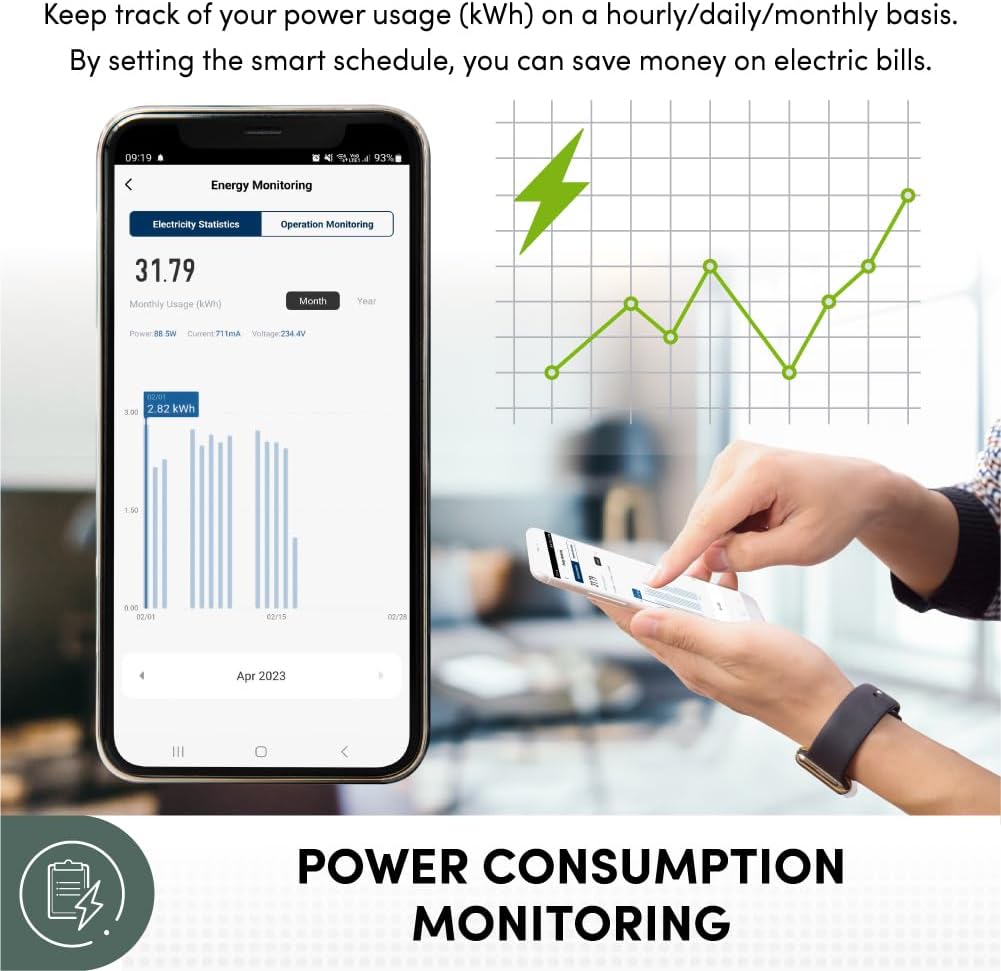
Image: A smartphone screen displaying the mEzee app's energy monitoring interface, showing monthly usage statistics and a graph of power consumption.
Lub Suab Tswj
The Prolink DS-3202M Smart Plug supports voice control through popular smart assistants such as Amazon Alexa, Google Assistant, and Siri Shortcuts. Link your mEzee account to these services to control your connected appliances using voice commands.
- Example commands: "Hey Google, turn on the Lamp", "Alexa, turn off the Coffee Maker".

Image: An illustration demonstrating how to use voice commands with Google Assistant, Siri Shortcuts, and Alexa to control devices connected to the smart plug.
Tus me nyuam xauv
The smart plug includes a child lock feature to prevent accidental activation or deactivation by children. This function can be enabled via the mEzee app to disable the physical power button on the plug.

Image: A child attempting to press the physical button on a smart plug, with an overlay indicating the child lock feature prevents accidental operation.
Kev tu
The Prolink DS-3202M Smart Plug requires minimal maintenance. To ensure optimal performance and longevity:
- Keep the device clean by wiping it with a dry, soft cloth.
- Tsis txhob siv cov tshuaj hnyav hnyav lossis cov tshuaj abrasive.
- Ensure the plug and socket connections are secure and free from dust or debris.
- Tsis txhob tso lub cuab yeej kom ya raws ntau dhau los yog qhov kub thiab txias.
Kev daws teeb meem
Teeb meem kev sib txuas
- Plug not connecting to Wi-Fi: Ensure your Wi-Fi network is 2.4GHz. The smart plug does not support 5GHz networks. Check that your Wi-Fi signal strength is adequate where the plug is located.
- App cannot find the plug: Make sure the plug is powered on and in pairing mode (refer to app instructions for specific indicator light behavior). Restart the mEzee app or your smartphone.
- Kev tswj chaw taws teeb tsis ua haujlwm: Verify your smartphone has an active internet connection. Check if the smart plug is still connected to your home Wi-Fi network.
Ntaus tsis teb
- Plug unresponsive: Try unplugging the smart plug from the wall socket, waiting 10 seconds, and plugging it back in. This can resolve temporary glitches.
- Physical button not working: Check if the Child Lock feature is enabled in the mEzee app. Disable it if you wish to use the physical button.
Teem sijhawm thiab Automation
- Schedules not executing: Ensure the smart plug has a stable Wi-Fi connection. Verify that the schedules are correctly configured in the mEzee app, including time zones and active days.
- Appliance requires manual restart after power cycle: Some appliances do not automatically resume operation after power is restored. The smart plug cannot override this inherent behavior of the connected appliance.
- No loop programmable: The mEzee app's current scheduling features may not support continuous loop programming for certain advanced scenarios. Review the app's capabilities for available scheduling types.
Specifications
| Feature | Paub meej |
|---|---|
| Hom | Prolink |
| Qauv | Qauv: DS-3202M |
| Xim | Dawb |
| Voltage | 12 Volts |
| Khoom Dimensions (D x W x H) | 5.5D x 6.1W x 5.5H cm |
| Khoom siv | Yas |
| Hom Connector | Hom G |
| Number of Poles | 1 |
| Ampnpau taws | 13 Amps |
| Yam Nyhav | 31 Nws |
| Cov Cheebtsam suav nrog | Ntse Plug |

Image: A visual comparison demonstrating the compact design of the Prolink smart plug, which avoids blocking adjacent sockets on a power strip.
Warranty Information
The Prolink DS-3202M Smart Plug comes with a Lifetime Local Manufacturer Warranty. Please retain your proof of purchase for warranty claims. For specific terms and conditions, refer to the official Prolink warranty policy or contact Prolink customer support.
Txhawb nqa
For further assistance, technical support, or inquiries regarding your Prolink DS-3202M Smart Plug, please visit the official Prolink website lossis hu rau lawv lub chaw pabcuam neeg siv khoom.
Koj tuaj yeem mus saib tau Prolink Store on Amazon rau cov ntaub ntawv khoom thiab hloov tshiab.
Product Video
Video: An official product video demonstrating the features and functionality of the PROLiNK DS-3202M Smart Plug with Energy Monitoring. This video provides a visual overview of its capabilities, including setup, app control, and energy tracking.