
GOKOO B08FMBHSWD
GOKOO Smart Watch B08FMBHSWD User Manual
Taw qhia
This manual provides essential information for the proper setup, operation, and maintenance of your GOKOO Smart Watch B08FMBHSWD. Please read it thoroughly before using the device to ensure optimal performance and longevity.
The GOKOO Smart Watch is a versatile fitness tracker and smartwatch designed to monitor various health metrics and assist with daily activities. It features a full touch screen, heart rate and blood oxygen monitoring, sleep tracking, multiple sports modes, and notification capabilities.
Khoom Tshajview
The GOKOO Smart Watch B08FMBHSWD is equipped with advanced features to support your active lifestyle and health monitoring needs.
- All-day Activity Tracking: Records steps, calories, and mileage. Supports 10 sports modes including walking, running, yoga, and swimming.
- Comprehensive Health Monitoring: Continuously monitors heart rate and blood oxygen levels. Features automatic sleep tracking, breathing training, and sedentary reminders.
- Tsim Khoom Siv Tau Ntev Thiab Tsis Muaj Dej: IP68 waterproof rating suitable for daily use and swimming.
- Customizable Display: 1.3-inch round high-definition screen with personalized UI interfaces.
- Cov Ntawv Ceeb Toom Ntse: Synchronizes messages and allows management of incoming calls.
- Lub neej roj teeb ntev: Up to 10 days of usage on a single charge (200MA battery).
- Wide Compatibility: Works with Android 5.0+ and iOS 9.0+ devices.

Figure 1: GOKOO Smart Watch highlighting its design and core functionalities.
Teeb tsa
1. Kev them nyiaj yug ntaus ntawv
Before initial use, fully charge your GOKOO Smart Watch. Connect the magnetic charging cable to the charging contacts on the back of the watch and plug the USB end into a power adapter (not included) or a computer's USB port. The watch display will indicate charging status.
A full charge typically takes approximately 2 hours and provides up to 10 days of usage, depending on individual use patterns.

Figure 2: Illustration of the watch's IP68 waterproof capability and its extended battery life.
2. Kev Teeb tsa thiab Kev Sib Txuas ntawm App
- Download tau lub App: Nrhiav rau the official GOKOO companion app in your smartphone's app store (Apple App Store for iOS, Google Play Store for Android).
- Nruab thiab Sau Npe: Nruab lub app thiab ua raws li cov lus qhia ntawm qhov screen los tsim ib tus account lossis nkag mus.
- Qhib Bluetooth: Xyuas kom tseeb tias Bluetooth qhib rau ntawm koj lub smartphone.
- Pair Watch: Open the GOKOO app, navigate to the device pairing section, and select your GOKOO Smart Watch from the list of available devices. Confirm the pairing request on both your phone and the watch if prompted.
- Kev Tso Cai Pom Zoo: Tso cai rau cov kev tso cai tsim nyog (piv txwv li, cov ntawv ceeb toom, qhov chaw, cov ntaub ntawv kev noj qab haus huv) rau lub app kom ua haujlwm tau zoo.
The watch will synchronize its language with your phone upon successful connection.
Cov lus qhia ua haujlwm
1. Basic Navigation
- Kov Screen: The watch features a full touch screen for interaction.
- Swipe Up/down: Scroll los ntawm cov ntawv qhia zaub mov thiab cov ntawv ceeb toom.
- Swipe Left/Right: Access different widgets or quick functions.
- Coj mus rhaub: Xaiv ib yam khoom lossis paub meej tias qhov kev ua.
- Sab Khawm: Typically used to return to the home screen or activate/deactivate the display.

Figure 3: The watch interface displaying multiple functions and touch screen interaction methods.
2. Kev taug qab ua haujlwm
The watch automatically tracks your daily steps, calories burned, and distance traveled. For specific activities, you can select from 10 sports modes:
- Taug kev
- Khiav
- Yoga
- Ua luam dej
- Kev caij tsheb kauj vab
- Nce toj
- Ntaus pob
- Ncaws pob
- Badminton
- Hla
To start a workout, navigate to the 'Sports' menu on your watch, select the desired activity, and tap to begin. The watch will record your exercise data, which can be reviewed hauv lub app sib koom ua ke.

Figure 4: The watch interface showing available sports monitoring modes.

Figure 5: The watch tracking an outdoor run, displaying distance, calories, and a trajectory map.
3. Kev Saib Xyuas Kev Noj Qab Haus Huv
- Lub plawv dhia: Lub moos tsis tu ncua saib xyuas koj lub plawv dhia. View cov ntaub ntawv tiag tiag ntawm lub moos lossis cov ntaub ntawv keeb kwm ntxaws ntxaws hauv lub app.
- Ntshav Oxygen (SpO2): Monitor your blood oxygen levels throughout the day.
- Pw tsaug zog Tracking: The watch automatically records your sleep quality, including deep sleep, light sleep, and wake times. Review sleep patterns in the app to help adjust your habits.
- Kev cob qhia ua pa: Access guided breathing exercises on the watch to help reduce stress and improve relaxation.
- Sedentary Reminders: Set reminders in the app to prompt you to move after periods of inactivity.

Figure 6: The watch displaying real-time heart rate and blood oxygen data during exercise.
4. Notifications and Smart Features
Once paired with your smartphone, the GOKOO Smart Watch can display notifications for incoming calls, messages, and various app alerts. You can read messages directly on your wrist and manage incoming calls (answer/reject) without reaching for your phone.
- Hu rau Management: Swipe on the watch screen to accept or reject incoming calls.
- Message Display: View text messages and app notifications.
- Huab Cua Huab Cua: Access current weather information.
- Tswj suab paj nruag: Tswj suab paj nruag playback ntawm koj lub smartphone.
- Lub Koob Yees Duab Chaw Taws Teeb: Use the watch as a remote shutter for your phone's camera.
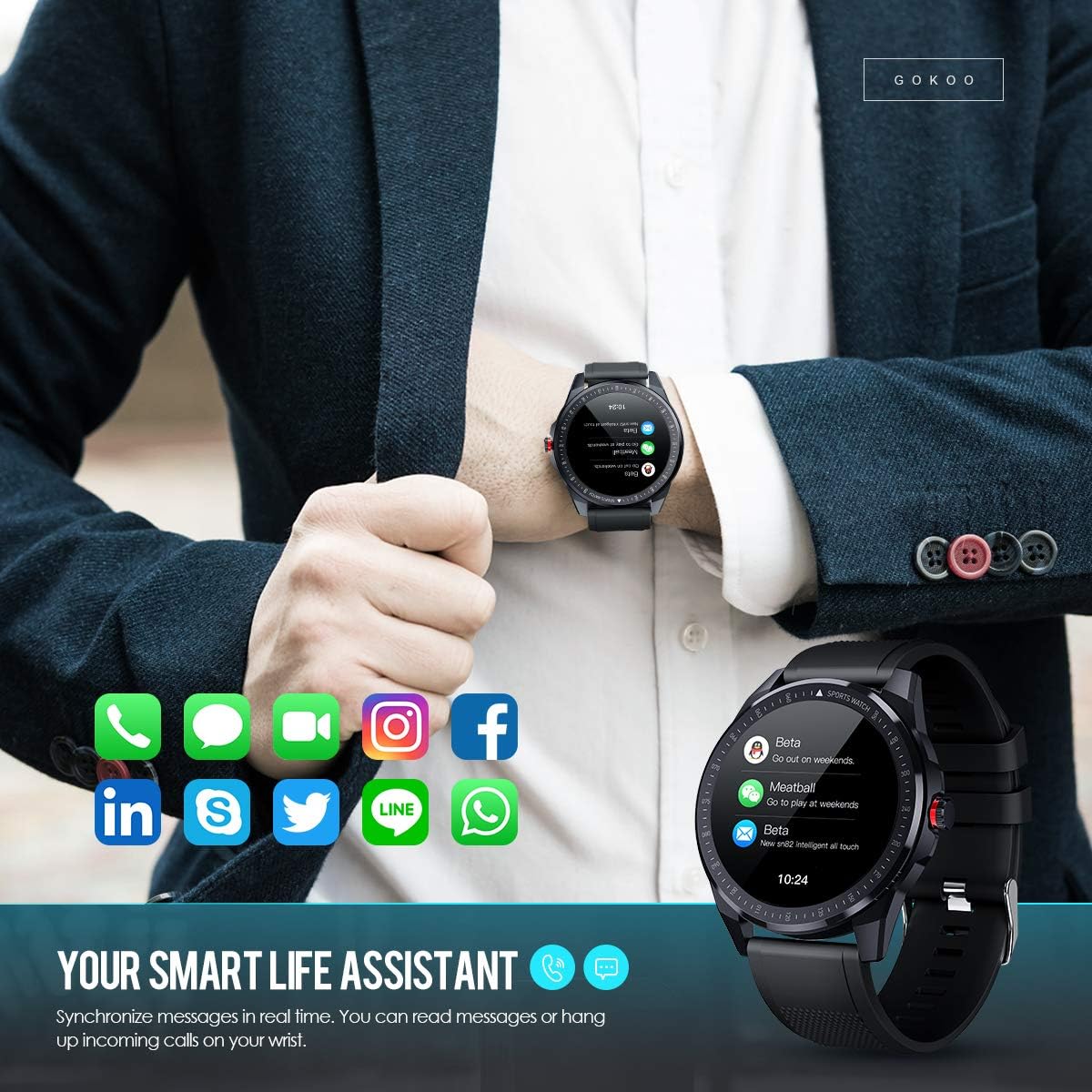
Figure 7: The watch showing synchronized notifications from a smartphone.
5. Kev hloov kho
The GOKOO Smart Watch allows for personalization of its interface. You can select from various pre-installed watch faces or download additional styles through the companion app to match your preference.
Kev tu
1. Kev ntxuav
Regularly clean your watch and strap to prevent skin irritation and maintain device hygiene. Use a soft, lint-free cloth. If necessary, slightly dampen the cloth with water. Avoid using harsh chemicals, abrasive cleaners, or aerosol sprays.
2. Cov lus qhia txog kev tiv thaiv dej
The GOKOO Smart Watch has an IP68 waterproof rating, meaning it is resistant to dust and can withstand immersion in water up to 1.5 meters for 30 minutes. It is suitable for daily use, hand washing, rain, and swimming.
Tseem ceeb: Do not use the watch in hot water baths, saunas, or during diving. High temperatures and high pressure can compromise the waterproof seals and cause damage.
3. Kev kho roj teeb
- Tsis txhob tso lub roj teeb tas li ntau zaus.
- Them lub moos siv lub xov hlau sib nqus uas muab los.
- Khaws lub moos hauv qhov chaw txias, qhuav thaum tsis siv rau lub sijhawm ntev.
Kev daws teeb meem
- Saib tsis tig rau: Xyuas kom lub moos tau them tag nrho. Txuas nws mus rau lub charger tsawg kawg 30 feeb.
- Tsis tuaj yeem ua khub nrog xov tooj:
- Xyuas kom tseeb tias Bluetooth qhib rau ntawm koj lub xov tooj.
- Xyuas kom tseeb tias lub moos nyob hauv Bluetooth nrug ntawm koj lub xov tooj.
- Rov pib dua koj lub xov tooj thiab lub moos.
- Check if the app has necessary permissions.
- Cov ntaub ntawv kho mob tsis raug: Xyuas kom tseeb tias lub moos hnav nruj rau ntawm koj lub dab teg, dav li ib tus ntiv tes saum pob txha dab teg. Ntxuav lub sensor ntawm sab nraub qaum ntawm lub moos.
- Cov ntawv ceeb toom tsis tshwm sim:
- Verify that notification permissions are granted in the app and your phone's settings.
- Xyuas kom lub moos txuas nrog ntawm Bluetooth.
- Check if 'Do Not Disturb' mode is active on either the watch or phone.
- Lub roj teeb luv luv: Reduce screen brightness, disable continuous heart rate monitoring if not needed, and limit the number of active notifications.
Specifications
| Feature | Paub meej |
|---|---|
| Hom | GOKOO |
| Qauv | B08FMBHSWD |
| Qhov Loj | 1.3 Nws |
| Kev Ua Haujlwm | Android 5.0 lossis siab dua, iOS 9.0 lossis siab dua |
| Compatible Devices | Smartphone |
| Roj teeb lub neej | Up to 10 days (depending on usage) |
| Hom roj teeb | Lithium Polymer |
| Dej tsis kam | IP68 |
| Kev sib txuas wireless | Bluetooth |
| Human Interface Input | Touchscreen |
| Khoom Dimensions | 27 x 5 x 1.08 cm; 168g ua |

Figure 8: Detailed product dimensions of the GOKOO Smart Watch.
Warranty thiab Support
For warranty information or technical support, please refer to the contact details provided with your purchase or visit the official GOKOO website. If you require a copy of this manual or have any questions regarding your GOKOO Smart Watch B08FMBHSWD, please contact customer service.
Ask a question about this manual
Ask about setup, troubleshooting, compatibility, parts, safety, or missing instructions. Manuals+ will review the question and use this page’s manual context to help answer it.