
1. Khoom Tshajview
The DROK DC Buck Converter is a high-performance, digitally controlled step-down power module designed to convert a higher DC input voltage to a lower, adjustable DC output voltage and current. It features an integrated LED display for real-time monitoring of voltage, current, capacity, and time. This module is equipped with advanced microprocessor control for precise adjustments and includes a cooling fan and heat sink for efficient thermal management.

Duab 1: Sab saum toj view of the DROK DC Buck Converter module.
2. Cov lus qhia kev nyab xeeb
Thov nyeem thiab nkag siab cov lus qhia kev nyab xeeb no ua ntej siv lub cuab yeej. Yog tsis ua raws li cov lus qhia no yuav ua rau hluav taws xob poob, hluav taws kub, lossis puas tsuaj rau cov khoom.
- Cov lus qhia Voltage: Xyuas kom cov input voltage is within the specified range of DC 10V-65V. Exceeding this range can damage the module.
- Cov zis Load: Do not exceed the maximum output current of 12A or maximum output power of 720W.
- Polarity: Always observe correct input and output polarity. Incorrect connections can cause severe damage.
- Qhov cua: Ensure adequate ventilation around the module, especially the cooling fan and heat sink, to prevent overheating.
- Ib puag ncig: Avoid operating the module in environments with high humidity, dust, or extreme temperatures.
- Kev teeb tsa: Kev teeb tsa thiab kev txuas xov hlau yuav tsum tsuas yog ua los ntawm cov neeg ua haujlwm tsim nyog xwb.
- Muab cais nyob ib leeg: Ensure the module is properly isolated from other components to prevent accidental short circuits.
3. Cov Cheebtsam Khoom thiab Daim Duab Qhia
Familiarize yourself with the main components of the DROK DC Buck Converter:

Image 2: Labeled diagram of the DROK DC Buck Converter.
- Input + / Input -: Terminals for connecting the DC power source (10V-65V).
- Output + / Output -: Terminals for connecting the load.
- Interface zaub: LED screen showing real-time voltage, current, capacity, and time.
- Txias Txias: Activates automatically to dissipate heat during operation.
- Operation Key Buttons: Used for setting output voltage, tam sim no, thiab lwm yam parameters.
- Working Status Indicators: LEDs for OUT (Output active), CV (Constant Voltage mode), and CC (Constant Current mode).
4. Cov lus qhia tshwj xeeb
| Parameter | Tus nqi |
|---|---|
| Cov lus qhia Voltage Ntau yam | DC 10V - 65V |
| Adjustable Output Voltage Ntau yam | DC 0V - 60V |
| Adjustable Output Current Range | 0A - 12A |
| Cov zis siab tshaj plaws | 720 W |
| Tso zis Voltage Kev daws teeb meem | 10mV |
| Output Current Setting Resolution | 10 mA |
| Hom Efficiency | 94% (Input 54V, Output 30V, Current 5A) |
| Voltage Display Error | ±1% + 20mV |
| Current Display Error | ±1% + 20mA |
| Teb Sijhawm | <50ms |
| Qhov Loj (L x W x H) | 104mm x 83mm x 57mm (115mm length with cooling fan) |
| Qhov hnyav | 10.8 ooj (kwv yees 306g) |
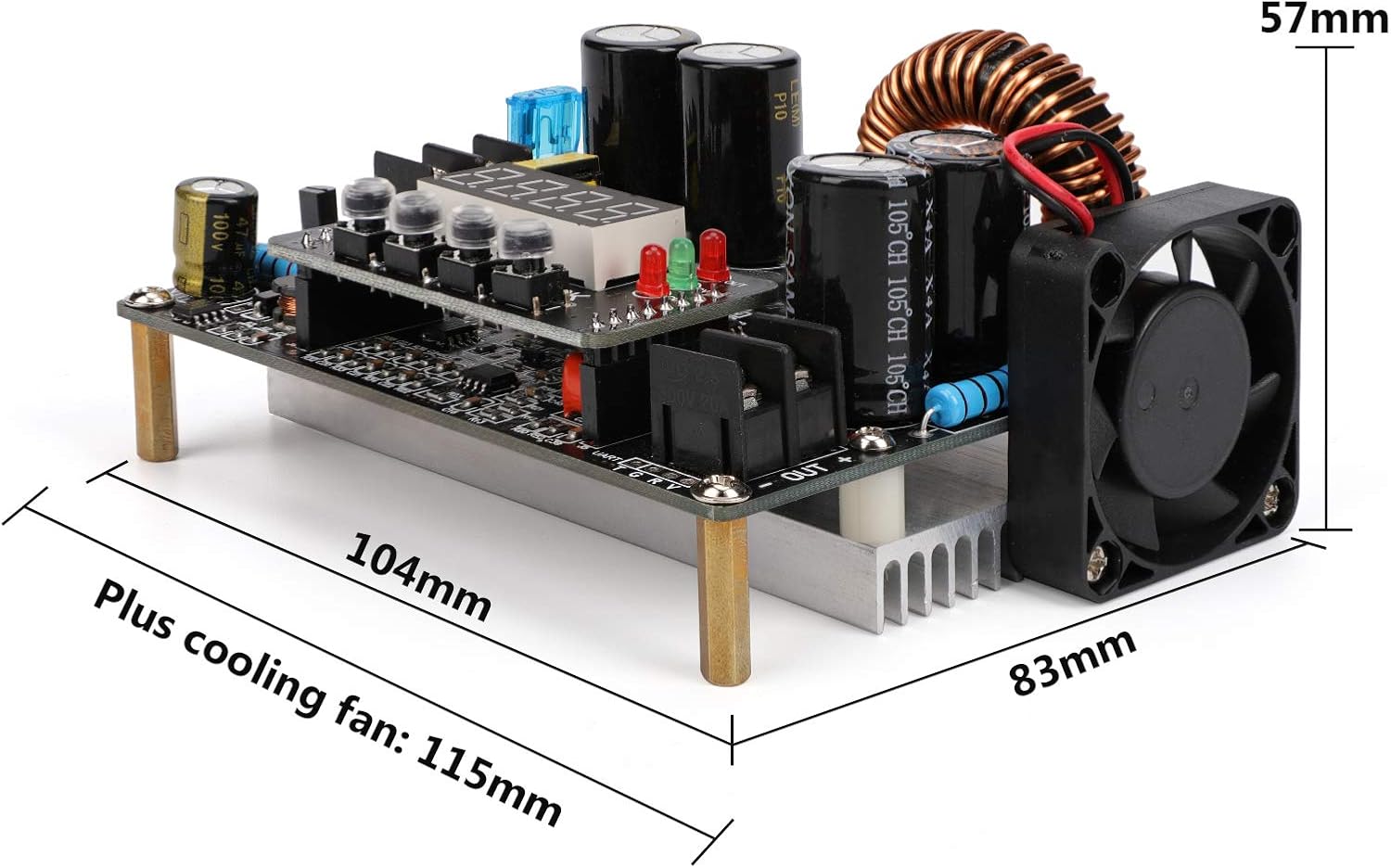
Image 3: Physical dimensions of the converter module.
5. Teeb tsa
5.1 Kev Txuas Txuas Txuas
- Input zog: Connect your DC power source (10V-65V) to the 'IN+' and 'IN-' terminals. Ensure correct polarity.
- Cov zis Load: Connect your load device to the 'OUT+' and 'OUT-' terminals. Again, verify correct polarity.
- Kev sib txuas ruaj ntseg: Ensure all wire connections are tight and secure to prevent loose contacts or short circuits.
5.2 Mounting
Mount the module in a stable location that allows for proper airflow, especially around the cooling fan and heat sink. Avoid enclosed spaces that could lead to heat buildup.

Image 4: Cooling fan and cooling pad for thermal management.
6. Cov lus qhia ua haujlwm
6.1 Lub Zog Rau
Once wired correctly, apply power to the input terminals. The LED display will illuminate, showing the current output voltage or other default parameters.
6.2 Adjusting Output Voltage thiab tam sim no
The module features operation key buttons for precise adjustment:
- Voltage Kev teeb tsa: Press the 'SET' button to enter voltage adjustment mode. Use the adjustment buttons (usually up/down arrows or rotary encoder, if present) to increase or decrease the voltage value. Press 'OK' to confirm and save the setting.
- Kev teeb tsa tam sim no: Similarly, press 'SET' to cycle to current adjustment mode. Adjust the current value using the appropriate buttons and confirm with 'OK'.
- Cov Zaub Mov Tiag Tiag: The LED display shows real-time output voltage and current. It can also display capacity and time, which can be cycled through using the buttons.
6.3 Cov cim xwm txheej
The module includes LED indicators to show its operating status:
- Tawm: Illuminates when the output is active.
- CV (Constant Voltage): Illuminates when the module is operating in constant voltagua mod.
- CC (Constant Current): Illuminates when the module is operating in constant current mode.
6.4 Advanced Features
- Automatic Output: The module can be configured to automatically enable output upon power input. Refer to the specific button sequence for this setting.
- Khawm xauv hom: To prevent accidental changes to settings, the parameter adjustment buttons can be locked. Consult the device's specific button combination for this function.
7. Kev tu
Regular maintenance ensures optimal performance and longevity of your DROK DC Buck Converter:
- Ntxuav: Khaws lub module kom huv si thiab tsis muaj hmoov av thiab cov khib nyiab. Siv daim ntaub mos mos thiab qhuav los ntxuav. Tsis txhob siv cov kua ntxuav.
- Cooling System: Periodically check that the cooling fan and heat sink fins are free from obstructions to ensure efficient heat dissipation.
- Kev sib txuas: Regularly inspect all input and output wiring connections for tightness and signs of wear or corrosion.
- Cia: When not in use for extended periods, store the module in a dry, cool, and dust-free environment.
8. Kev daws teeb meem
If you encounter issues with your DROK DC Buck Converter, refer to the following common problems and solutions:
| Teeb meem | Ua Tau | Kev daws |
|---|---|---|
| No display / No power | No input power; Incorrect input polarity; Loose connections. | Check input power source; Verify input wiring polarity; Secure all connections. |
| Tsis tso zis voltage/tam sim no | Output disabled; Output short circuit; Overload protection activated; Incorrect output settings. | Ensure output is enabled; Check load for short circuits; Reduce load; Verify output voltage/kev teeb tsa tam sim no. |
| Tso zis voltage/current unstable | Input power fluctuation; Loose connections; Overheating. | Use a stable input power source; Check all wiring; Ensure proper ventilation and cooling. |
| Module overheating | Insufficient ventilation; Cooling fan obstructed or faulty; Exceeding power limits. | Ensure clear airflow; Clean fan/heat sink; Reduce load to stay within specifications. |
| Zaub yuam kev | Measurement error within specified tolerance; Internal fault. | Note the specified error margin; If persistent and significant, contact support. |
9. Warranty thiab Support
DROK products are designed for reliability and performance. For technical assistance, warranty claims, or any questions regarding your DC Buck Converter, please contact DROK customer service through the retailer where you purchased the product or visit the official DROK website rau cov ntaub ntawv txhawb nqa.