
1. Taw qhia
The VEDINDUST HDMI Audio Embedder (Model CHD801) is designed to integrate external audio into an HDMI video signal. This device allows you to replace the original HDMI audio with digital optical (TOSLINK/SPDIF) or analog (3.5mm line) audio sources. It supports high-resolution video up to 4K@60Hz with 18Gbps bandwidth, HDR, CEC, and HDCP2.2/1.4 pass-through. This manual provides detailed instructions for setup, operation, and troubleshooting to ensure optimal performance.
2. Nta
- Digital/Analog Audio to HDMI Embedding: Replaces the original HDMI audio with external digital optical (TOSLINK/SPDIF) or analog (3.5mm line) audio.
- Kev them nyiaj yug siab: Supports video resolutions up to 4K@60Hz 4:4:4 with 18Gbps bandwidth. Also compatible with 1080p and 720p.
- Advanced Video Nta: Supports HDMI2.0, 10-bit High Dynamic Range (HDR), HDCP 2.2/1.4, and CEC pass-through.
- Suab Format Compatibility: HDMI port passes through all digital/analog audio formats including PCM, LPCM. Optical audio input supports various digital formats. 3.5mm audio input supports 2-channel stereo PCM audio.
- DVI to HDMI Conversion: Supports combining DVI signals with audio signals into HDMI signals using DVI to HDMI cables.
- Plug thiab Ua Si: No software installation required for operation.
3. Cov ntsiab lus ntawm pob
Thov xyuas kom meej tias txhua yam khoom teev hauv qab no suav nrog hauv koj pob:
- VEDINDUST HDMI Audio Embedder Unit (Model CHD801)
- Micro USB Fais Fab Cable
- Cov neeg siv phau ntawv
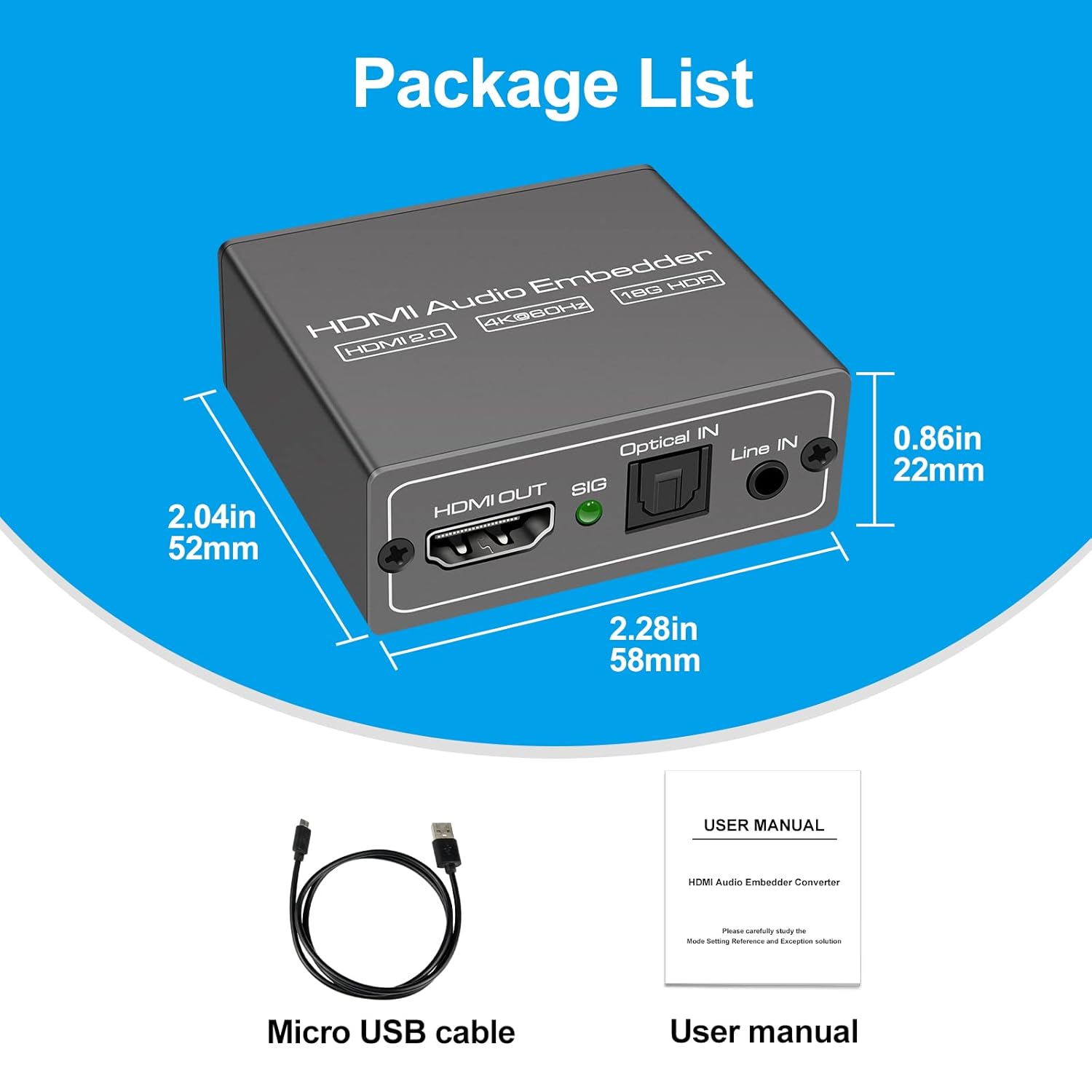
This image displays the items included in the product package: the VEDINDUST HDMI Audio Embedder unit, a Micro USB power cable, and the user manual.
4. Khoom Tshajview thiab Ports
Paub koj tus kheej nrog cov chaw nres nkoj thiab kev tswj hwm ntawm lub cuab yeej:

This close-up shows the mode switch on the device, allowing selection between 'Optical' audio input, 'Line' (3.5mm) audio input, or 'Pass' through mode for original HDMI audio.

This image details the audio output and input ports: HDMI OUT, Optical IN (TOSLINK), and 3.5mm Line IN, along with the signal indicator light.
- HDMI Hauv: Connect your HDMI video source (e.g., laptop, TV box, game console).
- HDMI TAM SIM NO: Connect to your display device (e.g., TV, projector).
- Optical IN: Connect your digital optical audio source (TOSLINK/SPDIF).
- Line IN: Connect your analog 3.5mm audio source.
- USB 5V (PW): Connect the Micro USB power cable to a 5V power adapter (not included) or a USB port on your display device.
- Hloov hom: Selects the desired audio input mode (Pass, Optical, or Line).
- SIG Indicator: Lights up when a signal is detected.
5. Teeb tsa
Follow these steps to set up your HDMI Audio Embedder:
- Connect your HDMI video source (e.g., laptop, TV box, PS4, Blu-Ray DVD player) to the HDMI UA port on the embedder using an HDMI cable.
- Connect your display device (e.g., HD TV, projector) to the HDMI OUT port on the embedder using an HDMI cable.
- Connect your external audio source to either the Kho qhov muag IN port (for digital audio) or the Kab IN (3.5mm) port (for analog audio), depending on your desired audio input.
- Connect the provided Micro USB power cable to the USB 5V (PW) port on the embedder and then to a 5V power source.
- Select the appropriate audio input mode using the Hom Hloov Mus on the device (refer to Section 6: Operating Modes).
- Ensure all connections are secure and power on all connected devices.

This diagram shows how to connect various devices to the HDMI Audio Embedder. HDMI sources (laptop, TV box, PS4, Blu-Ray DVD) connect to the HDMI IN. External audio sources (3.5mm or optical) connect to their respective inputs. The HDMI OUT connects to a display device like a projector or HD TV.
6. Hom kev ua haujlwm
The HDMI Audio Embedder features a mode switch to select how audio is handled:
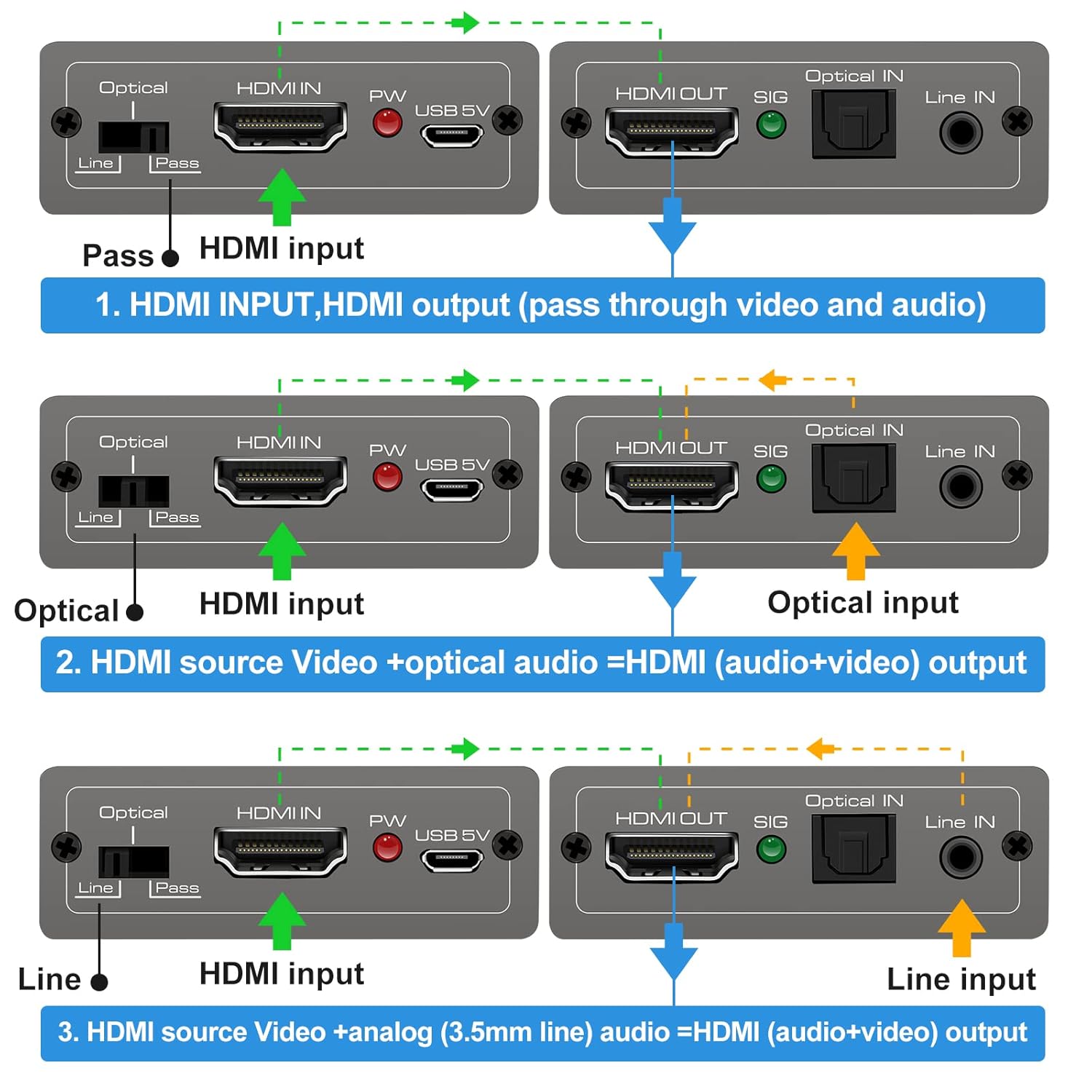
This diagram illustrates the three operational modes: 1. Pass Mode: HDMI input video and audio pass directly to HDMI output. 2. Optical Mode: HDMI input video combines with optical audio input for HDMI output. 3. Line Mode: HDMI input video combines with 3.5mm line audio input for HDMI output.
- Pass Hom: In this mode, the original HDMI audio from your source device is passed through directly to the HDMI output, along with the video signal. No external audio is embedded.
- Optical Hom: When selected, the HDMI video signal from your source is combined with the audio signal received from the Kho qhov muag IN port. The embedded audio is then sent to the HDMI output.
- Kab hom: When selected, the HDMI video signal from your source is combined with the audio signal received from the Kab IN (3.5mm) port. The embedded audio is then sent to the HDMI output.
To change modes, simply slide the switch to the desired position. The device will automatically adjust the audio routing.
7. Cov lus qhia tshwj xeeb
Technical specifications for the VEDINDUST HDMI Audio Embedder:
- Qauv: CHD 801
- HDMI Version: HDMI 2.0
- HDCP Version: HDCP 2.2 / 1.4
- Video daws teeb meem: Up to 4K@60Hz (YUV 4:4:4)
- Bandwidth: 18gbps ua
- Kev them nyiaj yug HDR: 10-bit HDR
- Kev them nyiaj yug CEC: Hla dhau
- Audio Input (Digital): Optical (TOSLINK/SPDIF)
- Audio Input (Analog): 3.5mm Line In (2-channel stereo PCM)
- Audio Output: HDMI (embedded audio)
- Fais fab mov: DC 5V (via Micro USB)
- Qhov Loj: 10.16 x 5.18 x 2.18 cm (4.0 x 2.04 x 0.86 nti)
- Qhov hnyav: 110 g (3.88 ooj)
- Chaw tsim tshuaj paus: VEDIDUST
- UPC: 798610311141

This image highlights the device's capability to support high-resolution video, up to 4K at 60Hz, ensuring clear and detailed visuals.
8. Kev daws teeb meem
If you encounter issues with your HDMI Audio Embedder, please refer to the following common troubleshooting steps:
- Tsis muaj Video tso zis:
- Xyuas kom tag nrho cov HDMI cables ruaj ntseg txuas.
- Verify the power adapter is connected and the device is receiving power.
- Try connecting the HDMI source directly to the display to confirm the source and display are working correctly.
- Check if the display's input source is correctly selected.
- No Audio Output / Incorrect Audio:
- Ensure the correct audio input mode (Pass, Optical, or Line) is selected on the embedder's switch.
- Verify that the external audio source is properly connected and producing sound.
- Check the volume levels on both your audio source and display device.
- If using Optical or 3.5mm input, ensure the cables are fully inserted and not damaged.
- Some audio formats may not be supported by all devices. Try adjusting the audio output format on your source device.
- Lub Teeb Liab Tsis Tu Ncua:
- Use high-quality HDMI cables, especially for 4K resolutions.
- Ensure the power supply is stable and sufficient (5V).
- Avoid excessive cable lengths.
Yog tias qhov teeb meem tshwm sim tom qab sim cov kauj ruam no, thov hu rau cov neeg siv khoom txhawb nqa.
9. Kev tu
To ensure the longevity and optimal performance of your HDMI Audio Embedder, follow these maintenance guidelines:
- Ntxuav: Siv ib daim ntaub mos, qhuav los ntxuav lub cuab yeej. Tsis txhob siv cov tshuaj ntxuav kua los yog aerosols.
- Ib puag ncig: Khaws cov khoom siv no rau qhov chaw txias thiab qhuav, kom deb ntawm tshav ntuj ncaj qha, qhov chaw kub, thiab dej noo.
- Kev tuav: Tsis txhob tso tseg lossis ua rau lub cuab yeej raug cuam tshuam.
- Qhov cua: Ensure proper airflow around the device to prevent overheating.
- Lub zog: Disconnect the power supply when the device is not in use for extended periods.
10. Warranty thiab Support
VEDINDUST products are designed for reliability and performance. For information regarding warranty coverage, technical support, or service, please refer to the warranty card included with your product or visit the official VEDINDUST website. Please have your model number (CHD801) and purchase information ready when contacting support.