
1. Khoom Tshajview
The Oladance OWS1 Open Ear Headphones offer a unique open-ear design for comfort and situational awareness. These wireless Bluetooth 5.2 headphones feature dual 16.5mm drivers for high-quality sound and extended battery life, making them suitable for various activities.
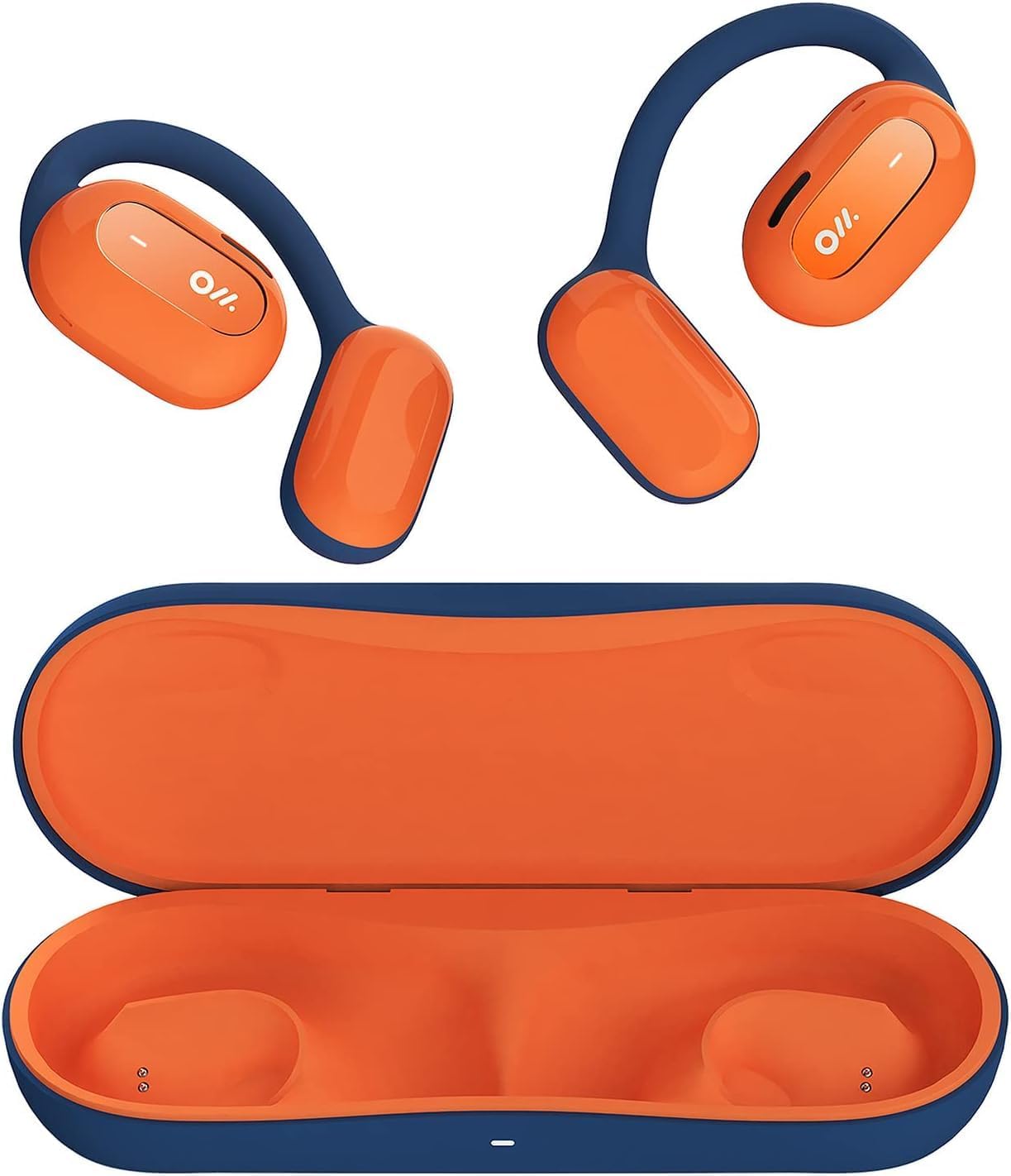
Image 1: Oladance OWS1 Open Ear Headphones and their carry case.
2. Dab tsi hauv lub thawv
- 1 × Oladance Wearable Stereo (Pair of Open Ear Headphones)
- 1 × Non-charging Carry Case
- 1 × Hom-C Cable
- 1 × Tus neeg siv phau ntawv
3. Cov yam ntxwv tseem ceeb
- True Open Ear Design: Earbuds rest gently on top of the ear, avoiding insertion into the ear canal for enhanced comfort and situational awareness.
- 360° Superior Sound: Equipped with dual powerful 16.5mm dynamic drivers and bio-diaphragm technology for rich, clear audio across all volume levels.
- Anti-Hearing Loss Focus: Designed to prevent common health issues associated with traditional earbuds by not blocking the ear canal, reducing pressure and potential hearing damage.
- Extended 16-Hour Playtime: Features a built-in 160mAh battery and low-consumption algorithms, providing up to 16 hours of continuous playback on a single charge. Note: A separate charging case is required for extended playtime beyond the included carry case.
- Kev ruaj ntseg thiab xis nyob haum: Multi-point support system distributes weight evenly across the ear, ensuring a stable and comfortable fit for various activities.

Image 2: The Oladance OWS1 headphones are designed for a secure and comfortable fit, ideal for activities like yoga.
4. Teeb Qhia
4.1 Pib Them Nqi
Before first use, fully charge your Oladance OWS1 headphones. Connect the provided Type-C cable to the charging port on the headphones and a compatible USB power source. The LED indicator will show charging status.
4.2 Hwj chim Rau/Tawm
- Txhawm rau Fais Fab: Press and hold the power button (location typically on one of the earbud units) for approximately 2-3 seconds until you hear an audible prompt or see an LED indicator light up.
- Mus Faib Tawm: Press and hold the power button for approximately 3-5 seconds until you hear an audible prompt or the LED indicator turns off.
4.3 Bluetooth Pairing
- Xyuas kom tseeb tias lub mloog pob ntseg raug kaw.
- Press and hold the power button for approximately 5-7 seconds until the LED indicator flashes red and blue alternately. This indicates the headphones are in pairing mode.
- Ntawm koj lub cuab yeej (smartphone, ntsiav tshuaj, computer), mus rau Bluetooth nqis.
- Nrhiav rau "Oladance OWS1" in the list of available devices.
- Select "Oladance OWS1" to connect. Once connected, the LED indicator will typically flash blue slowly or turn off, and you will hear a confirmation tone.

Image 3: The Oladance OWS1 headphones are designed for an ergonomic and stable fit during various activities.
5. Cov lus qhia ua haujlwm
5.1 Basic Controls
| Muaj nuj nqi | Kev ua |
|---|---|
| Ua si/Pause Music | Nias ib zaug xwb rau lub pob Multi-function. |
| Next Track | Nias ob lub pob Multi-function. |
| Yav dhau los Track | Triple press the Multi-function button. |
| Volume Up | Single press the Volume + button. |
| Volume Down | Single press the Volume - button. |
| Teb / Xaus Hu | Single press the Multi-function button during an incoming call or active call. |
| Tsis kam hu | Nias thiab tuav lub pob Multi-function rau 2 vib nas this thaum lub sijhawm hu xov tooj tuaj. |
| Qhib Lub Suab Assistant | Nias thiab tuav lub Multi-function khawm rau 2 vib nas this. |
5.2 Multi-Point Kev Txuas
The Oladance OWS1 headphones support multi-point connection, allowing them to be connected to two Bluetooth devices simultaneously. This enables seamless switching between devices without re-pairing.
- Ensure the headphones are paired with the first device.
- Put the headphones into pairing mode again (usually by holding the power button until the LED flashes red and blue).
- On the second device, search for "Oladance OWS1" in the Bluetooth settings and connect.
- The headphones should now be connected to both devices. Audio will automatically switch to the device playing content or receiving a call.

Image 4: The open-ear design allows for comfortable extended wear, even during work or calls.
6. Kev saib xyuas thiab tu
- Ntxuav: Siv daim ntaub mos mos thiab qhuav los so lub mloog pob ntseg. Tsis txhob siv cov tshuaj lom neeg lossis cov khoom siv uas ua rau tawv.
- Cia: Store the headphones in their provided non-charging carry case when not in use to protect them from dust and damage.
- Dej tsis kam: The headphones are water-resistant (IPX4 rated). Avoid submerging them in water or exposing them to high-pressure water jets. Dry thoroughly if they get wet.
- Kub: Tsis txhob muab lub mloog pob ntseg tso rau qhov kub thiab txias heev (kub lossis txias) lossis av noo heev.

Image 5: The included carry case protects your Oladance OWS1 headphones during transport and storage.
7. Kev daws teeb meem
- Ua tsis tau Power On
- Ensure the headphones are fully charged. Connect them to a power source using the Type-C cable.
- Ua tsis tau Pair nrog Device
- Xyuas kom tseeb tias lub mloog pob ntseg nyob rau hauv hom kev sib txuas (LED ntsais liab thiab xiav).
- Tua tawm thiab ntawm koj lub cuab yeej Bluetooth.
- Clear yav dhau los kev sib txuas Bluetooth ntawm koj lub cuab yeej.
- Txav lub mloog pob ntseg kom ze rau koj lub cuab yeej.
- Tsis muaj suab lossis suab qis
- Tshawb xyuas cov theem ntim ntawm ob lub mloog pob ntseg thiab koj lub cuab yeej txuas nrog.
- Xyuas kom lub mloog pob ntseg txuas nrog koj lub cuab yeej zoo.
- Sim ua suab los ntawm lwm daim ntawv thov lossis qhov chaw.
- Kev sib txuas sib txuas
- Xyuas kom meej tias tsis muaj kev cuam tshuam ntawm lub mloog pob ntseg thiab koj lub cuab yeej.
- Tsis txhob muaj zog electromagnetic cuam tshuam.
- Keep the headphones within the effective Bluetooth range (typically 10 meters).
8. Khoom Specifications
| Feature | Paub meej |
|---|---|
| Qauv nab npawb | OLA02 |
| Hom | Oladance |
| Connectivity Technology | Wireless (Bluetooth 5.2) |
| Pob ntseg tso | Qhib pob ntseg |
| Form Factor | Qhib pob ntseg |
| Tus Tsav Tsheb Loj | Dual 16.5mm Dynamic Drivers |
| Roj teeb lub neej (nruab nrab) | Mus txog 16 Teev |
| Them sij hawm | Kwv yees li 2 teev |
| Dej Resistance Level | Dej tsis kam (IPX4) |
| Microphone Format | Ua-hauv |
| Tswj hom | Kev Tswj Xyuas Xov Xwm (Khawm) |
| Khoom siv | Yas |
| Khoom Dimensions | 13 x 11 x 457.2 cm |
| Yam Nyhav | 260 g ib |

Image 6: A close-up of the Oladance OWS1 headphones, highlighting their design and color.
9. Warranty thiab Support
Oladance products are covered by a limited warranty. For detailed warranty information, product support, or service inquiries, please refer to the official Oladance website lossis tiv tauj lawv cov neeg siv khoom ncaj qha. Khaws koj cov ntaub ntawv pov thawj ntawm kev yuav khoom rau kev lees paub.
Yog xav paub ntxiv, thov mus saib: www.oladance.com