
1. Taw qhia
Thank you for choosing the Pantum BP5100DN Monochrome Laser Printer. This manual provides essential information for the safe and efficient use of your printer. Please read it thoroughly before operating the device and keep it for future reference.
The Pantum BP5100DN is designed for high-speed, high-quality monochrome printing, featuring automatic two-sided printing and versatile connectivity options including USB and Ethernet.
2. Cov ntaub ntawv kev nyab xeeb
- Muab lub tshuab luam ntawv tso rau ntawm qhov chaw ruaj khov thiab tiaj tus.
- Ensure proper ventilation around the printer to prevent overheating.
- Tsis txhob tso lub tshuab luam ntawv rau hauv dej los yog cov av noo ntau dhau.
- Use only the specified power supply and connect to a grounded outlet.
- Khaws ob txhais tes thiab xoob khaub ncaws kom deb ntawm qhov chaw txav thaum ua haujlwm.
- Avoid touching the fuser unit, as it can be very hot.
- Do not attempt to service the printer yourself. Refer to qualified service personnel.
3. Dab tsi hauv lub thawv
Xyuas kom tseeb tias txhua yam khoom teev hauv qab no suav nrog hauv koj pob:
- Pantum BP5100DN Monochrome Laser Printer
- Fais fab qaum
- USB interface cable
- Kev qhia ceev ceev
- Starter cartridge (3000 pages)
- Starter drum (30000 pages)

Figure 3.1: Package Contents. This image displays the Pantum BP5100DN printer along with its accessories: power cord, USB interface cable, quick setup guide, starter toner cartridge, and starter drum unit.
4. Khoom Tshajview
4.1. Printer Components
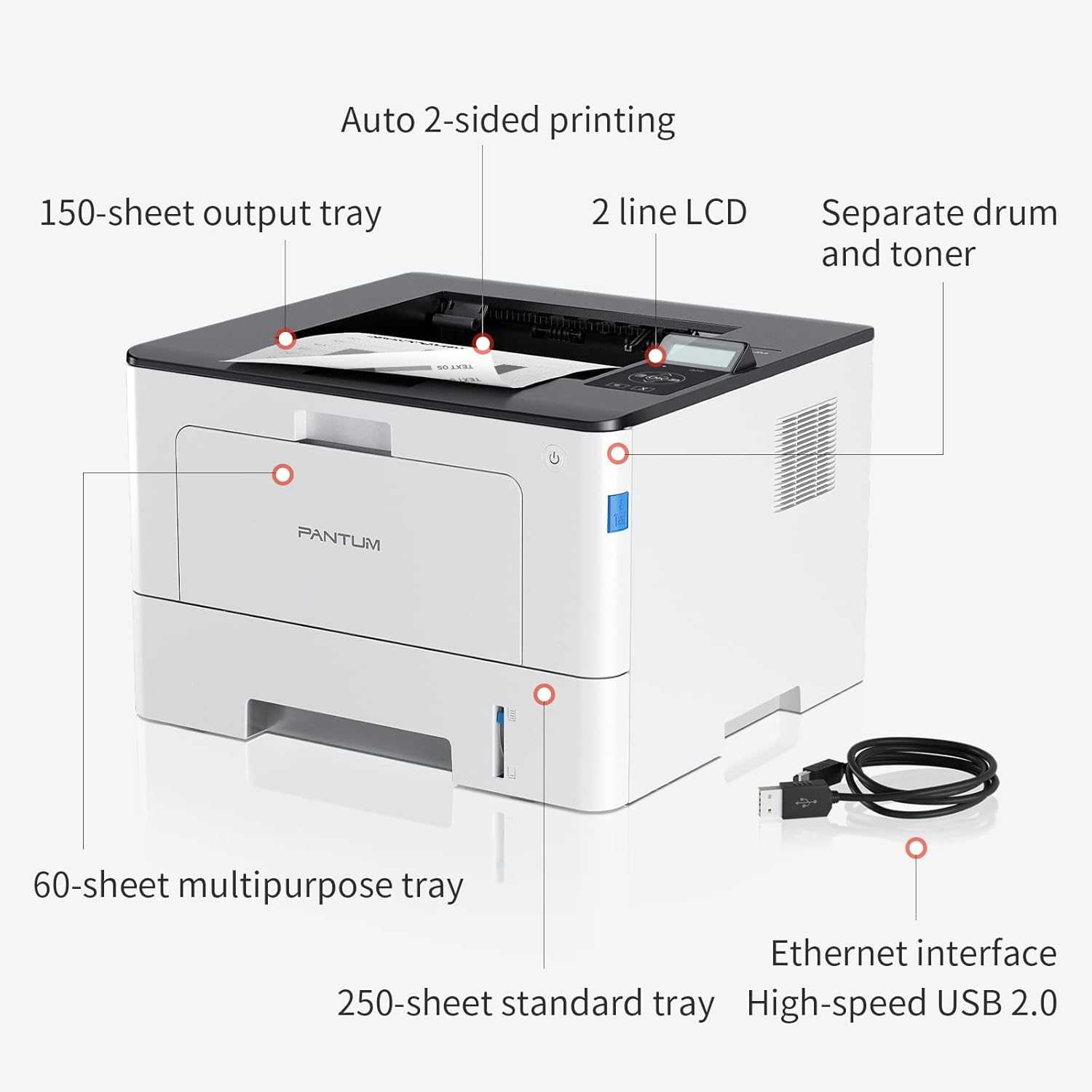
Figure 4.1: Printer Components. Key features include a 150-sheet output tray, a 2-line LCD display, separate drum and toner units, a 60-sheet multipurpose tray, a 250-sheet standard tray, an Ethernet interface, and a High-speed USB 2.0 port.
4.2. Qhov ntev

Figure 4.2: Printer Dimensions. The printer measures approximately 14.33 inches (W) x 10.12 inches (H) x 13.54 inches (D).
4.3. Tswj vaj huam sib luag

Figure 4.3: Control Panel. The control panel includes a 2-line LCD display for status messages and menu navigation, along with buttons for OK, arrow controls, and cancel functions.
5. Teeb tsa
5.1. Tshem tawm thiab tso
- Ua tib zoo tshem lub tshuab luam ntawv los ntawm nws lub ntim.
- Tshem tawm tag nrho cov ntaub nplaum tiv thaiv thiab cov ntaub ntim khoom ntawm lub tshuab luam ntawv.
- Place the printer on a firm, level surface with adequate space for ventilation.
5.2. Toner and Drum Installation
- Qhib lub hau ntej ntawm lub tshuab luam ntawv.
- Unpack the drum unit and toner cartridge.
- Insert the toner cartridge into the drum unit until it clicks into place.
- Insert the combined drum and toner unit into the printer.
- Kaw lub hau ntej.
5.3. Daim ntawv Loading
- Pull out the standard paper tray or open the multipurpose tray.
- Adjust the paper guides to the size of your paper.
- Load paper into the tray, ensuring it is flat and not exceeding the maximum capacity (250 sheets for standard tray, 60 sheets for multipurpose tray).
- Kaw lub tais ntawv.
5.4. Power and Connectivity
- Txuas lub hwj huam qaum rau lub tshuab luam ntawv thiab tom qab ntawd mus rau lub qhov hluav taws xob hauv av.
- For USB connection: Connect the provided USB 2.0 cable from the printer to your computer.
- For Ethernet connection: Connect an Ethernet cable from the printer to your network router or switch.
- Nias lub hwj huam khawm kom qhib lub tshuab luam ntawv.
6. Cov lus qhia ua haujlwm
6.1. Kev teeb tsa tsav tsheb
For optimal performance, install the printer drivers from the official Pantum website or the provided installation media. The printer supports easy one-step installation for quick setup.
6.2. Printing a Document
- Qhib cov ntaub ntawv koj xav luam tawm ntawm koj lub computer lossis mobile ntaus ntawv.
- Xaiv qhov kev xaiv luam ntawv los ntawm koj daim ntawv thov.
- Choose the Pantum BP5100DN from the list of available printers.
- Kho qhov chaw luam ntawv raws li qhov xav tau (piv txwv li, tus naj npawb ntawm cov ntawv theej, qhov loj ntawm daim ntawv, kev luam ntawv ob sab).
- Nyem 'Luam Tawm'.
The printer offers fast printing speeds of up to 40 pages per minute (A4) / 42 pages per minute (Letter) in black and white. It also supports automatic two-sided printing to save paper.
6.3. Kev Luam Ntawv Xov Tooj
The Pantum BP5100DN supports direct printing of office documents from mobile devices. Ensure your mobile device and printer are connected to the same network or via USB OTG (if supported by your device and printer).
7. Kev tu
7.1. Replacing Toner Cartridge and Drum Unit
When the toner is low or the drum unit reaches its end of life, the printer's display will show a message. Refer to the instructions provided with the replacement consumables for proper installation. The starter toner cartridge yields approximately 3000 pages, and the starter drum unit yields approximately 30000 pages.
7.2. Ntxuav lub tshuab luam ntawv
- Turn off the printer and unplug the power cord before cleaning.
- So sab nrauv ntawm lub tshuab luam ntawv nrog ib daim ntaub mos, tsis muaj lint.
- Use a dry cloth to clean the paper path and rollers if paper jams occur frequently.
- Tsis txhob siv cov tshuaj abrasive los yog cov kuab tshuaj.
8. Kev daws teeb meem
If you encounter issues with your printer, refer to the following common solutions:
- Lub tshuab luam ntawv tsis teb: Tshawb xyuas kev sib txuas fais fab, USB / Ethernet cable txuas, thiab xyuas kom lub tshuab luam ntawv qhib. Rov pib dua ob lub tshuab luam ntawv thiab koj lub computer.
- Ntawv Jams: Open all covers and carefully remove any jammed paper. Ensure paper is loaded correctly and not creased or damaged.
- Tsis zoo luam ntawv: Check toner levels. If print quality is faded, especially with cut and paste text, ensure you are using the correct print settings and consider replacing the toner cartridge or drum unit if they are near end-of-life.
- Cov teeb meem kev sib txuas: For Ethernet, verify network cable connection and IP address settings. For USB, try a different USB port or cable.
- Cov lus yuam kev: Consult the printer's display for specific error codes and refer to the quick setup guide or online support for detailed solutions.
For persistent issues, please contact customer service for support.
9. Cov lus qhia tshwj xeeb
| Feature | Specification |
|---|---|
| Qauv Lub Npe | BP5100DN |
| Tshuab luam ntawv | Laser |
| Lub tshuab luam ntawv tso zis | Monochrome |
| Max Print Speed (Monochrome) | 40 ppm (A4) / 42 ppm (Letter) |
| Maximum Print Resolution | 1200 x 1200 dpi |
| Dual-sided Printing | Yog (Automatic) |
| Connectivity Technology | Ethernet, USB 2.0 |
| Max Input Sheet Muaj peev xwm | 250 sheets (Standard Tray), 60 sheets (Multipurpose Tray) |
| Sau Media | Ntawv (dawb) |
| Daim Ntawv Loj | A4, Letter, etc. |
| Compatible Devices | Smartphones, PCs |
| Wattage | 650 Watts |
| Yam Nyhav | 9.07 kg (approx. 9 kg 70 g) |
| Chaw tsim tshuaj paus | Pantum |
10. Warranty thiab Support
The Pantum BP5100DN Monochrome Laser Printer comes with a 1-year warranty from the date of purchase. For warranty claims, technical support, or any inquiries, please refer to the contact information provided in your quick setup guide or visit the official Pantum webqhov chaw.
For a better experience, please kindly refer to the user manual or contact customer service for support.