
1. Khoom Tshajview
The Nuvance K22 Outdoor Smartwatch is a versatile and robust device designed for daily use and outdoor activities. It features a 45mm touch screen, IP67 waterproof rating, and is compatible with both Android and iOS devices. This manual provides detailed instructions on how to set up, operate, and maintain your smartwatch to ensure optimal performance.

Duab 1.1: Pem hauv ntej view of the Nuvance K22 Outdoor Smartwatch, showcasing nws cov qauv tsim rugged thiab cov zaub digital.
2. Cov yam ntxwv tseem ceeb
- Multi-Sport Hom: Track 8 different activities including hiking, running, cycling, yoga, and more.
- Kev Saib Xyuas Kev Noj Qab Haus Huv: Accurate heart rate, blood pressure, SpO2 (blood oxygen saturation), and sleep monitoring.
- Kev Ua Haujlwm Saib Xyuas: Integrated pedometer, calorie counter, and distance tracker.
- Kev sib txuas lus: Call function, alarm, and notifications for messages and social media.
- Durability: IP67 tsis muaj dej casing (not suitable for swimming/showering), shatterproof case, and hardened glass.
- Yooj yim: Music control, remote camera activation, and current weather information.
- Lub neej roj teeb ntev: Up to 15 days of active use and 30 days in standby mode.

Duab 2.1: Visual representation of the smartwatch's robust features, including its durable casing, hardened glass, and water/dust resistance, making it suitable for outdoor use.
3. Pib
3.1 Ntim Cov Ntsiab Lus
Thov kos lub pob rau cov khoom hauv qab no:
- Nuvance K22 Smartwatch
- Charge Cable
- Tus Neeg Siv Los Siv (cov ntawv no)
3.2 Them lub Smartwatch
Before first use, fully charge your smartwatch. Connect the charging cable to the charging port on the back of the watch and plug the USB end into a power adapter (not included) or a computer's USB port. A full charge takes approximately 2.5 hours.
3.3 App Installation thiab Pairing
To unlock the full potential of your Nuvance K22 Smartwatch, you need to download and install the corresponding application on your smartphone. The smartwatch is compatible with Android 4.4 or higher and iOS 8.0 or higher.
- Scan the QR code in the manual or search for the app name (usually mentioned in the quick start guide or on the watch screen) in your phone's app store (Google Play Store for Android, Apple App Store for iOS).
- Download tau thiab nruab daim ntawv thov.
- Qhib Bluetooth ntawm koj lub smartphone.
- Open the app and follow the on-screen instructions to pair your smartwatch. Ensure the smartwatch is powered on and near your phone during the pairing process.
- Once paired, you can access clear statistics of your activities and customize watch settings through the app.
4. Siv Koj Lub Smartwatch
4.1 Kev Taw Qhia thiab Kev Sib Txuas Lus
The Nuvance K22 Smartwatch features a full touch screen for easy navigation. Swipe left, right, up, or down to access different functions and menus. Press the side buttons for specific actions like power on/off or returning to the home screen.
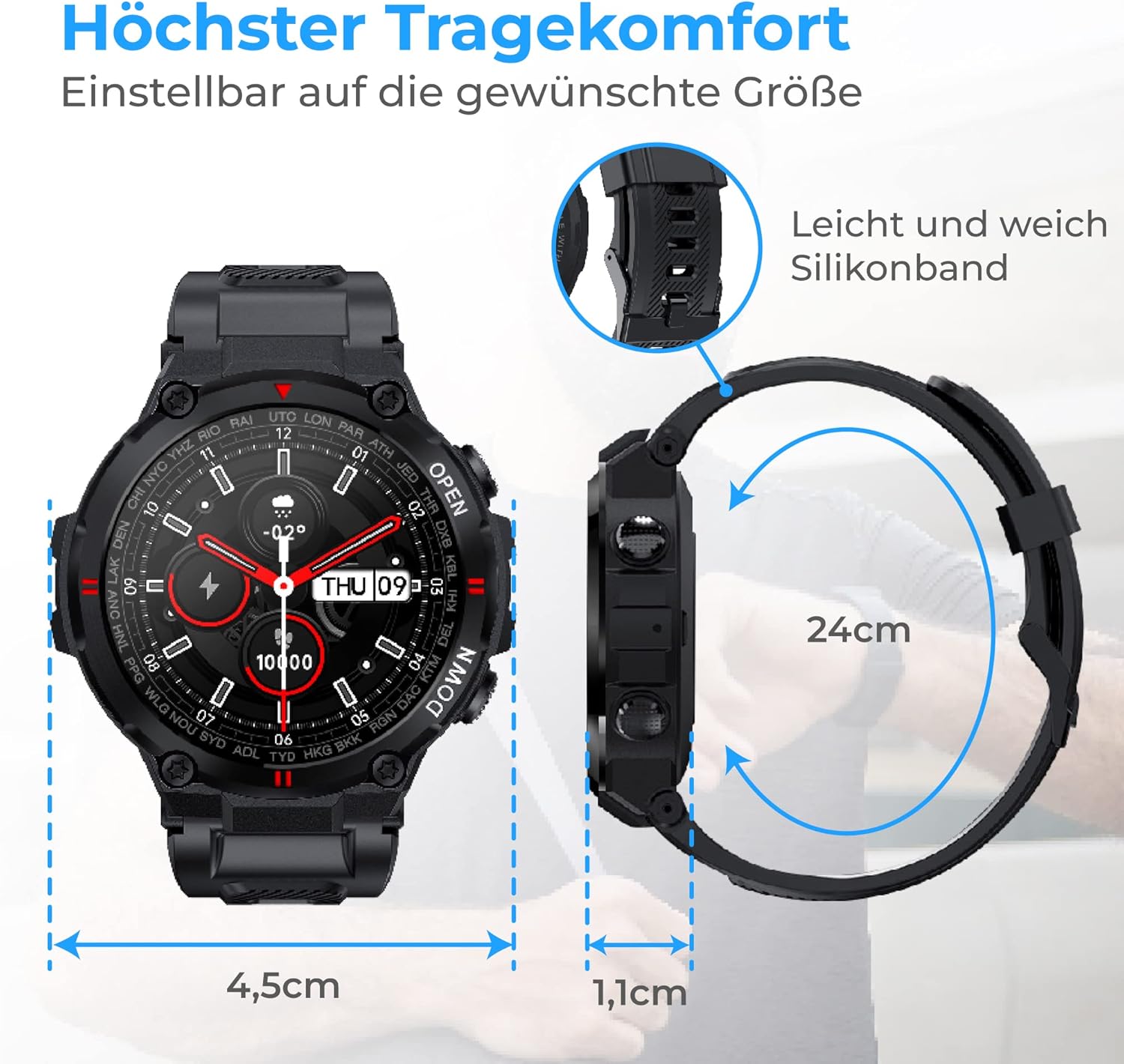
Duab 4.1: The smartwatch dimensions (4.5cm width, 1.1cm thickness) and the flexible 24cm silicone band, designed for maximum wearing comfort.
4.2 Hu rau Functionality
With the integrated call function, you can make calls directly from your smartwatch or record incoming calls. The watch features a speaker for clear audio.
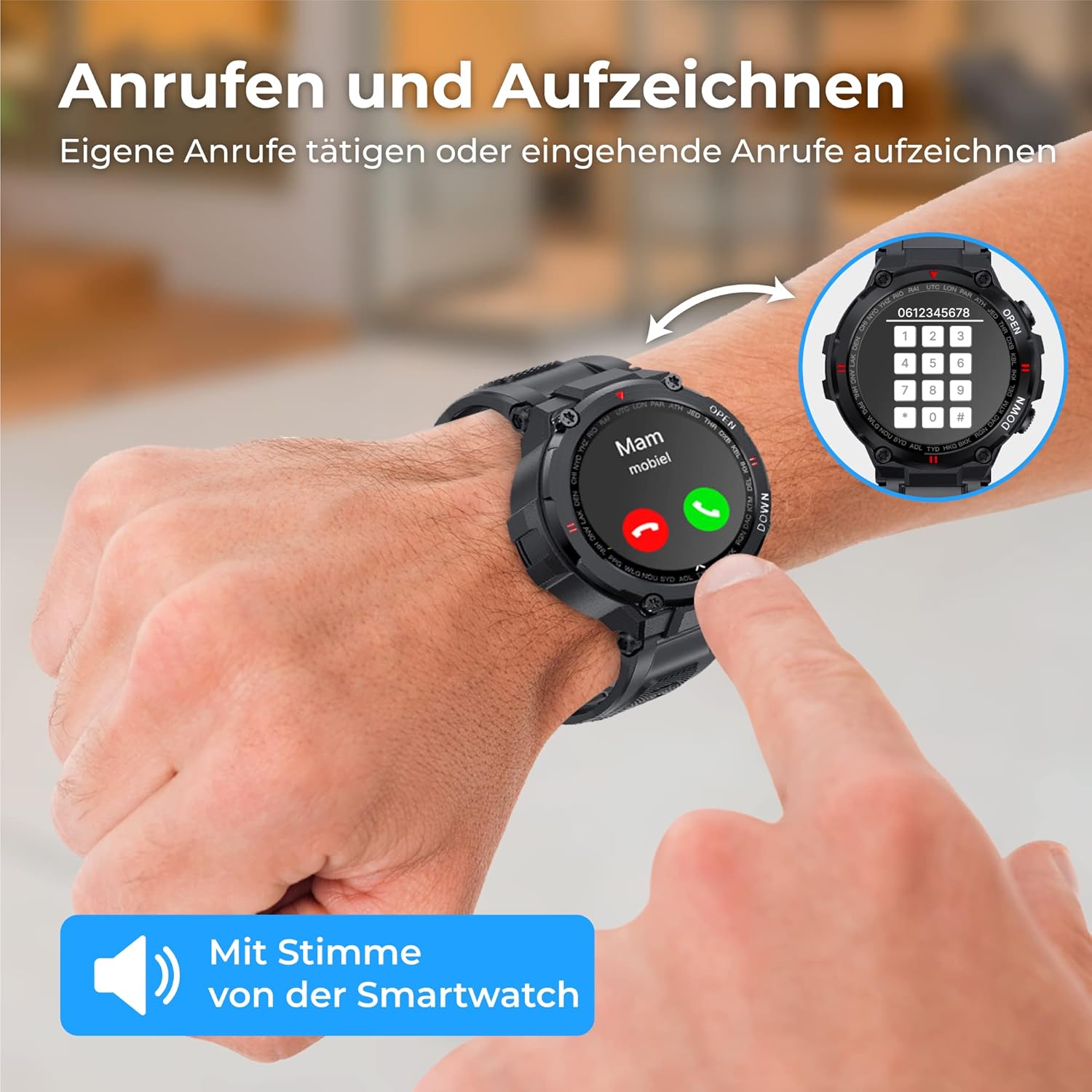
Duab 4.2: A user interacting with the smartwatch to make or receive a call, highlighting the direct call functionality from the wrist.
4.3 Kev ceeb toom
Receive notifications for messages, social media updates, and emails directly on your smartwatch. The vibration mode alerts you to incoming messages and calls.

Duab 4.3: The smartwatch showing a WhatsApp notification, demonstrating its ability to display messages and alerts from connected social media and email applications.
4.4 Kev Saib Xyuas Kev Noj Qab Haus Huv
The smartwatch is equipped with an intelligent sensor to accurately measure various health metrics.
- Lub plawv dhia: Monitor your heart rate continuously to optimize workouts and track your cardiovascular health.
- SpO2 (ntshav Oxygen): Ntsuas koj cov ntshav oxygen saturation.
- Ntshav siab: Keep track of your blood pressure readings.
- Pw tsaug zog saib xyuas: Gain insights into your sleep patterns, including deep sleep, light sleep, and awake times, to improve sleep quality.
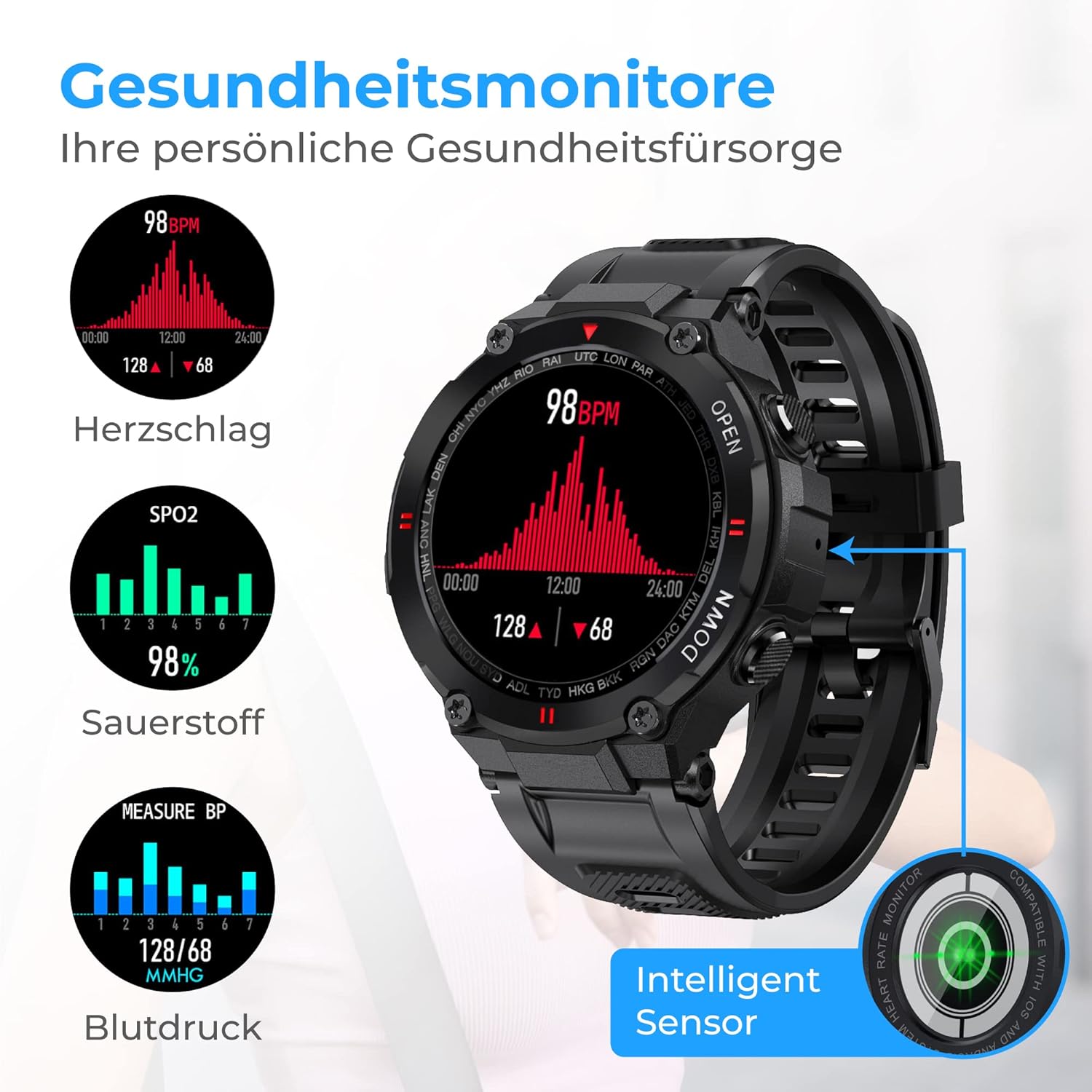
Duab 4.4: The smartwatch interface showing real-time health data, including heart rate (BPM), blood oxygen saturation (SpO2), and blood pressure (mmHg) readings.

Duab 4.5: The smartwatch displaying sleep analysis, categorizing sleep into deep sleep, light sleep, and awake periods, helping users understand and improve their sleep rhythm.
4.5 Kev Ua Haujlwm Saib Xyuas
The Nuvance K22 helps you stay active and reach your fitness goals.
- Pedometer & Distance: Tracks your steps and distance covered throughout the day.
- Calorie Counter: Estimates calories burned based on your activity.
- Multi-Sport Hom: Select from 8 different activities (hiking, running, yoga, cycling, treadmill, mountain climbing, spinning) to track specific workout data.
4.6 Txoj Haujlwm Ntxiv
- Tswj suab paj nruag: Control music playback directly from your smartwatch.
- Chaw taws teeb tswj lub koob yees duab: Shake the smartwatch or tap the screen to remotely trigger your phone's camera.
- Cov ntaub ntawv huab cua: Get current weather updates and forecasts directly on your watch face.

Duab 4.6: The smartwatch demonstrating its additional features: remote camera control, displaying current weather conditions, and controlling music playback.
5. Roj teeb thiab them nyiaj
The Nuvance K22 Smartwatch is equipped with a powerful 400mAh battery, providing excellent endurance.
- Lub sij hawm them nqi: Kwv yees li 2.5 teev kom them tag nrho.
- Active Siv: Up to 15 days of battery life for the average user.
- Hom Standby: Up to 30 days of battery life when used only in standby mode.
To charge, connect the magnetic charging cable to the back of the watch and a USB power source. Ensure the contacts are clean and dry before charging.

Duab 5.1: Visual representation of the smartwatch's battery performance: 2.5 hours charging time, 15 days active use, and 30 days standby mode.
6. Kev saib xyuas thiab tu
6.1 Kev Tiv Thaiv Dej (IP67)
The Nuvance K22 Smartwatch has an IP67 waterproof rating, meaning it is protected from dust and can withstand immersion in water up to 1 meter for up to 30 minutes. It is suitable for daily activities like hand washing or light rain.
Tseem ceeb: The IP67 rating does tsis yog make the watch suitable for swimming, showering, diving, or exposure to hot water/steam, as this can compromise the seals and cause damage.
6.2 Kev ntxuav
To clean your smartwatch, wipe it gently with a soft, damp cloth. Do not use harsh chemicals, abrasive cleaners, or solvents, as these can damage the watch's finish and components. Ensure the watch is dry before charging.
7. Kev daws teeb meem
| Teeb meem | Ua Tau | Kev daws |
|---|---|---|
| Saib tsis qhib | Tsawg roj teeb; Lub hwj chim khawm tsis nias ntev txaus | Charge the watch for at least 30 minutes; Press and hold the power button for 3-5 seconds. |
| Tsis tuaj yeem txuas nrog lub xov tooj | Bluetooth off; App not open; Watch too far; App permissions missing | Ensure Bluetooth is on; Open the app and follow pairing steps; Keep watch close to phone; Grant necessary app permissions. |
| Kev ceeb toom tsis tau txais | App not running in background; Notification permissions off; Do Not Disturb mode on watch/phone | Ensure app is running; Check app notification settings on phone; Disable Do Not Disturb mode. |
| Cov ntaub ntawv kev noj qab haus huv tsis raug | Watch not worn correctly; Sensor dirty; Excessive movement | Ensure watch is snug on wrist; Clean the sensor on the back; Remain still during measurements. |
8. Kev qhia tshwj xeeb
| Feature | Specification |
|---|---|
| Hom | NV Nuvance |
| Qauv nab npawb | k22 ua |
| Xim | Dub |
| Kev Ua Haujlwm | Android Wear 2.6 (Compatible with Android 4.4+ and iOS 8.0+) |
| Qhov Loj | 1.28 Nws |
| Kev sib txuas | Bluetooth |
| Tshwj xeeb nta | Call Function, Current Weather Information, Sleep Monitor, Health Monitoring, Dust and Water Resistant |
| Compatible Devices | Smartphone, ntsiav tshuaj |
| Hom roj teeb | 1 Lithium-ion (nrog) |
| Kev ntsuas dej tsis kam | IP67 |
9. Kev them nyiaj yug thiab Warranty
For any questions, technical support, or warranty claims, please contact Nuvance customer service through the platform where you purchased the product. Please refer to your purchase receipt for specific warranty terms and conditions.
Nuvance is committed to providing quality products and customer satisfaction. For more information about Nuvance products, visit their official channels or the retailer's webqhov chaw.