
Taw qhia
This manual provides instructions for the setup, operation, and maintenance of your Azwok BN59-01014A replacement remote control. This remote is designed to function as a direct replacement for the original Samsung BN59-01014A remote control, offering full functionality without the need for programming.
Teeb tsa
Kev teeb tsa roj teeb
The Azwok BN59-01014A remote control requires two AAA batteries (not included) for operation. Follow these steps to install the batteries:
- Nrhiav lub roj teeb hauv qab ntawm lub chaw taws teeb tswj.
- Press down on the tab and slide the battery cover downwards to open it.
- Ntxig ob lub roj teeb AAA, kom ntseeg tau qhov zoo (+) thiab qhov tsis zoo (-) terminals ua kom raug nrog cov cim hauv lub thawv.
- Xaub lub roj teeb npog rov qab rau hauv qhov chaw kom txog thaum nws nyem ruaj ntseg.

Image: Back of the remote control with the battery cover removed, illustrating the correct orientation for AAA battery insertion.
Cov lus qhia ua haujlwm
Basic Functions
Once batteries are installed, the remote control is ready for immediate use. No programming or pairing is required. Point the remote control directly at your Samsung LCD TV and press the desired function buttons.
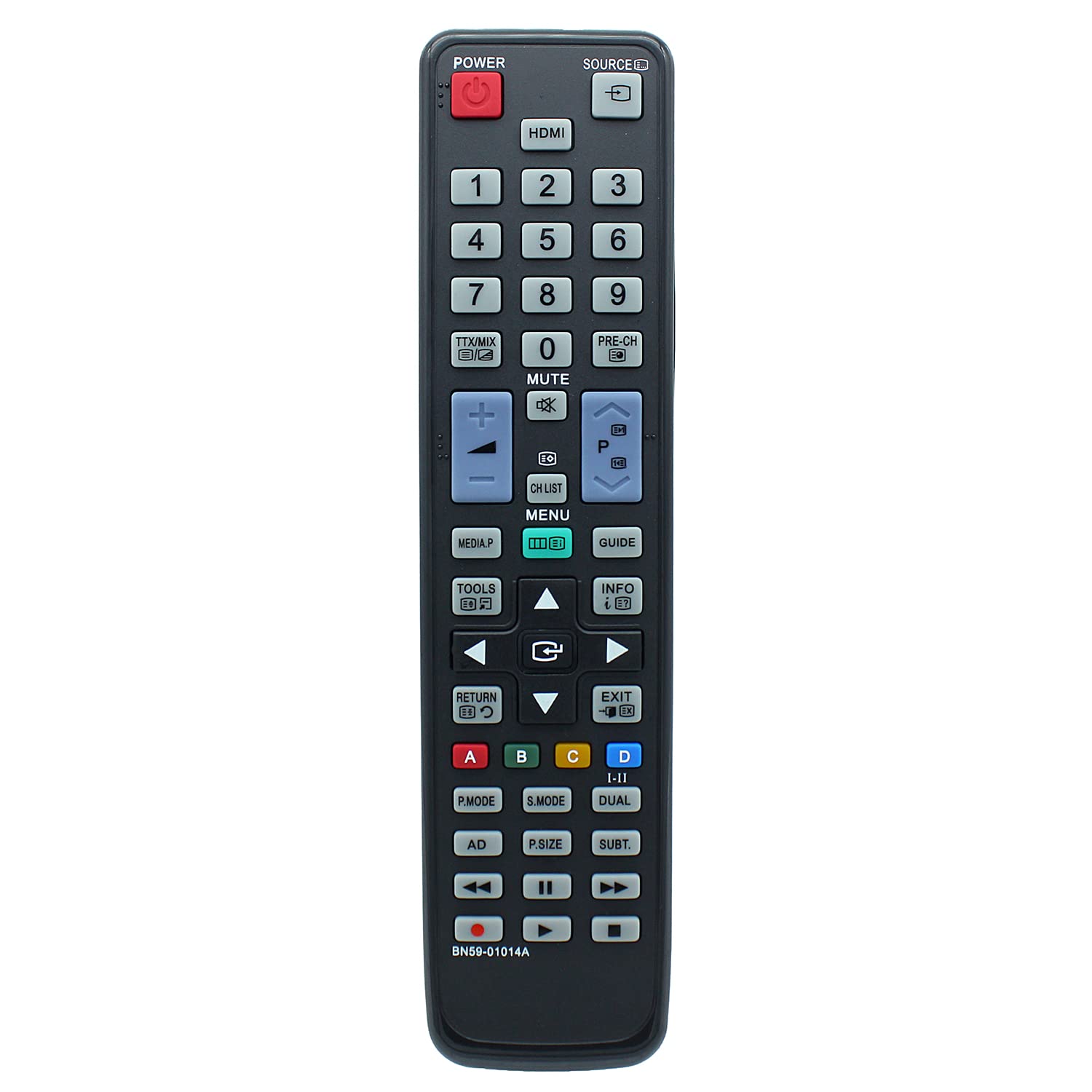
Duab: pem hauv ntej view of the remote control, displaying the layout of all operational buttons.
Compatible TV Models
This replacement remote control is compatible with a wide range of Samsung LCD TV models, including but not limited to:
- LA32C530F1F, LA32C530F1M, LA32C550J1F, LA32C630K1F, LA32C630K1M
- LA37C530F1M, LA37C550J1F
- LA40C530F1F, LA40C530F1M, LA40C550J1F, LA40C550J1M, LA40C630K1F, LA40C630K1M
- LA46C550J1F, LA46C550J1M, LA46C630K1F, LA46C630K1M
- LA55C630K1F, LA55C630K1M
- PS50C531C2F, PS50C550G1F, PS50C550G1M
- UA22C4000PD, UA22C4000PM, UA26C4000PD, UA26C4000PM, UA32C4000PD, UA32C4000PM
- LA32C530F1FXXY, LA32C530F1MXRD, LA32C550J1FXXY, LA32C630K1FXXY, LA32C630K1MXRD
- LA37C530F1MXRD, LA37C550J1FXXY
- LA40C530F1FXXY, LA40C530F1MXRD, LA40C550J1FXXY, LA40C550J1MXRD, LA40C630K1FXXY, LA40C630K1MXRD
- LA46C550J1FXXY, LA46C550J1MXRD, LA46C630K1FXXY, LA46C630K1MXRD
- LA55C630K1FXXY, LA55C630K1MXRD
- PS50C531C2FXXY, PS50C550G1FXXY, PS50C550G1MXRD
- UA22C40000PDXXY, UA22C4000PMXRD, UA26C4000PDXXY, UA26C4000PMXRD, UA32C4000PDXXY, UA32C4000PMXRD
Kev tu
Ntxuav
To clean the remote control, use a soft, dry cloth. Do not use liquid cleaners or abrasive materials, as these may damage the remote's surface or internal components.
Hloov roj teeb
Replace batteries when the remote control's response becomes inconsistent or stops working. Always replace both batteries simultaneously with new AAA alkaline batteries. Do not mix old and new batteries or different battery types.
Kev daws teeb meem
- Tej thaj chaw deb tsis teb: Ensure batteries are installed correctly with the proper polarity. Replace old batteries with new AAA alkaline batteries. Check for any obstructions between the remote control and the TV's infrared sensor. Ensure you are within the maximum operating range of 10 meters.
- Cov haujlwm tshwj xeeb tsis ua haujlwm: Verify that your TV model is listed as compatible. If your original remote had unique functions not present on this replacement, those functions will not be available. If your TV model is not listed, contact support for compatibility confirmation.
Specifications
| Hom | Azwok |
| Qauv nab npawb | AU-BN59-01014A-SM073 (BN59-01014A) |
| Compatible Devices | Samsung LCD Televisions |
| Connectivity Technology | Infrared |
| Hom tswj | Khawm Tswj |
| Ntau tus lej txhawb nqa | 1 |
| Qhov siab tshaj plaws | 10m ua |
| Yuav tsum tau roj teeb | 2 x AAA (Alkaline recommended) |
| Yam Nyhav | 89 Nws |
| Tshwj xeeb Feature | Tsis xav tau Programming |
| Chaw tsim tshuaj paus | Azwok |
| UPC | 710421391891 |
| ASIN | B0BPNNLPXB |
Warranty thiab Support
This remote control comes with a 12-month warranty. For warranty claims, troubleshooting assistance, or to confirm compatibility for unlisted TV models, please contact the seller or manufacturer directly. Provide your product model number (BN59-01014A) and purchase details for efficient support.