
1. Taw qhia thiab tshajview
This manual provides essential instructions for setting up, operating, and maintaining your Brinno TLC300 Time Lapse Camera. The TLC300 is designed for capturing time-lapse videos in various environments, including construction sites, outdoor projects, and general-purpose applications. It features Full HD 1080P resolution with HDR, a 118° field of view, and an intuitive user interface.

Daim duab 1: Pem hauv ntej thiab sab view of the Brinno TLC300 Time Lapse Camera.
Video 1: Ib qho dhau losview of the Brinno TLC300 Time Lapse Camera's features and capabilities.
2. Dab tsi hauv lub thawv
Upon unboxing your Brinno TLC300, please ensure all the following items are present:
- Brinno Time Lapse Camera TLC300
- AA roj teeb x 4
- Lens Cover
- SD Card
- Phau ntawv ceev ceev
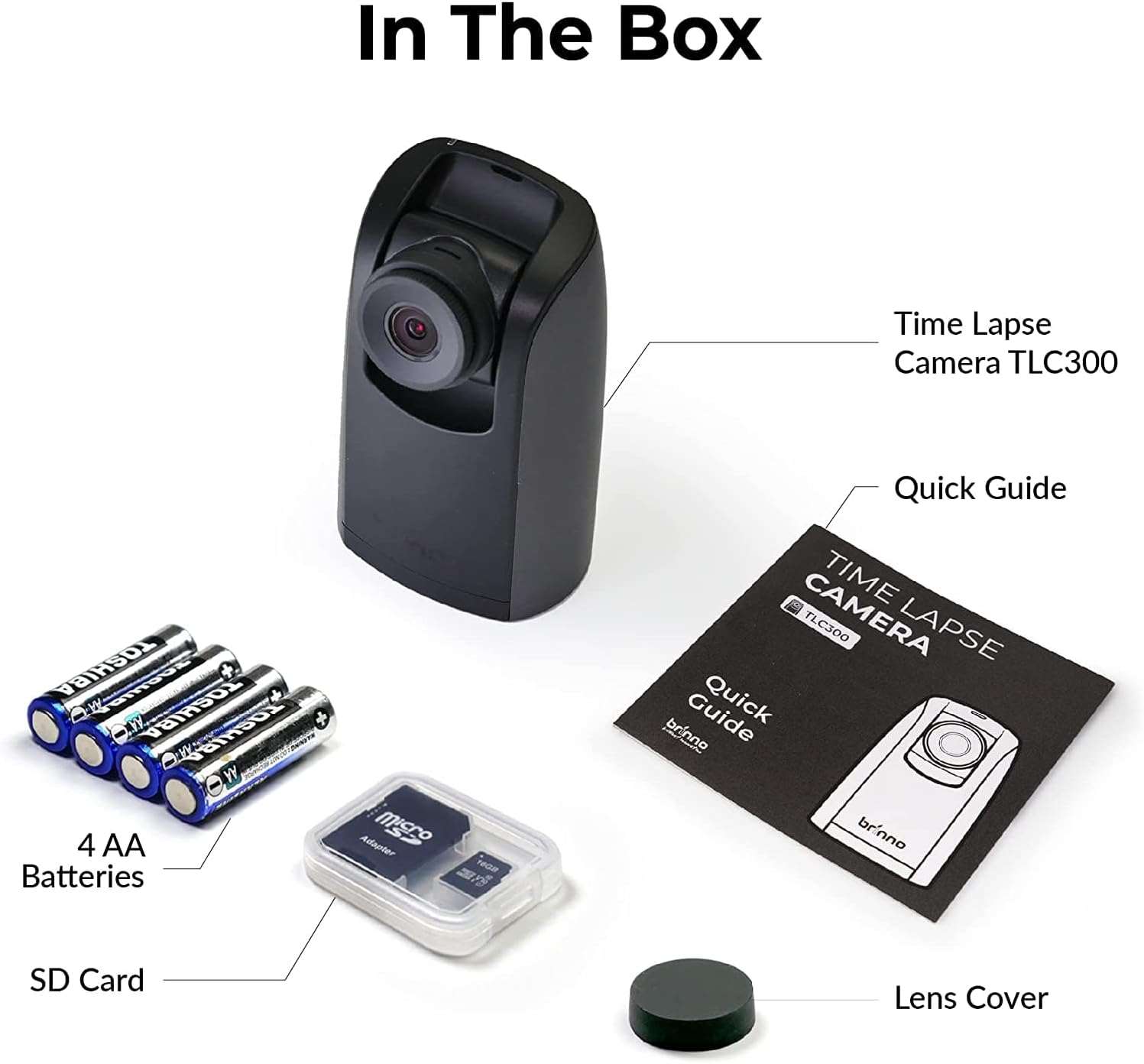
Figure 2: All items included in the Brinno TLC300 package.
3. Teeb tsa
3.1 Battery and SD Card Installation
- Qhib lub roj teeb lub hau npog nyob rau hauv qab ntawm lub koob yees duab.
- Ntxig 4 AA roj teeb, xyuas kom meej polarity (+/-).
- Insert the provided Micro SD card into the SD card slot until it clicks into place. The camera supports up to 128GB.
- Kaw lub roj teeb lub hau npog kom ruaj ntseg.

Figure 3: Proper installation of AA batteries into the camera.
3.2 Pib Fais fab-On thiab Basic Settings
- Nias thiab tuav lub hwj huam khawm kom tig lub koob yees duab.
- The 1.44" IPS LCD screen will display the live view.
- Navigate the menu using the directional buttons and the OK button.
- Set the current date and time for accurate time-lapse recording.
- Select your preferred language from the multilingual user interface.

Figure 4: The camera's menu for adjusting settings.
4. Ua haujlwm lub koob yees duab
4.1 Setting Recording Parameters
The TLC300 offers straightforward operation. You primarily need to set the 'interval' and 'schedule' before starting a recording.
- Interval: This defines how often the camera captures an image. Adjust this setting based on the duration of your project and the desired speed of the final time-lapse video.
- Teem caij: Use the schedule function to specify filming days and times. This ensures the camera only records during active periods, conserving battery life and storage.
- Kev daws teeb meem: The camera records in Full HD 1080P. Ensure HDR is enabled for optimal image quality, especially for day-to-night transitions.

Figure 5: Visual comparison of HDR and Night Mode performance.
4.2 Starting and Stopping Recording
After configuring your settings, press the OK button to begin recording. The camera will automatically start capturing images according to your set interval and schedule. To stop recording, press the Power button again.
5. Kev tu
- Ntxuav: Siv daim ntaub mos mos thiab qhuav los ntxuav lub cev lub koob yees duab thiab lub lens. Tsis txhob siv cov khoom siv uas ua rau tawv los yog cov tshuaj lom neeg hnyav.
- Roj teeb lub neej: The TLC300 offers up to 100 days of battery life with a 5-minute capture interval using 4 AA batteries. Monitor battery levels regularly, especially for long-term projects.
- Cia: Periodically transfer your time-lapse videos from the SD card to a computer or external storage device to free up space and prevent data loss. The camera supports Micro SD cards up to 128GB.
- Lens Cover: Always use the provided lens cover when the camera is not in use to protect the lens from dust and scratches.
6. Kev daws teeb meem
- Lub koob yees duab tsis powering rau: Ensure batteries are correctly inserted and fully charged. Try replacing with new batteries.
- Cov duab tsis zoo: Check lens for smudges or dirt. Ensure HDR is enabled for challenging lighting conditions. Verify the lens cover is removed.
- Recording not starting: Confirm that the interval and schedule settings are correctly configured. Ensure the SD card has sufficient free space.
- Yuam kev ntawm daim npav SD: Reformat the SD card using the camera's menu (this will erase all data). If the issue persists, try a different SD card.
7. Cov lus qhia tshwj xeeb
| Feature | Specification |
|---|---|
| Qauv nab npawb | TXL 300 |
| Qhov ntev | 2.05 x 2.52 x 4.21 po |
| Yam Nyhav | 4.9 hli |
| Hwj chim Source | 4 AA roj teeb |
| Video Capture daws teeb meem | Tiam Ntawv Tsis Tau HD 1080p |
| Yees duab Sensor Technology | CMOS |
| Maximum Focal Length | 15 hli |
| Qhov siab tshaj plaws Aperture | 2 ib f |
| Flash Nco Hom | Micro SD (txog 128GB) |
| Video Capture Format | MP4, MOV, AVI |
| Txhawb suab hom | MP3, AAC |
| Qhov Loj | 1.44 Nws |
| Connectivity Technology | Bluetooth |
8. Warranty thiab Support
Brinno products are designed for durability and performance. For any technical assistance, warranty claims, or product inquiries, please refer to the contact information provided in your Quick Guide Manual or visit the official Brinno support weblub vas sab. Khaws koj daim ntawv txais nyiaj yuav khoom ua pov thawj ntawm kev yuav khoom rau cov kev pabcuam lav.