
ClocTeck ClocTeck-CL01
ClocTeck Transparent Digital Alarm Clock
Model: ClocTeck-CL01
Brand: ClocTeck
Taw qhia
This manual provides detailed instructions for the setup, operation, and maintenance of your ClocTeck Transparent Digital Alarm Clock. Please read this manual thoroughly before using the product to ensure proper function and longevity.
Cov ntaub ntawv kev nyab xeeb
- Tsis txhob tso lub cuab yeej rau qhov kub thiab txias, ncaj qha tshav ntuj, lossis cov av noo siab.
- Tsis txhob tso tseg lossis ua rau lub cuab yeej raug cuam tshuam.
- Khaws lub cuab yeej kom deb ntawm dej thiab lwm yam kua.
- Tsis txhob sim disassemble lossis kho lub cuab yeej koj tus kheej. Hu rau cov neeg ua haujlwm tsim nyog rau kev pabcuam.
- Use only the specified Type-C charging cable for power.
Ntim Cov Ntsiab Lus
Thov xyuas cov ntsiab lus ntawm pob thaum unboxing:
- ClocTeck Transparent Digital Alarm Clock (Gold)
- Hom-C USB Charging Cable
- Tus Neeg Siv Los Siv (cov ntawv no)
Khoom Tshajview
The ClocTeck Transparent Digital Alarm Clock features a clear LCD display that shows time, date, day of the week, temperature, humidity, and a weather icon. It is designed with a sleek aluminum alloy case.
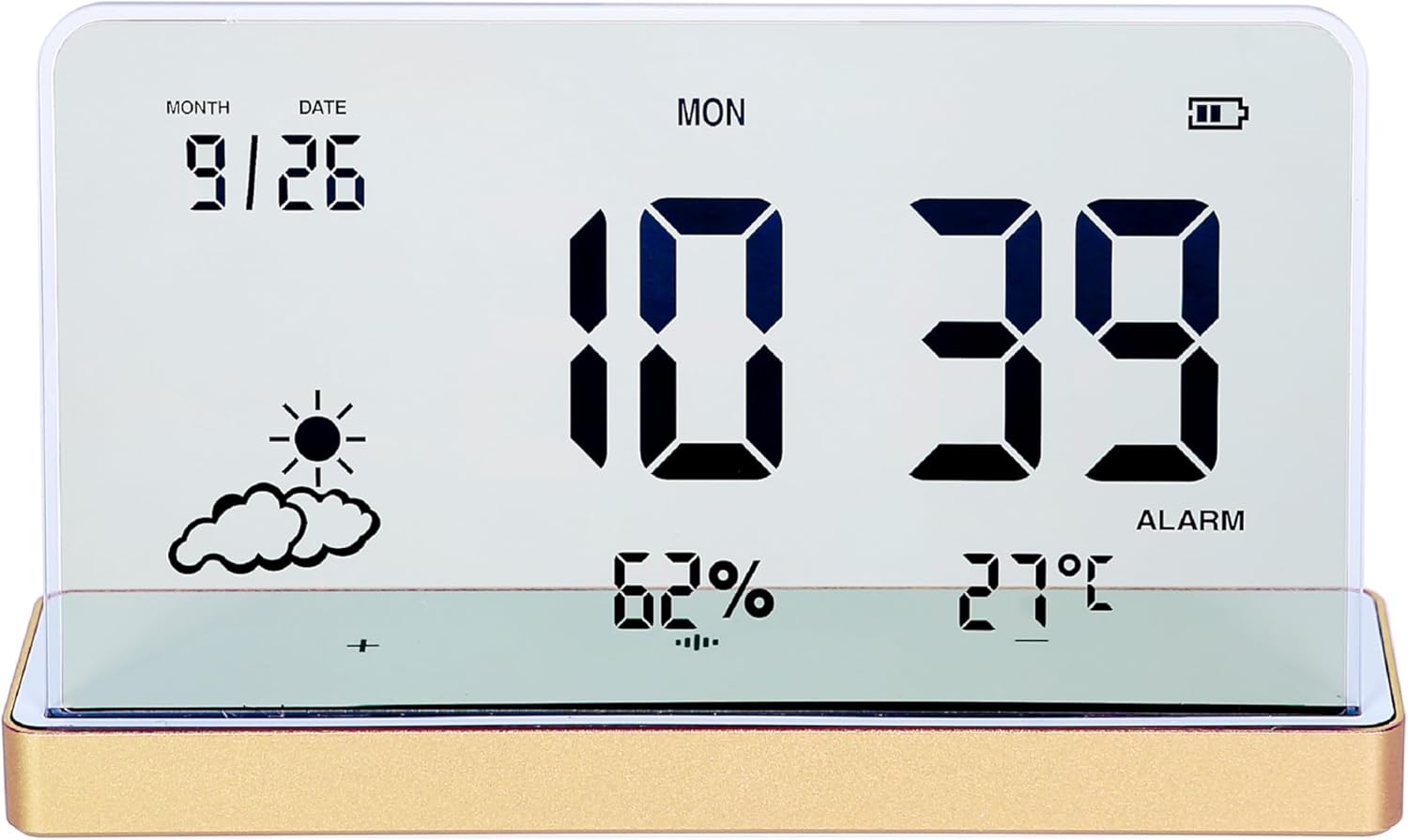
Daim duab 1: Pem hauv ntej view of the ClocTeck Transparent Digital Alarm Clock. The display shows the current time (10:39), date (9/26), day (MON), humidity (62%), temperature (27°C), and a partly cloudy weather icon. A battery indicator is visible in the top right corner.
Cov yam ntxwv tseem ceeb:
- Transparent LCD Display
- Time, Date, and Day Display
- Indoor Temperature and Humidity Monitoring
- Up to 3 Programmable Alarms
- Rechargeable Battery with long standby time
- Durable Aluminum Alloy Case
Teeb tsa
1. Lub Zog Rau Thiab Them Nuj Nqi
The clock is powered by a built-in rechargeable battery. Before first use, or if the battery indicator is low, connect the provided Type-C USB charging cable to the charging port on the back or side of the clock and plug the other end into a standard USB power adapter (not included).
- A full charge provides approximately 75 days of operation.
- Qhov taw qhia roj teeb ntawm cov zaub yuav qhia cov xwm txheej them.
2. Qhov chaw pib
Place the clock on a stable, flat surface. For accurate temperature and humidity readings, avoid placing it near heat sources, direct sunlight, or in areas with extreme drafts.
Cov lus qhia ua haujlwm
The clock features several buttons, typically located on the back or bottom, for setting time, alarms, and other functions. Refer to the specific button labels on your device.
1. Teem sijhawm thiab hnub tim
- Nias lub SET khawm kom nkag mus rau lub sijhawm teeb tsa hom.
- Siv cov UP thiab POM cov nyees khawm los kho lub sijhawm. Nias SET kom paub meej thiab txav mus rau feeb.
- Repeat for minutes, year, month, and date.
- Xovxwm SET rov mus rau qhov kev teeb tsa hom.
2. Teem Lub Ceeb Toom
The clock supports up to 3 independent alarms.
- Nias lub Tswb button to cycle through Alarm 1, Alarm 2, Alarm 3, and alarm off modes.
- When an alarm is selected, press and hold the Tswb button to enter alarm setting mode for that specific alarm.
- Siv cov UP thiab POM buttons to set the alarm hour and minutes. Press Tswb kom paub meej txhua kauj ruam.
- After setting the time, you may be prompted to set the alarm's activation days (e.g., weekdays, weekends, daily). Use UP/POM thiab Tswb xaiv.
- To activate or deactivate an alarm, short press the Tswb button until the alarm icon appears or disappears next to the corresponding alarm number on the display.
3. Temperature and Humidity Display
The clock continuously displays indoor temperature and humidity. The temperature range is -20°C to 65°C, and the humidity range is 10% to 99%.
- Temperature is displayed in Celsius (°C).
- Humidity is displayed as a percentage (%).
4. Ntsig muaj nuj nqi
When an alarm sounds, press any button (other than the alarm off button, if present) to activate the snooze function. The alarm will sound again after a short interval (typically 5-10 minutes).
5. Zaub Brightness Kho
The clock may feature automatic brightness adjustment or manual control. Consult the device's physical buttons for a dedicated brightness control button or a combination of buttons to adjust display intensity.
Kev tu
- To clean the display and casing, use a soft, dry cloth. Do not use abrasive cleaners or solvents.
- Xyuas kom tseeb tias qhov chaw them hluav taws xob tsis muaj hmoov av thiab cov khib nyiab.
- Store the clock in a cool, dry place when not in use for extended periods.
Kev daws teeb meem
| Teeb meem | Ua Tau | Kev daws |
|---|---|---|
| Cov zaub yog dawb los yog dim. | Low battery or power saving mode. | Charge the device using the Type-C cable. Check brightness settings. |
| Tswb tsis suab. | Lub tswb tsis tau qhib los yog lub suab qis dhau. | Ensure the alarm is set and activated (alarm icon visible). Check if there's a volume setting. |
| Incorrect temperature/humidity readings. | Device placed in an unsuitable environment. | Relocate the clock away from direct heat, cold, or high drafts. Allow time for readings to stabilize. |
| Cov nyees khawm tsis teb. | Ib ntus software glitch los yog roj teeb tsawg. | Recharge the device. If issue persists, try a soft reset (refer to manual for reset procedure, if available, or let battery drain and recharge). |
Specifications
- Qauv: ClocTeck-CL01
- Qhov Loj: Approximately 12.5 cm (Width) × 3.2 cm (Depth) × 8 cm (Height)
- Lub cev hnyav: Kwv yees li 0.13 kg
- Case Material: Aluminium Alloy
- Hom Zaub: Transparent LCD Digital Display
- Qhov kub thiab txias: -20 ° C txog 65 ° C
- Ntau Yam Vaum: 10% txog 99%
- Lub zog Source: Rechargeable Battery (Type-C USB charging)
- Roj teeb lub neej: Approximately 75 days on a full charge
- Tswb: 3 programmable tswb

Figure 2: Dimensions of the ClocTeck Transparent Digital Alarm Clock. The image shows the clock with labels indicating a height of 8cm and a width of 12.5cm.
Warranty thiab Support
ClocTeck provides a 12-month refund and exchange guarantee txij hnub uas koj yuav khoom. Daim ntawv pov thawj no suav nrog cov teeb meem uas tshwm sim los ntawm kev siv ib txwm.
If you encounter any problems or have questions regarding your ClocTeck Transparent Digital Alarm Clock, please do not hesitate to contact our customer support team. We are committed to providing assistance and ensuring your satisfaction.
For support, please refer to the contact information provided on the product packaging or the seller's page where you purchased the item.
Ask a question about this manual
Ask about setup, troubleshooting, compatibility, parts, safety, or missing instructions. Manuals+ will review the question and use this page’s manual context to help answer it.