
Taw qhia
This manual provides detailed instructions for the EKSA H1 Plus Bluetooth Trucker Headset. Please read thoroughly to ensure proper setup, operation, and maintenance of your device. This headset is designed for clear communication in various environments, featuring advanced noise-cancelling technology and versatile connectivity options.
Ntim Cov Ntsiab Lus
- H1 Plus Headset
- Tiv thaiv Case
- Replacement Ear Pad (Mesh breathable)
- Hom-C Them Rau Cable
- USB Dongle (PC Adapter)
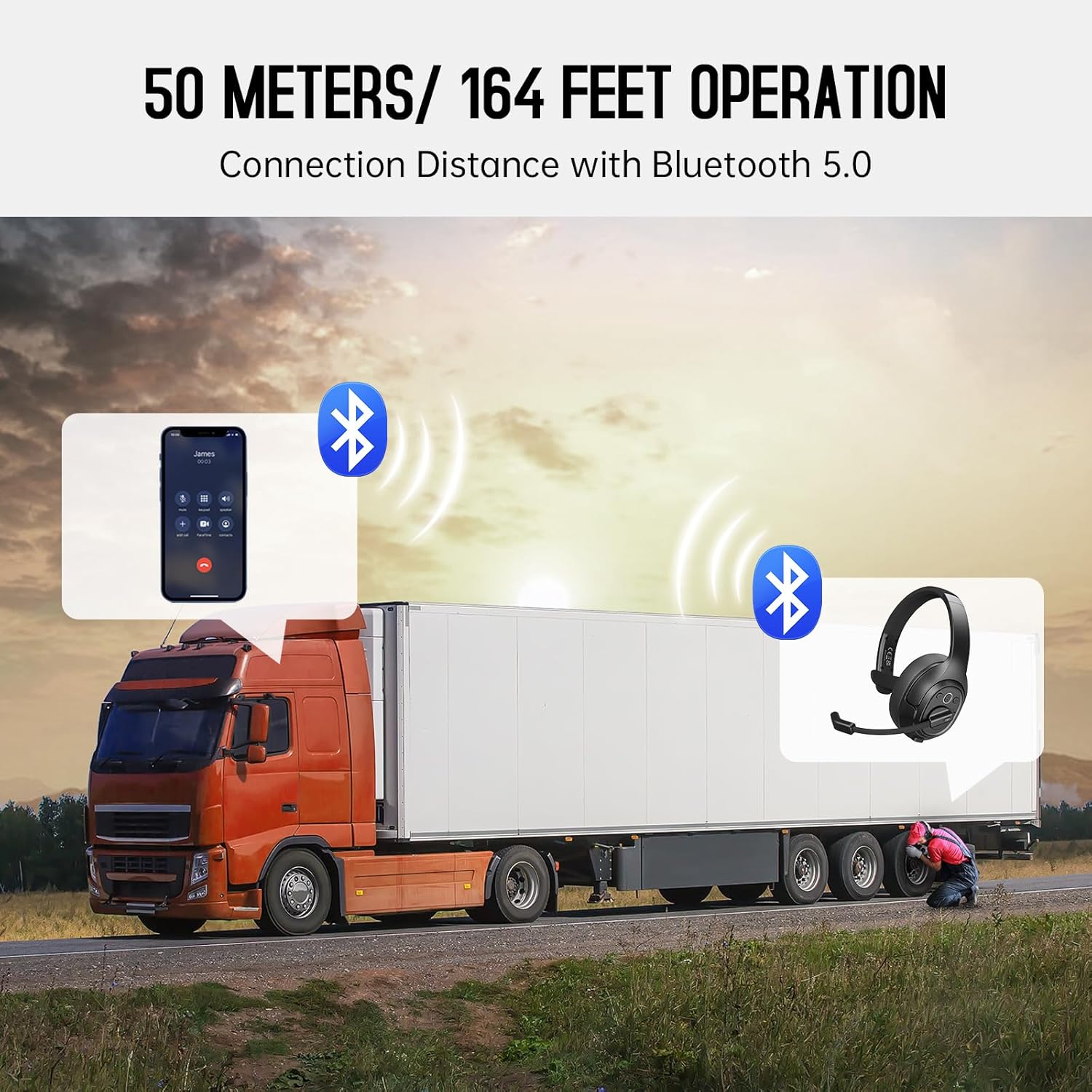
Image: The EKSA H1 Plus headset, USB dongle, and charging cable as typically found in the product packaging.
Teeb tsa
1. Them lub mloog pob ntseg
Before first use, fully charge the headset. Connect the provided Type-C charging cable to the headset's charging port and the other end to a USB power source. The charging indicator will show the charging status. A full charge takes approximately 1.5 hours.

Image: Visual representation of the headset's battery life and charging duration.
2. Fais fab rau / tawm
Press and hold the Multi-Function Button (MFB) for 3 seconds to power on or off the headset. A voice prompt will indicate the status.
3. Bluetooth Pairing (for Mobile Devices)
- Xyuas kom meej tias lub pob ntseg raug kaw.
- Press and hold the MFB for 5-7 seconds until the LED indicator flashes blue and red alternately, indicating pairing mode.
- On your mobile device, enable Bluetooth and search for "EKSA-H1PLUS".
- Select "EKSA-H1PLUS" to connect. The LED will turn solid blue once connected.
4. Connecting with USB Dongle (for PC/Mac without Bluetooth)
- Txuas lub USB dongle rau hauv ib qho chaw nres nkoj USB uas muaj nyob hauv koj lub computer.
- Qhib lub mloog pob ntseg. Nws yuav sim txuas rau lub dongle.
- The LED on the dongle and headset will turn solid blue when connected.
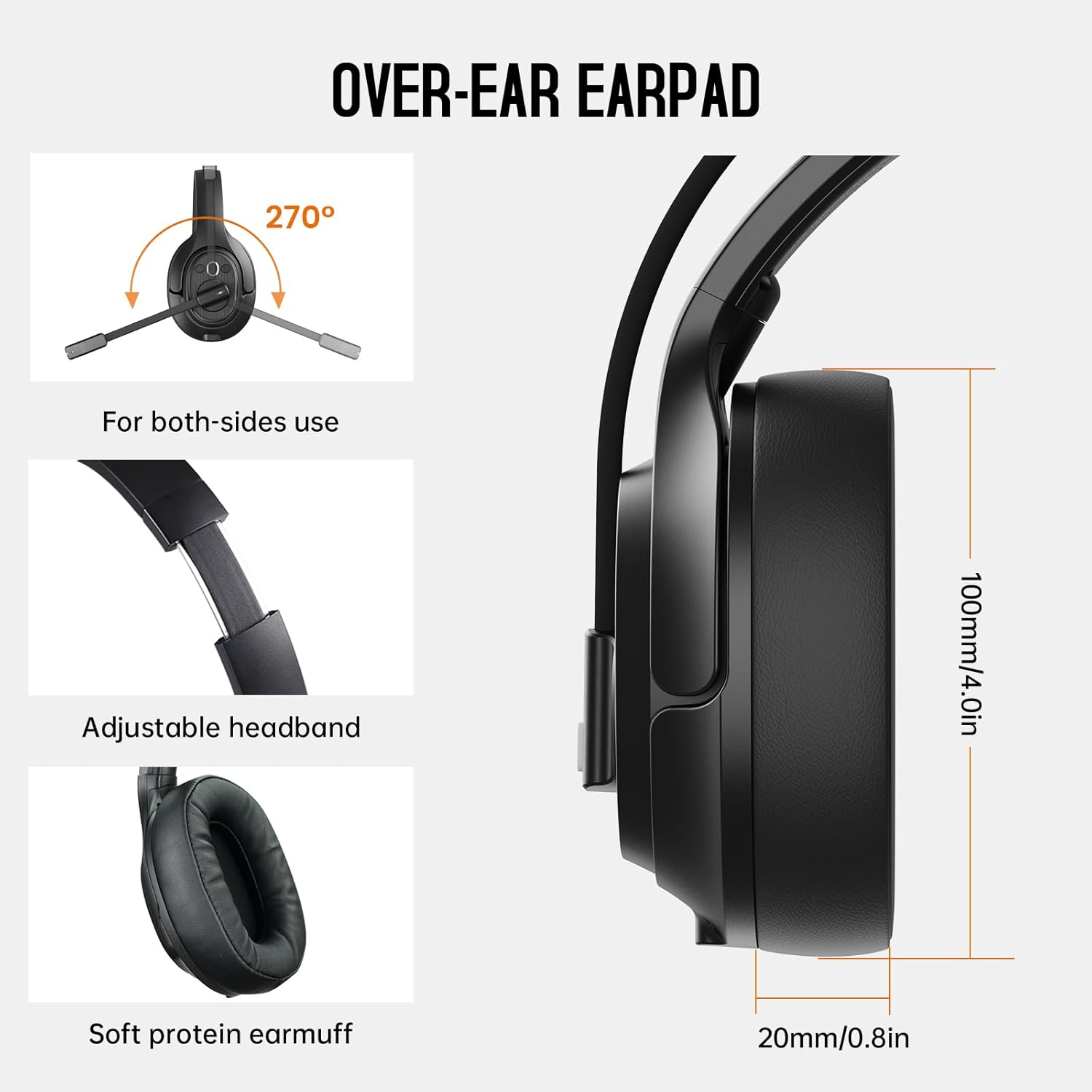
Image: The headset demonstrating simultaneous connection to a phone via Bluetooth and a laptop via USB dongle.
Cov lus qhia ua haujlwm
1. Kev tswj hwmview
The headset features intuitive controls located on the earcup:
- Multi-Function Button (MFB): Qhib/kaw, ua si/nres suab paj nruag, teb/xaus xov tooj.
- Volume Up (+): Nce ntim.
- Volume Down (-): Txo qhov ntim.
- Lub Pob Kom Ncauj: Mute/unmute lub microphone thaum hu.
- AI Assistant Button: Qhib koj lub cuab yeej lub suab pab.

Duab: Close-up view of the headset's control buttons and ports.
2. Ua thiab txais hu
- Teb / Xaus Hu: Luv nias lub MFB.
- Tsis kam hu: Nias thiab tuav MFB rau 2 vib nas this.
- Rov qab tus lej xeem: Ob-nias MFB.
- Mute / Unmute Microphone: Short press the dedicated mute button on the microphone arm.
3. Microphone and Wearing Adjustments
The headset is designed for comfort and versatility:
- Adjustable Headband: Ntev lossis rub lub headband kom haum koj lub taub hau zoo.
- Rotatable Microphone: The microphone arm can rotate 270 degrees, allowing it to be worn on either the left or right ear. Position the microphone close to your mouth for optimal voice pickup.
- Cov Pob Ntseg Xis Nyob: The over-ear design with soft ear pads ensures comfort during extended use.

Image: Features illustrating the ergonomic design of the headset, including adjustable headband and rotatable microphone.
4. Environmental Noise Cancelling (ENC) Microphone
The AI-Powered ENC microphone filters out up to 99.8% of ambient noise, ensuring your voice is transmitted clearly even in noisy environments like call centers, construction sites, or trucks.

Image: A visual explanation of the ENC microphone's function, demonstrating noise reduction.
5. Kev sib txuas ntau yam
The headset supports simultaneous connection to two different devices, such as a smartphone and a computer, allowing seamless switching between calls and other audio sources.

Image: Illustration of the headset's ability to connect to two devices concurrently.
6. Extended Wireless Range
Utilizing Bluetooth 5.0 technology, the headset offers a stable wireless connection up to 30 meters (99 feet). In unobstructed environments, the range can extend up to 50 meters (164 feet).

Image: Visualizing the headset's long-range wireless capabilities in an outdoor setting.
Kev tu
- Ntxuav: Use a soft, dry cloth to clean the headset. Avoid using harsh chemicals or abrasive materials.
- Kev Hloov Pob Ntseg Pob Ntseg: The headset comes with a replacement mesh breathable ear pad. To replace, gently twist and pull off the existing ear pad, then align and press the new ear pad into place.
- Cia: Store the headset in its protective case when not in use to prevent damage.

Image: Demonstrating the detachable ear pads and the two types included for different comfort levels.
Kev daws teeb meem
| Teeb meem | Kev daws |
|---|---|
| Lub mloog pob ntseg tsis qhib. | Ensure the headset is fully charged. Press and hold the MFB for 3 seconds. |
| Tsis tuaj yeem ua khub ntawm Bluetooth. | Ensure the headset is in pairing mode (flashing blue/red LED). Turn off and on Bluetooth on your device. Move closer to the device. |
| Tsis muaj suab los yog lub suab tsis zoo. | Check volume levels on both the headset and connected device. Ensure the headset is selected as the audio output device. Re-pair the headset. |
| Microphone tsis ua haujlwm. | Ensure the microphone is not muted. Check microphone settings on your connected device. Adjust microphone position. |
| USB dongle tsis txuas. | Ensure the dongle is fully inserted. Try a different USB port. Restart your computer. |
Specifications
| Feature | Paub meej |
|---|---|
| Qauv Lub Npe | EKSA-H1PLUS |
| Connectivity Technology | Wireless (Bluetooth 5.0) |
| Bluetooth Version | 5.0 |
| Bluetooth Ntau | 30 Meters (99 feet), up to 50 Meters (164 feet) unobstructed |
| Microphone | AI-Powered Environmental Noise Cancelling (ENC) |
| Roj teeb Lub Neej (Thaum tham) | Mus txog 30 Teev |
| Lub Neej Siv Roj Teeb (Suab Paj Nruag) | Mus txog 57 Teev |
| Them sij hawm | Kwv yees li. 1.5 teev |
| Pob ntseg Shape | Tshaj pob ntseg |
| Tswj hom | Volume Control, Mute, AI Assistant |
| Qhov hnyav | 1.01 phaus (kwv yees 458g) |
Official Product Videos
EKSA H1 Plus Wireless Bluetooth Headset Overview
Video: Ib sim hawjview of the EKSA H1 Plus Wireless Bluetooth Headset, highlighting its key features and design.
EKSA H1Plus Bluetooth Trucker Headset Features
Video: A detailed look at the features and benefits of the EKSA H1Plus Bluetooth Trucker Headset.
Warranty thiab Support
EKSA products are designed for durability and performance. For warranty information and customer support, please refer to the official EKSA website or contact their customer service directly. Optional protection plans are available for extended coverage.
Yog xav paub ntxiv, mus saib: www.eksa.net