
Thomson 24HA2S13C
THOMSON 24HA2S13C 24-nti 12V HD Smart Android TV Phau Ntawv Qhia Siv
Model: 24HA2S13C
Cov ntaub ntawv tseem ceeb ntawm kev nyab xeeb
Read all instructions before operating the TV. Keep this manual for future reference. Follow all warnings and instructions marked on the product.
- Tsis txhob thaiv qhov rooj qhib pa taws.
- Tsis txhob nruab rau ze cov khoom siv cua sov.
- Tiv thaiv txoj hlua hluav taws xob los ntawm kev taug kev los yog pinched.
- Tsuas yog siv cov ntawv txuas / khoom siv tau teev tseg los ntawm cov chaw tsim khoom.
- Tshem tawm thaum muaj cua daj cua dub lossis thaum tsis siv rau lub sijhawm ntev.
- Xa tag nrho cov kev pabcuam rau cov neeg ua haujlwm tsim nyog.
Khoom Tshajview
The THOMSON 24HA2S13C is a 24-inch HD Smart Android TV designed for versatile use, including camping with its 12V power supply. It features Google Assistant, Wi-Fi, Bluetooth, Dolby Digital audio, and a triple-tuner for various signal reception.

Duab: pem hauv ntej view of the THOMSON 24HA2S13C 24-inch Smart Android TV, showing the screen displaying streaming service logos and a family enjoying the TV in a camphauv kev teeb tsa.
Ntim Cov Ntsiab Lus
Xyuas kom tseeb tias txhua yam khoom muaj nyob rau hauv pob:
- THOMSON 24HA2S13C Smart Android TV
- Chaw taws teeb tswj
- Power Adapter (12V compatible)
- TV Stand (2)
- Screws rau TV Stands
- Tus Neeg Siv Los Siv (cov ntawv no)
- Phau Ntawv Qhia Pib Ceev
Teeb tsa
1. Txuas lub TV Stands
- Ua tib zoo muab lub TV ntsej muag rau ntawm qhov muag, tiaj tus kom tiv thaiv kev puas tsuaj ntawm lub vijtsam.
- Align the TV stands with the mounting holes on the bottom of the TV.
- Ruaj ntseg cov chaw muag khoom siv cov screws muab. Xyuas kom lawv nruj nreem.

Image: The THOMSON 24HA2S13C TV showing two possible stand positions for different furniture widths. The image highlights the flexibility in stand placement.
2. Txuas fais fab
Connect the 12V power adapter to the TV's power input and then to a suitable power source. For camping or mobile use, connect to a 12V DC power outlet.

Image: The THOMSON 24HA2S13C TV mounted in a caravan, with a 12V power adapter shown, illustrating its suitability for mobile use.
3. Txuas cov khoom siv sab nraud
Lub TV muaj ntau qhov chaw nres nkoj rau kev sib txuas cov khoom siv sab nraud:
- HDMI: For high-definition audio and video devices (e.g., game consoles, Blu-ray players).
- USB: Rau kev txuas cov khoom siv cia khoom USB los ua si cov ntaub ntawv xov xwm.
- LAN: Rau wired internet kev twb kev txuas.
- Kav hlau txais xov / Satellite: Rau tau txais kev tshaj tawm xov xwm.
- AV HAUV: Rau cov khoom siv analog qub.
- Audio Out (Optical): Rau kev txuas mus rau sab nraud suab tshuab.
- CI +: For conditional access modules.

Duab: Rov qab view of the THOMSON 24HA2S13C TV, detailing the various input and output ports available for connectivity.
Ua haujlwm TV
1. Pib Teeb Wizard
Thaum thawj lub hwj chim-on, TV yuav coj koj mus rau qhov pib txheej txheem. Qhov no suav nrog:
- Xaiv lus.
- Kev sib txuas network (Wi-Fi lossis Ethernet).
- Google account sign-in (optional, but recommended for full Smart TV features).
- Channel scanning (for DVB-T2/C/S2).
2. Kev Tswj Chaw Taws Teeb
The included remote control provides access to all TV functions. It features backlit buttons for use in low light and a dedicated "Favorite" button for quick access to your preferred app.

Image: The remote control for the THOMSON 24HA2S13C TV, highlighting its ergonomic design, backlit buttons, and voice control capabilities.
3. Cov yam ntxwv ntawm Smart TV (Android TV)
This TV runs on Android TV, providing access to a wide range of applications and services:
- Streaming Services: Access Netflix, Prime Video, YouTube, Disney+, and more.
- Google Assistant: Use voice commands to search for content, control playback, and get information. Activate by pressing the Google Assistant button on the remote.
- Chromecast Built-in: Cast content from compatible smartphones, tablets, or computers directly to your TV.
- Google Play Store: Rub tawm cov apps thiab games ntxiv.

Image: The THOMSON 24HA2S13C TV screen showing the Android TV home interface with popular streaming applications and content recommendations.
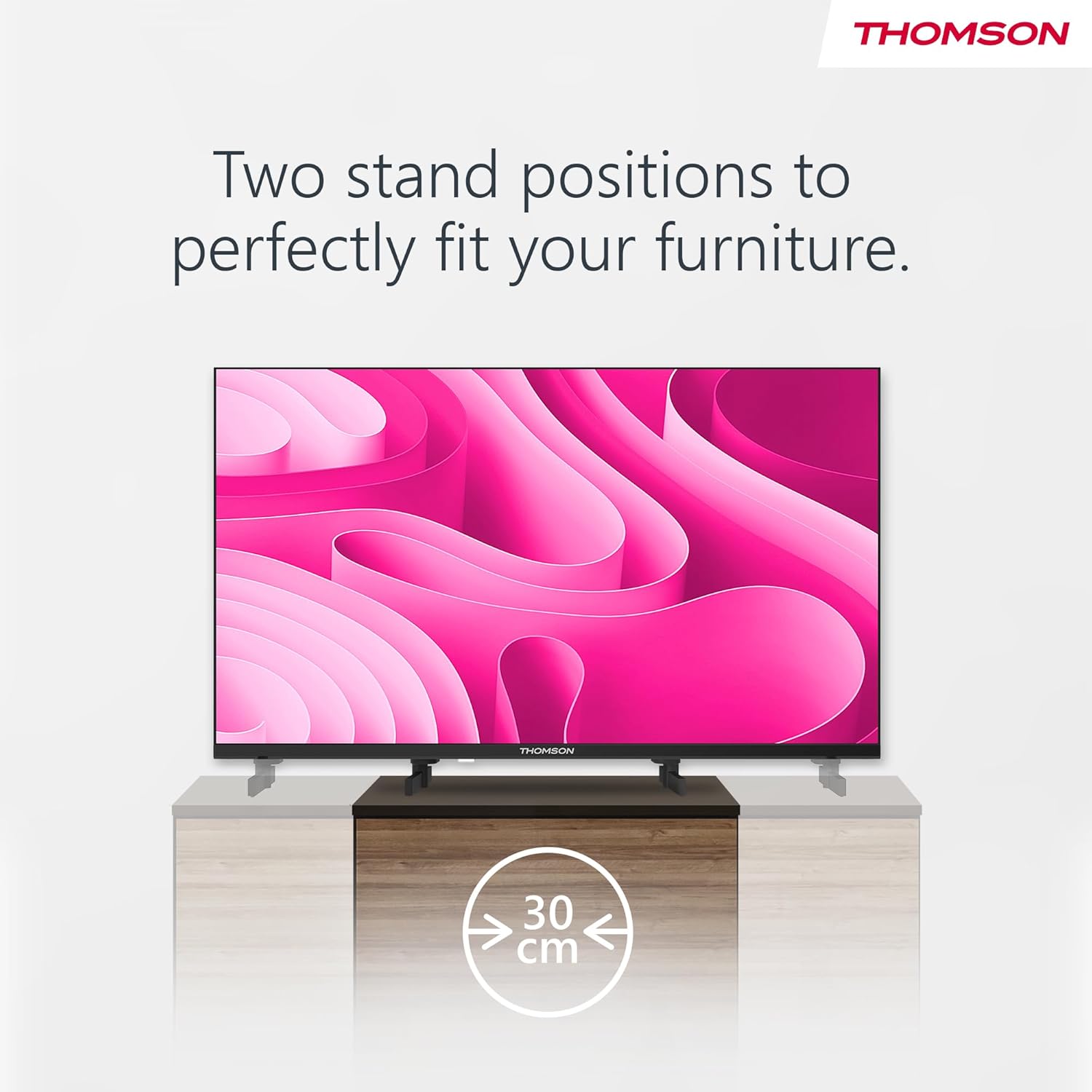
Image: A person using the voice control feature of the THOMSON TV remote, demonstrating interaction with Google Assistant.
Kev tu
Ntxuav lub TV
- Nco ntsoov tshem lub TV ua ntej ntxuav.
- Use a soft, dry cloth to wipe the screen and cabinet. Do not use liquid cleaners or aerosol sprays.
- Rau cov cim tawv tawv, maj mam dampen a microfiber cloth with water and gently wipe. Avoid excessive moisture.
Hloov tshiab software
The TV may receive software updates to improve performance and add new features. Ensure your TV is connected to the internet to receive these updates. You can usually check for updates in the TV's settings menu.
Kev daws teeb meem
| Teeb meem | Ua Tau | Kev daws |
|---|---|---|
| Tsis muaj zog | Txoj hlua fais fab tsis txuas; qhov hluav taws xob tsis ua haujlwm. | Check power cord connection. Test outlet with another device. |
| Tsis muaj duab, tab sis suab yog tam sim no | Xaiv qhov chaw nkag tsis raug; muaj teeb meem backlight. | Press the "Input" button on the remote to select the correct source. Contact support if issue persists. |
| Tsis muaj suab, tab sis muaj duab | Volume too low or muted; audio cables loose. | Increase volume. Check mute status. Ensure audio cables are securely connected. |
| Kev tswj chaw taws teeb tsis ua haujlwm | Cov roj teeb tas lawm; muaj kev thaiv ntawm cov chaw taws teeb tswj thiab TV. | Hloov cov roj teeb. Tshem tawm tej kev cuam tshuam. Xyuas kom meej tias cov chaw taws teeb taw qhia ntawm TV's IR sensor. |
| Txuas tsis tau Wi-Fi | Tus password tsis raug; teeb meem router; TV dhau deb ntawm router. | Verify Wi-Fi password. Restart router. Move TV closer to router or use a wired connection. |
Specifications
| Feature | Paub meej |
|---|---|
| Hom | Thomson |
| Qauv | 24 HH2S13C |
| Qhov Loj | 24 nti (60 cm) |
| Zaub Technology | LED |
| Kev daws teeb meem | 1366 x 768 (HD) daws teeb meem |
| Kev Ua Haujlwm | Android TV |
| Tshwj xeeb nta | Google Assistant, Chromecast Built-in, 12V Power Supply, Dolby Audio, Triple Tuner (DVB-T2/C/S2) |
| Kev sib txuas | Wi-Fi, Bluetooth, HDMI (x3), USB (x2), LAN, Optical Audio Out, AV In, CI+ |
| Voltage | 12V (DC) |
| Khoom Dimensions (W x D x H) | 53.5 x 15.1 x 35.3 cm (nrog rau sawv ntsug) |
| Qhov hnyav | 3.5, XNUMX kg |
Yog xav paub ntxiv txog kev siv hluav taws xob kom zoo, thov mus saib lub ntaub ntawv EU EPREL: https://eprel.ec.europa.eu/qr/1456673

Image: The EU Energy Label for the THOMSON 24HA2S13C TV, showing an energy efficiency rating of E and power consumption of 18 kWh/1000h.
Warranty thiab Support
This Thomson TV comes with a 3-year guarantee. For technical support, warranty claims, or service inquiries, please contact your local Thomson service provider or refer to the manufacturer's webqhov chaw.
Manufacturer: STREAMVIEW GMBH
Webqhov chaw: www.streamview.com
Email: contact@streamview.com
Official Product Video
Saib daim vis dis aus no kom pom qhov pomview of the Thomson 24-inch Easy TV.
Video: Ib nyuag ntuview of the Thomson 24-inch Easy TV, showcasing its design and features. This video is provided by the vendor Streamview GmbH.
Ask a question about this manual
Ask about setup, troubleshooting, compatibility, parts, safety, or missing instructions. Manuals+ will review the question and use this page’s manual context to help answer it.