
1. Taw qhia
Thank you for choosing the techno line WT2600 Digital Calendar. This device provides accurate time, date, indoor temperature, and humidity readings, along with alarm functions. This manual will guide you through the setup, operation, and maintenance of your new digital calendar.
2. Cov ntaub ntawv kev nyab xeeb
- Tsis txhob tso lub cuab yeej rau qhov kub thiab txias, ncaj qha tshav ntuj, lossis cov av noo siab.
- Tsis txhob tso lub cuab yeej los yog ua rau muaj kev cuam tshuam zoo.
- Tsis txhob sim disassemble lossis kho lub tsev koj tus kheej. Xa mus rau cov neeg ua haujlwm tsim nyog.
- Pov tseg cov roj teeb uas siv los ua lub luag haujlwm raws li cov cai hauv zos.
- Khaws lub cuab yeej kom deb ntawm cov menyuam yaus.
3. Cov ntsiab lus ntawm pob
Thov xyuas tias txhua yam khoom muaj nyob hauv koj pob:
- techno line WT2600 Digital Calendar Unit
- Tus Neeg Siv Los Siv (cov ntawv no)
- Batteries (may be included depending on region)
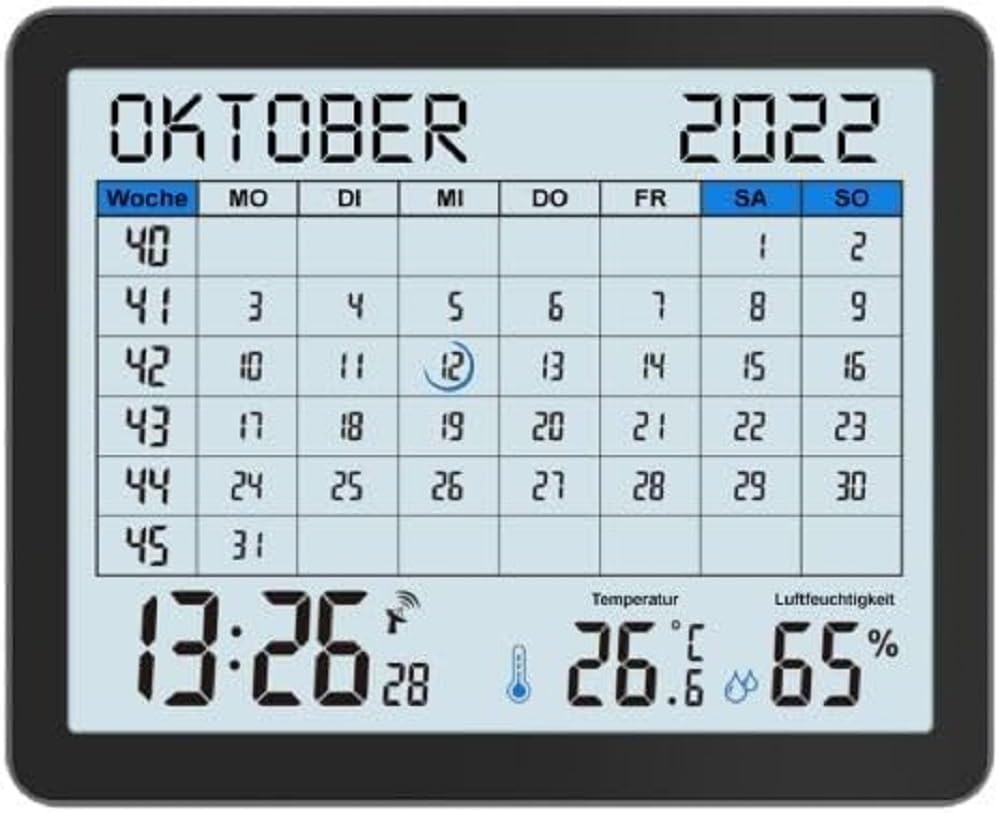
Image of the techno line WT2600 Digital Calendar packaging, showing the device and its key features.
4. Khoom Nta
The techno line WT2600 Digital Calendar offers the following key features:
- DCF-77 Radio-Controlled Clock: Automatic time synchronization for precise timekeeping, with an option for manual setting.
- 12/24 Hour Time Display: Select your preferred time format.
- Daim ntawv qhia hnub: Shows the current date, day of the week, and month.
- 7-Language Month Display: Choose from seven languages for the month display.
- Indoor Temperature Display: Shows indoor temperature in Celsius (°C) or Fahrenheit (°F).
- Cov Zaub Av noo Sab Hauv Tsev: Displays the current indoor humidity level.
- MIN/MAX Display: Records and displays the minimum and maximum temperature and humidity values.
- Dual Alarms with Snooze: Set two independent alarms with a convenient snooze function.
- Tsawg roj teeb qhov taw qhia: Ceeb toom koj thaum lub roj teeb xav tau hloov.
- Versatile Placement: Designed for both wall mounting and table standing.

Pem hauv ntej view of the techno line WT2600 Digital Calendar display, showing the calendar grid, current time, temperature, and humidity.
5. Teeb tsa
5.1 Kev teeb tsa roj teeb
- Nrhiav lub roj teeb hauv qab ntawm chav tsev.
- Qhib lub roj teeb lub hau npog.
- Insert the required batteries (e.g., 2 x AAA, not specified in data, common for such devices) according to the polarity markings (+ and -).
- Kaw lub roj teeb lub hau npog kom ruaj ntseg.
5.2 Initial Power On and DCF-77 Signal Reception
Upon battery insertion, the device will power on and automatically begin searching for the DCF-77 radio signal. This process may take several minutes. For optimal reception, place the unit near a window and away from electronic interference.
- A signal icon (e.g., an antenna symbol) will flash during signal search.
- Once the signal is received, the time and date will be set automatically, and the signal icon will become solid.
- If no signal is received after 10-15 minutes, try repositioning the unit.
5.3 Manual Time and Date Setting
If automatic synchronization is not desired or unsuccessful, you can set the time and date manually.
- Press and hold the 'SET' button (or similar, refer to device buttons) for a few seconds to enter manual setting mode.
- Use the '+' or '-' buttons to adjust the flashing value (e.g., hour, minute, year, month, day).
- Press 'SET' again to confirm the current setting and move to the next adjustable parameter.
- Repeat until all settings are complete.
5.4 Kev teeb tsa lus
To change the display language for the month:
- Enter the setting mode (e.g., by pressing 'SET').
- Navigate through the settings until the language option appears.
- Use the '+' or '-' buttons to cycle through the available 7 languages.
- Paub meej tias koj xaiv.
6. Kev khiav haujlwm
6.1 Viewing Time, Date, Temperature, and Humidity
The main display continuously shows the current time, date, indoor temperature, and indoor humidity. You can switch between 12-hour and 24-hour time formats by pressing a dedicated button (e.g., '12/24H' or 'MODE').
6.2 Teem lub tswb
The device features two independent alarms.
- Press the 'ALARM' button (or similar) to view Tswb 1 lub sij hawm.
- Press and hold 'ALARM' to enter Alarm 1 setting mode.
- Use '+' or '-' to adjust the hour and minute, pressing 'ALARM' to confirm each.
- Repeat for Alarm 2.
- To activate/deactivate an alarm, press 'ALARM' repeatedly until the alarm icon appears/disappears.
6.3 Using Snooze
When an alarm sounds, press the 'SNOOZE' button (or similar, often a large button on top) to temporarily silence the alarm. The alarm will sound again after a few minutes (typically 5-10 minutes). To stop the alarm completely, press any other button.
6.4 MIN/MAX Display Function
The device records the minimum and maximum temperature and humidity values since the last reset.
- Press the 'MIN/MAX' button (or similar) once to view the maximum recorded values.
- Press it again to view the minimum recorded values.
- To reset the MIN/MAX records, press and hold the 'MIN/MAX' button while viewntawm cov ntaub ntawv.

Close-up of the techno line WT2600 Digital Calendar display, highlighting the time, temperature, and humidity readings.
7. Kev tu
7.1 Kev ntxuav
So lub cuab yeej nrog lub mos, damp daim ntaub. Tsis txhob siv cov tshuaj abrasive los yog cov kuab tshuaj, vim cov no yuav ua rau cov zaub lossis casing.
7.2 Hloov roj teeb
When the low battery indicator appears on the display, replace all batteries with new ones of the same type. Follow the battery installation steps in Section 5.1.
8. Kev daws teeb meem
- Tsis muaj zaub: Xyuas kom lub roj teeb polarity thiab xyuas kom cov roj teeb tshiab.
- Lub Sijhawm / Hnub tsis raug: Ensure the DCF-77 signal icon is solid. If not, reposition the unit or set the time manually (Section 5.3). Check your time zone setting if applicable (not explicitly mentioned in data, but common).
- Temperature/Humidity Readings Seem Inaccurate: Ensure the unit is placed in a location with good air circulation, away from direct heat sources or drafts. Allow some time for readings to stabilize after initial setup or relocation.
- Lub tswb tsis suab: Verify that the alarm is activated (alarm icon displayed) and the alarm time is set correctly.
9. Cov lus qhia tshwj xeeb
| Feature | Specification |
|---|---|
| Qauv nab npawb | WT2600 |
| Qhov Loj (L x W x H) | 17.3 x 3.81 x 14 cm |
| Qhov hnyav | 380 g ib |
| Xim | Dub |
| Khoom siv | Yas |
| Hwj chim Source | Roj teeb muaj zog |
| Hom zaub | Digital |
| Siv sab hauv / sab nraum zoov | Sab hauv |
10. Warranty thiab Support
Information regarding product warranty and customer support was not available in the provided product data. Please refer to the retailer or manufacturer's official website for details on warranty coverage and support options.