
Taw qhia
Ua tsaug rau kev yuav khoomasing the Funistree Cell Phone Stand with Wireless Bluetooth Speaker. This device combines a versatile phone stand with a high-quality Bluetooth speaker and a white noise machine, designed to enhance your audio and viewing experience. Please read this manual carefully before use to ensure proper operation and to maximize the product's lifespan.
Khoom Tshajview
The Funistree H77 is a multi-functional device featuring a detachable phone stand and a wireless Bluetooth speaker. Its innovative design allows for independent use of the speaker and the stand, or combined for an integrated entertainment solution.
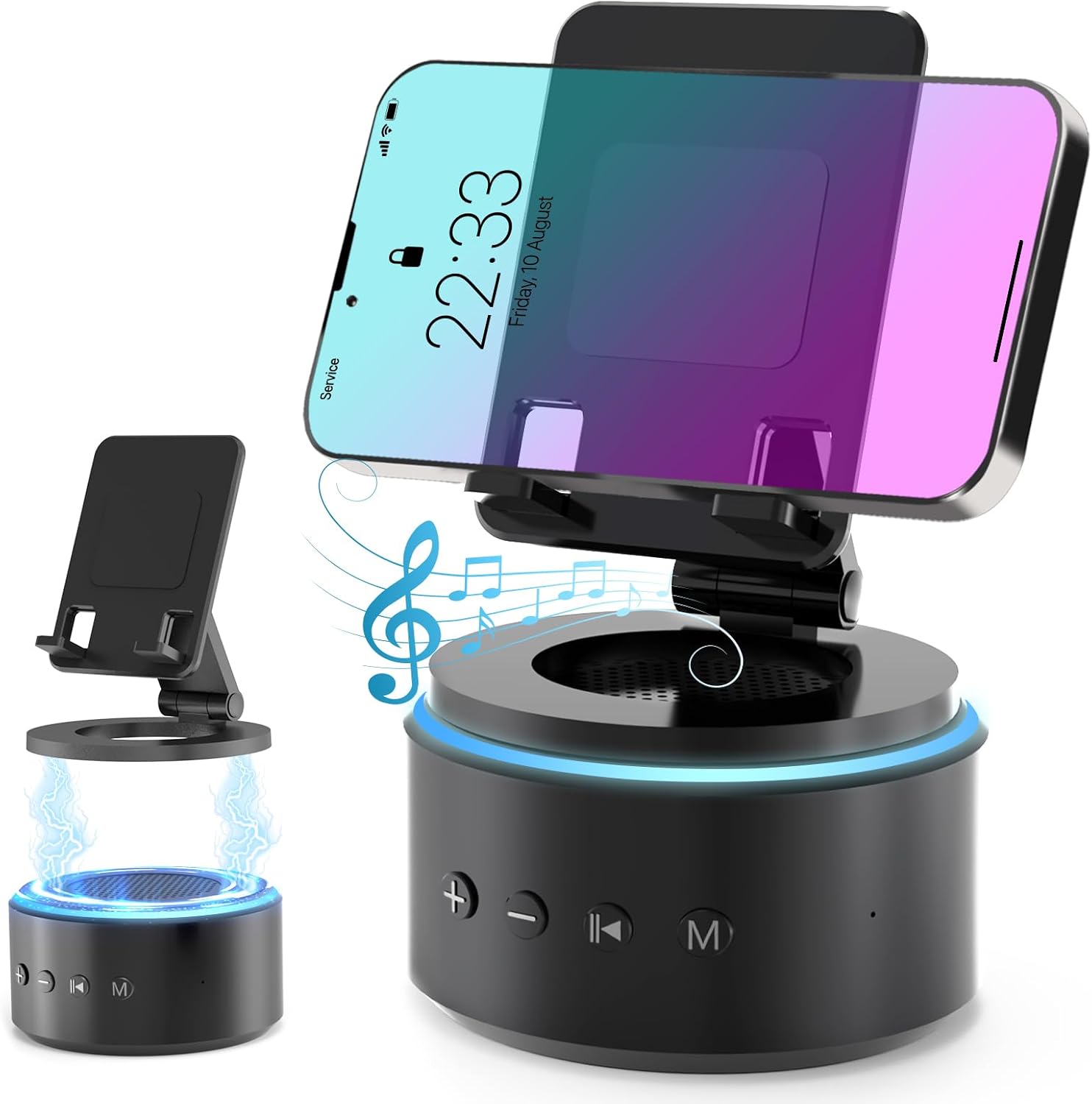
Image: The Funistree H77 device, illustrating its 2-in-1 design with the phone stand attached to the speaker base and also shown detached.
Cov yam ntxwv tseem ceeb:
- 2-in-1 Detachable Design: The phone stand magnetically connects to the Bluetooth speaker, allowing for combined or separate use.
- Adjustable & Portable Stand: Muaj ntau yam viewing angles and includes a hanging design for easy portability.
- HD Stereo Sound: Equipped with a dual stereo system for enhanced bass, clear highs, and balanced midrange.
- Lub Tshuab Suab nrov: Features 10 soothing white noise sounds with an auto-off timer (15, 30, or 60 minutes).
- Lub hauv paus ruaj khov: Anti-slip silicone pads ensure device stability.
- Lub neej roj teeb ntev: Optimized 1800 mAh battery for extended use.
Ntim Cov Ntsiab Lus
Thov kos lub pob rau cov khoom hauv qab no:
- Funistree Cell Phone Stand with Wireless Bluetooth Speaker (Model H77)
- USB Charging Cable
- Cov neeg siv phau ntawv
Note: Contents may vary slightly. If any items are missing or damaged, please contact customer support.
Teeb tsa
Kev them nyiaj yug Device:
- Locate the charging port on the speaker base.
- Connect the provided USB charging cable to the speaker.
- Ntsaws sab tod ntawm txoj hlua USB rau hauv lub adapter fais fab USB uas siv tau (tsis muaj nrog) lossis lub qhov (port) USB hauv computer.
- The charging indicator light will illuminate. Once fully charged, the light may change color or turn off.
Initial charge time is approximately 2-3 hours.
Assembling the Phone Stand and Speaker:
The phone stand and speaker connect magnetically.
- Align the magnetic base of the phone stand with the top surface of the speaker.
- The magnets will snap the two components together securely.
- To detach, simply pull the phone stand upwards from the speaker base.

Duab: Close-up view demonstrating the magnetic connection between the phone stand and the speaker base.
Cov lus qhia ua haujlwm
Fais fab / Off:
- To power on, press and hold the Power button (usually marked with a power symbol) on the speaker base for a few seconds until you hear an audible prompt or see an indicator light.
- Yuav kom tua hluav taws xob, nias thiab tuav lub pob Fais Fab dua ob peb feeb.
Bluetooth khub:
- Ensure the speaker is powered on and in pairing mode (indicated by a flashing LED light, usually blue). If not, briefly press the Bluetooth button (if available) or power cycle the device.
- On your mobile device (smartphone, tablet, etc.), go to Bluetooth settings.
- Nrhiav rau available devices. The speaker will appear as "H77" or "Funistree H77".
- Select the speaker from the list to pair. Once paired, you will hear a confirmation sound, and the LED light will become solid.
- Tam sim no koj tuaj yeem ua si suab ntawm koj lub cuab yeej los ntawm tus hais lus.

Image: The Funistree H77 in use, with a smartphone mounted on the stand, playing music, and a laptop nearby, illustrating its versatile functionality.
White Noise Function:
The speaker includes 10 built-in white noise sounds to aid relaxation or concentration.
- Press the 'M' (Mode) button to cycle through the white noise sounds.
- To set a timer for the white noise, press the Timer button (if available) or refer to the specific button layout on your device. The available timer settings are 15, 30, or 60 minutes. The device will automatically turn off after the selected duration.

Image: Visual representation of the 10 white noise options (Ocean, Wind, Rain, Bird, Heartbeat, Campfire, Thunderstorm, Brook, Fan, Piano) and timer settings, with a person sleeping, indicating the relaxation benefits.
Kho Volume thiab Playback:
- Ntim Tuaj: Nias lub '+' khawm.
- Ntim Cia: Nias lub khawm '-'.
- Ua si / Pause: Press the Play/Pause button (usually marked with a triangle/two vertical bars).
- Next Track: Press the '>>|' button.
- Yav dhau los khiav: Press the '|<<' button.
Siv Lub Xov Tooj Stand:
The phone stand is adjustable to provide optimal viewhauv cov ces kaum.
- Place your smartphone or tablet securely on the stand's cradle.
- Adjust the angle of the stand by gently pushing or pulling the articulated arm to your desired viewhauv txoj hauj lwm.
- The stand features anti-slip silicone pads to prevent your device from sliding.

Duab: Paub meej view highlighting the adjustable angle mechanism and the anti-slip silicone pads on the phone stand and base for secure device placement.
Portability:
The speaker can be carried easily using its integrated hanging design.

Image: A woman outdoors, holding the Funistree speaker by its hanging rope, demonstrating its portability for outdoor activities.
Kev tu
- Ntxuav: Use a soft, dry cloth to wipe the surface of the device. Do not use abrasive cleaners, alcohol, or chemical solvents, as these may damage the finish.
- Cia: Thaum tsis siv rau lub sijhawm ntev, khaws cov cuab yeej hauv qhov chaw txias, qhuav kom deb ntawm tshav ntuj ncaj qha thiab qhov kub thiab txias.
- Kev kho roj teeb: Txhawm rau kom lub roj teeb lub neej ntev, tsis txhob tso lub roj teeb tas li ntau zaus. Them lub cuab yeej tsis tu ncua, txawm tias tsis siv.
- Zam dej: This device is not waterproof. Keep it away from water, moisture, and excessive humidity.
- Handle nrog Care: Tsis txhob tso tseg lossis ua rau lub cuab yeej raug cuam tshuam.
Kev daws teeb meem
| Teeb meem | Ua Tau | Kev daws |
|---|---|---|
| Cov cuab yeej tsis siv hluav taws xob. | Tsawg roj teeb. | Them lub cuab yeej tag nrho. |
| Tsis tuaj yeem ua khub ntawm Bluetooth. | Speaker not in pairing mode; Bluetooth disabled on source device; device too far. | Ensure speaker is in pairing mode. Enable Bluetooth on your device. Move devices closer (within 10 meters). Forget previous pairings and try again. |
| Tsis muaj suab nrov lossis tsis muaj suab nrov. | Volume too low on speaker or source device; device not properly paired. | Increase volume on both speaker and source device. Re-pair the device. |
| White noise function not working. | Xaiv hom tsis raug. | Press the 'M' (Mode) button to cycle to the white noise function. |
| Phone stand is unstable. | Device not placed correctly; surface is uneven. | Ensure phone is centered on the cradle. Place the stand on a flat, stable surface. |
If the problem persists, please contact Funistree customer support.
Specifications
| Qauv nab npawb | H77 |
| Khoom Dimensions | 4.53 x 4.13 x 4.37 po |
| Yam Nyhav | 15.8 hli |
| Hom roj teeb | 1 Lithium Ion roj teeb (nrog) |
| Roj teeb muaj peev xwm | 1800 mAh |
| Kev sib txuas | Bluetooth |
| Suab nrov nrov | 10 types (Ocean, Wind, Rain, Bird, Heartbeat, Campfire, Thunderstorm, Brook, Fan, Piano) |
| Timer Settings | 15, 30, 60 feeb |
| Compatible Devices | Smartphones, Tablets (iPhone, Galaxy, LG, iPad, Samsung Tab, Sony, etc.) |
Cov ntaub ntawv kev nyab xeeb
- Do not disassemble, repair, or modify the device. This may cause damage, electric shock, or fire.
- Keep the device away from heat sources, direct sunlight, and high temperatures.
- Tsis txhob tso lub cuab yeej rau dej lossis lwm yam kua.
- Do not use the device in environments with strong electromagnetic interference.
- Khaws kom deb ntawm me nyuam yaus thiab tsiaj.
- Dispose of the device and its battery responsibly according to local regulations. Do not dispose of with household waste.
Warranty thiab Support
Funistree products are designed and manufactured to the highest quality standards. For warranty information and customer support, please refer to the warranty card included with your purchase or visit the official Funistree website. If you encounter any issues or have questions regarding your product, please contact our customer service team.
Yog xav paub ntxiv, thov mus saib: Funistree Official Store on Amazon