
1. Taw qhia
This manual provides detailed instructions for the installation, operation, maintenance, and troubleshooting of the Fydun ZL-7901A Incubator Controller. This device is designed for precise and automatic control of temperature and humidity in various incubation environments, ensuring optimal conditions for successful hatching.
2. Khoom Tshajview
The Fydun ZL-7901A is a high-precision digital incubator controller capable of managing both temperature and humidity. It features a clear display and intuitive controls for easy programming and monitoring.
Cov yam ntxwv tseem ceeb:
- Precise Control: High-accuracy temperature and humidity regulation for stable incubator environments.
- Strong Anti-interference: Designed for reliable operation in various conditions.
- High Stability and Accuracy: Ensures consistent performance for critical incubation processes.
- Daim ntawv thov dav: Suitable for a variety of eggs including chicken, duck, goose, pigeon, quail, parrot, and peacock.
- Tsis siv neeg ua haujlwm: Fully automatic control reduces manual intervention.
Cheebtsam:

Daim duab 2.1: Pem hauv ntej view of the Fydun ZL-7901A Incubator Controller, showing the display and control buttons.

Daim duab 2.2: The ZL-7901A controller packaged with its temperature and humidity sensors and connecting cables.

Daim duab 2.3: The ZL-7901A controller shown in an incubator environment, demonstrating its application for egg incubation.
3. Cov ntaub ntawv kev nyab xeeb
- Nyeem tag nrho cov lus qhia ua tib zoo ua ntej kev teeb tsa thiab ua haujlwm.
- Xyuas kom lub hwj huam mov voltage matches the controller's requirements (100V-240V).
- All wiring should be performed by a qualified professional to prevent electrical hazards.
- Tsis txhob tso tus maub los rau dej los yog dej noo ntau dhau.
- Khaws lub cuab yeej kom deb ntawm cov khoom siv hluav taws xob.
- Tshem tawm lub hwj chim ua ntej ua ib qho kev tu lossis kev hloov pauv.
- Cov cuab yeej no tsis yog khoom ua si. Txhob nyob ze cov me nyuam.
4. Kev teeb tsa thiab kev teeb tsa
4.1 Mounting Controller
The ZL-7901A controller is designed for panel mounting. Ensure a secure and stable location within your incubator setup.

Daim duab 4.1: Sab view illustrating the mounting bracket for panel installation.
4.2 Kev Txuas Txuas Txuas
Carefully connect the power supply, sensors, and output devices (heater, humidifier, fan, egg turner) to the appropriate terminals on the back of the controller. Refer to the wiring diagram provided with your product for specific connections. Ensure all connections are tight and secure.

Daim duab 4.2: Qab view of the controller, showing the terminal blocks for electrical connections.
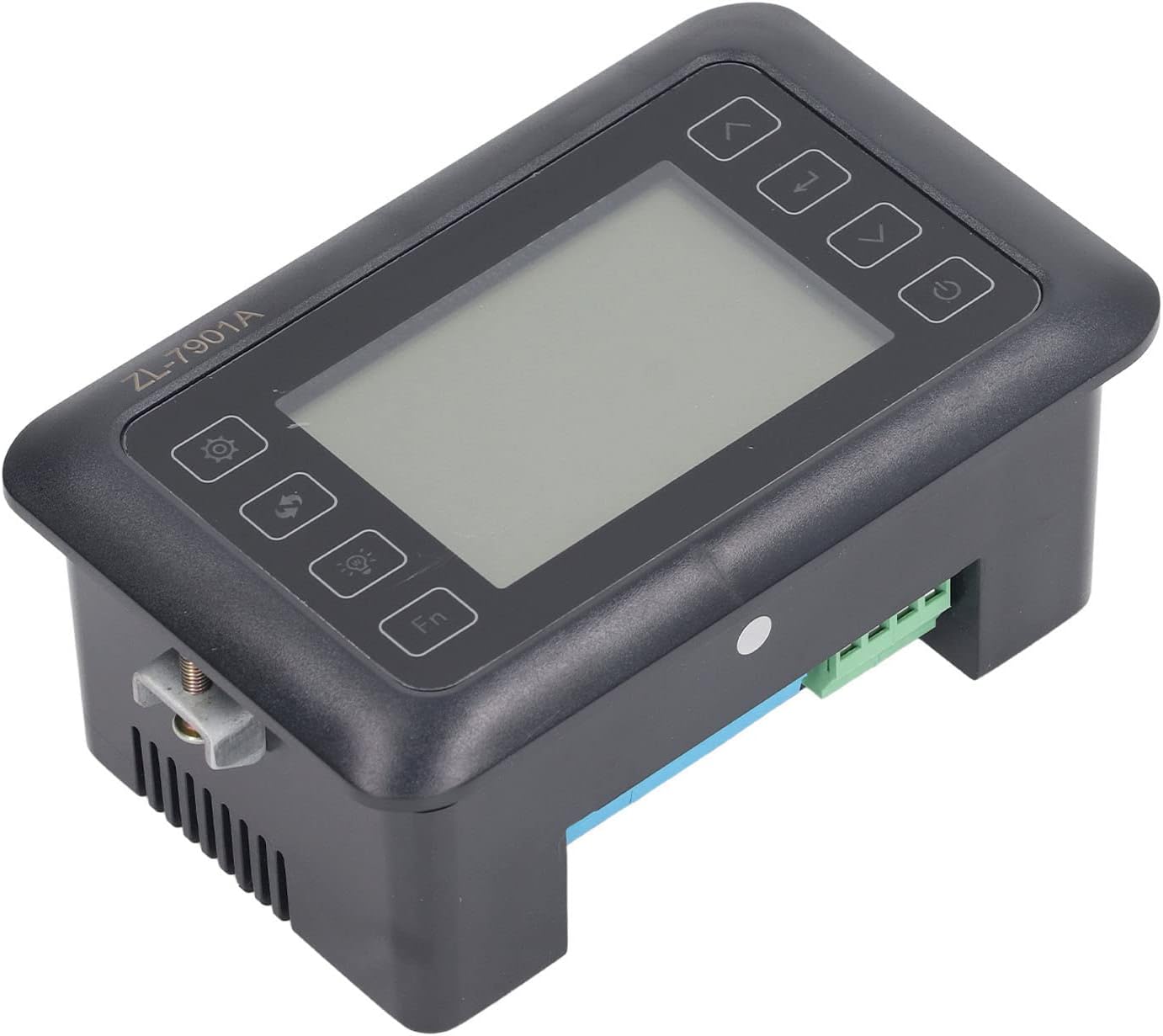
Daim duab 4.3: Angled view highlighting the various connection points on the controller's side.
After all connections are made, double-check them for correctness before applying power.
5. Cov lus qhia ua haujlwm
5.1 Fais fab / Off
Nias lub Lub hwj chim khawm to turn the controller on or off. The display will illuminate upon power-on. The power button is located on the right side of the controller's front panel.
5.2 Zaub Tshajview
The main display shows the current temperature and humidity readings. Additional indicators may show the status of heating, humidifying, and turning functions.
5.3 Chaw Parameters
- Nias lub Kev teeb tsa khawm (gear icon) to enter the parameter setting mode. This button is on the left side of the controller's front panel.
- Siv cov Up (xub xub nce mus) thiab nqes (down arrow) buttons to navigate through different parameters (e.g., target temperature, target humidity, egg turning interval). These buttons are on the right side of the controller's front panel.
- Nias lub Nkag mus khawm (return arrow icon) to select a parameter for editing. This button is on the right side of the controller's front panel.
- Siv cov Up thiab nqes nyees khawm los kho tus nqi.
- Nias lub Nkag mus khawm dua kom paub meej tus nqi tshiab.
- Repeat for all desired parameters.
- Exit the setting mode by pressing the Kev teeb tsa khawm again or waiting for a timeout.
Nco tseg: Consult the full product manual (if provided separately) for a complete list of parameters and their functions.
5.4 Muaj nuj nqi khawm
- Lub teeb khawm (light bulb icon): Controls the internal light of the incubator (if connected). This button is on the left side of the controller's front panel.
- Fn Khawm: Activates special functions or enters advanced settings. Refer to the detailed manual for specific Fn button operations. This button is on the left side of the controller's front panel.
6. Kev tu
6.1 Kev ntxuav
- Ensure the controller is powered off and disconnected from the power source before cleaning.
- Wipe the exterior of the controller with a soft, dry cloth.
- Do not use abrasive cleaners, solvents, or immerse the unit in water.
- Keep the sensor probes clean and free from debris to ensure accurate readings.
6.2 Kev Saib Xyuas Sensor
Handle the temperature and humidity sensors with care. Avoid bending or damaging the cables. If readings appear inaccurate, gently clean the sensor tips. Do not attempt to disassemble the sensors.
7. Kev daws teeb meem
| Teeb meem | Ua Tau | Kev daws |
|---|---|---|
| Controller tsis muaj zog. | Tsis muaj hluav taws xob; xoob kev sib txuas; faulty fais fab cable. | Check power outlet; ensure all connections are secure; test power cable. |
| Kev nyeem ntawv kub/av noo tsis raug. | Sensor dirty or damaged; sensor not properly placed; calibration needed. | Clean sensor; reposition sensor away from direct airflow/heat; refer to advanced settings for calibration (if available). |
| Heater/Humidifier not activating. | Output device not connected; setpoint not reached; faulty output device. | Verify wiring connections; check setpoint values; test heater/humidifier independently. |
| Zaub qhia qhov yuam kev code. | Sensor fault; internal error. | Note the error code and consult the full product manual or contact support. |
8. Cov lus qhia tshwj xeeb
| Feature | Paub meej |
|---|---|
| Qauv | ZL-7901A |
| Hom | Fydun |
| Cov lus qhia Voltage | AC 100V-240V |
| Tswj hom | Fully Automatic Digital Temperature and Humidity Control |
| Qhov tseeb | High precision for both temperature and humidity |
| Daim ntawv thov | Incubators for various poultry and bird eggs |
| Mounting | Vaj huam sib luag Mount |
9. Warranty thiab Support
Fydun is committed to providing quality products and excellent customer service. If you encounter any issues or have questions regarding your ZL-7901A Incubator Controller, please contact our customer service team.
For support, please refer to the contact information provided with your purchase or visit the official Fydun store on Amazon: Fydun Amazon Store.
Our professional customer service team is ready to assist you promptly.