
Elkron KCR200GSM
Elkron KCR200GSM Wireless Alarm System Kit User Manual
Model: KCR200GSM
1. Taw qhia
This manual provides comprehensive instructions for the installation, operation, and maintenance of your Elkron KCR200GSM Wireless Alarm System Kit. Please read this manual thoroughly before attempting to install or operate the system to ensure proper function and safety. Keep this manual for future reference.
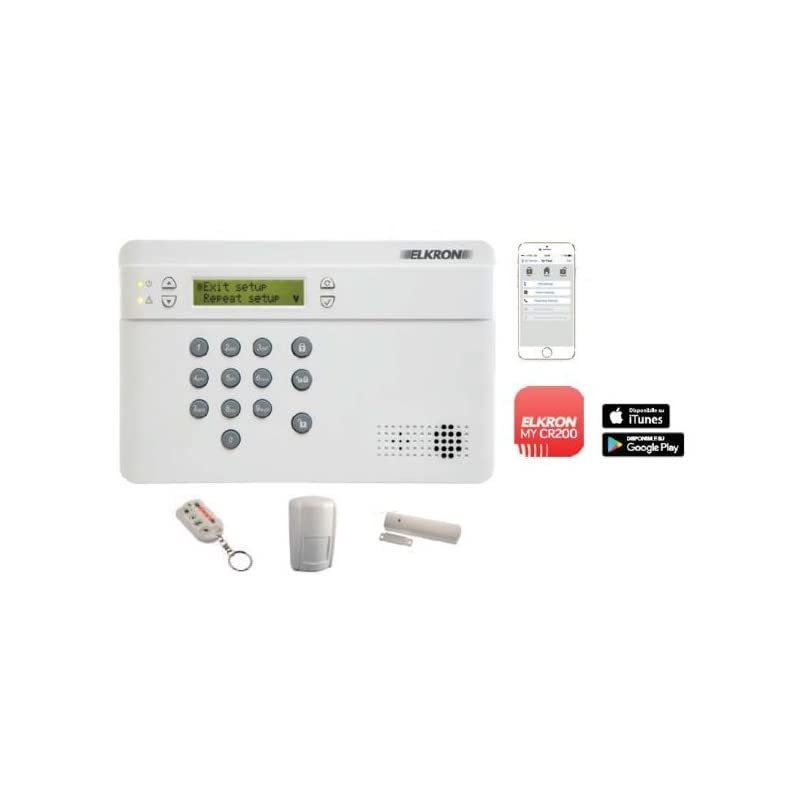
Daim duab 1: The Elkron KCR200GSM Wireless Alarm System Kit, showing the main control panel and various sensors.
2. Cov ntaub ntawv kev nyab xeeb
- Ensure the power source matches the system's requirements.
- Tsis txhob muab lub tshuab tso rau qhov kub thiab txias heev, av noo, lossis tshav ntuj ncaj qha.
- Khaws lub kaw lus kom deb ntawm cov teb hluav taws xob muaj zog.
- Do not attempt to disassemble or repair the system yourself. Refer all servicing to qualified personnel.
- Test the system regularly to ensure all components are functioning correctly.
3. Cov ntsiab lus ntawm pob
Xyuas kom tseeb tias tag nrho cov khoom hauv qab no suav nrog hauv koj pob:
- Main Controller (Control Panel)
- Motion Sensors
- Qhov rooj / Qhov rai Sensors
- Siren
- Power Adapter (if applicable, for main unit)
- Mounting Kho vajtse
- Tus Neeg Siv Los Siv (cov ntawv no)
Note: The exact quantity of sensors may vary depending on the specific kit purchased.
4. Kev teeb tsa thiab kev teeb tsa
The Elkron KCR200GSM system is designed for Wireless DIY installation. Follow these steps for proper setup:
4.1 Main Controller Placement
Choose a central location for the main controller, away from direct sunlight, heat sources, and large metal objects that could interfere with wireless signals. Ensure it is within Wi-Fi range for internet connectivity.
4.2 Powering the Main Controller
Connect the provided power adapter to the main controller and plug it into a standard wall outlet. The system also features an internal battery for backup power during outages.
4.3 Kev Txhim Kho Sensor
Motion Sensors: Install motion sensors in corners of rooms, approximately 2-2.5 meters (6.5-8 feet) from the floor, ensuring a clear line of sight to the areas you wish to monitor. Avoid pointing them directly at windows or heat sources.
Cov Sensors Qhov Rooj/Qhov Rai: Attach the two parts of each door/window sensor to the frame and the movable part of the door or window. Ensure they are aligned and within 1-2 cm (0.4-0.8 inches) of each other when the door/window is closed.
Siren: Mount the siren in a secure, discreet location, preferably outdoors or in a high-traffic area indoors, where its sound can be effective. Ensure it is protected from weather if installed outside.
4.4 Wi-Fi Connectivity and App Pairing
- Download the official Elkron security app from your smartphone's app store.
- Tsim ib tus account thiab nkag mus.
- Follow the in-app instructions to add your KCR200GSM main controller. This typically involves scanning a QR code on the device or entering a serial number.
- Connect the main controller to your home Wi-Fi network through the app.
- Pair all sensors and the siren with the main controller using the app's pairing function. Refer to the app's specific instructions for each sensor type.
5. Cov lus qhia ua haujlwm
The Elkron KCR200GSM system is primarily controlled via its dedicated smartphone application.
5.1 Txhim Kho Qhov System
- Open the Elkron security app on your smartphone.
- Select the desired arming mode (e.g., Full Arm, Home Arm, Disarm).
- Confirm your selection. The system will provide an audio confirmation (if enabled) and the app will display the current status.
Tag Nrho Tes: All sensors are active. Ideal when no one is home.
Tes Hauv Tsev (Nyob Tes): Typically activates perimeter sensors (door/window) while allowing movement within the home. Ideal when people are inside.
5.2 Kev tshem riam phom
- Open the Elkron security app.
- Select the "Disarm" option.
- Enter your PIN or use biometric authentication if configured. The system will disarm, and the app will update its status.
5.3 Alarm Activation and Notifications
When an armed sensor is triggered, the system's siren will activate (audio only alert type). You will receive instant notifications on your smartphone via the app, detailing which sensor was triggered. The system can also be configured to send SMS or make calls to pre-programmed numbers (GSM functionality).
5.4 System Settings and Customization
The app allows you to customize various settings, including:
- Sensor sensitivity adjustments.
- Entry/exit delays.
- Tswb Duration.
- Notification preferences (push, SMS, call).
- Adding/removing users.
Refer to the in-app help section for detailed instructions on advanced settings.
6. Kev tu
Regular maintenance ensures the optimal performance and longevity of your Elkron KCR200GSM system.
6.1 Kev ntxuav
Wipe the main controller and sensors with a soft, dry cloth. Do not use liquid cleaners or abrasive materials, as these can damage the components.
6.2 Roj teeb Check
The main controller has an internal battery for backup power. The app will notify you if the battery level is low. Ensure the main controller remains connected to its power adapter for continuous charging. Individual sensors are typically powered by replaceable batteries; the app will also alert you when these need replacement. Follow the sensor's specific instructions for battery replacement, ensuring correct battery type and polarity.
6.3 Kev Ntsuas Kev Ntsuas
It is recommended to test your alarm system at least once a month. Arm the system and intentionally trigger a sensor (e.g., open a door/window, walk past a motion sensor) to verify that the siren activates and you receive notifications on your smartphone.
7. Kev daws teeb meem
| Teeb meem | Ua Tau | Kev daws |
|---|---|---|
| System not connecting to Wi-Fi. | Wi-Fi password tsis raug, teeb liab tsis muaj zog, teeb meem router. | Verify Wi-Fi password. Move the main controller closer to the router. Restart your router. Ensure your Wi-Fi is 2.4GHz. |
| Sensor not pairing. | Sensor too far from main controller, low sensor battery, pairing mode not active. | Move sensor closer. Replace sensor battery. Ensure main controller is in pairing mode via the app. |
| tswb tsis suab. | Siren not powered, siren not paired, system disarmed, siren volume low. | Check siren power/battery. Re-pair siren. Ensure system is armed. Check siren volume settings in the app. |
| Tsis muaj kev ceeb toom ntawm app. | Phone notification settings, app not running in background, internet connectivity issues. | Check phone's notification settings for the Elkron app. Ensure phone has internet access. Restart the app. |
8. Cov lus qhia tshwj xeeb
- Qauv nab npawb: KCR200GSM
- Hom Tshuaj: Elkron
- Installation Method: Wireless DIY
- Lub zog Source: Battery (internal for main unit, replaceable for sensors)
- Connectivity Technology: Wi-nkaus, GSM
- Tswj txoj kev: Application (Smartphone App)
- Hom ceeb toom: Audio only (siren)
- Khoom hnyav: Approximately 1 kg (main unit)
- Cov Cheebtsam suav nrog: Main Controller, Motion Sensors, Door/Window Sensors, Siren
- Xim: Nruab nrab
9. Warranty thiab Support
For warranty information, please refer to the documentation provided with your purchase or contact your retailer. For technical support, troubleshooting assistance beyond this manual, or to inquire about replacement parts, please visit the official Elkron website or contact their customer service department. Contact details can typically be found on the product packaging or the Elkron webqhov chaw.
Ask a question about this manual
Ask about setup, troubleshooting, compatibility, parts, safety, or missing instructions. Manuals+ will review the question and use this page’s manual context to help answer it.