
1. Khoom Tshajview
This manual provides instructions for the CHUNGHOP ASK-STI6220 Voice Remote Control. This remote is designed as a replacement for specific Verizon Stream TV Box models, offering intelligent voice control and responsive button functionality for an enhanced entertainment experience.
2. Compatibility Information
The ASK-STI6220 Voice Remote Control is specifically designed to work ONLY with Verizon Stream TV Box voice remote control V2 ARRIS CCAM21LP1890T2, 2AGOFRC451A, RC451A, STI6220-D315, ASK-STI6220. It is NOT a universal remote for Verizon FiOS and is NOT compatible with Verizon Stream TV JS8V, Verizon FiOS TV 2019 - MG3-R32140B VRC4100 BLE Remote, or any Verizon remote with a "LAST" button. Please ensure your original remote's design and button layout match this model for proper functionality.
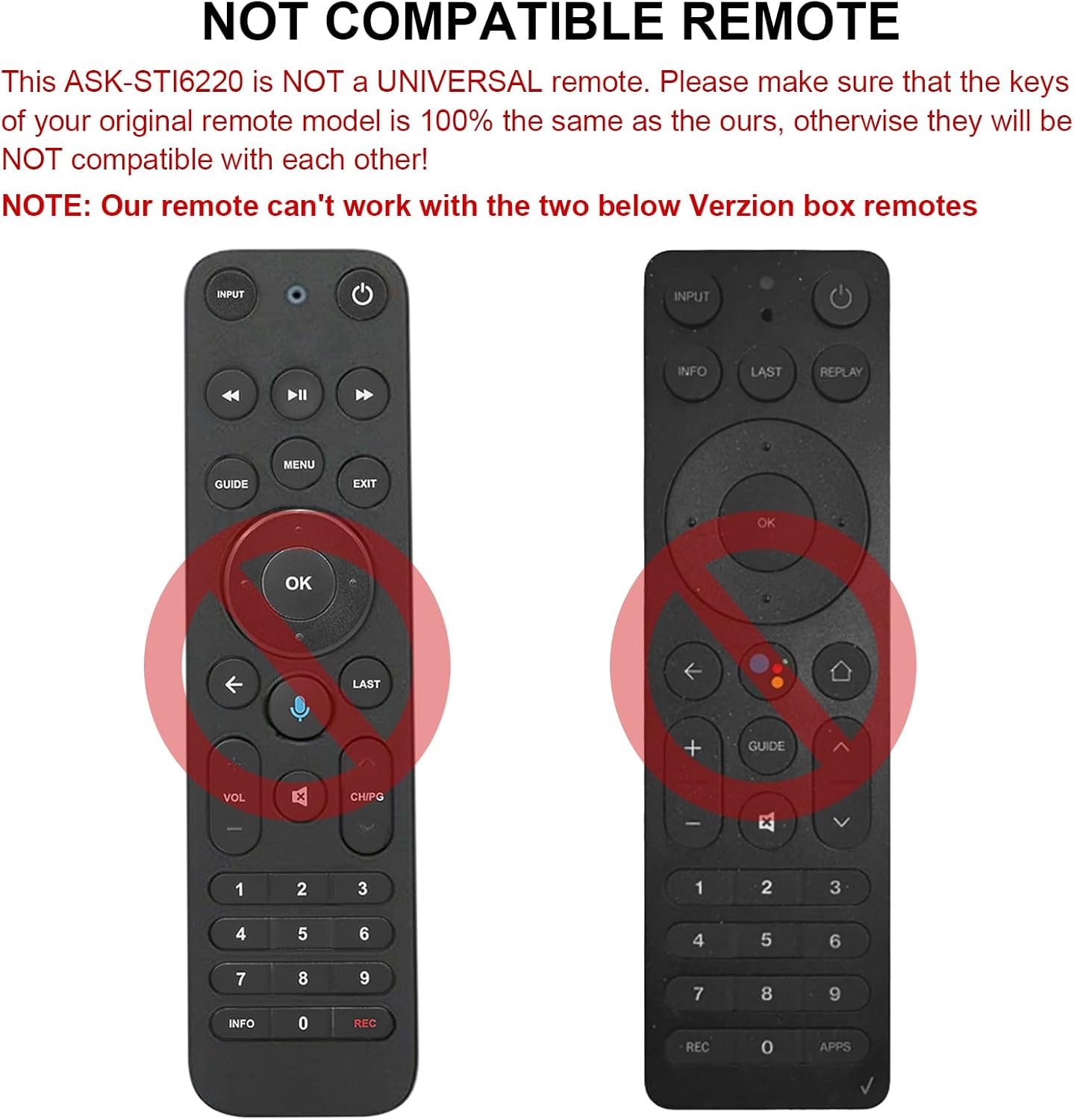
Fig 2.1: Examples of incompatible Verizon remotes. Ensure your original remote's buttons match the ASK-STI6220 model.

Figure 2.2: The ASK-STI6220 Voice Remote Control, compatible with Verizon Stream TV Box.
3. Kev teeb tsa thiab kev teeb tsa
3.1 Kev teeb tsa roj teeb
Cov chaw taws teeb tswj yuav tsum muaj ob lub roj teeb AAA (tsis suav nrog). Rau nruab cov roj teeb:
- Tshem lub roj teeb npog ntawm sab nraum qab ntawm cov chaw taws teeb tswj.
- Insert two AAA batteries, ensuring correct polarity (+ and - ends match the markings inside the compartment).
- Hloov lub roj teeb npog kom ruaj ntseg.

Figure 3.1: Battery compartment for two AAA batteries.
Video 3.1: Demonstration of battery installation and initial setup for the ASK-STI6220 Voice Remote.
3.2 Pairing Instructions
To use the voice remote, it must first be paired with your Verizon Stream TV Box. Follow one of the methods below:
- Txoj Kev 1: Nias lub "Rov qab los"thiab"apps" buttons simultaneously to initiate pairing.
- Txoj Kev 2: Alternatively, press the "OK"thiab"TSEV" buttons simultaneously to initiate pairing.
Lus Cim Tseem Ceeb:
- A device can only be paired with one voice remote at a time. Before pairing this new remote, please disconnect your old remote control (e.g., by removing its batteries).
- If pairing fails on the first attempt, try turning your TV Box off and then back on. If you continue to experience issues, clear any existing remote settings on your TV Box before attempting to pair again.

Figure 3.2: Visual guide for pairing the remote control.
4. Cov lus qhia ua haujlwm
4.1 General Button Functions
The ASK-STI6220 remote features a standard layout for easy navigation and control of your Verizon Stream TV Box:
- Lub zog khawm: Turns the TV Box on or off.
- Input Button: Switches input sources on your TV.
- Navigation Pad (Up/down/Sab laug/Right/OK): Siv rau kev taw qhia cov ntawv qhia zaub mov thiab xaiv.
- Volume Up / Down: Kho qhov ntim.
- Channel Up/down: Hloov cov channel.
- Ua si/Pause, Fast Forward, Rewind: Media playback tswj.
- Khawm Tsev: Rov qab mus rau qhov screen tsev tseem ceeb.
- Taw qhia khawm: Accesses the program guide.
- Tus lej Pad (0-9): Direct channel nkag.
- Cov ntaub ntawv khawm: Qhia cov ntaub ntawv ntawm qhov kev pab cuam.
- APPs Button: Accesses applications.
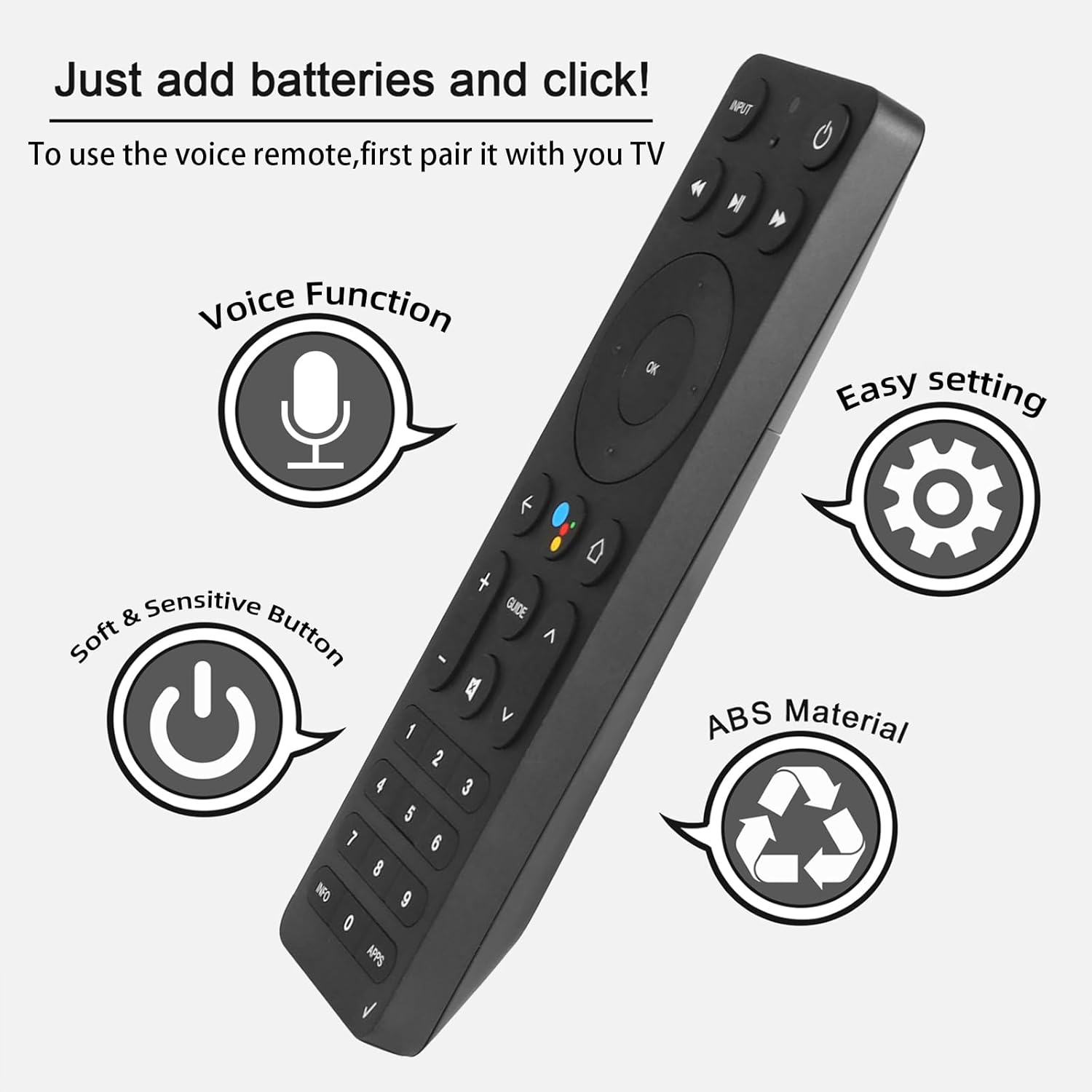
Figure 4.1: Key features and button layout of the remote control.
4.2 Intelligent Voice Control
The remote features an intelligent voice function, allowing you to control your TV Box with voice commands. Press the dedicated voice button (often represented by a microphone icon) and speak clearly into the remote.
Examples of voice commands:
- "Launch channels"
- "Lower the volume"
- "Play action movie"
If the voice function does not work correctly, follow these steps:
- Go to the home page of your TV Box.
- Press the "Settings" button on the remote control.
- Select "Remote Controls and Accessories" and then "Remote Controls."
- Select to add a new remote control and follow the on-screen steps to complete the setup.

Figure 4.2: Using intelligent voice search and control.

Figure 4.3: The remote offers a 0.2-second fast response and a 33-foot transmitting distance for accurate control.
5. Kev tu
Yuav kom paub tseeb tias koj lub chaw taws teeb tswj tau ntev thiab ua haujlwm tau zoo tshaj plaws:
- Keep the remote clean by wiping it with a soft, dry cloth. Avoid using liquid cleaners or abrasive materials.
- Replace batteries promptly when the remote's responsiveness decreases. Always use fresh AAA batteries.
- Avoid exposing the remote to extreme temperatures, direct sunlight, or moisture.
- Do not drop the remote or subject it to strong impacts.
6. Kev daws teeb meem
If you encounter issues with your ASK-STI6220 remote control, please refer to the following common solutions:
- Tej thaj chaw deb tsis teb:
- Xyuas kom tseeb tias cov roj teeb tau teeb tsa kom raug thiab tsis tas. Hloov cov roj teeb AAA tshiab yog tias tsim nyog.
- Verify that the remote is properly paired with your Verizon Stream TV Box (refer to Section 3.2).
- Xyuas kom tseeb tias tsis muaj dab tsi thaiv ntawm qhov chaw taws teeb thiab lub thawv TV.
- Pairing teeb meem:
- Confirm that your original remote is disconnected (e.g., by removing its batteries) as only one Bluetooth remote can be paired at a time.
- If pairing fails, try turning the TV Box off and on again, then re-attempt the pairing process.
- Clear existing remote settings on your TV Box before trying to pair again.
- Lub suab tswj tsis ua haujlwm:
- Ensure the remote is successfully paired and the voice function is enabled on your TV Box.
- Follow the voice control setup steps outlined in Section 4.2.
- Speak clearly and directly into the remote's microphone.
- Remote not compatible with my device:
- This remote is specifically designed for Verizon Stream TV Box voice remote control V2 ARRIS CCAM21LP1890T2, 2AGOFRC451A, RC451A, STI6220-D315, ASK-STI6220. It is not a universal remote. Please verify your device's model number and compare your original remote's buttons with the ASK-STI6220.

Figure 6.1: Common questions and answers regarding the remote's functionality and compatibility.
7. Cov lus qhia tshwj xeeb
| Feature | Paub meej |
|---|---|
| Hom | CHUNGHOP |
| Qauv nab npawb | ASK-STI6220 |
| Compatible Devices | Verizon Stream TV Box (specific models as listed in Section 2) |
| Ntau tus lej txhawb nqa | 1 |
| Tshwj xeeb Feature | Ergonomic, Voice Control |
| Xim | As Shown (typically black) |
| Yuav tsum tau roj teeb | 2 AAA roj teeb |
| Yam Nyhav | 3.2 hli |
| Pob Dimensions | 8.19 x 3.54 x 0.94 po |
8. Warranty thiab Support
For any questions or concerns regarding your CHUNGHOP ASK-STI6220 Voice Remote Control, including pairing, setup, or functionality, please contact the seller directly. Refer to your purchase documentation for specific warranty details, as these may vary.
The manufacturer, CHUNGHOP, is committed to providing support for their products.