
1. Taw qhia
The FLIPSKY Mini V6 MK5 is an advanced electronic speed controller (ESC) designed for various electric vehicle applications, including e-skateboards, e-bikes, scooters, and robots. Based on VESC6.6 hardware, it features an integrated power button and an aluminum anodized heat sink for efficient thermal management. This manual provides essential information for the safe and effective use of your Mini V6 MK5 ESC.
2. Cov ntaub ntawv kev nyab xeeb
- Always disconnect the battery before performing any wiring or maintenance.
- Xyuas kom tag nrho cov kev sib txuas muaj kev ruaj ntseg thiab zoo insulated los tiv thaiv luv luv circuits.
- Operate the ESC within its specified voltage range. The Mini V6 MK5 supports 14V-60V (4-13S battery cells). It is safe for 4S to 12S configurations, but voltage spikes must not exceed 60V. Exceeding this limit can cause permanent damage.
- Avoid operating the ESC in wet conditions or environments with excessive dust or debris.
- Ensure adequate airflow around the heat sink to prevent overheating during operation.
- Khaws kom deb ntawm cov menyuam yaus.
3. Khoom Tshajview
The FLIPSKY Mini V6 MK5 ESC is a compact and powerful controller featuring a robust design with an aluminum anodized heat sink for improved heat dissipation. It includes an integrated power button for convenient operation.

Daim duab 3.1: Zuag qhia tag nrho view of the FLIPSKY Mini V6 MK5 ESC, showing the main board, capacitors, motor wires, battery wires, and the external power button.

Daim duab 3.2: Sab saum toj view of the ESC, highlighting the main integrated circuits, capacitors, and various connection ports.
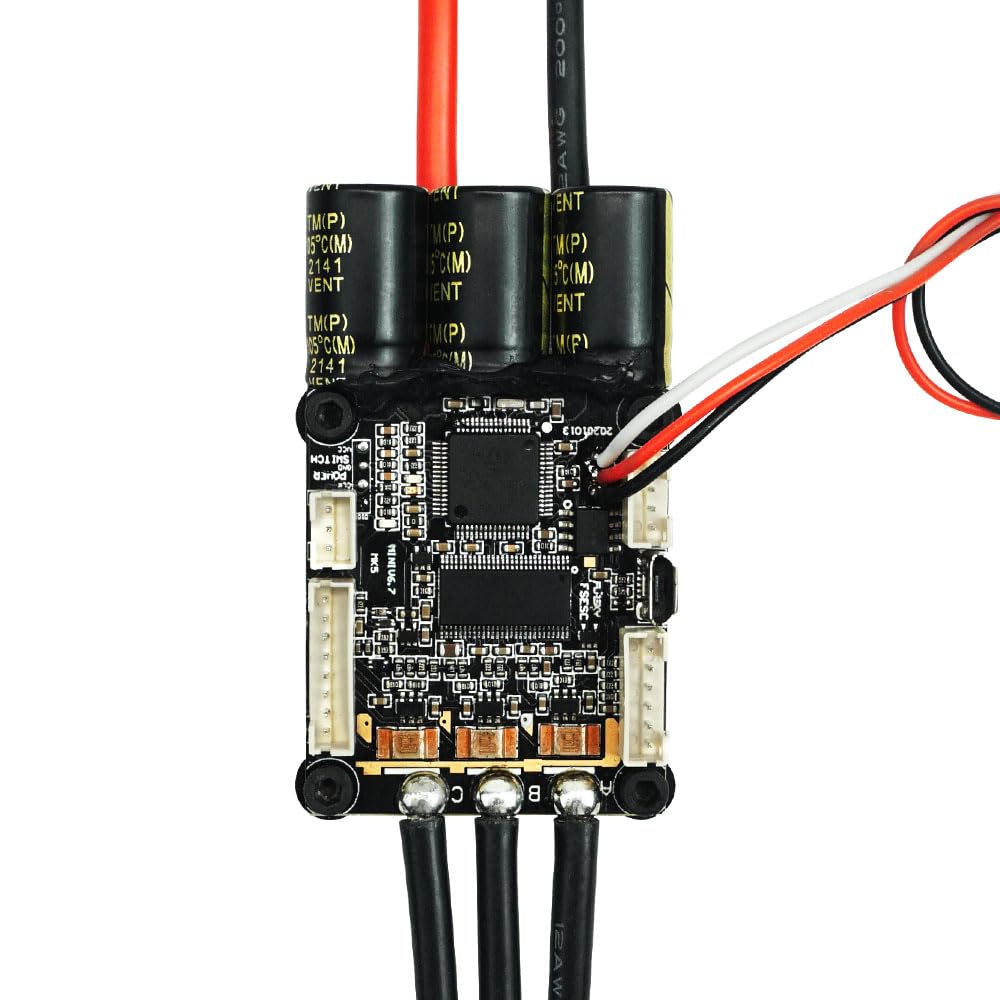
Daim duab 3.3: Close-up view of the aluminum anodized heat sink, which aids in dissipating heat generated during operation, ensuring stable performance.
4. Cov lus qhia tshwj xeeb
| Parameter | Tus nqi |
| Firmware Version | 60 |
| Hardware Version | VESC 6.4 |
| Nruam Tam sim no | 70 A |
| Instantaneous Current | 200 A |
| Voltage Ntau yam | 14V-60V (4-13S, safe for 4S to 12S; voltage spikes must not exceed 60V) |
| Control Interface Ports | USB, CAN, UART, SPI, IIC |
| Txhawb Sensors | ABI, HALL, AS5047, AS5048A |
| Input Set Support | PPM, ADC, NRF, UART |
| Tswj hom | DC, BLDC, FOC (sinusoidal) |
| Regenerative Capacity | Yog lawm |
| BEC tso zis | 5V @1A |
| ERPM | 150000 |
| Programmable | Yog lawm |
| Motor Wire Gauge | 12 AWG |
| Power Cable Gauge | 12 AWG |
| Qhov Loj (L x W x H) | 67mm x 39mm x 18.7mm (2.64" x 1.54" x 0.74") (Including heatsink) |
| Qhov hnyav | 130g (0.13 Kilograms) |
| Khoom siv | Aluminium |
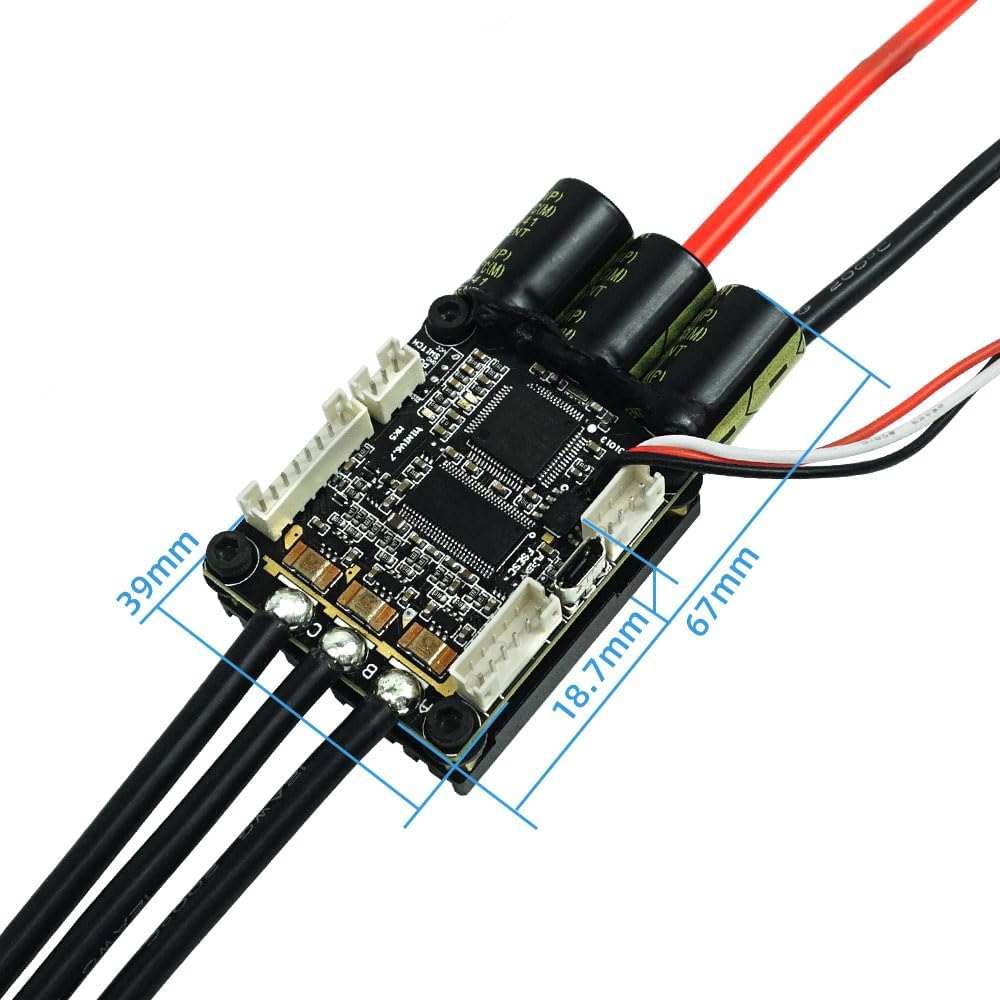
Figure 4.1: Dimensions of the FLIPSKY Mini V6 MK5 ESC, showing length, width, and height measurements.
5. Kev teeb tsa thiab xaim
Proper wiring is crucial for the safe and correct operation of the Mini V6 MK5 ESC. Follow the diagram below for connecting your battery, motor, and receiver.
5.1 Wiring Diagram

Figure 5.1: Detailed wiring diagram illustrating connections for battery, motor, receiver, and various control interfaces (CAN, SENSE, COMM, Power Switch, USB).
5.2 Cov kauj ruam txuas
- Roj teeb kev twb kev txuas: Connect your battery pack to the main power cables (red for positive, black for negative) of the ESC. Ensure correct polarity.
- Kev sib txuas ntawm lub cev muaj zog: Connect the three motor phase wires (A, B, C) from your motor to the corresponding outputs on the ESC. The order may affect motor rotation direction, which can be adjusted in software.
- Kev sib txuas ntawm receiver: Connect your receiver to the COMM port or other appropriate input set support (PPM, ADC, NRF, UART) as per your setup.
- Lub zog khawm: The integrated power button connects to the designated switch port.
- USB kev twb kev txuas: Use the USB port to connect the ESC to a computer for initial configuration and firmware updates using compatible VESC tool software.
- Xaiv Modules: For balancing car functions, connect an IMU module (e.g., MPU9250, MPU9150, MPU6050, LSM6DS3, BMI160) via the IIC interface.
6. Kev ua haujlwm hom thiab kev ua haujlwm
The Mini V6 MK5 ESC offers versatile control and power management features:
6.1 Tswj hom
- Current Control Mode: Regulates the motor current.
- Dutycycle Control Mode: Controls the motor's duty cycle (voltage applied).
- Speed Control Mode: Maintains a set motor speed (RPM).
- Position Control Mode: Controls the motor's angular position.
6.2 Tswj fais fab
- Sliding Power On: Allows the device to power on automatically when motion is detected.
- Automatic Fais fab tuag: The ESC can be configured to power off after a period of inactivity.
- Standby Function: Supports 4 different standby modes for power efficiency.
7. Kev tu
To ensure the longevity and optimal performance of your FLIPSKY Mini V6 MK5 ESC, consider the following maintenance tips:
- Kev tshuaj xyuas tsis tu ncua: Periodically check all wiring connections for looseness or damage.
- Kev huv huv: Keep the ESC and its heat sink free from dust, dirt, and moisture. Use a soft, dry brush or compressed air for cleaning.
- Thermal Management: Ensure the heat sink is not obstructed and has adequate airflow, especially during high-load operations.
- Hloov tshiab Firmware: Regularly check for and apply official firmware updates using the VESC tool to benefit from performance improvements and bug fixes.
8. Kev daws teeb meem
The Mini V6 MK5 ESC incorporates several protection functions to safeguard itself and connected components. If you encounter issues, consider the following:
8.1 Kev Tiv Thaiv Kev Ua Haujlwm
- Tsawg Voltage Kev Tiv Thaiv: The ESC will reduce power or shut down if the battery voltage drops below a configurable threshold.
- Siab Voltage Kev Tiv Thaiv: Protects against overvoltage tej yam kev mob.
- Kev tiv thaiv dhau tam sim no: Limits current to prevent damage from excessive loads.
- Temperature Abnormally Protection: Monitors internal temperatures and reduces power if they exceed safe limits.
- MOSFETs Over-Temperature Protection: Specifically protects the MOSFETs from overheating.
8.2 Cov teeb meem thiab kev daws teeb meem
- Tsis muaj zog: Check battery connections, ensure the power button is pressed, and verify battery charge level.
- Lub cev muaj zog tsis tig: Verify motor phase wire connections, check sensor connections (if used), and ensure the ESC is properly configured via the VESC tool.
- Kev ua haujlwm tsis sib xws: Inspect all wiring for loose connections or damage. Check for signs of overheating.
- ESC Not Responding to Input: Confirm receiver connection and proper configuration of input set support (PPM, ADC, NRF, UART) in the VESC tool.
9. Warranty thiab Support
The FLIPSKY Mini V6 MK5 ESC comes with a warranty description of "2m+". For specific warranty terms and conditions, please refer to your purchase documentation or contact the retailer.
For technical support, troubleshooting assistance beyond this manual, or inquiries regarding repairs, please contact FLIPSKY directly or your authorized dealer. Provide your product model number (Mini V6 MK5) and any relevant purchase information when seeking support.