
VOLT PLUS TECH F9
VOLT PLUS TECH F9 Wireless V5.3 Bluetooth Earbuds User Manual
Qauv: F9
1. Taw qhia
Thank you for choosing the VOLT PLUS TECH F9 Wireless V5.3 Bluetooth Earbuds. This manual provides essential information for setting up, operating, and maintaining your new earbuds. Please read it carefully before use.
Ntim Cov Ntsiab Lus
- 2 x Wireless Earbuds
- 1 x 2000mAh Power Bank Charging Case
- 1 x USB-C Them Rau Cable
- 3 x Pairs of Ear Adapters (Small, Medium, Large)
- 1 x User Manual

Image 1.1: Contents included in the VOLT PLUS TECH F9 Earbuds package.
2. Khoom Tshajview
The VOLT PLUS TECH F9 earbuds feature a compact design with a multi-functional charging case that also serves as a power bank. The case includes an LED display to show battery levels.
Nta ntawm Earbud
- Ntse kov tswj: Rau kev tswj suab paj nruag, hu, thiab lub suab pab.
- Microphone: Built-in for calls.
- Qhov taw qhia LED: On each earbud for status.
Charging Case Nta
- 2000mAh Power Bank: Charges earbuds and can provide emergency charge for mobile devices.
- LED Cov Zaub: Qhia pom lub roj teeb puas tsuajtage of the charging case and charging status of individual earbuds.
- USB-C Tswv yim: Rau them cov ntaub ntawv.

Duab 2.1: Tshajview of the earbuds and charging case with LED display.

Image 2.2: The bright LED display on the charging case indicates battery levels.
3. Teeb thiab Pairing
Kev them nqi pib
- Ua ntej siv thawj zaug, them tag nrho cov ntaub ntawv them nyiaj thiab lub mloog pob ntseg.
- Connect the USB-C charging cable to the charging case and a power source. The LED display will show the charging progress.
- Place the earbuds into the charging case. They will begin charging automatically. The LED indicators on the earbuds will light up, and the case display will show their charging status.
Bluetooth khub
- Automatic Power On: Qhib lub thawv them nyiaj, thiab lub pob ntseg yuav cia li qhib thiab nkag mus rau hom kev sib txuas.
- Qhib Bluetooth: On your device (e.g., smartphone), go to Bluetooth settings and enable Bluetooth.
- Xaiv Ntaus Ntaus: Look for "F9" or similar in the list of available devices and select it to connect.
- Kev lees paub: Once connected, you will hear a confirmation tone, and the earbud LED indicators will change.
The earbuds feature Bluetooth V5.3 for a stable and efficient connection. They will automatically reconnect to the last paired device when taken out of the case.

Image 3.1: Fast Bluetooth auto-pairing process.
4. Cov lus qhia ua haujlwm
The F9 earbuds utilize smart touch controls for various functions.
Kov Tswj Kev Ua Haujlwm
| Kev ua | Sab laug Earbud (L) | Txoj cai Earbud (R) |
|---|---|---|
| Ua si/Pause Music | Nias ib zaug | |
| Tom ntej no Nkauj | Nias ob zaug sai | N/A |
| Previous Nkauj | N/A | Nias ob zaug sai |
| Volume Up | N/A | Nias peb zaug |
| Volume Down | Nias peb zaug | N/A |
| Teb / Xaus Hu | Click/Double click | |
| Tsis kam hu | Nias thiab tuav rau 2 vib nas this | |
| Qhib Lub Suab Assistant (Siri / Google Assistant) | Nias ob zaug sai | |

Image 4.1: Smart touch control guide for earbud functions.
5. Kev them nyiaj yug
Kev them nyiaj yug Earbuds
Place the earbuds into the charging case. They will automatically begin charging. The LED display on the case will show the charging status for each earbud.
Charging the Case (Power Bank)
Connect the provided USB-C cable to the charging port on the case and to a USB power adapter. The LED display will show the battery percentage of the case as it charges.
Using the Case as a Power Bank
The 2000mAh charging case can also be used to provide an emergency charge to your mobile phone or other small devices. Connect your device's charging cable to the USB output port on the charging case.

Image 5.1: Charging your phone using the earbud charging case.
Roj teeb lub neej
A full charge provides approximately 5 hours of music time and 6 hours of talk time for the earbuds. The 2000mAh charging case can recharge the earbuds multiple times, extending total usage to over 24 hours.
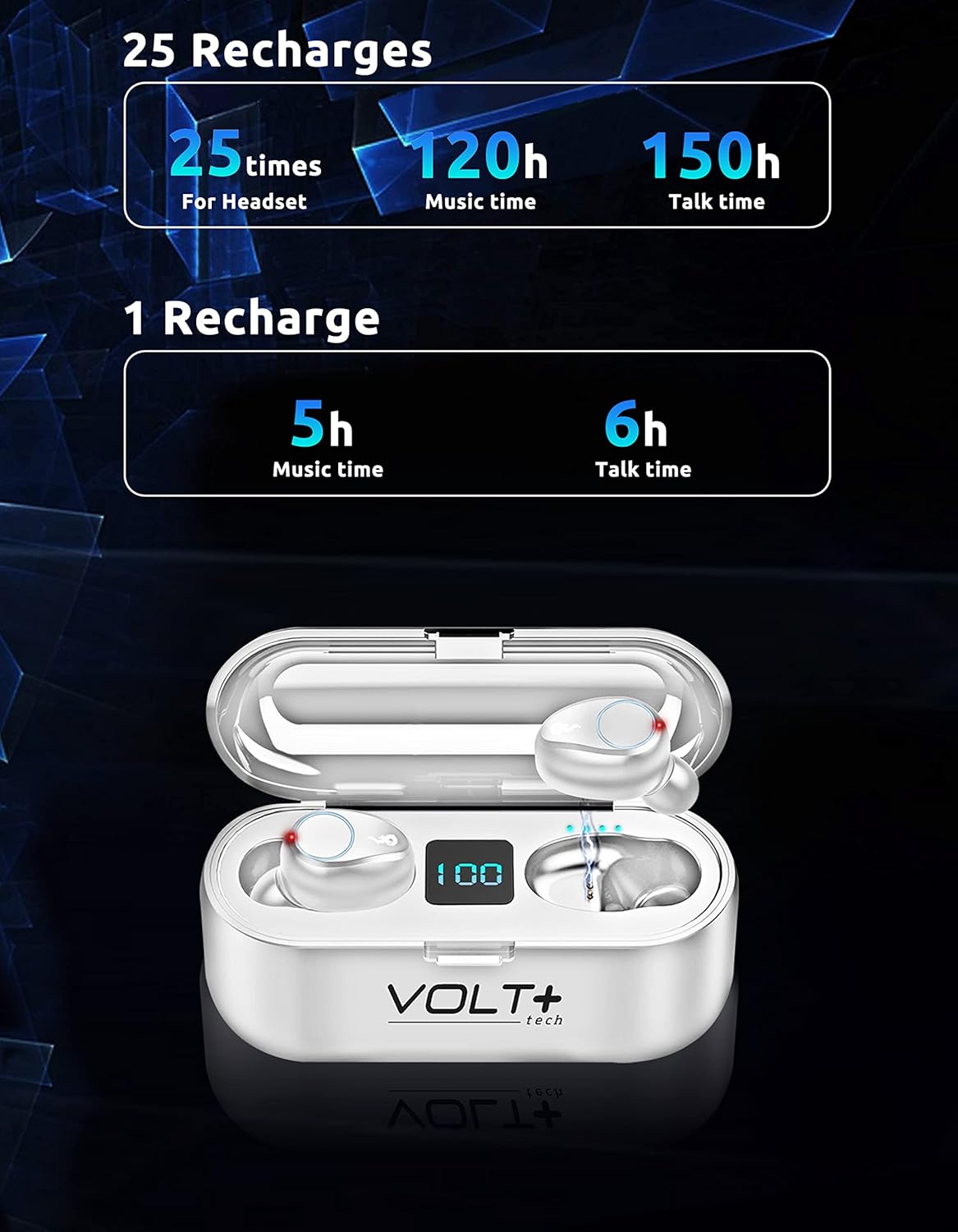
Image 5.2: Battery life and recharge capabilities.
6. Kev tu thiab tu
Ntxuav
- Tsis tu ncua ntxuav lub pob ntseg thiab cov ntaub ntawv them nyiaj nrog cov ntaub mos muag, qhuav, tsis muaj lint.
- Tshem tawm cov lus qhia pob ntseg thiab ntxuav lawv nrog xab npum me me thiab dej, tom qab ntawd kom qhuav kom huv si ua ntej rov ua dua.
- Xyuas kom cov chaw them nyiaj ntawm ob lub pob ntseg thiab cov ntaub ntawv yog huv si thiab tsis muaj khib nyiab.
Dej tsis kam (IPX7)
The earbuds are IPX7 waterproof, meaning they can withstand immersion in water up to 1 meter for 30 minutes. This makes them suitable for rainy outdoor sports and sweating during workouts. However, the charging case is not waterproof. Do not immerse the charging case in water.

Image 6.1: IPX7 waterproof rating of the earbuds.
Cia
Store the earbuds in their charging case when not in use to protect them and keep them charged. Avoid extreme temperatures and direct sunlight.
7. Kev daws teeb meem
Earbuds Tsis Pairing
- Xyuas kom tseeb tias ob lub mloog pob ntseg raug them.
- Tua Bluetooth ntawm koj lub cuab yeej, tom qab ntawd tig nws rov qab.
- Forget the "F9" device in your device's Bluetooth settings and try pairing again.
- Muab cov pob ntseg rov qab rau hauv lub thawv, kaw lub hau, tos ob peb feeb, tom qab ntawd qhib kom rov pib hom kev sib txuas.
Only One Earbud Working
- Xyuas kom tseeb tias ob lub mloog pob ntseg raug them.
- Try placing both earbuds back into the charging case, close the lid, and then take them out again to allow them to re-sync with each other.
- If the issue persists, try resetting the earbuds (refer to specific reset instructions if available in a full manual, or try forgetting the device and re-pairing).
Charging Case Not Charging
- Xyuas seb lub USB-C cable thiab lub adapter fais fab puas puas lawm.
- Ensure the cable is securely connected to both the case and the power source.
- Sim sib txawv USB-C cable lossis fais fab adapter.
Lub suab tsis zoo
- Ensure earbuds are properly seated in your ears. Try different sized ear tips.
- Clean the earbud mesh to remove any wax or debris.
- Ensure your device is within the Bluetooth range (up to 33 feet/10 meters) and there are no significant obstructions.
8. Cov lus qhia tshwj xeeb
| Feature | Paub meej |
|---|---|
| Qauv Lub Npe | F9 |
| Bluetooth Version | 5.3 |
| Bluetooth Ntau | 33 ft (10 m) |
| Charge Case Battery Capacity | 2000 mAh |
| Lub Neej Roj Teeb Ntawm Lub Pob Ntseg (Ib Zaug Them) | Approx. 5 hours music, 6 hours talk time |
| Tag nrho cov roj teeb lub neej (nrog Case) | Ntau tshaj 24 teev |
| Them sij hawm | Approx. 30 minutes (earbuds) |
| Dej Resistance Level | IPX7 (Earbuds nkaus xwb) |
| Tsis Siv Neeg Tswj | Active Noise Cancellation, Passive Noise Cancellation, Sound Isolation (CVC 8.0) |
| Hom Tsav Tsheb | Dynamic Tsav |
| Audio Driver Size | 26 hli |
| rhiab heev | 103dB ua |
| Impedance | 25.94 awm |
| Tswj Txoj Kev | Kov |
| Compatible Devices | Android, iOS, Mac, Windows, Nubia Red Magic 5G |
| Earbud Qhov ntev | Approx. 0.9 x 0.5 inches |
| Case Dimensions | Kwv yees. 2.7 x 1.3 x 1.2 nti |
| Yam Nyhav | 4 Ounces (total) |

Image 8.1: Physical dimensions of the earbuds and charging case.
9. Warranty Information
VOLT PLUS TECH products are designed and manufactured to the highest quality standards. This product is covered by a limited warranty from the date of purchase. Please retain your proof of purchase for warranty claims. The warranty covers manufacturing defects but does not cover damage caused by misuse, accidents, unauthorized modifications, or normal wear and tear.
10. Cov neeg siv khoom txhawb nqa
If you encounter any issues or have questions regarding your VOLT PLUS TECH F9 Wireless Bluetooth Earbuds, please contact our customer support team. Refer to the contact information provided on the product packaging or our official webqhov chaw rau kev pab.
Ask a question about this manual
Ask about setup, troubleshooting, compatibility, parts, safety, or missing instructions. Manuals+ will review the question and use this page’s manual context to help answer it.