
1. Taw qhia
This manual provides detailed instructions for the installation, operation, and maintenance of your NOPAARD 52-YJ682 Smart Ceiling Fan with Light. Please read this manual thoroughly before installation and use to ensure safe and efficient operation. Keep this manual for future reference.
2. Cov ntaub ntawv kev nyab xeeb
WARNING: To reduce the risk of fire, electric shock, or personal injury, always follow these safety precautions:
- Xyuas kom tseeb tias lub hwj chim raug kaw ntawm lub tshuab hluav taws xob ua ntej kev teeb tsa lossis kev pabcuam.
- Tag nrho cov xaim yuav tsum ua raws li cov cai hauv teb chaws thiab hauv zos.
- Kev teeb tsa yuav tsum tau ua los ntawm tus kws tshaj lij hluav taws xob tsim nyog.
- Mount the fan directly to a structural ceiling joist or an outlet box marked "Acceptable for Fan Support of 35 lbs (15.9 kg) or less".
- Do not bend blade holders during installation, balancing, or cleaning.
- Keep foreign objects clear of rotating fan blades.
- Tus kiv cua no yog damp-rated for covered outdoor patios, but should not be exposed to direct water.
3. Cov ntsiab lus ntawm pob
Xyuas kom tseeb tias tag nrho cov khoom muaj nyob ua ntej pib installation.
- Qab nthab Ntxuam Motor Assembly
- Ntxuam Hniav (3)
- Downrods (6-nti thiab 10-nti)
- Mounting Bracket
- Qab ntug
- Chaw taws teeb tswj
- Cov Khoom Siv Hluav Taws Xob
- Cov Khoom Siv Kho Vajtse (ntsia hlau, hlau txiv ntoo, thiab lwm yam)
- Cov neeg siv phau ntawv
4. Kev teeb tsa thiab kev teeb tsa
4.1 Xaiv qhov chaw Mounting
Select a location where the fan blades will have at least 7 feet (2.1 meters) of clearance from the floor and 30 inches (76 cm) from any walls or obstructions.
4.2 Kev xaiv Mounting
This fan supports two mounting options: standard downrod mount and sloped ceiling mount (up to 20 degrees).
Duab piav qhia: A diagram illustrating the NOPAARD 52-inch ceiling fan's dimensions, including its 52-inch width and adjustable height with 6-inch and 10-inch downrods. It also shows icons for flat ceiling mounting and sloped ceiling mounting (up to 20 degrees), along with recommended room sizes (130-300 sq. ft.) and damp rating for covered locations.
4.3 Cov kauj ruam los ua ke
- Fais fab tuag: Before starting, ensure the power supply is disconnected at the main circuit breaker.
- Mounting Bracket: Secure the mounting bracket to the ceiling outlet box. Ensure the box is rated for fan support.
- Sib dhos Downrod: Choose the appropriate downrod (6-inch or 10-inch) for your ceiling height. Feed the motor wires through the downrod.
- Txuas Ntxuam Lub Cev: Carefully lift the fan motor assembly and hang it from the mounting bracket.
- Hlau Txuas: Connect the fan wires to the household electrical wires according to the wiring diagram provided in the separate wiring guide (not included in this manual, refer to product packaging for full wiring instructions). Ensure all connections are secure with wire nuts.
- Secure Canopy: Slide the canopy up to the ceiling and secure it to the mounting bracket with screws.
- Txuas Hniav: Securely attach the three fan blades to the motor housing.
- Install Light Kit: Connect the LED light kit wires and attach the light kit to the bottom of the fan motor housing.
5. Cov lus qhia ua haujlwm
5.1 Cov txheej txheem tswj
Your NOPAARD Smart Ceiling Fan can be controlled via the included remote, the Tuya Smart App, or voice commands through Alexa and Google Assistant.

Duab piav qhia: An illustration detailing the four control methods for the NOPAARD ceiling fan: a remote control, a smartphone displaying the Tuya app, a microphone icon for voice control (Alexa and Google Assistant), and a wall switch. A note indicates that wall control can only turn the fan and lights on/off together and cannot adjust settings separately.
5.2 Kev tswj chaw taws teeb
The remote control allows for basic fan and light functions.
- Kiv cua qhib/tua: Nias lub pob kiv cua kom qhib lossis kaw lub kiv cua.
- Ntxuam Ceev: Use the speed buttons (1-6) to adjust fan speed.
- Lub teeb ON/OFF: Nias lub teeb kom tig lub teeb rau lossis tawm.
- Lub Teeb Dimming: Hold the light button to dim or brighten the light.
- Xim kub: Press the color temperature button to cycle through 3000K (warm yellow), 4000K (bright daylight), and 5000K (cool white).
- Timer: Set a 2-hour timer for the fan to automatically turn off.
- Rov qab muaj nuj nqi: Press the reverse button to change blade direction for summer (downward airflow) or winter (upward airflow).
5.3 Smart App Control (Tuya Smart)
- Rub tawm App: Rub tawm lub "Tuya Smart" app los ntawm koj lub cuab yeej lub khw app.
- Sau npe / ID nkag mus: Tsim ib tus account lossis nkag rau hauv.
- Ntxiv Device: Follow the in-app instructions to add your NOPAARD ceiling fan. Ensure your phone is connected to a 2.4GHz Wi-Fi network.
- Tswj Kev Ua Haujlwm: Use the app to control fan speed, light brightness, color temperature, timer, and reverse function.
5.4 Kev Tswj Lub Suab (Alexa & Google Assistant)
- Txuas Tus Account: In your Alexa or Google Home app, link your Tuya Smart account.
- Tshawb nrhiav Devices: Allow the smart assistant to discover your NOPAARD ceiling fan.
- Lub Suab Commands: Siv cov lus txib xws li:
- "Alexa, tig lub kiv cua."
- "Nyob zoo Google, teeb tsa qhov ceev ntawm kiv cua rau 3."
- "Alexa, turn off the light."
- "Hey Google, dim the fan light to 50%."
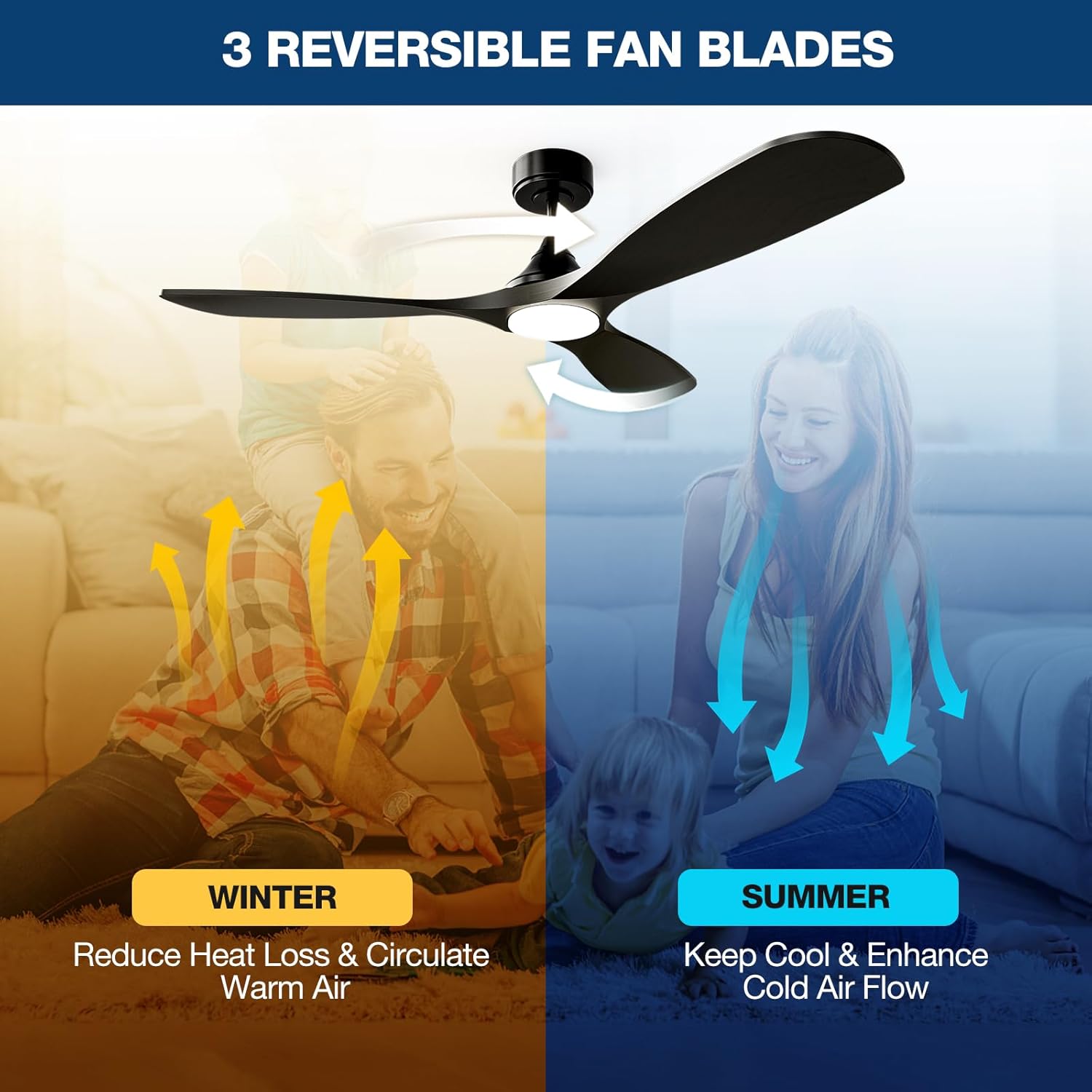
5.5 Reversible Blades Function

Duab piav qhia: An illustration demonstrating the reversible blade function. In "SUMMER" mode, blue arrows show downward airflow for cooling. In "WINTER" mode, yellow arrows show upward airflow to circulate warm air.
The fan features a reversible DC motor to optimize air circulation for different seasons:
- Lub caij ntuj sov hom: Cov hniav tig rov qab-clockwise, thawb cua mus rau hauv qab kom tsim cua txias.
- Lub caij ntuj no hom: Cov hniav tig mus rau sab laug, rub cua mus rau sab saud kom cua sov nyob ze ntawm lub qab nthab ncig.
6. Kev tu
Regular maintenance ensures optimal performance and extends the lifespan of your ceiling fan.
- Ntxuav: Siv lub mos, damp daim ntaub los ntxuav cov hniav kiv cua thiab lub cev muaj zog. Tsis txhob siv cov tshuaj ntxuav lossis cov tshuaj yaj.
- Blade Tightness: Periodically check and tighten all blade screws to prevent wobbling and noise.
- Lub teeb khoom siv: The integrated LED light is designed for long life and is not user-replaceable.
- Plua Plav: Dust the fan regularly to prevent buildup that can affect performance.
7. Kev daws teeb meem
| Teeb meem | Ua Tau | Kev daws |
|---|---|---|
| Ntxuam tsis pib |
|
|
| Cov kiv cua wobbles |
|
|
| Lub teeb tsis ua haujlwm |
|
|
| Cannot connect to App/Voice Control |
|
|
8. Cov lus qhia tshwj xeeb
| Feature | Paub meej |
|---|---|
| Qauv nab npawb | 52-YJ 682 |
| Hom | NOPAARD |
| Loj | 52cm ua |
| Xim | Dub |
| Khoom siv | Hlau, Ntoo |
| Hom Tsav | DC Tsav |
| Tswj txoj kev | Remote, Tuya App, Alexa, Google Assistant |
| Ntxuam Ceev | 6 variable speeds |
| Cua Flow Capacity | Mus txog 6872 CFM |
| Lub suab nrov | Less than 35dB (speeds 1-2) |
| Hom Lub Teeb | LED teeb ci ntsa iab |
| Lub Teeb Ci ntsa iab | 0-2000 Lumens |
| Xim kub | 3000K (Warm Yellow), 4000K (Bright Daylight), 5000K (Cool White) |
| Voltage | 110 Volts |
| Wattage | 50 watt |
| Downrod Sizes | 6 nti, 10 nti |
| Damp Kev ntsuas | Covered Damp Location (Indoor/Covered Outdoor) |
| Cov ntawv pov thawj | ETL Sau npe |
9. Warranty thiab Support
NOPAARD offers a 24-hli kev ruaj ntseg zoo for this product and a 10 xyoo warranty for the DC motor.
If you encounter any issues with installation, operation, or product quality, please contact NOPAARD customer support for assistance. Refer to your purchase documentation for contact details.