
1. Taw qhia
The OSD Audio DAC-X200 is a powerful 2-channel Class D stereo amplifier designed to deliver high-fidelity audio. It features a built-in Hi-Res 24bit/192khz DAC, offering superior digital audio conversion. With versatile input options including USB, Optical, and RCA, and A/B speaker switching, this amplifier is suitable for various home audio setups, from driving bookshelf speakers to powering floorstanding units.
2. Cov lus qhia kev nyab xeeb
- Lub zog Source: Txuas lub tshuab tsuas yog rau qhov fais fab mov uas tau teev tseg xwbtage.
- Qhov cua: Xyuas kom muaj qhov cua txaus. Tsis txhob thaiv qhov qhib qhov cua.
- Dej thiab noo noo: Do not expose the unit to rain, moisture, or excessive humidity.
- Qhov Chaw Kub Kub: Keep the unit away from heat sources such as radiators, heat registers, stoves, or other heat-producing appliances.
- Ntxuav: Ntxuav tsuas yog nrog daim ntaub qhuav.
- Kev pab: Tsis txhob sim muab cov khoom no rau koj tus kheej. Xa mus rau txhua qhov kev pabcuam rau cov neeg ua haujlwm pabcuam uas tsim nyog.
- Qhov chaw: Place the unit on a stable, flat surface. Avoid placing heavy objects on top of the ampua neej nyob.
3. Cov ntsiab lus ntawm pob
Xyuas kom tseeb tias txhua yam khoom muaj nyob hauv pob:
- OSD Audio DAC-X200 Ampua neej nyob
- Phau Ntawv Qhia Pib Ceev
- Fais fab Cable
- Kev Tswj Chaw Taws Teeb (yog tias muaj nrog koj tus qauv)
4. Khoom Tshajview
4.1 Pem Hauv Ntej Vaj Huam Sib Luag
The front panel provides access to essential controls for daily operation.

Daim duab 4.1: Pem hauv ntej view of the DAC-X200 amplifier, showing the power button, speaker selectors, balance, and volume controls.

Daim duab 4.2: Detail of the front panel, highlighting the Power button and Speaker A/B selection buttons.

Daim duab 4.3: Detail of the front panel, showing the Balance and Volume control knobs.
4.2 Lub Vaj Huam Sib Luag
The rear panel houses all input and output connections for audio sources and speakers.
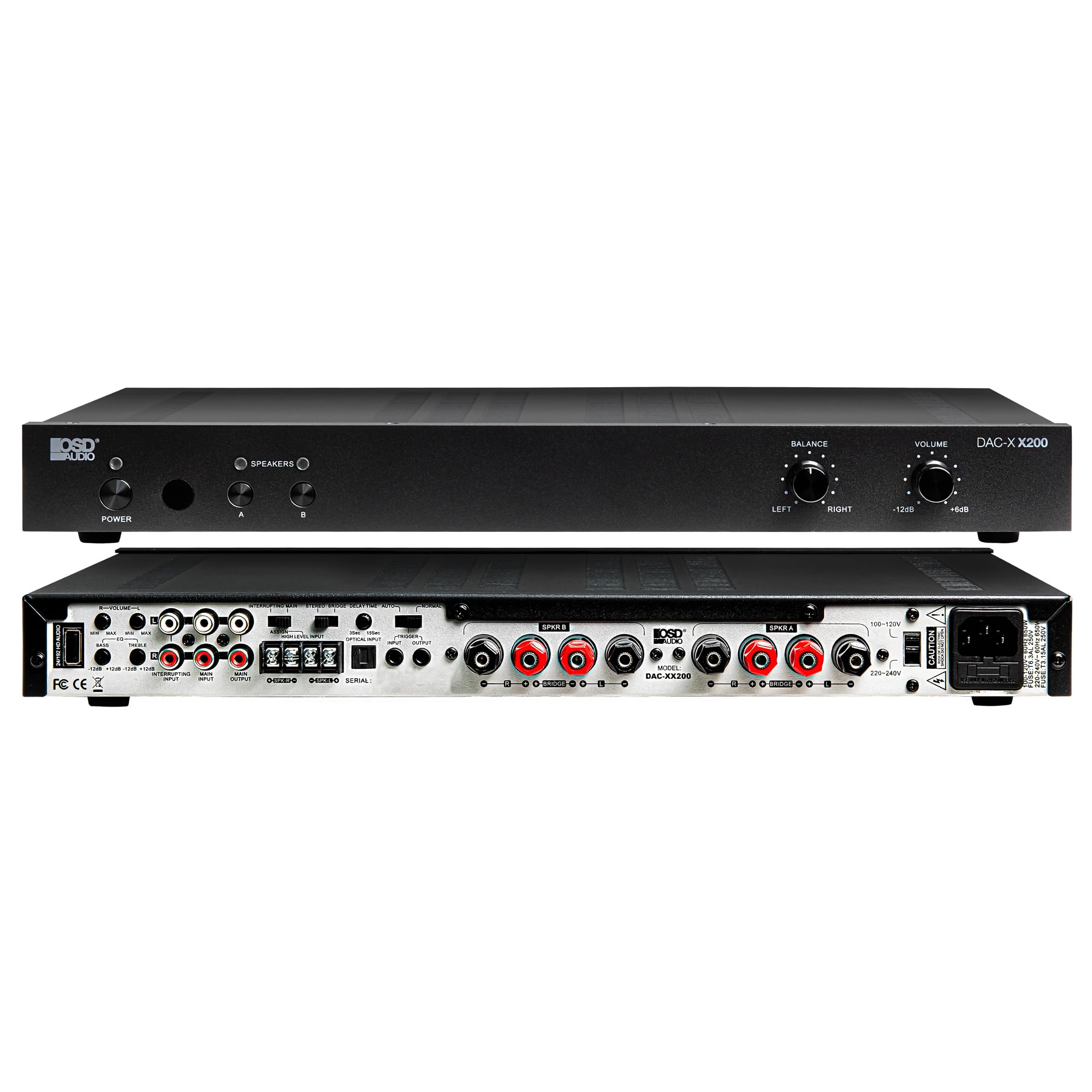
Daim duab 4.4: Qab view of the DAC-X200 amplifier, displaying various audio inputs (USB, Optical, RCA), speaker outputs, and power input.

Daim duab 4.5: Detail of the rear panel inputs, including USB, Optical, and RCA connections.

Daim duab 4.6: Detail of the rear panel speaker output terminals for Speaker A and Speaker B.
5. Teeb tsa
5.1 Qhov chaw
Place the DAC-X200 on a flat, stable surface with adequate space around it for ventilation. Avoid enclosed cabinets or areas with poor airflow to prevent overheating.
5.2 Txuas Cov Hais Lus
- Xyuas kom cov amplifier is powered off and unplugged.
- Txuas koj cov neeg hais lus passive mus rau qhov Hais lus A thiab/los yog Hais lus B terminals on the rear panel. Observe correct polarity (+ to + and - to -).
- For optimal performance, use high-quality speaker wire.
5.3 Txuas Cov Khoom Siv Suab
The DAC-X200 supports multiple input types:
- Cov tswv yim USB: Connect a computer or other USB audio source using a Type A to Type A USB 2.0 cable.
- Optical Input: Connect digital audio sources like TVs or CD players using an optical cable.
- RCA Inputs: Connect analog audio sources such as music streamers, turntables (with a pre-amp), or other devices using RCA cables.
5.4 Kev sib txuas fais fab
After all audio and speaker connections are made, connect the supplied power cable to the amplifier's power inlet and then to a suitable AC power outlet.
6. Cov lus qhia ua haujlwm
6.1 Fais fab / Off
Nias lub Hwj chim button on the front panel to turn the amplifier on or off. The power indicator light will illuminate when the unit is on.
6.2 Input Xaiv
The DAC-X200 features smart source switching, automatically detecting and switching to an active input. If multiple inputs are active, you may need to manually select the desired input using the remote control (if applicable) or by cycling through inputs.
6.3 Volume Control
Adjust the overall output volume using the VOLUME knob on the front panel. Rotate clockwise to increase volume and counter-clockwise to decrease it.
6.4 Tone Controls
Siv cov NYIAJ knob to adjust the left/right channel balance. The DAC-X200 also includes bass and treble adjustment knobs (located on the rear panel or accessible via remote, depending on model variation) to fine-tune the sound to your preference or room acoustics.
6.5 A/B Speaker Switching
Nias lub A or B buttons on the front panel to select which set of speakers (Speaker A, Speaker B, or both) are active. This allows for multi-room audio configurations.
7. Kev tu
- Ntxuav: Siv ib daim ntaub mos, qhuav los ntxuav lub sab nrauv amptshuab ua pa. Tsis txhob siv cov tshuaj ntxuav kua lossis cov tshuaj tsuag.
- Qhov cua: Tshawb xyuas tas li seb qhov qhib cua puas huv si thiab tsis muaj hmoov av thiab cov khib nyiab.
- Cia: Yog tias khaws cia rau lub sijhawm ntev, tshem tawm ntawm lub qhov hluav taws xob thiab khaws cia rau hauv qhov chaw txias, qhuav.
8. Kev daws teeb meem
| Teeb meem | Ua Tau | Kev daws |
|---|---|---|
| Tsis muaj zog | Power cable not connected; Power outlet not active; Amplifier tawm. | Check power cable connection; Test power outlet; Press the Power button. |
| Tsis muaj suab | Incorrect input selected; Speaker cables loose; Volume too low; Speakers A/B not selected. | Select correct input; Check speaker connections; Increase volume; Ensure Speaker A or B is active. |
| Distorted suab | Input signal too high; Speaker impedance mismatch; Faulty cable. | Reduce source volume; Verify speaker impedance (8̣ or 4̣); Replace audio cables. |
| Input not switching automatically | Multiple active sources; Specific source not detected. | Manually select input; Ensure only one source is playing if auto-switching is desired. |
9. Cov lus qhia tshwj xeeb
- Qauv: DAC-X200
- Tso zis zog: 100W RMS per channel at 8̣; 225W RMS per channel at 4̣; 450W bridged mono
- Number of Channels: 2
- DAC: Hi-Res 24bit/192khz, DSD formats supported
- Cov tswv yim: USB, Optical, RCA
- Speaker Zones: A/B Switching
- Qhov Loj (L x W x H): 16.7 x 10 x 2 po
- Khoom siv: Yas
- UPC: 810074881173
10. Warranty Information
OSD Audio products are designed for reliability and performance. This product is covered by a limited warranty against defects in materials and workmanship. Please refer to the official OSD Audio weblub vas sab lossis koj cov ntaub ntawv yuav khoom kom paub txog cov nqe lus thiab tej yam kev mob ntawm kev lav phib xaub, suav nrog lub sijhawm thiab cov ntsiab lus ntawm kev them nqi. Khaws koj daim ntawv pov thawj ntawm kev yuav khoom rau cov lus thov lav phib xaub.
11. Txhawb nqa
For technical assistance, troubleshooting not covered in this manual, or service inquiries, please contact OSD Audio customer support. You can find contact information, FAQs, and additional resources on the official OSD Audio webqhov chaw.
Webqhov chaw: www.osdaudio.com