
1. Taw qhia
The MASTECH MS8236 is a versatile 2-in-1 digital multimeter and network cable track tester designed for electrical and network diagnostics. This device combines the functions of a digital multimeter for measuring electrical parameters with a network cable tester for verifying cable integrity and a tone generator for tracing wires. It is suitable for professional and DIY use in various applications.
2. Cov ntaub ntawv kev nyab xeeb
Always adhere to basic safety precautions when using this device to prevent personal injury or damage to the meter or equipment under test. Read all instructions carefully before use.
- Tsis txhob siv ntau tshaj qhov nqi nkag siab tshaj plaws uas tau teev tseg rau txhua txoj haujlwm.
- Ua tib zoo saib xyuas thaum ua haujlwm nrog cov circuits nyob.
- Ua ntej ntsuas, xyuas kom tseeb tias lub qhov hloov ua haujlwm nyob rau hauv qhov chaw raug.
- Tsis txhob siv lub 'meter' yog tias nws zoo li puas lawm lossis yog tias cov xov hlau kuaj puas lawm.
- Replace batteries immediately when the low battery indicator appears to ensure accurate readings.
- Avoid using the device in environments with high humidity, extreme temperatures, or explosive gases.
- Always disconnect power to the circuit before testing continuity or resistance.
3. Khoom Tshajview
The MASTECH MS8236 integrates a digital multimeter with a detachable cable tracker/tone generator. The main unit features a clear digital display, function selector dial, and input jacks. The cable tracker assists in identifying and tracing network and telephone lines.
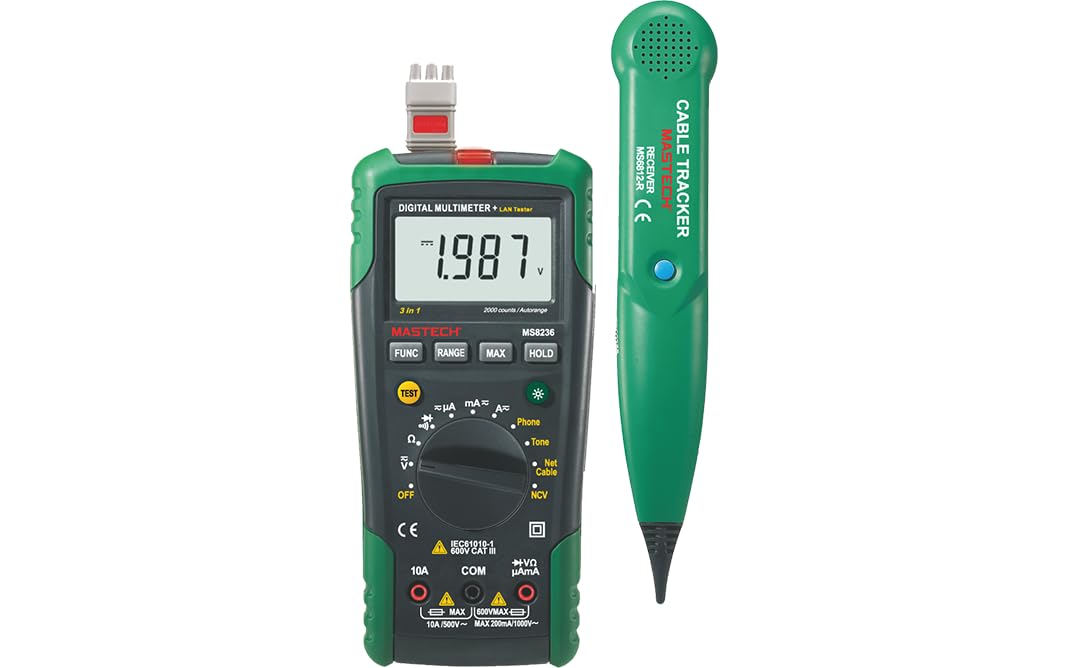
Figure 3.1: MASTECH MS8236 Digital Multimeter and Cable Tracker. The image shows the main multimeter unit on the left and the separate cable tracker unit on the right. Both are green and black.
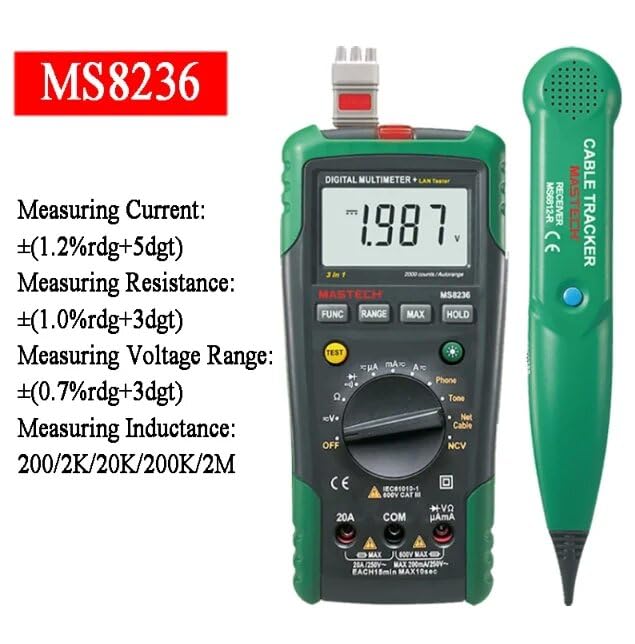
Figure 3.2: Close-up of the MASTECH MS8236 Multimeter Display and Controls. The display shows '1.987 V' and the function dial indicates various measurement modes including V, A, Ohm, Diode, Continuity, Phone, Net Cable, and NCV.
Cov yam ntxwv tseem ceeb:
- Zaub: 2000 suav
- Ranging: Auto & Manual
- Tsis Sib cuag Voltage (NCV) Detector
- Diode Qhib Voltagib: 1.7v
- Continuity Buzzer: Activates below 70Ω
- Data Hold muaj nuj nqi
- Low Battery Display
- Zaub Backlight
- Pib Fais fab tuag
- Network Cable Check: Tests for open circuits, shorts, miss-wires, reversals, split pairs, and shield detection. Supports T568A, T568B, 10Base-T.
- Telephone Line Check: Identifies line states (Busy, Ringing, Clear) and continuity.
- Tone Function: For tracking cables and diagnosing break points.
4. Teeb tsa
4.1. Unpacking thiab tshuaj xyuas
Carefully unpack the MS8236 and all accessories. Inspect the device for any signs of damage. If any damage is found, contact your supplier immediately.
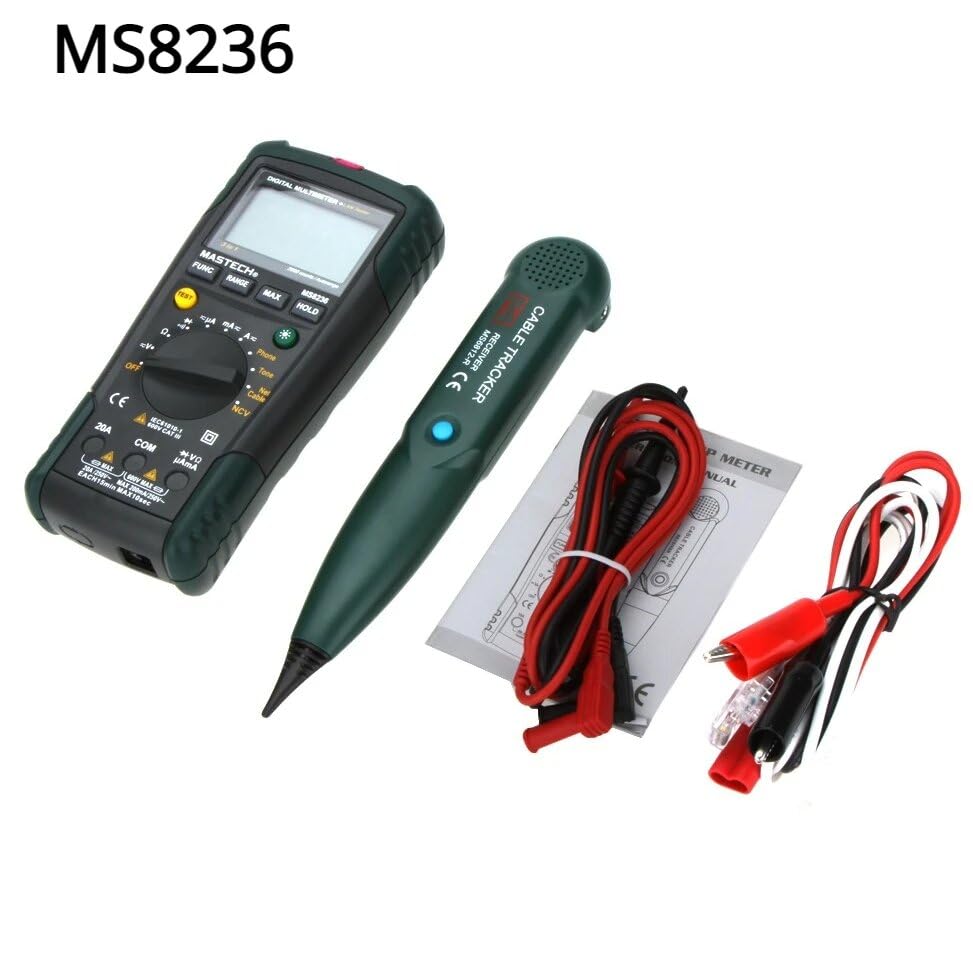
Figure 4.1: MASTECH MS8236 Kit Contents. The image displays the multimeter, cable tracker, red and black test leads, a network cable adapter, and a small instruction manual.
4.2. Kev teeb tsa roj teeb
The MS8236 requires 2 LR44 batteries, which are included. To install or replace batteries:
- Locate the battery compartment cover on the back of the multimeter unit.
- Siv lub hau ntswj los qhib lub roj teeb.
- Insert the 2 LR44 batteries, observing the correct polarity (+/-).
- Muab cov roj teeb khwb sib khwb kom zoo.
5. Cov lus qhia ua haujlwm
5.1. Basic Multimeter Functions
Connect the test leads to the appropriate input jacks (COM for black lead, VΩmA for red lead for most measurements, or 20A for high current). Select the desired function using the rotary switch.
- Voltage Measurement (DCV/ACV): Turn the rotary switch to the 'V' position. Select DC or AC voltage if applicable. Connect test leads in parallel to the circuit.
- Current Measurement (DCA/ACA): Turn the rotary switch to the 'A' position. Select DC or AC current. Connect test leads in series with the circuit. Ensure the correct input jack (mA or 20A) is used.
- Kev ntsuas qhov ntsuas (Ω): Turn the rotary switch to the 'Ω' position. Ensure the circuit is de-energized. Connect test leads across the component.
- Diode Test (→|): Turn the rotary switch to the diode symbol. Connect the red lead to the anode and the black lead to the cathode of the diode.
- Kev xeem txuas ntxiv ()))): Turn the rotary switch to the continuity symbol. The buzzer will sound if the resistance is below approximately 70Ω.
5.2. Network Cable Check
This function tests the integrity of network cables (RJ45). It can detect open circuits, shorts, miss-wires, reversals, split pairs, and shield detection for T568A, T568B, and 10Base-T standards.
- Turn the rotary switch to the 'Net Cable' position.
- Connect one end of the network cable to the RJ45 port on the main multimeter unit.
- Connect the other end of the network cable to the RJ45 port on the remote cable tracker unit.
- Observe the display for test results, which will indicate the cable status. The device also features a debug mode for detailed fault identification.
5.3. Telephone Line Check
This function allows for checking the state of a working telephone line and its continuity.
- Turn the rotary switch to the 'Phone' position.
- Connect the telephone line to the appropriate port on the main unit.
- The device will identify the state of the line as Busy, Ringing, or Clear. It can also judge the continuity of the telephone cables or wires.
5.4. Tone Function
The tone function is used with the cable tracker to trace cables and wires and diagnose break points.
- Turn the rotary switch to the 'Tone' position.
- Connect the test leads or RJ11/RJ45 plug to the cable you wish to trace.
- Use the remote cable tracker unit to follow the cable. The tracker will emit an audible tone when it detects the signal from the main unit, helping to locate the cable and identify breaks.
5.5. Tsis Sib cuag Voltage (NCV) Detection
The NCV function allows for detecting AC voltage without direct contact with the conductor.
- Turn the rotary switch to the 'NCV' position.
- Move the top part of the multimeter near a live AC voltage qhov chaw.
- The device will indicate the presence of AC voltaglos ntawm lub tswb ceeb toom thiab/lossis lub cim qhia pom.
5.6. Muaj nuj nqi ntxiv
- Cov ntaub ntawv tuav: Nias lub khawm 'HOLD' kom khov qhov kev nyeem tam sim no ntawm cov zaub. Nias dua kom tso tawm.
- Backlight: Press the backlight button (often labeled with a light bulb symbol) to illuminate the display for better visibility in low-light conditions.
- Auto Fais Fab: The device will automatically power off after a period of inactivity to conserve battery life.
6. Kev tu
6.1. Kev ntxuav
So cov ntaub ntawv nrog adamp daim ntaub thiab cov tshuaj ntxuav mos mos. Tsis txhob siv cov khoom siv txhuam lossis cov tshuaj yaj. Xyuas kom lub cuab yeej qhuav tag ua ntej siv.
6.2. Hloov roj teeb
When the low battery indicator appears on the display, replace the batteries as described in Section 4.2. Remove batteries if the device will not be used for an extended period.
7. Kev daws teeb meem
- Tsis muaj zaub los yog tsaus muag: Xyuas cov roj teeb installation thiab them qib. Hloov cov roj teeb yog tias tsim nyog.
- Cov kev nyeem tsis raug: Ensure test leads are properly connected and the correct function is selected. Verify the circuit is de-energized for resistance/continuity tests.
- Network cable test failure: Ensure both ends of the cable are securely connected to the main unit and remote. Check for physical damage to the cable or connectors.
- No tone from cable tracker: Verify the main unit is in 'Tone' mode and properly connected to the cable. Check the cable tracker's battery.
8. Cov lus qhia tshwj xeeb
The following table outlines the general and electrical specifications for the MASTECH MS8236.

Figure 8.1: MASTECH MS8236 Features and Specifications Table. This image provides detailed electrical specifications for DC Voltage, AC Voltage, DC Current, AC Current, and Resistance, including ranges, resolutions, and accuracies.
| Parameter | Ntau yam | Kev daws teeb meem | Qhov tseeb |
|---|---|---|---|
| DC Voltage | 200mV/2V/20V/200V/600V | 0.1mV/1mV/10mV/100mV/1V | ± (0.5% + 5) |
| AC Voltage | 200mV/2V/20V/200V/600V | 0.1mV/1mV/10mV/100mV/1V | ± (0.8% + 5) |
| DC tam sim no | 200µA/2000µA/20mA/200mA/2A/10A | 0.1µA/1µA/10µA/0.1mA/1mA/10mA | ± (1.2% + 5) ±(2.0%+10) for 10A |
| AC Tam Sim No | 200µA/2000µA/20mA/200mA/2A/10A | 0.1µA/1µA/10µA/0.1mA/1mA/10mA | ± (1.5% + 5) ±(3.0%+10) for 10A |
| Kev tiv thaiv | 200Ω/2kΩ/20kΩ/200kΩ/2MΩ/20MΩ | 0.1Ω/1Ω/10Ω/100Ω/1kΩ/10kΩ | ± (1.0% + 5) ±(1.5%+5) for 20MΩ |
| Diode Qhib Voltage | 1.7v XNUMX | ||
| Mus Ntxiv Buzzer | <70Ω | ||
| Zaub | 2000 suav | ||
| Kev sib tw | Auto & Manual | ||
| Tsis Sib cuag Voltage Ntes | Yog lawm | ||
| Pib Fais fab tuag | Yog lawm | ||
| Cov ntaub ntawv tuav | Yog lawm | ||
| Low Battery Display | Yog lawm | ||
| Zaub Backlight | Yog lawm | ||
| Hwj chim Source | 2 LR44 roj teeb (nrog) | ||
| Khoom Dimensions | 16 x 9 x 5 cm | ||
| Yam Nyhav | 500 g ib | ||
| Khoom siv | Acrylonitrile Butadiene Styrene (ABS) | ||
| Cov ntawv pov thawj | CE, RoHS | ||
9. Warranty thiab Support
For warranty information and technical support, please refer to the documentation provided with your purchase or contact the seller or manufacturer directly. Specific warranty terms may vary by region and retailer.