
Taw qhia
This manual provides essential information for setting up, operating, maintaining, and troubleshooting your Alienware X16 Gaming Laptop. Designed for high-performance gaming, this laptop features cutting-edge components and advanced cooling solutions to deliver an immersive experience.

Figure 1: Alienware X16 Gaming Laptop, showcasing its high-refresh-rate display and powerful graphics capabilities.
Dab tsi nyob hauv lub thawv
Upon unboxing your Alienware X16 Gaming Laptop, verify that all components are present:
- Alienware X16 R2 Laptop
- Power Adapter (330W Small Form Factor)
- Hwj chim Cord
- Cov ntaub ntawv (nrog rau phau ntawv no)
Teeb tsa
Thaum pib Power-On
- Txuas lub hwj chim Adapter: Plug the power adapter into the Power/DC-in Port on the rear of the laptop. Connect the power cord to the adapter and then to a wall outlet.
- Qhib lub Laptop: Ua tib zoo tsa lub hau zaub.
- Hwj chim On: Nias lub hwj chim khawm, feem ntau nyob rau ntawm lub lawj keyboard.
- Ua raws li cov lus qhia On-Screen: The laptop will guide you through the initial Windows 11 Pro setup process, including language selection, network connection, and user account creation.
Txuas Peripherals
The Alienware X16 offers a variety of ports for connecting external devices:
- USB 3.2 Gen 1 Ports (x2): Rau cov khoom siv USB ib txwm xws li nas, keyboards, lossis cov tsav sab nraud.
- USB-C 3.2 Gen 2 Port with DisplayPort: For modern USB-C devices and external displays.
- Thunderbolt 4 Port with Power Delivery and DisplayPort: High-speed connectivity for advanced peripherals, external GPUs, and charging.
- HDMI 2.1 Chaw nres nkoj: Rau kev txuas mus rau sab nraud saib lossis TVs.
- Headset (Headphone and Microphone Combo) Port: Rau audio input/output.
- microSD daim npav qhov: Rau kev nthuav dav cia lossis hloov chaw files los ntawm daim npav nco.

Figure 2: Rear port configuration of the Alienware X16, detailing connectivity options.
Ua haujlwm lub laptop
Zaub thiab Visuals
The Alienware X16 features a 16.0" QHD+ (2560 x 1600) display with a 240Hz refresh rate and 3ms response time, ensuring smooth and vibrant visuals. It supports 100% DCI-P3 color gamut, ComfortView Plus for reduced blue light, and NVIDIA G-SYNC + Advanced Optimus for tear-free gaming.

Figure 3: The integrated FHD HDR IR Camera supports facial recognition and provides clear video quality.
Keyboard and Input
The English US AlienFX RGB backlit (per-key) Alienware X Series keyboard offers a responsive typing and gaming experience. The AlienFX lighting zones are programmable with up to 16.8 million distinct colors, allowing for extensive customization.
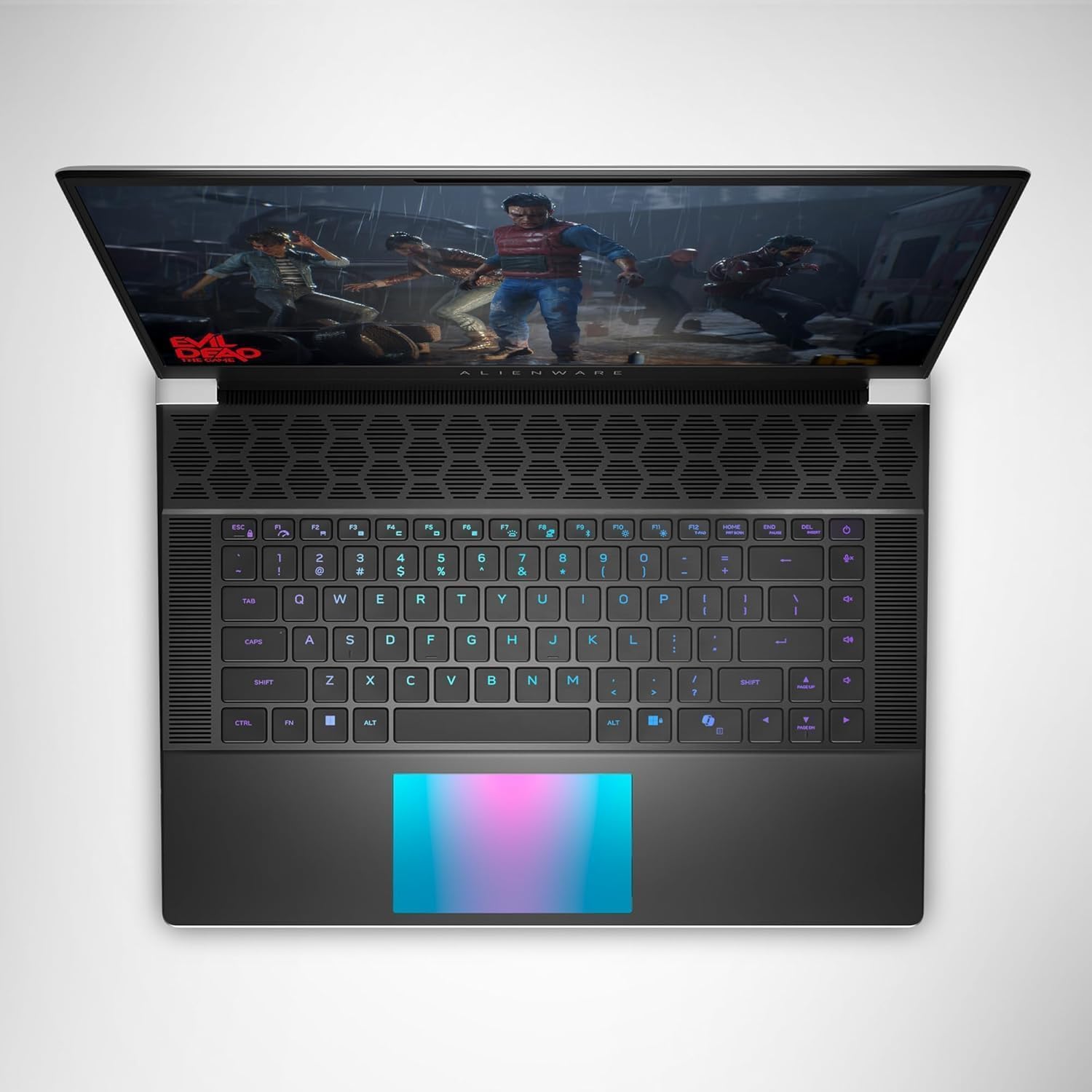
Daim duab 4: Sab saum toj view of the Alienware X16, highlighting the customizable RGB keyboard and touchpad.
Chaw Tso Cai Alienware
Utilize the Alienware Command Center software to customize your gaming experience. This application allows you to manage performance presets, monitor system vitals, and configure AlienFX lighting effects and combinations for a personalized setup.

Figure 5: Alienware Command Center interface for system control and customization.
Kev tu
Txias System
The Alienware X16 incorporates advanced Alienware Cryo-tech™ cooling technology, featuring six laser-welded flat end heat pipes. To ensure optimal performance and longevity, regularly check and clean the ventilation grilles to prevent dust accumulation, which can impede airflow.
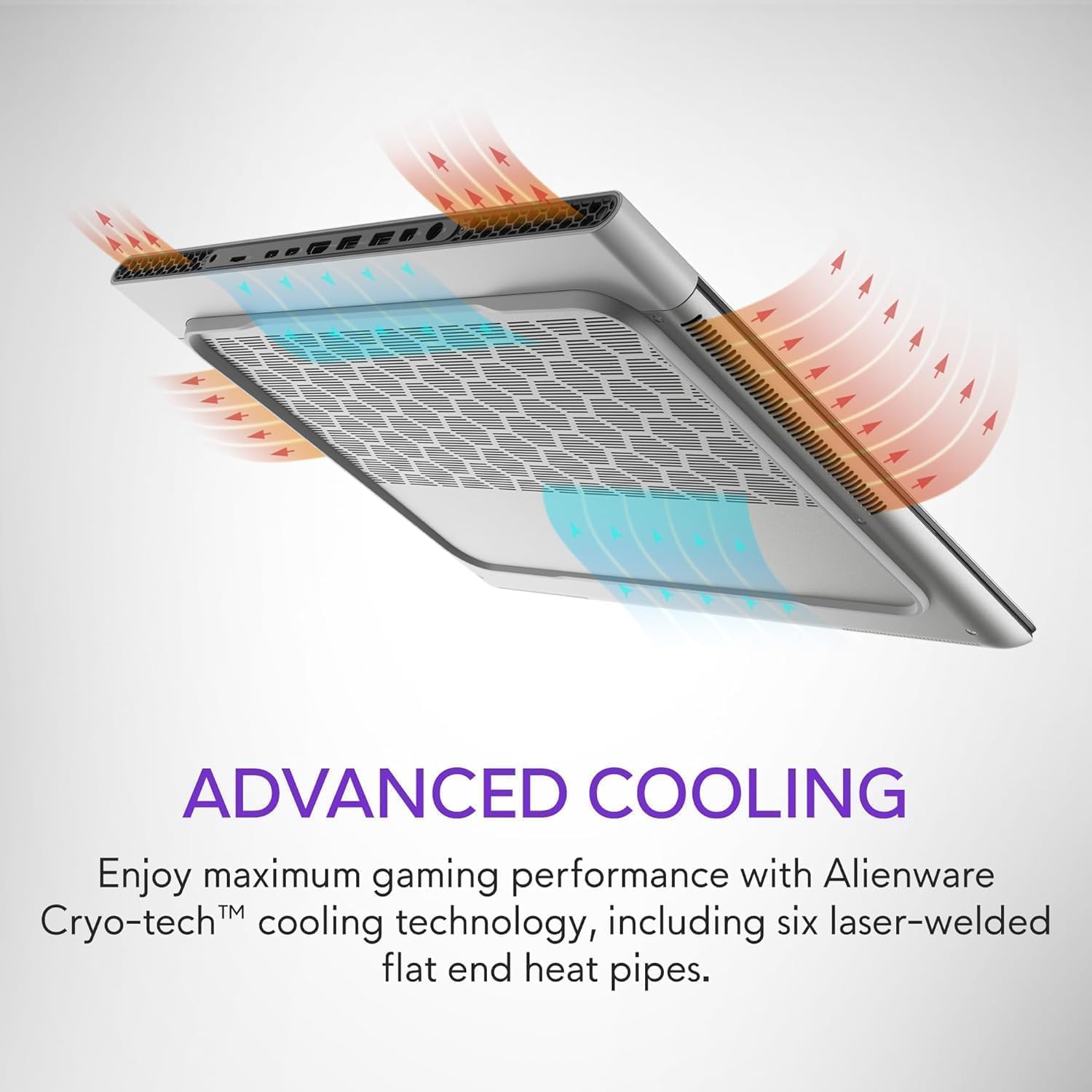
Figure 6: Illustration of the Alienware Cryo-tech™ advanced cooling system.
Kev saib xyuas dav dav
- Keep the laptop on a flat, stable surface to ensure proper ventilation.
- Tsis txhob tso lub laptop rau qhov kub thiab txias, tshav ntuj ncaj qha, lossis cov av noo siab.
- Clean the screen with a soft, lint-free cloth specifically designed for electronics.
- Siv cov cua compressed kom tshem cov plua plav tawm ntawm cov keyboards thiab cov chaw nres nkoj.
Kev daws teeb meem
Tej teeb meem thiab kev daws teeb meem
| Teeb meem | Ua Tau | Kev daws |
|---|---|---|
| Lub laptop tsis muaj zog. | No power, faulty adapter, or battery issue. | Ensure power adapter is securely connected to laptop and wall outlet. Check wall outlet with another device. Try a different power outlet. |
| Cov zaub yog dawb los yog flickering. | Incorrect display settings, driver issue, or hardware problem. | Restart the laptop. Update graphics drivers. If using an external monitor, check cable connections. |
| Poor performance during gaming. | Overheating, outdated drivers, or background applications. | Ensure proper ventilation. Update graphics and chipset drivers. Close unnecessary background applications. Adjust power settings to high performance. |
| Wi-Fi kev twb kev txuas teeb meem. | Driver issue, router problem, or interference. | Restart the laptop and router. Update wireless drivers. Check router settings. |
For more complex issues, refer to the official Alienware support website lossis hu rau cov neeg siv khoom.
Specifications
| Cheebtsam | Paub meej |
|---|---|
| Processor | Intel® Core™ Ultra 9 processor 185H (24MB cache, 16 cores, 2.30 to 5.10 GHz P-Core) |
| Kev Ua Haujlwm | Windows 11 Pro |
| Graphic Card | NVIDIA GeForce RTX 4090 16GB GDDR6 |
| Zaub | 16.0" QHD+ (2560 x 1600) 240Hz 3ms, 100% DCI-P3, ComfortView Plus, NVIDIA G-SYNC + Advanced Optimus |
| Nco | 32GB, 2x16GB, LPDDR5X, 7467MT/s |
| Cia | 2 TB, M.2, PCIe NVMe, SSD |
| Keyboard | English US AlienFX RGB backlit (per-key) Alienware X Series keyboard |
| Wireless | Intel Killer™ 1750 2x2 and Bluetooth 5.4 Wireless Card with Wifi 7 Ready |
| Lub koob yees duab | 1080p at 30fps, FHD HDR RGB+IR camera; Dual-array microphones |
| Suab | Tweeter speaker: 2W x 2; Woofer speaker: 3W x 4 |
| Chaw nres nkoj | 2 USB 3.2 Gen 1, 1 USB-C 3.2 Gen 2 (DP), 1 Thunderbolt 4 (PD, DP), 1 Headset, 1 HDMI 2.1, 1 microSD-card slot |
| Roj teeb | 6 Cell, 90 Wh |
| Dimensions (HxWxD) | 18.57 hli (0.73 nti) x 364.81 hli (14.36 nti) x 289.98 hli (11.41 nti) |
| Qhov hnyav (tsawg kawg) | 2.66 kg (5.86 lb) |
Warranty thiab Support
Your Alienware X16 Gaming Laptop comes with a standard manufacturer's warranty. For detailed warranty terms and conditions, please refer to the documentation included in the box or visit the official Alienware support webqhov chaw.
Yog xav tau kev pab txog kev siv tshuab, kev rub tawm cov tsav tsheb, lossis kev txhawb nqa ntxiv, thov mus saib Alienware Official Store or their dedicated support portal.