
1. Taw qhia
This manual provides essential instructions for the safe and efficient use of your Meizu Note 21 Pro smartphone. Please read this manual thoroughly before operating the device and retain it for future reference.
2. Dab tsi hauv lub thawv
- Meizu Note 21 Pro Smartphone
- Fais fab Adapter
- (Other accessories such as USB cable, SIM ejector tool, and documentation may vary by region.)
3. Ntaus Layout
Familiarize yourself with the physical components of your Meizu Note 21 Pro.
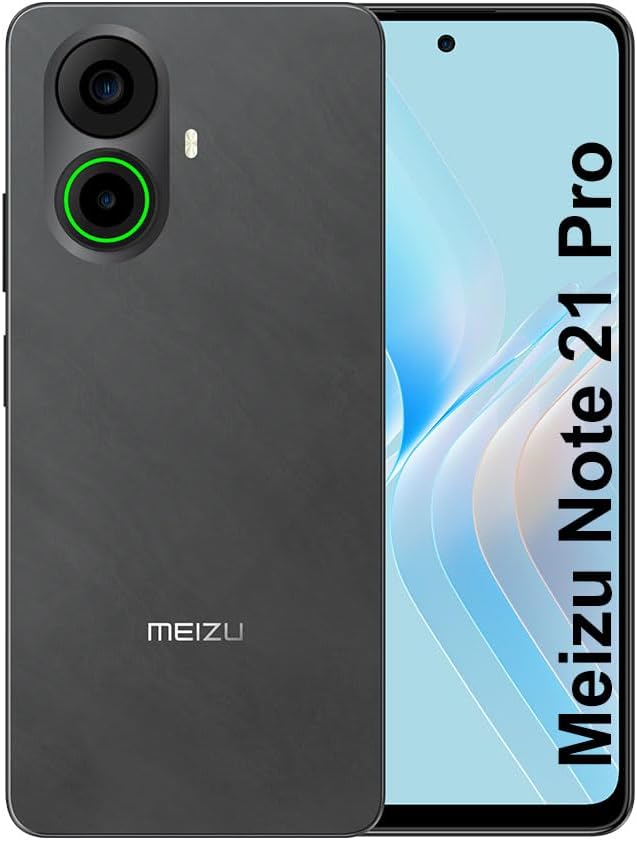
Duab 3.1: Pem hauv ntej thiab nram qab view of the Meizu Note 21 Pro. The front displays the screen with a punch-hole camera. The rear shows the dual camera module with a green accent ring on one lens, a flash, and the "MEIZU" logo at the bottom.
- Pem hauv ntej Display: 6.78-inch FHD+ screen with a 120Hz refresh rate.
- Lub koob yees duab pem hauv ntej: Nyob rau saum nruab nrab ntawm cov zaub.
- Lub koob yees duab nram qab: Dual camera system, including a 64MP main camera.
- Side Fingerprint Sensor: Integrated for secure access.
- USB Chaw nres nkoj: Rau kev them nyiaj thiab xa cov ntaub ntawv.
- 3.5mm Audio Jack: Rau headphones.
- SIM/MicroSD Card Tray: Supports Dual Nano SIM and MicroSD cards.
4. Teeb tsa
4.1. Ntxig SIM thiab MicroSD Cards
- Nrhiav lub SIM card tais ntawm sab ntawm koj lub cuab yeej.
- Ntxig lub SIM ejector cuab tam rau hauv lub qhov me me ntawm lub tais thiab thawb maj mam kom txog thaum lub tais tawm.
- Place your Nano SIM card(s) and/or MicroSD card into the designated slots on the tray. Ensure the gold contacts face downwards.
- Ua tib zoo rov ntxig lub tais rau hauv lub cuab yeej kom txog thaum nws nyem rau hauv qhov chaw.
4.2. Pib Fais fab rau thiab teeb
- Press and hold the Power button until the Meizu logo appears.
- Ua raws li cov lus qhia ntawm lub vijtsam kom xaiv koj cov lus, txuas rau Wi-nkaus network, thiab teeb tsa koj tus lej Google.
- During setup, you will be guided to configure security features such as a PIN, pattern, or password.
4.3. Fingerprint Recognition Setup
- Nkag mus rau Chaw > Kev ruaj ntseg & kev ceev ntiag tug > Fingerprint Xauv.
- Follow the on-screen instructions to register your fingerprint by repeatedly touching the side-mounted sensor.
- Ensure your finger covers the entire sensor area during registration for optimal performance.
5. Ua haujlwm ntawm koj lub cuab yeej
5.1. Zaub thiab Navigation
- The 6.78-inch FHD+ display operates at a 120Hz refresh rate for smooth visuals.
- Navigate the Android 14 operating system using touch gestures: tap, swipe, pinch-to-zoom.
- Access quick settings by swiping down from the top of the screen.
5.2. Lub koob yees duab ua haujlwm
- Qhib lub koob yees duab daim ntawv thov los ntawm qhov screen tsev lossis lub tub rau khoom app.
- The rear camera system features a 64MP main sensor for high-resolution photos and a 2MP depth-of-field camera for portrait effects.
- The 13MP front-facing camera is suitable for selfies and video calls.
- Tap on the screen to focus, and use the on-screen shutter button to capture images. Explore various modes like Portrait, Night, and Pro within the camera app.
5.3. Kev ua tau zoo thiab kev cia
- The MediaTek G99 Octa Core processor ensures efficient performance for applications and multitasking.
- The device comes with 256GB of internal storage and 8GB of RAM.
- Storage can be expanded using a MicroSD card (sold separately).
5.4. Roj teeb thiab them nyiaj
- The Meizu Note 21 Pro is equipped with a 5000mAh battery.
- Use the provided Power Adapter for 30W fast charging.
- To charge, connect the USB cable to the phone's USB port and the power adapter, then plug the adapter into a wall outlet.
5.5. Kev sib txuas
- 4G LTE: Supports various LTE FDD and TDD bands for cellular data. Note: This international version works on T-Mobile in the USA and globally with other carriers.
- Wi-Fi 5: Txuas mus rau wireless networks rau kev siv internet.
- Bluetooth: Ua ke nrog cov khoom siv wireless xws li lub mloog pob ntseg thiab cov neeg hais lus.
- NFC: Rau kev them nyiaj tsis sib cuag thiab sib txuas ceev nrog cov khoom siv sib xws.
- GPS: Rau qhov chaw pabcuam thiab navigation.
6. Kev tu
- Ntxuav: Use a soft, lint-free cloth to clean the screen and body of the device. Avoid harsh chemicals or abrasive materials.
- Kev kho roj teeb: Avoid extreme temperatures. Do not fully discharge the battery frequently. For optimal battery longevity, keep the charge between 20% and 80%.
- Software hloov tshiab: Regularly check for and install system updates to ensure optimal performance and security. Go to Chaw > Qhov system > Hloov kho qhov system.
7. Kev daws teeb meem
| Qhov teeb meem | Kev daws teeb meem |
|---|---|
| Cov cuab yeej tsis siv hluav taws xob | Ensure the battery is charged. Connect the device to the power adapter and try again. If unresponsive, press and hold the Power button for 10-15 seconds to force a restart. |
| Tsis zoo network teeb liab | Check if the SIM card is correctly inserted. Move to an area with better network coverage. Restart the device. Verify with your carrier that your plan is active. |
| Cov apps qeeb los yog crashing | Close background applications. Clear app cache (Chaw > Apps > xaiv app > Cia & cache > Clear cache). Restart the device. Ensure sufficient storage space. |
| Fingerprint sensor tsis ua haujlwm | Ensure your finger and the sensor are clean and dry. Re-register your fingerprint in settings. |
8. Cov lus qhia tshwj xeeb
- Qauv: Meizu Note 21 Pro
- Kev khiav hauj lwm System: Hauv 14
- Processor: MediaTek G99 Octa Core (2.2GHz)
- Zaub: 6.78 inches FHD+ (1080 x 2160 resolution), 120Hz Refresh Rate
- RAM: 8 GB ua
- Internal Storage: 256 GB ua
- Lub Koob Yees Duab: 64MP Main + 2MP Depth
- Lub koob yees duab pem hauv ntej: 13 MP
- Roj teeb: 5000mAh, 30W Kev Them Nyiaj Sai
- Kev sib txuas: 4G LTE (FDD:1,2,3,4,5,7,8,12,17,18,19,20,26,28,66; TDD:38,40,41), 3G WCDMA, 2G Quad Band, Wi-Fi 5, Bluetooth, NFC, GPS
- Suab Jack: 3.5 XNUMXmm
- Qhov Loj: 6.64 x 2.96 x 0.33 po
- Qhov hnyav: 1.1 puj
9. Warranty thiab Support
For warranty information and technical support, please refer to the warranty card included with your product or visit the official Meizu webqhov chaw. Khaws koj cov ntaub ntawv pov thawj ntawm kev yuav khoom rau kev lees paub.
For further assistance, you may contact Meizu customer service through their official channels.