
1. Taw qhia
Welcome to the user manual for your Orbic JOURNEY Pro 4G flip phone. This device is designed for essential communication with the added benefits of 4G connectivity and smart features powered by KaiOS 3.1. This manual will guide you through the setup, operation, maintenance, and troubleshooting of your new phone, ensuring you can utilize all its functionalities effectively.
2. Cov ntsiab lus ntawm pob
Thov xyuas kom meej tias tag nrho cov khoom hauv qab no suav nrog hauv koj pob khoom:
- Orbic JOURNEY Pro 4G Main Unit
- AC Adapter
- USB Cable (Type-C)
- Roj teeb
- Phau Ntawv Qhia Pib Ceev
3. Ntaus Tshajview
The Orbic JOURNEY Pro 4G features a classic flip phone design with a physical keypad and two displays for convenience.


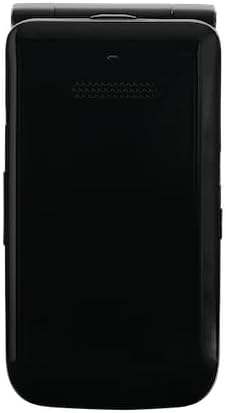
Cov ntsiab lus tseem ceeb:
- Main Display: The internal 3.2-inch TFT LCD screen for primary interaction.
- Sab nrauv zaub: A 1.77-inch external display for time, notifications, and caller ID when the phone is closed.
- Keypad: Alphanumeric keys and navigation buttons for easy input and menu navigation.
- Lub koob yees duab: A 5-megapixel rear camera with flash for capturing photos.
- USB Hom-C Port: Rau kev them nyiaj thiab xa cov ntaub ntawv.
- 3.5mm Headset Jack: Rau kev txuas wired headphones.
4. Kev teeb tsa thawj zaug
4.1. Installing the Battery and SIM Card
- Tshem lub hau rov qab ntawm lub xov tooj.
- Insert the nanoSIM card into the designated SIM slot. Ensure the gold contacts face downwards and the card is correctly oriented.
- Insert the 1850mAh removable battery into its compartment, aligning the contacts.
- Hloov lub hau rov qab, kom ntseeg tau tias nws nias ruaj ntseg rau hauv qhov chaw.
4.2. Kev them nyiaj yug ntaus ntawv
- Connect the USB Type-C cable to the phone's charging port.
- Connect the other end of the USB cable to the provided AC adapter.
- Txuas lub AC adapter rau hauv lub qhov hluav taws xob.
- The phone will indicate that it is charging. Allow the battery to fully charge before initial use.
4.3. Fais fab rau / tawm
- Txhawm rau Fais Fab: Press and hold the Power/End Call button until the screen lights up.
- Mus Faib Tawm: Press and hold the Power/End Call button, then select 'Power Off' from the options on the screen.
5. Kev ua haujlwm yooj yim
5.1. Ua thiab txais hu
- Hu rau: Open the phone, enter the phone number using the keypad, and press the Green Call button.
- Teb ib Hu: When the phone rings, press the Green Call button. You can answer with the phone closed by pressing the Green Call button, or open the phone to answer.
- Xaus Hu: Nias lub pob liab Xaus Hu.
5.2. Xa thiab txais cov lus
- Navigate to the 'Messages' application from the main menu.
- Select 'New Message' to compose a new text message.
- Enter the recipient's number or select from contacts, then type your message using the keypad.
- Press 'Send' to transmit the message.
5.3. Navigation and Smart Features
The Orbic JOURNEY Pro 4G runs on KaiOS 3.1, offering access to various smart applications:
- Web Browser: Access the internet to browse webqhov chaw.
- Google Maps: Use for navigation and location services.
- YouTube: Watch videos directly on your device.
- Wi-Fi Hotspot (Tethering): Share your phone's 4G internet connection with up to 8 other devices simultaneously. Access this feature through the phone's settings menu.
6. Kev tu thiab tu
- Ntxuav: Use a soft, dry cloth to clean the phone's exterior. Avoid using harsh chemicals or abrasive materials.
- Kev kho roj teeb: To prolong battery life, avoid exposing the phone to extreme temperatures. Do not leave the battery fully discharged for extended periods.
- Dej thiab hmoov av: This device is not rated for water or dust resistance. Avoid exposure to liquids and dusty environments.
- Kev tuav: Ua tib zoo tuav lub xov tooj. Tsis txhob tso tseg lossis ua rau muaj kev cuam tshuam loj.
7. Kev daws teeb meem
If you encounter issues with your Orbic JOURNEY Pro 4G, please refer to the following common solutions:
| Teeb meem | Kev daws |
|---|---|
| Xov tooj tsis muaj hwj chim rau | Xyuas kom lub roj teeb raug ntsia thiab them. Txuas lub charger thiab sim dua. |
| Tsis tuaj yeem hu lossis txais kev hu | Check if the SIM card is properly inserted and activated. Verify network signal strength. Contact your service provider if the issue persists. |
| Tsis muaj internet txuas | Ensure mobile data is enabled in settings. Check Wi-Fi connection if using Wi-Fi. Verify your data plan with your service provider. |
| Roj teeb ntws sai sai | Reduce screen brightness, close unused applications, and disable Wi-Fi/Bluetooth when not in use. Avoid extreme temperatures. |
| Phone is unresponsive | Tshem tawm thiab rov muab lub roj teeb rov qab los ua kom rov pib dua. |
8. Cov lus qhia tshwj xeeb
| Feature | Specification |
|---|---|
| Khoom npe | Orbic JOURNEY Pro 4G |
| Qauv nab npawb | O4F231JP |
| Xim | Dav Hlau Dub |
| Kev Ua Haujlwm | KaiOS® 3.1 |
| Processor | Qualcomm® QM215 Quad-Core (4x 1.3 GHz-ARM Cortex A53) |
| RAM | 1 GB ua |
| Internal Storage | 8 GB ua |
| Expandable Cia | Supports up to 128GB Micro SD |
| Sensors | Magnetic Sensor, Barometric Sensor |
| Fingerprint Authentication | Tsis Txhawb |
| Roj teeb muaj peev xwm | 1,850mAh (Removable) |
| Charger | 5W (Type C 2.0) Charger |
| Kev them nqi ceev ceev | Tsis Txhawb |
| Wireless Charging | Tsis Txhawb |
| Lub sij hawm hais lus tsis tu ncua | Max 5.6 teev |
| Nruam Standby Sijhawm | Max 150 teev |
| Main Display Size | 3.2 nti TFT LCD |
| Main Display Resolution | 240x320 (125ppi) |
| External Display Size | 1.77 nti TFT LCD |
| Sab nraud zaub daws teeb meem | 128x160 (116ppi) |
| Dimensions (H x W x D) | Kwv yees li. 115.3 x 60.9 x 19.8 mm |
| Qhov hnyav | Kwv yees li. 148g ua |
| Khoom siv lub cev | Resin |
| Txuas | USB Hom-C 2.0 |
| Dej / plua plav Resistance | Tsis siv tau |
| Durability | Tsis siv tau |
| Cov neeg hais lus | 2 |
| Microphones | 2 |
| 3.5mm Headset Jack | Yog lawm |
| Lub Koob Yees Duab | 5 Megapixels (f/2.2) with Flash |
| Lub koob yees duab pem hauv ntej | Tsis Txhawb |
| 2 G Bands | GSM: 850/900/1800/1900MHz |
| 3 G Bands | UMTS: B1/B5/B6/B8/B19 |
| 4 G Bands | LTE: B1/B3/B5/B7/B8/B18/B19/B20/B26/B28/B38/B40/B41 |
| 5 G Bands | Tsis Txhawb |
| Hom SIM | nanoSIM/4EF |
| Wi-Fi® kev sib txuas | 802.11 b/g/n 2.4GHz |
| Tethering | Supported (up to 8 devices simultaneously) |
| Bluetooth® | 4.2 |
| NFC | Tsis Txhawb |
| FeliCa | Tsis Txhawb |
| Qhov System | GPS / AGPS / GLONASS |
9. Warranty thiab Support
9.1. Warranty Information
The Orbic JOURNEY Pro 4G comes with a 1-xyoo txwv warranty txij hnub ntawm kev yuav khoom. Qhov kev lees paub no suav nrog kev tsim khoom tsis raug raws li kev siv ib txwm. Thov khaws koj cov ntaub ntawv pov thawj ntawm kev yuav khoom rau kev lees paub.
Warranty Exclusions:
- Damage caused by misuse, alteration, or unauthorized repair.
- Damage due to fire, earthquake, water damage, lightning, or other natural disasters.
- Damage or injury resulting from operations or usage methods contrary to the warnings and instructions in this manual.
- Loss of personal data or property damage incurred from the use or malfunction of this product.
- Products imported privately or parallel imports from overseas businesses are not covered by the product warranty.
9.2. Cov neeg siv khoom txhawb nqa
For further assistance, technical support, or warranty inquiries, please refer to the contact information provided in your Quick Start Guide or visit the official Orbic webqhov chaw rau koj cheeb tsam.