
1. Taw qhia
This manual provides detailed instructions for the setup, operation, and maintenance of your BPXX Bluetooth Thermal Shipping Label Printer, Model D463B. This printer is designed for efficient and clear printing of various thermal labels, including 4x6 inch shipping labels, with a resolution of 203 DPI. It supports both Bluetooth connectivity via the 'Ezlabel' mobile application and USB connection to computers.
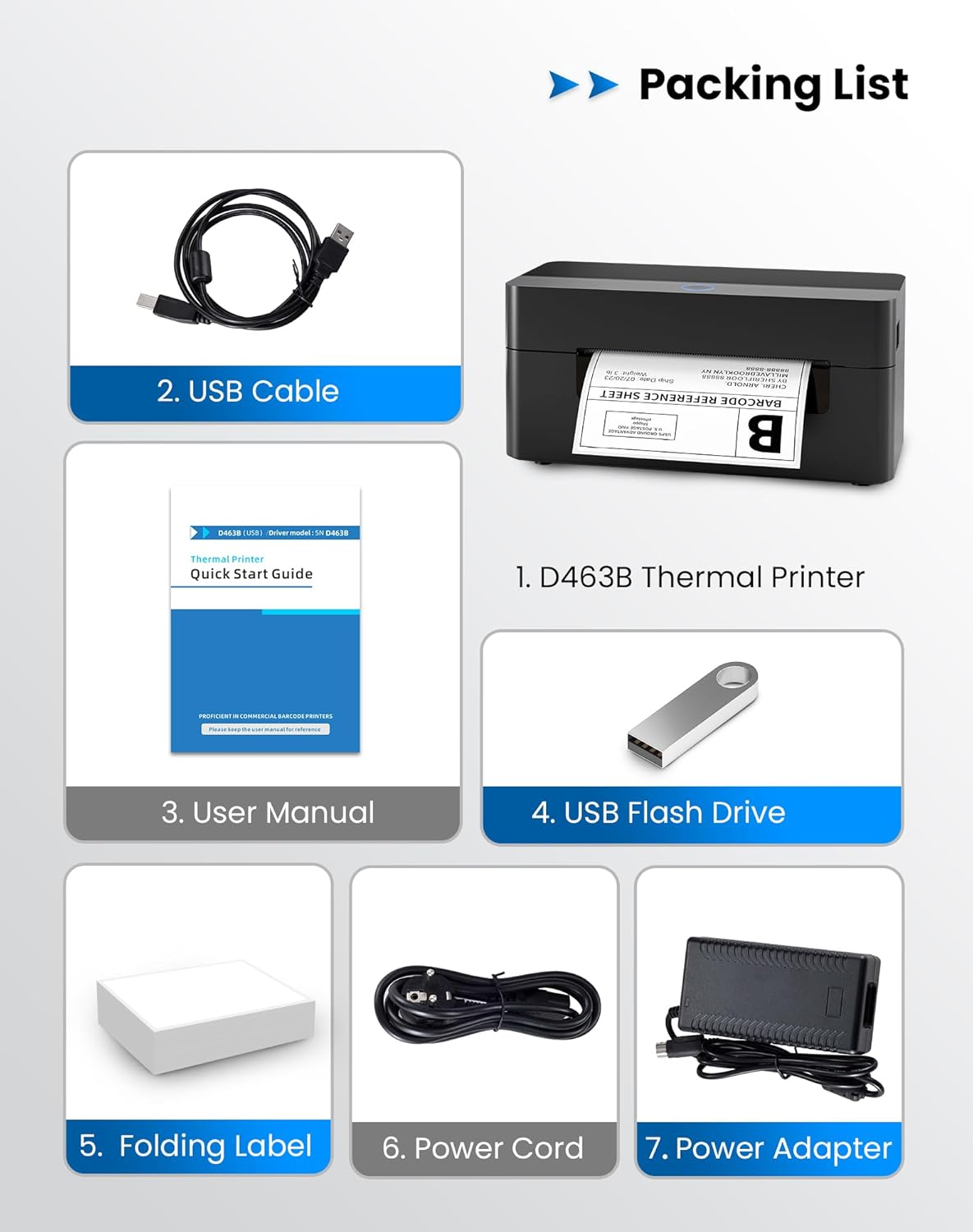
2. Cov npe ntim khoom
Thov xyuas kom meej tias txhua yam khoom teev hauv qab no suav nrog hauv koj pob:
- 1 x BPXX D463B Thermal Printer
- 1 x USB Cable
- 1 x User Manual
- 1 x USB Flash Drive (muaj cov tsav tsheb)
- 1 x Folding Label (sample roll)
- 1 x Lub Hwj Huaj Qaum
- 1 x Fais fab Adapter
3. Teeb Qhia
3.1 Kev sib txuas ntawm Hardware
- Connect the power adapter to the printer's power port and plug the power cord into an electrical outlet.
- Open the printer cover and load the thermal labels. Ensure the labels are facing the correct direction for printing and are properly aligned within the guide rails.
- Kaw lub tshuab luam ntawv npog kom zoo.

3.2 Software thiab Driver Installation
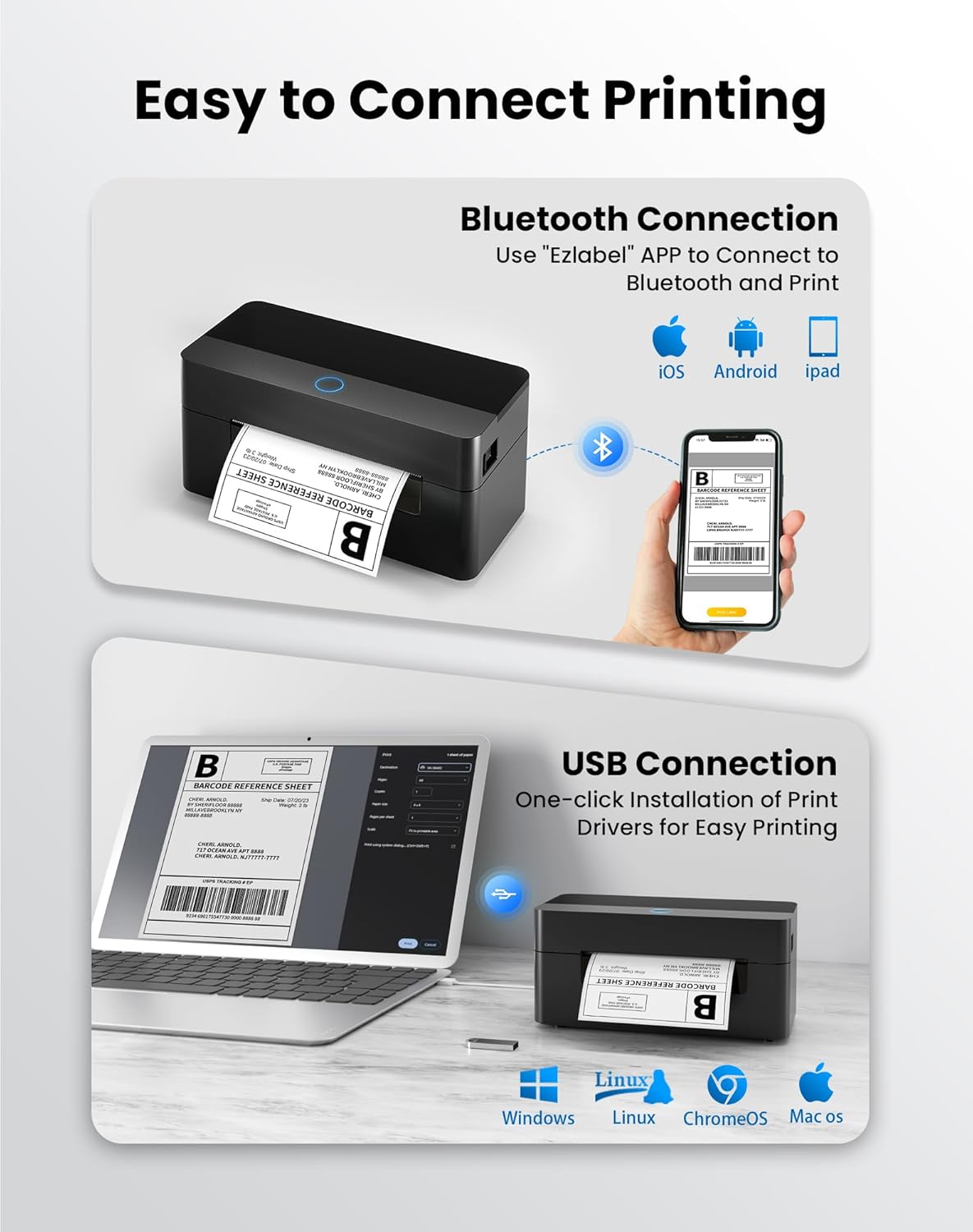
3.2.1 Mobile App (Bluetooth Connection)
For mobile printing, download the 'Ezlabel' application from your device's app store (available for iOS and Android).
- Nrhiav rau 'Ezlabel' in the App Store (iOS) or Google Play Store (Android).
- Download tau thiab nruab daim ntawv thov.
- Qhib Bluetooth ntawm koj lub xov tooj ntawm tes.
- Open the 'Ezlabel' app and follow the in-app instructions to connect to your BPXX D463B printer via Bluetooth.
3.2.2 Computer Driver (USB Connection)
For computer printing, install the appropriate drivers for your operating system (Windows, Mac OS, Linux, ChromeOS). Drivers are provided on the included USB flash drive or can be downloaded from the official webqhov chaw.
- Insert the provided USB flash drive into your computer.
- Locate and run the installer for your operating system.
- Ua raws li cov lus qhia ntawm on-screen kom tiav cov tsav tsheb installation.
- Alternatively, download drivers from: BPXX Driver Download
4. Cov lus qhia ua haujlwm
4.1 Kev Thauj Khoom Cov Ntawv
Ensure the thermal labels are loaded correctly for optimal printing. The printer supports thermal labels with widths ranging from 1 to 4.5 inches, including standard 4x6 inch shipping labels.
- Qhib lub hau saum toj kawg nkaus ntawm lub tshuab luam ntawv.
- Place the roll of thermal labels into the label compartment, ensuring the printable side faces upwards.
- Feed the first label through the printer's output slot until it is slightly extended.
- Adjust the label guides to fit the width of your labels snugly, without being too tight.
- Close the top cover. The printer will automatically detect the label size and calibrate.

4.2 Printing via Bluetooth (Mobile App)
- Ensure the printer is powered on and connected to the 'Ezlabel' app via Bluetooth.
- Open the 'Ezlabel' app on your mobile device.
- Select or create your desired label design. The app includes preset templates for various label sizes.
- Confirm print settings such as label size and quantity.
- Initiate the print command from the app.
4.3 Printing via USB (Computer)
- Txuas lub tshuab luam ntawv rau koj lub computer siv USB cable.
- Ensure the printer drivers are correctly installed.
- Open the document or application from which you wish to print (e.g., a PDF viewer, shipping software).
- Select the BPXX D463B printer from your printer options.
- Adjust print settings as needed (e.g., paper size to 4x6 inches for shipping labels).
- Send the print command.
4.4 Supported Platforms and Print Quality
The BPXX D463B printer is compatible with major shipping carriers and e-commerce platforms, facilitating the printing of shipping labels, return labels, and postage labels.
- Shipping Carriers: FedEx, UPS, USPS, DHL, EasyPost, etc.
- E-commerce Platforms: Amazon, Shopify, Etsy, eBay, Walmart, etc.
The printer utilizes a high-quality thermal print head and advanced algorithms to deliver clear and sharp barcodes and text at 203 DPI resolution. It achieves a high-speed output of 152mm/s, capable of printing approximately 72 4x6 inch shipping labels per minute.


5. Kev tu
Kev saib xyuas tsis tu ncua ua kom muaj kev ua haujlwm zoo tshaj plaws thiab ua kom koj lub tshuab luam ntawv siv tau ntev dua.
- Ntxuav lub taub hau Printing: Use an alcohol swab or a specialized thermal printer cleaning pen to gently wipe the print head. Ensure the printer is off and cooled down before cleaning.
- Cleaning Sab nrauv: So sab nraud ntawm lub tshuab luam ntawv nrog ib daim ntaub mos mos, damp daim ntaub. Tsis txhob siv cov tshuaj hnyav lossis cov khoom siv abrasive.
- Kev tshem tawm plua plav: Periodically use compressed air to clear any dust or paper debris from inside the label compartment.
6. Kev daws teeb meem
If you encounter issues with your BPXX D463B printer, refer to the following common problems and solutions:
- Lub tshuab luam ntawv tsis teb:
- Ensure the power cord is securely connected and the printer is turned on.
- For Bluetooth connection, verify that Bluetooth is enabled on your device and the printer is paired within the 'Ezlabel' app.
- For USB connection, check the USB cable connection and ensure drivers are correctly installed. Try a different USB port or cable.
- Poor Print Quality (Faint/Streaky Prints):
- Ntxuav lub taub hau luam ntawv raws li tau piav qhia hauv ntu Kev Saib Xyuas.
- Xyuas kom koj siv cov ntawv thermal zoo.
- Check print density settings in the 'Ezlabel' app or printer preferences on your computer.
- Cov Ntawv Sau Tsis Pub Noj Kom Yog:
- Verify that labels are loaded correctly and aligned with the guide rails.
- Xyuas kom tseeb tias tsis muaj dab tsi thaiv txoj kev sau daim ntawv lo.
- Perform a label calibration from the printer settings or app if available.
- Printer Offline Error:
- Restart both the printer and your computer/mobile device.
- Re-establish the Bluetooth or USB connection.
- Check printer status in your operating system's printer settings.
7. Khoom Specifications
| Qauv Lub Npe | D463B |
| Hom | BPXX |
| Tshuab luam ntawv | Kub |
| Connectivity Technology | Bluetooth, USB |
| Maximum Print Resolution | 203 x 203 Dots Per Inch (DPI) |
| Max Print Ceev | 152 mm/s (72 labels per minute) |
| Ntau tshaj Media Size | 4 x 6 po |
| Txhawb Daim Ntawv Dav | 1-4.5 po |
| Compatible Devices | PC (Windows, Mac OS, Linux, ChromeOS), Smartphones (iOS, Android) |
| Tswj Txoj Kev | App ('Ezlabel'), USB |
| Khoom Dimensions | 7.3" H x 3.3" W x 3.3" H |
| Yam Nyhav | 1.6 puj |
| Cov Cheebtsam suav nrog | Printer, USB Cable, User Manual, USB Flash Drive, Sample Labels, Power Cord, Power Adapter |
8. Warranty thiab Support
The BPXX D463B Thermal Shipping Label Printer comes with a limited warranty. For specific warranty terms and conditions, please refer to the documentation included with your product or contact BPXX customer support.
For technical assistance, troubleshooting, or any inquiries regarding your product, please contact BPXX customer support through the official webqhov chaw lossis cov ntaub ntawv tiv tauj tau muab rau hauv koj cov khoom ntim khoom.