
Taw qhia
Welcome to your Timex Ironman Triathlon Classic 10 Digital Watch. This manual provides detailed instructions for setting up, operating, and maintaining your watch. Designed for durability and functionality, this watch features a digital display, stopwatch, timer, and is water-resistant up to 100 meters.

Pem hauv ntej view of the Timex Ironman Triathlon Classic 10 44mm Digital Watch, showcasing its digital display and black case.
Ntim Cov Ntsiab Lus
Xyuas kom txhua yam khoom muaj nyob hauv pob:
- Timex Men's Ironman Triathlon Classic 10 44mm Digital Watch
- Tus Neeg Siv Los Siv (cov ntawv no)
- Warranty Information
- Watch Box/Case
Cov Cheebtsam Saib thiab Cov Khawm
Familiarize yourself with the watch's buttons and their general functions. Specific button labels and functions may vary slightly by model, but common digital watch controls are described below.
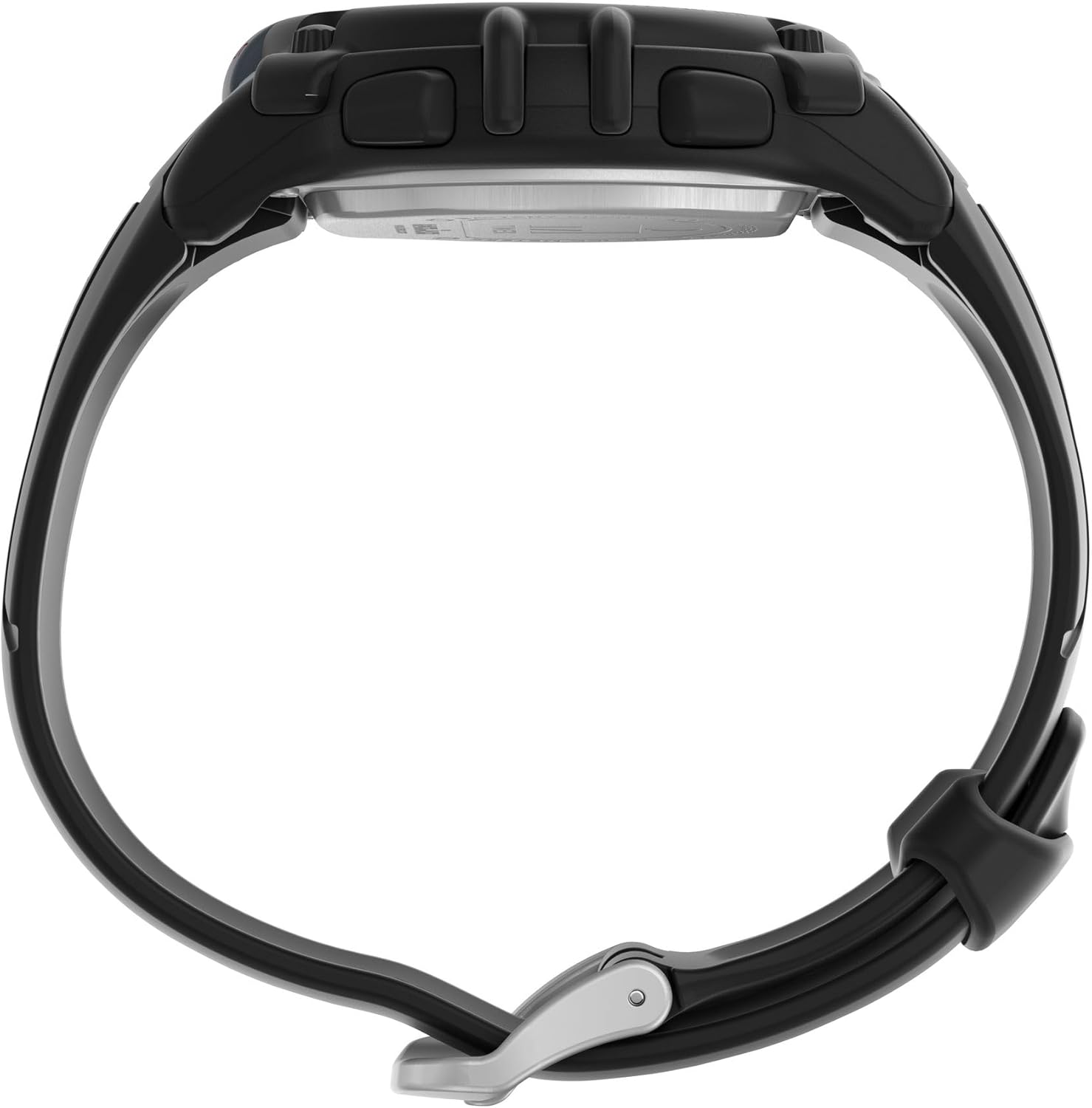
Sab view of the watch, illustrating the control buttons on the left and right sides of the case.
- MODE khawm: Cycles through different watch modes (Time, Stopwatch, Timer, Alarm).
- SET/ADJUST Button: Used to enter and exit setting modes, or to confirm selections.
- START/STOP khawm: Initiates and pauses functions like the stopwatch or timer.
- LAP/RESET Button: Records lap times in stopwatch mode or resets values.
- LIGHT Khawm: Activates the Indiglo backlight for visibility in low light conditions.

Qab view of the watch, showing the stainless steel backplate and the buckle mechanism of the two-piece strap.
Teeb tsa
Teem sij hawm thiab hnub tim
- Hauv Hom Sijhawm, nias thiab tuav lub SET/ADJUST button until the display flashes.
- Nias lub MODE button to cycle through hours, minutes, seconds, month, day, and year settings.
- Siv cov PIB/STOP or LAP/RESET buttons to adjust the flashing value.
- Thaum tag nrho cov kev teeb tsa yog lawm, nias lub SET/ADJUST khawm dua kom tawm ntawm qhov chaw teeb tsa.
Activating Indiglo Night-Light
Nias lub Lub teeb button to illuminate the watch face. The Indiglo night-light will remain active for a few seconds.
Hom kev ua haujlwm
Nias lub MODE button to cycle through the available functions:

Close-up of the digital watch face, displaying time and other indicators.
Sijhawm hom
This is the default display mode, showing the current time (hours, minutes, seconds) and date (month, day, day of week).
Chronograph (Stopwatch) Mode
- Los ntawm Hom Sijhawm, nias MODE until 'CHRONO' or 'STOPWATCH' appears.
- Xovxwm PIB/STOP pib lub sijhawm.
- Xovxwm LAP/RESET los sau lub sijhawm ib lap yam tsis tas nres lub timer tseem ceeb.
- Xovxwm PIB/STOP dua kom ncua lub stopwatch.
- Xovxwm LAP/RESET while paused to reset the stopwatch to zero.
Timer hom
- Los ntawm Hom Sijhawm, nias MODE until 'TIMER' appears.
- Nias thiab tuav SET/ADJUST los teem lub sijhawm suav rov qab uas xav tau.
- Siv MODE to select hours, minutes, or seconds, and PIB/STOP or LAP/RESET los kho qhov tseem ceeb.
- Xovxwm SET/ADJUST kom paub meej tias lub sijhawm teem sijhawm.
- Xovxwm PIB/STOP kom pib suav rov qab. Lub tswb ceeb toom yuav nrov thaum lub sijhawm mus txog xoom.
- Xovxwm PIB/STOP to pause/resume the timer. Press LAP/RESET rov pib dua lub timer.
Kev tu
Dej tsis kam
Your watch is water-resistant up to 100 meters (330 feet). This means it is suitable for showering, swimming, and snorkeling. Do not press any buttons while the watch is wet or submerged, as this can compromise the water resistance seal.
Cov ntaub ntawv roj teeb
This watch uses one Lithium Metal battery (CR2025). Battery replacement should ideally be performed by a qualified watch technician to ensure proper sealing and water resistance. Improper battery replacement can damage the watch and void the warranty.
Kev tu thiab tu
Clean your watch with a soft, damp cloth. Avoid using chemical cleaners, which can damage the watch case or strap. Rinse the watch with fresh water after exposure to salt water or chlorine.
Kev daws teeb meem
| Teeb meem | Kev daws |
|---|---|
| Cov zaub yog dawb los yog dim. | Lub roj teeb tej zaum yuav tsawg lossis tag. Hloov lub roj teeb. |
| Cov nyees khawm tsis teb. | Ensure the watch is not in a locked mode (if applicable). If wet, dry the watch thoroughly before pressing buttons. If the issue persists, a reset may be required (refer to advanced settings in a full manual or contact support). |
| Sijhawm/hnub tim tsis raug. | Follow the 'Setting Time and Date' instructions in the Setup section. |
| Moisture under the crystal. | This indicates a compromised water resistance seal. Stop using the watch in water and seek professional service immediately. |
Specifications
| Feature | Paub meej |
|---|---|
| Qauv nab npawb | TW5M644009J |
| Hom zaub | Digital |
| Case Diameter | 44 hli |
| Case Material | Resin |
| Khoom siv Crystal | Acrylic |
| Band Khoom | Polyurethane |
| Band Ntev | 8 Nws |
| Band dav | 18 hli |
| Dej Resistance Qhov tob | 100 meters (330 ft) |
| Hom kev txav | Quartz |
| Hom roj teeb | 1 Lithium Metal battery (CR2025) |
| Nta ntxiv | Timer, Stopwatch |
| Yam Nyhav | 0.09 Kilograms (kwv yees li 3 ooj) |
| UPC | 194366379860 |
Cov ntaub ntawv loj
Understanding watch case size in relation to your wrist is important for comfort and appearance. The following video provides a visual guide to Timex watch sizing.
Official Timex video demonstrating various watch case sizes on different wrist sizes to help determine the best fit.
Warranty thiab Support
Warranty Information
Your Timex watch comes with a Limited Warranty. Please refer to the included 'Warranty Information' document in your package for full details regarding coverage, terms, and conditions.
Kev Pab Txhawb Cov Neeg Siv Khoom
For further assistance, technical support, or service inquiries, please visit the official Timex website or contact their customer service department. Contact information can typically be found on the warranty card or the Timex webqhov chaw.