
ELKO EP RFSAI-62B-SL/MT
ELKO EP RFSAI-62B-SL/MT Matter Switching Actuator User Manual
Model: RFSAI-62B-SL/MT
1. Taw qhia
The ELKO EP RFSAI-62B-SL/MT is a state-of-the-art switching actuator designed for smart home environments. This unit features two output relays, making it suitable for controlling various consumer appliances and lighting systems. It integrates seamlessly into Matter-compatible ecosystems through the Thread protocol, ensuring broad interoperability with other Matter-certified devices.
Beyond traditional switches and buttons, the RFSAI-62B-SL/MT can also be controlled using wireless wall switches like the RFGB-40-MT. Its robust design allows for a range of up to 200 meters in open air, providing flexible installation options. The device supports a maximum switching capacity of 2000 W (8 A) and utilizes an AgSnO2 + Zero Cross relay contact, optimized for switching lighting loads efficiently.
2. Cov ntaub ntawv kev nyab xeeb
Please read this manual carefully before installation and operation. Failure to follow these instructions may result in electric shock, fire, or other hazards.
- Kev teeb tsa yuav tsum tau ua los ntawm tus kws tshaj lij hluav taws xob tsim nyog raws li txhua qhov hauv zos thiab lub teb chaws cov cai hluav taws xob.
- Disconnect power at the circuit breaker before installing or servicing the device.
- Tsis txhob tso lub cuab yeej kom ya raws, qhov kub thiab txias, lossis ncaj qha tshav ntuj.
- Xyuas kom tseeb tias cov cuab yeej siv nyob rau hauv nws cov lus teev tsegtage and current ratings (AC 230 V, 8 A).
- Tsis txhob sim kho lossis hloov kho lub cuab yeej. Xa cov neeg ua haujlwm tsim nyog mus rau txhua qhov kev pabcuam.
3. Cov ntsiab lus ntawm pob
Xyuas kom tseeb tias txhua yam khoom muaj nyob hauv pob:
- 1x ELKO EP RFSAI-62B-SL/MT Matter Switching Actuator
- 1x Tus neeg siv phau ntawv (cov ntaub ntawv no)
4. Khoom Tshajview
The RFSAI-62B-SL/MT is a compact unit designed for flush mounting. Below is an image of the device with key components highlighted.
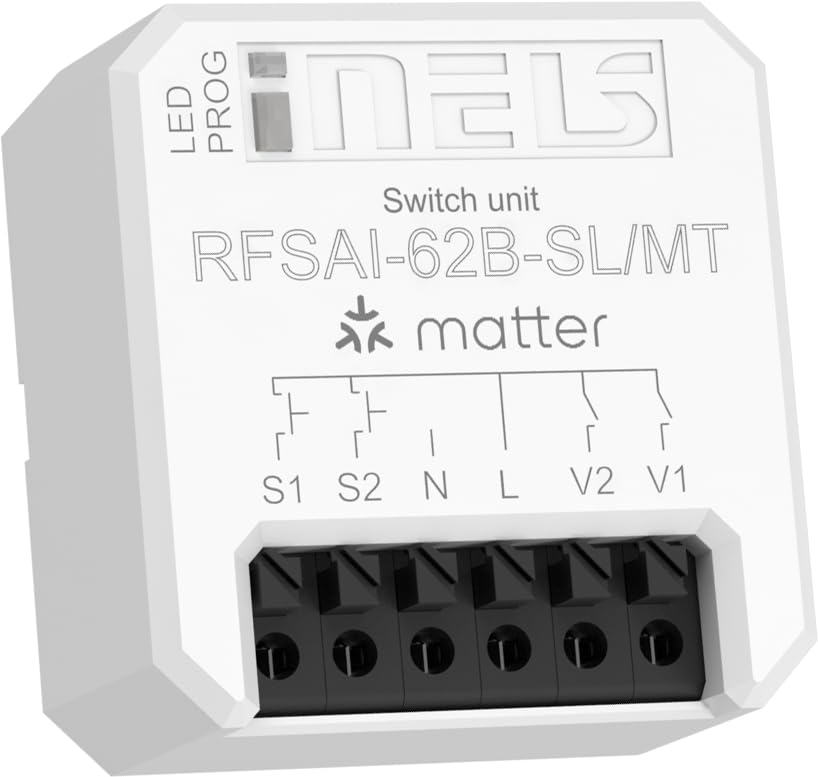
Figure 4.1: ELKO EP RFSAI-62B-SL/MT Matter Switching Actuator.
This image shows the ELKO EP RFSAI-62B-SL/MT Matter Switching Actuator. The device is white with black screwless terminals at the bottom. The top surface features the 'iNELS' logo, 'Switch unit', 'RFSAI-62B-SL/MT', and the 'matter' logo. There are labels for 'LED' and 'PROG' indicating an LED indicator and a program button. Wiring diagrams are printed above the terminals, labeled S1, S2, N, L, V2, and V1.
Cov ntsiab lus tseem ceeb:
- Qhov taw qhia LED: Muab cov lus taw qhia txog qhov xwm txheej.
- PROG (Program/RESET) Button: Used for pairing, resetting, and other programming functions.
- Screwless Terminals: For secure and easy wiring connections.
- S1, S2: Input terminals for external switches/buttons.
- N: Neutral wire connection.
- L: Live wire connection (AC 230V).
- v1,v 2:. Output terminals for controlled loads (e.g., lighting, appliances).
5. Kev teeb tsa thiab kev teeb tsa
Before proceeding with installation, ensure power is disconnected at the main circuit breaker.
5.1 Cov lus qhia txuas
- Fais fab tuag: Turn off the main power supply to the circuit where the actuator will be installed. Verify with a voltagua tester.
- Txuas lub zog:
- Txuas lub Nyob (L) wire (AC 230V) to the 'L' terminal on the actuator.
- Txuas lub Nruab nrab (N) wire to the 'N' terminal on the actuator.
- Txuas Loads:
- Connect the load (e.g., light fixture) to the V1 thiab/los yog V2 terminals. Ensure the neutral wire of the load is connected to the main neutral line.
- Connect External Switches (Optional):
- If using external push-buttons or switches, connect them to the S1 thiab S2 terminals. These inputs can be configured for various control modes.
- Kev ruaj ntseg Installation: Place the actuator securely within a suitable electrical box or enclosure.
- Rov Qab Fais Fab: Once all connections are secure and verified, restore power at the circuit breaker.
5.2 Matter Network Integration
To integrate the RFSAI-62B-SL/MT into your smart home system, you will need:
- One or more Thread Border Routers connected to your Wi-Fi network.
- A Matter-compatible hub (e.g., Home Assistant, Apple HomeKit, Google Home, Amazon Alexa).
- The associated mobile application for your chosen Matter hub.
Follow the pairing instructions provided by your Matter hub's application. Typically, this involves putting the device into pairing mode (often by pressing the PROG/RESET button for a specified duration) and scanning a QR code or entering a pairing code provided with the device.
6. Cov lus qhia ua haujlwm
Once successfully integrated into your Matter network, the RFSAI-62B-SL/MT can be controlled in several ways:
- Via Matter Hub Application: Use your preferred Matter controller application (e.g., Home Assistant, Apple Home, Google Home) to remotely switch the connected loads ON or OFF.
- Via External Switches: If wired, the S1 and S2 inputs allow control via traditional wall switches or push-buttons. The functionality of these inputs can be configured within your Matter ecosystem.
- Via Wireless Wall Switches: Compatible wireless wall switches, such as the ELKO EP RFGB-40-MT, can be paired with the actuator for convenient local control without additional wiring.
- PROG/RESET Button: While primarily for pairing and resetting, the PROG button may also offer basic toggle functionality depending on the specific firmware and Matter configuration.
7. Kev tu
The ELKO EP RFSAI-62B-SL/MT is designed for maintenance-free operation. However, consider the following:
- Ntxuav: If necessary, gently wipe the device with a dry, soft cloth. Do not use abrasive cleaners or solvents.
- Hloov tshiab Firmware: Periodically check your Matter hub's application for available firmware updates for the actuator to ensure optimal performance and security.
- Ib puag ncig tej yam kev mob: Ensure the device remains within its specified operating environment (temperature, humidity) to prevent damage.
8. Kev daws teeb meem
| Teeb meem | Ua Tau | Kev daws |
|---|---|---|
| Ntaus tsis teb. | No power; Not paired; Out of Thread network range. | Check power supply; Re-pair the device; Ensure it's within range of a Thread Border Router. |
| Cannot connect to Matter network. | Incorrect pairing procedure; Matter hub issue; Thread Border Router issue. | Refer to your Matter hub's pairing guide; Restart Matter hub and Thread Border Router; Try factory resetting the actuator (long press PROG/RESET button). |
| Connected load does not switch. | Incorrect wiring; Overload; Faulty load. | Verify wiring connections; Check load's power consumption against actuator's max rating (2000W/8A); Test the load independently. |
| External switch (S1/S2) not working. | Incorrect wiring; Switch type not compatible; Configuration issue in Matter app. | Check wiring to S1/S2; Ensure switch is compatible (e.g., momentary push-button vs. toggle); Verify input configuration in your Matter hub. |
9. Cov lus qhia tshwj xeeb
| Feature | Paub meej |
|---|---|
| Khoom Dimensions (L x W x H) | 4.3 x 4.4 x 2.2 cm (1.69 x 1.73 x 0.87 nti) |
| Chaw tsim tshuaj paus | ELKO EP |
| Qauv nab npawb | 8975 (Internal), RFSAI-62B-SL/MT (Product) |
| Kev ua haujlwm hom | Hluav taws xob |
| Kev ntsuas tam sim no | 8A (Max. 2000 W) |
| Kev Ua Haujlwm Voltage | 230V (AC) |
| Hu rau hom | Normally Closed (AgSnO2 + Zero Cross relay) |
| Hom Connector | Dej Dag Ntiag Mount |
| Hloov hom | Dimmer (Note: Product description indicates a switching unit, not a dimmer) |
| Terminal Hom | Wago (Screwless terminals) |
| Khoom siv | Yas |
| Kev sib txuas lus raws tu qauv | Matter (Application Protocol), Thread (Communication Protocol) |
| Number of Switches | 2 (8 A/AC1) |
| Ntau yam | Mus txog 200 m (qhib cua) |
10. Warranty thiab Support
ELKO EP products are manufactured to the highest quality standards. For warranty information and technical support, please refer to the official ELKO EP website lossis hu rau koj tus neeg muag khoom hauv zos.
Yog xav paub ntxiv, thov mus saib: www.elkoep.com
Ask a question about this manual
Ask about setup, troubleshooting, compatibility, parts, safety, or missing instructions. Manuals+ will review the question and use this page’s manual context to help answer it.